
Home / Blog / Access control testing checklist
Playbooks
Access control testing checklist: sideways, upward and across tenants.
A practical checklist for proving each signed-in account reaches only what it should: how to plan the accounts, what to try, what to record and how to keep it current.
Cyberlop Labs · Updated · 15 min read
An access control testing checklist is a list of checks proving each account reaches only its own data and permitted functions. Plan accounts across two tenants, write an access plan, then test sideways (other users' records), upwards (admin functions) and across tenants. Record request, response and verdict, then retest each fix with the exact exploit.
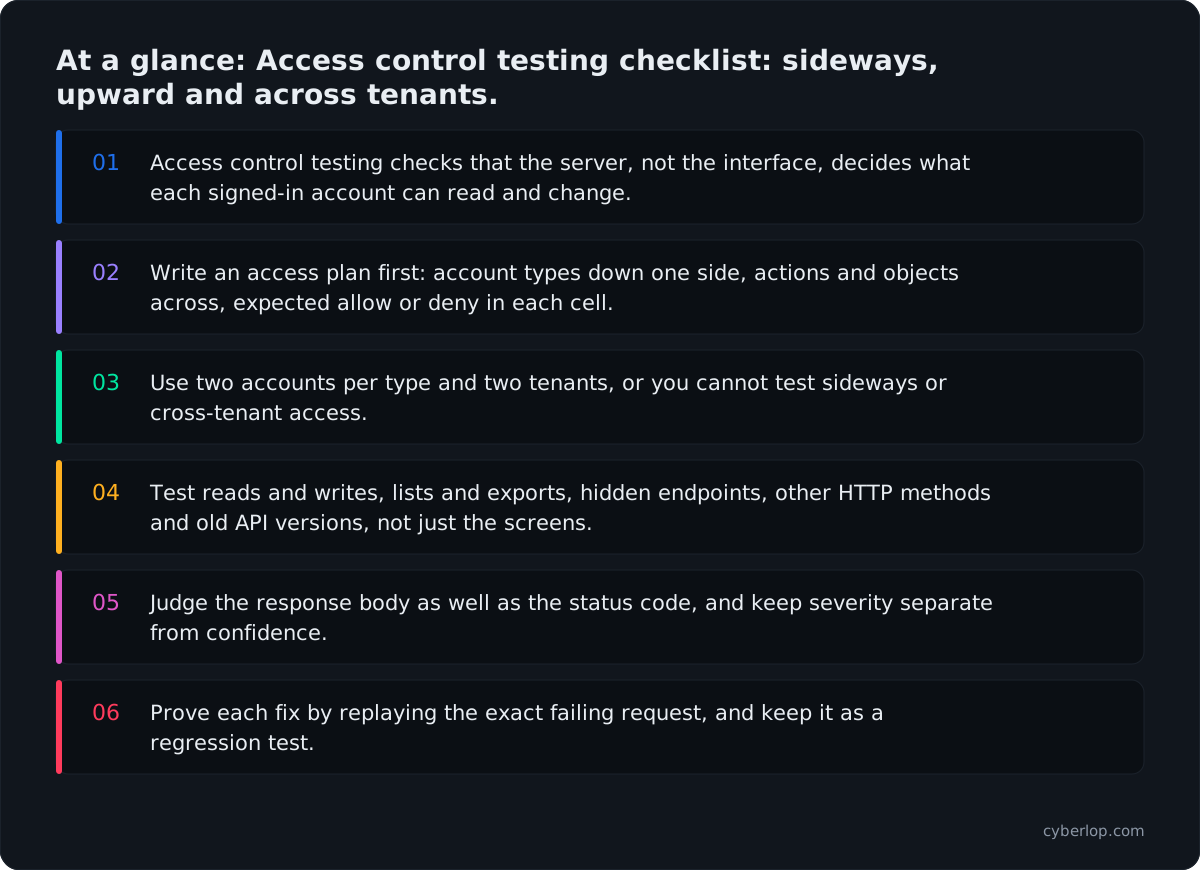
- Access control testing checks that the server, not the interface, decides what each signed-in account can read and change.
- Write an access plan first: account types down one side, actions and objects across, expected allow or deny in each cell.
- Use two accounts per type and two tenants, or you cannot test sideways or cross-tenant access.
- Test reads and writes, lists and exports, hidden endpoints, other HTTP methods and old API versions, not just the screens.
- Judge the response body as well as the status code, and keep severity separate from confidence.
- Prove each fix by replaying the exact failing request, and keep it as a regression test.
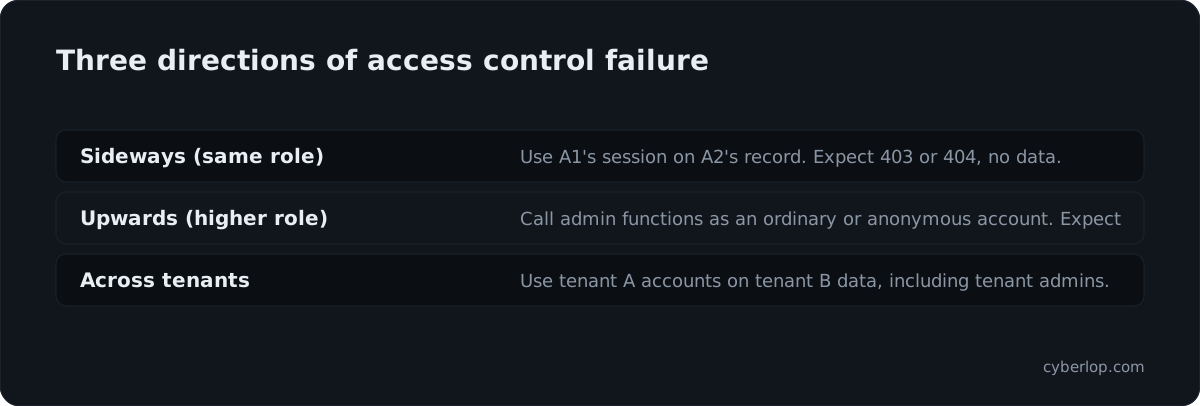
An access control testing checklist is a written list of checks that prove your application lets each signed-in account reach only the data and functions it should. Work through it by testing three directions: sideways (one customer reading another customer's records), upwards (an ordinary account using admin functions) and across tenants (one organisation reaching another's workspace). Record every check as pass or fail, with the request and response as evidence.
This page gives you that checklist for 2026: how to plan the accounts and the access plan, the checks for each direction, what to record, and how to keep the results from going stale. It works for web apps and the APIs behind them, and you can run it by hand, with scripts, or hand it to a tester.
What is access control testing?
Access control testing is the practice of checking that authorisation rules are enforced by the server for every request, not only drawn in the interface. You sign in with accounts of different types, then try to read, change or delete things those accounts should not touch, and note what the server allows.
It differs from testing login. Authentication asks who you are. Access control asks what that identity may do. A perfectly secure login screen sits in front of many apps whose /api/invoices/1042 endpoint will happily return another customer's invoice to anyone with a valid session. The usual names for the failures are broken access control, IDOR and BOLA.
Why does access control testing still matter in 2026?
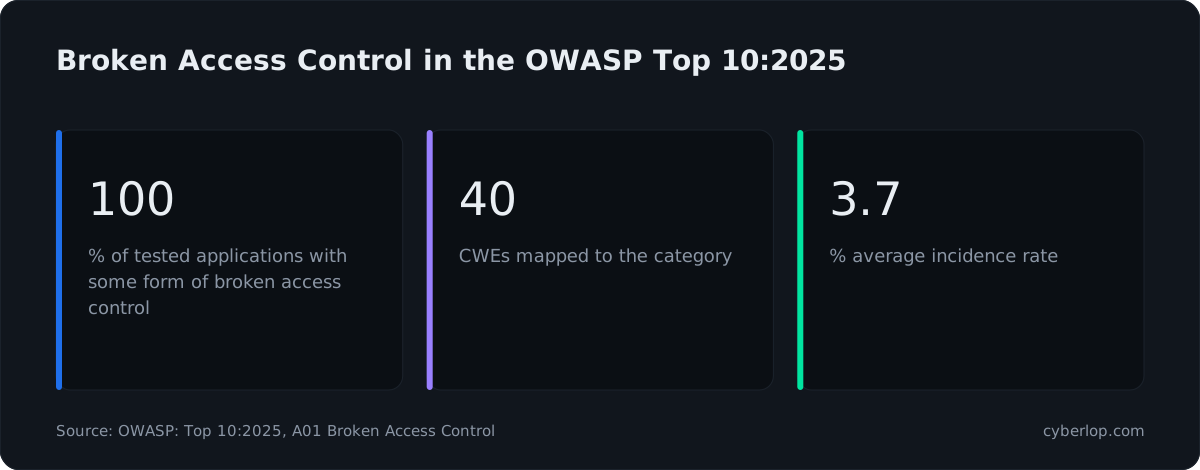
Because OWASP still ranks it as the top web application risk, and automated tools struggle to see it. In the OWASP Top 10:2025, Broken Access Control stays at number one. OWASP reports that 100% of the applications it tested had some form of it, that the category maps to 40 CWEs, and that the data holds 1,839,701 occurrences with an average incidence rate of 3.74%.
The wider picture is no kinder. The 2026 Verizon Data Breach Investigations Report says 31% of breaches now start with software vulnerabilities, ahead of stolen passwords as the top way in. MITRE's 2025 CWE Top 25 ranks CWE-862 Missing Authorization fourth, with a score of 13.28. For the API side, OWASP rates API1:2023 Broken Object Level Authorization as "easy" to exploit and "widespread", with "easy" detectability, according to the API Security Top 10 entry.
Scanners miss it for a simple reason. A scanner holds one session and sees a valid response to a valid request. It cannot know that the record belongs to someone else. We explain that gap in why your scanner has one login. A checklist makes a person, or a script, supply that missing knowledge.
What do you need before you start?
You need three things: a test environment you are allowed to test, a set of accounts that differ in the ways that matter, and an access plan that says what each account should and should not reach. Skipping the plan is the most common reason access tests find little: you cannot spot a wrong answer if nobody wrote down the right one.
Plan the accounts
Create at least two accounts of each type in at least two separate tenants (organisations, workspaces, shops). Two accounts of the same type let you test sideways access. Two tenants let you test crossing the boundary. Use test data only and agree scope in writing first; our VAPT checklist covers that part.
The minimum account set
| Account | Why you need it | Tenant |
|---|---|---|
| Anonymous (no session) | Finds pages and API calls that need no sign-in at all | None |
| Ordinary user A1 | The main test account for sideways and upward checks | Tenant A |
| Ordinary user A2 | Owns the records that A1 should never reach | Tenant A |
| Admin A (tenant admin) | Shows what privileged calls look like, and tests admin-only limits | Tenant A |
| Ordinary user B1 | Owns records in a different tenant, for cross-tenant checks | Tenant B |
| Admin B | Confirms an admin in one tenant cannot manage another | Tenant B |
| Read-only or restricted account | Tests write actions against an account that may only view | Tenant A |
| Disabled or removed account | Confirms old sessions and tokens stop working | Tenant A |
If your product has more types, such as a billing manager, a support agent or a partner, add one account for each, because every extra type adds new ways for the rules to disagree.
Write the access plan
The access plan is a plain table: down the side, the actions and objects in your app; across the top, the account types; in each cell, the expected result (allow, deny, own records only). The OWASP Authorization Testing Automation Cheat Sheet recommends the same idea in a machine-readable form: list the roles, list the services with their methods and the roles allowed, then drive tests from that file.
Example access plan rows
| Action (endpoint) | Anonymous | User A1 | Admin A | User B1 |
|---|---|---|---|---|
Read invoice owned by A2 (GET /api/invoices/{id}) | Deny (401) | Deny (403 or 404) | Allow | Deny |
| Read own invoice | Deny | Allow | Allow | Allow (own) |
Change a user's role (PATCH /api/users/{id}) | Deny | Deny | Allow, tenant A only | Deny |
Export all customers (POST /api/exports) | Deny | Deny | Allow, tenant A only | Deny |
| Delete a project owned by A2 | Deny | Deny | Allow | Deny |
| List members of tenant A | Deny | Allow, limited fields | Allow, full fields | Deny |
Build the plan from the product, not from the code, then walk through it with the people who know the business rules. A support lead can tell you in minutes that agents see tickets but never refund amounts, which no scanner could guess.
List the objects and functions
Collect every object type that has an owner (invoices, orders, files, messages, API keys, reports) and every function that changes state (create, update, delete, invite, export, refund, approve, impersonate). Pull them from your OpenAPI specification, your router file, and the network tab while you click through the app. Include the endpoints the interface never calls; they are usually the least protected.
How do you test horizontal access control?
You test horizontal access control by taking a request that works for one account and replaying it with a different account's session or a different record identifier, then checking that the server refuses. The pattern is "same role, someone else's data", the textbook horizontal privilege escalation. The OWASP Web Security Testing Guide lists the matching case as Testing for Insecure Direct Object References (WSTG-ATHZ-04).
The sideways checks
1. Replay with another record identifier
Sign in with A1, open a record A1 owns, and capture the request. Change the identifier to a record that A2 owns. A correct server answers 403 or 404 and returns none of A2's data. Try the path, query string, JSON body, header and cookie.
2. Swap the session, keep the request
Capture a request made by A2, then send it unchanged with A1's token. This catches APIs that trust the identifier in the body and ignore who is calling.
3. Look for identifiers hidden in other places
Check export files, email links, webhook payloads, PDF download URLs, websocket messages, and the "share" and "invite" flows. Unguessable IDs help, but they do not replace a check: a leaked link or a list endpoint that returns every ID defeats them. Our longer IDOR checklist covers where IDs leak.
4. Test list, search and aggregate endpoints
Single-record reads are usually protected first. Lists, search, autocomplete, reports, counts and dashboards are the ones that quietly return everyone's rows. Query them as A1 and look for A2's or B1's records, names or totals.
5. Test writes and deletes, not only reads
Try to update, replace and delete a record owned by A2 using A1's session. Also try changing an owner field, such as user_id or tenant_id, in the body of a normal update. If the server accepts it, you have mass assignment as well as a missing check.
For a deeper treatment of the API form of these flaws, read broken object level authorization. Fixes belong in a shared server-side ownership check, which OWASP calls out too: its prevention list says to check that the signed-in user may perform the requested action on the record in every function that takes a client-supplied identifier.
How do you test vertical access control?
You test vertical access control by trying privileged functions with a lower-privileged account and with no account at all. The target is vertical privilege escalation: an ordinary user, or an anonymous visitor, performing something reserved for admins. OWASP lists it as Testing for Privilege Escalation (WSTG-ATHZ-03) and, for the API world, as API5:2023 Broken Function Level Authorization.
The upward checks
1. Call admin endpoints as an ordinary user
Record every call the admin account makes while you work through the admin screens. Replay each with A1's token. Pay most attention to the calls the ordinary interface never makes: user management, role changes, exports, settings, feature flags, billing and support tools.
2. Request hidden pages directly
Try /admin, /internal, /debug, /actuator, /api/v1/admin/... and any path in your JavaScript bundles or API documentation. Hiding a menu item is not an access control. This is forced browsing, and an exposed admin panel is a frequent finding.
3. Change the HTTP method
If GET /api/users/5 is blocked, try PUT, PATCH, DELETE and POST on the same path, and method-override headers such as X-HTTP-Method-Override. Authorisation is sometimes attached to the verb rather than the route.
4. Try to promote yourself
Send profile and settings updates that include fields like role, is_admin, plan, permissions or verified. Edit your own JWT claims to see whether the server checks the signature. Check that an invitation cannot grant a higher role than the person inviting holds.
How do you test cross-tenant access?
You test cross-tenant access by using an account from tenant A against data that belongs to tenant B, across every route into that data. In a multi-tenant product this is the most serious failure, because one company's records appear in another company's account. Background: tenant isolation.
The cross-tenant checks
Foreign identifiers everywhere
Repeat every sideways check, using B1's record identifiers with A1's session. Then repeat with Admin A: an admin of tenant A must not list users, change settings or read audit logs for tenant B.
Tenant selectors the client controls
Look for X-Tenant-ID, subdomain, org_id query parameters or a tenant claim in a token. If the server believes the value the client sends, switching it moves you into another tenant. The tenant should come from the verified session, never from a field the caller can edit.
Shared resources
Check caches, search indexes, file storage paths, background job queues, reports, email notifications and webhooks. The main database often keeps tenants apart while the layers around it do not: a cached response keyed only by URL, or an export saved in a bucket path anyone can guess.
Which other surfaces does an access control checklist need to cover?
It must cover every way a request can reach data, not just the main web interface. A check applied on the browser route but missing on the API, the mobile backend, a GraphQL query or a file download is still a hole. Use the table below as a coverage list, and tick each row for each account type.
Coverage by surface
| Surface | What to try | Typical gap |
|---|---|---|
| REST and JSON APIs | Replay each call with other accounts, other IDs, other methods | Check in the UI layer only; checks on GET but not PUT or DELETE |
| GraphQL | Query other users' objects by ID, nested fields, batched aliases; see GraphQL | Field-level checks missing; introspection reveals admin types |
| Mobile app backends | Intercept the traffic and replay it; check older API versions | Old API versions without the new checks |
| File downloads and uploads | Fetch a file URL as another account or anonymously; overwrite another user's file name | Public storage paths, signed links that never expire |
| Exports and reports | Request a full export as a low-privilege account; check scope of the result | Export job runs as a system user with no tenant filter |
| Background jobs and webhooks | Trigger jobs with foreign IDs; check the callbacks carry tenant context | Jobs trust the ID in the queue message |
| Websockets and events | Subscribe to another user's or tenant's channel | Authentication on connect, authorisation never on subscribe |
| Admin and support tools | Reach them as an ordinary account; check impersonation limits; see impersonation features | Network-only protection, no role check |
Anonymous access
With no session at all, request every endpoint you listed. Anything that returns data or performs an action without a session should be there on purpose. The shorthand for the failure is unauthenticated access.
Field-level exposure
An endpoint may be correctly restricted to the right account and still return too much: password hashes, internal notes, other users' emails, or flags like is_admin. Compare the response fields with what the screen shows. This is excessive data exposure. In API terms it is Broken Object Property Level Authorization (BOPLA).
What should you record for each check?
Record the account, the request, the expected result, the actual result and the evidence, in a table anyone on the team can read next quarter. Without that, a "pass" cannot be trusted and a "fail" cannot be reproduced or fixed.
Should a refused request return 403 or 404?
Either can pass, so choose one convention and write it in the access plan. A 403 says the record exists but is off limits; a 404 avoids confirming it. Testers then judge every result against the same rule.
| Response | Meaning | Pass when |
|---|---|---|
| 401 | No valid identity was sent | Anonymous requests to protected routes |
| 403 | Known identity, action refused | Body holds no record data |
| 404 | Hides whether the record exists | Same shape as a truly missing record |
| 200, empty list | Filtered collection | Other owners' rows are absent |
| 200 with data | Server answered the request | Never, if the record belongs to someone else |
Fields for the test log
| Field | What goes in it | Why it helps |
|---|---|---|
| Check ID and area | H-04 sideways write, V-02 admin endpoint, T-01 cross-tenant read | Lets you group results and spot weak areas |
| Account and tenant | A1 (Tenant A) acting on B1's record | Shows exactly who touched what |
| Request | Method, full path, body and the identifier changed | Makes the check repeatable |
| Expected result | Deny with 403 or 404 and no data in the body | The answer from your access plan |
| Actual result | Status code, response size, whether the body held foreign data | Distinguishes "blocked" from "200 with an empty list" |
| Evidence | Saved request and response, screenshot where a person can see it | What a developer needs to reproduce it |
| Verdict and notes | Pass, fail, not applicable, blocked; link to the ticket | Feeds triage and the retest |
Judge by the response body, not only the status code. A 200 with an empty array may be correct; a 403 that still includes the record in the body is not. For a fail, write down how bad it is separately from how sure you are that it is real: severity and confidence are different questions, as our post on how to read a finding explains.
How do you automate access control tests?
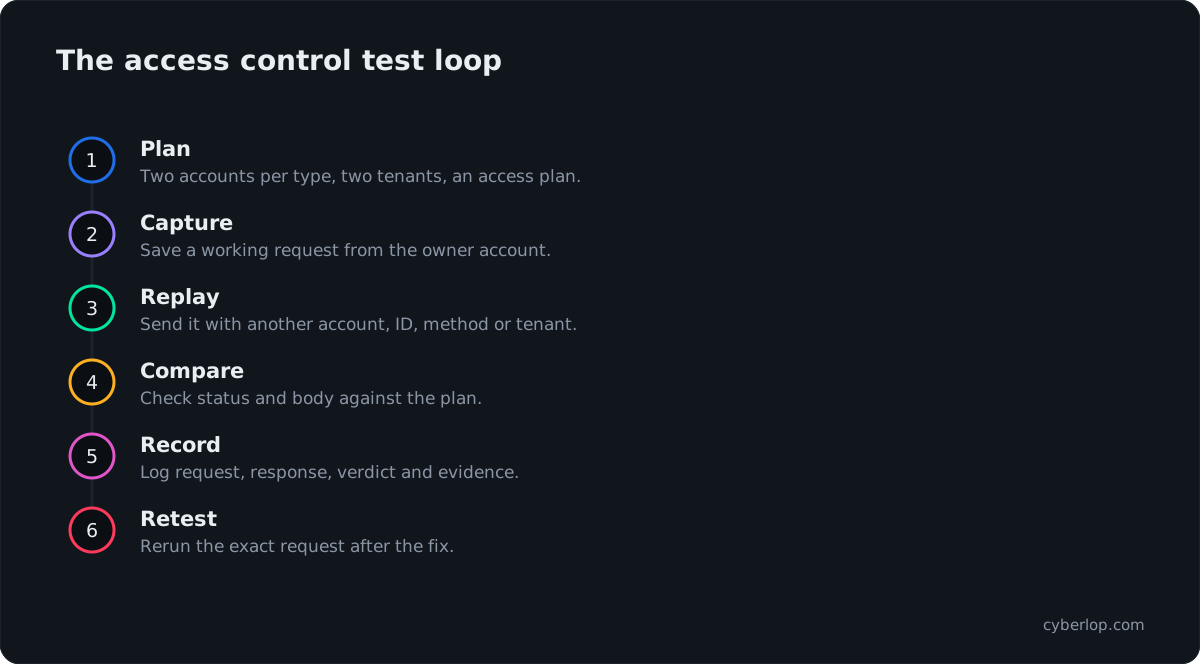
You automate them by turning the access plan into a test that loops over account types and endpoints, makes each call, and asserts the expected allow or deny result. OWASP's Authorization Cheat Sheet says automated unit and integration tests should verify that access control works as designed, including failed checks, and that they complement but do not replace manual testing.
A practical approach
- Store the access plan as data (a YAML or JSON file) next to the code, with one entry per endpoint and account type.
- Create fixtures that seed two tenants with users and records, and return a token for each account.
- Write one parameterised test that runs every entry and compares the actual outcome with the expected one.
- Fail the build when a new route has no entry in the plan, so coverage grows with the product.
- Run the suite on every pull request, and run the full cross-tenant set on a schedule against staging.
OWASP's API1 guidance makes the same point: write tests for the authorisation mechanism and do not deploy changes that make them fail. A security regression test for each fixed finding is the cheapest insurance you can buy. For the wider picture of running tests as part of delivery, see continuous penetration testing and gating a build.
How does reading the code help access control testing?
It shows you where the check should be and whether it is there. Black-box testing sees only behaviour; grey-box testing adds real accounts and an API description; white-box testing adds the source. For authorisation that matters, because missing checks are an absence: nothing in the response says a function forgot to ask who is calling.
With the code in front of you, search each route handler for the shared policy or ownership check, and list the handlers that skip it. CWE-862, Missing Authorization, describes this: the product does not perform an authorization check when an actor attempts to access a resource or perform an action. CWE-639, Authorization Bypass Through User-Controlled Key, is the identifier-swapping form. In white-box mode Cyberlop reads your code while it tests the running app, so a finding can point to the file and line, and it reports only what it actually exploited.
What mistakes make access control tests miss bugs?
Five mistakes cause most missed bugs: too few accounts, trusting status codes, testing only reads, forgetting the API, and never retesting.
Common mistakes and fixes
| Mistake | What it hides | Fix |
|---|---|---|
| Testing with one account | Sideways flaws cannot appear with only one owner of data | Two accounts per type, two tenants |
| Trusting the status code | 200 with foreign data in the body; 403 that leaks the record | Read the body and compare it with the plan |
| Testing reads only | Anyone can edit or delete what they cannot see | Test create, update, delete, export and approve too |
| Following the UI only | Hidden endpoints and old API versions | Build the list from the spec, router and traffic |
| Treating a fix as closed | Changed IDs, other verbs or other routes still work | Rerun the exact request and neighbours; add a regression test |
| Letting the plan go stale | New roles and routes ship untested | Review the plan when roles or routes change, and each quarter |
The fixes that last
Enforce the rule once, on the server, and reuse it. OWASP's A01:2025 guidance says to deny by default except for public resources, to implement access control in trusted server-side code, to build the mechanism once and reuse it, and to enforce record ownership. Log denied attempts. If a team keeps copying a check into each handler, the missing one is only a matter of time.
Prove the fix
After the patch, replay the exact failing request, then its neighbours (other verbs, other IDs, the older API version). A fix is proven by re-running the exploit against the new code, which is what a closed-loop retest does, rather than by a fresh scan that may never have found it.
What is the complete access control testing checklist?
The complete checklist is the list below, grouped by direction. Copy it into your tracker, add a row for each object and function in your own app, and mark every item pass, fail or not applicable for each account type.
Access control testing, 2026
- Setup: written permission and scope; test environment; two accounts per type; two tenants; access plan reviewed by the business owner.
- Inventory: objects with owners; state-changing functions; endpoints from the spec, router and traffic, including ones the interface never calls.
- Anonymous: every endpoint without a session; error messages that confirm which records exist.
- Sideways: foreign IDs in path, query, body, header and cookie; swapped sessions; lists, search and exports; writes and deletes; nested objects.
- Upwards: admin calls with an ordinary token; hidden pages; other HTTP methods; self-promotion fields; invitation limits; sessions after a role change.
- Across tenants: foreign IDs with tenant admin rights; client-controlled tenant selectors; caches, storage, queues and webhooks; invitations and sharing.
- Other surfaces: GraphQL, mobile backend, old API versions, websockets, file links, background jobs, admin and support tools.
- Response content: fields beyond what the screen needs; foreign data in 403 bodies.
- Recording: account, request, expected, actual, evidence, verdict; severity and confidence kept apart.
- Afterwards: fix in shared server-side code; regression test; retest with the exact exploit; plan updated.
How often should you run it?
Run the automated set on every change and the full manual list at least once a year, and again after major releases, new roles, new tenants or a new integration. Scripts only check what you wrote down, so keep people for rules that live in heads, such as business logic. The web application checklist shows where this list fits.
Questions people ask
Access control testing checklist: FAQs
What is the difference between horizontal and vertical access control testing?
Horizontal testing checks that one account cannot reach another account's data at the same privilege level, such as one customer reading another's invoice. Vertical testing checks that a lower-privileged account cannot use functions reserved for a higher one, such as an ordinary user calling an admin endpoint.
How many test accounts do I need?
At least two accounts for each account type, in at least two separate tenants, plus an anonymous session. Two of the same type are needed for sideways tests, and two tenants for cross-tenant tests. Add restricted, read-only and disabled accounts where your product has them.
Can a vulnerability scanner find broken access control?
Only a small part. A scanner usually holds one session and sees valid responses to valid requests, so it cannot tell that a record belongs to someone else. Scanners help with missing headers and known flaws; access control needs accounts and an access plan. See the post on why a scanner has one login.
Is a 403 response enough to pass a check?
No. Read the response body and headers too. A 403 or 404 that still includes the other customer's data, or a 200 with a filtered list that leaks counts or names, is a failure. Compare the whole response with what your access plan expects.
How often should access control be tested?
Run automated checks on every change, and a full manual pass at least yearly and after releases that add roles, tenants, endpoints or integrations. Compliance frameworks may set their own minimums, so confirm what your auditor expects.
Where does access control testing fit in the OWASP guidance?
OWASP lists Broken Access Control as A01 in the Top 10:2025 and Broken Object Level Authorization as API1:2023 in the API Security Top 10. The Web Security Testing Guide has an authorization testing section covering bypassing the authorization schema, privilege escalation and insecure direct object references.
Should I test access control in staging or production?
Prefer a staging environment with seeded test tenants and fake data, so write and delete tests cannot harm real customers. If you must test production, use dedicated test tenants, agree limits in writing and avoid touching real customer records.
How do I keep access control from breaking again?
Enforce deny by default in shared server-side code, add an automated test for every endpoint and account type, fail the build when a route has no entry in the access plan, and turn each fixed finding into a regression test.
Sources
Where the facts come from
- OWASP: Top 10:2025, A01 Broken Access Control
- Verizon: 2026 Data Breach Investigations Report
- OWASP: API Security Top 10 2023, API1 Broken Object Level Authorization
- OWASP: API Security Top 10 2023, API5 Broken Function Level Authorization
- OWASP: Web Security Testing Guide v4.2, Authorization Testing
- OWASP: Authorization Testing Automation Cheat Sheet
- OWASP: Authorization Cheat Sheet
- MITRE: CWE-862 Missing Authorization
- MITRE: CWE-639 Authorization Bypass Through User-Controlled Key
- MITRE: 2025 CWE Top 25 Most Dangerous Software Weaknesses
Keep reading
Related articles
Broken object level authorization (BOLA): examples, testing and fixes
Broken object level authorization (BOLA) explained: examples, BOLA vs IDOR, a two-account test, the ownership-check fix and code review questions.
Business logic testing checklist: prices, coupons, workflows and race conditions
A business logic testing checklist covering prices, quantities, coupons, workflows, limits, timing and race conditions, with test ideas and fixes.
Continuous penetration testing: how to run it alongside your annual pentest
What continuous penetration testing really means, how it compares with annual pentests, DAST and PTaaS, and how to run both in your pipeline.

Which accounts reach what they should not?
Cyberlop checks cross-account access: one signed-in account reaching another's data or functions. It reports only what it exploited, with the request, the response and, in white-box mode, the line of code. Ask us to run it on one of your applications.
Or start with a $199 pilot on one application: thirty days, success criteria agreed before day one, credited against the annual if you convert.