
A VAPT checklist is a stage-by-stage list for running a vulnerability assessment and penetration test: agree scope and rules, prepare accounts and a safe test environment, check coverage during testing, review the report for proof, assign owners, fix root causes, and retest every finding.
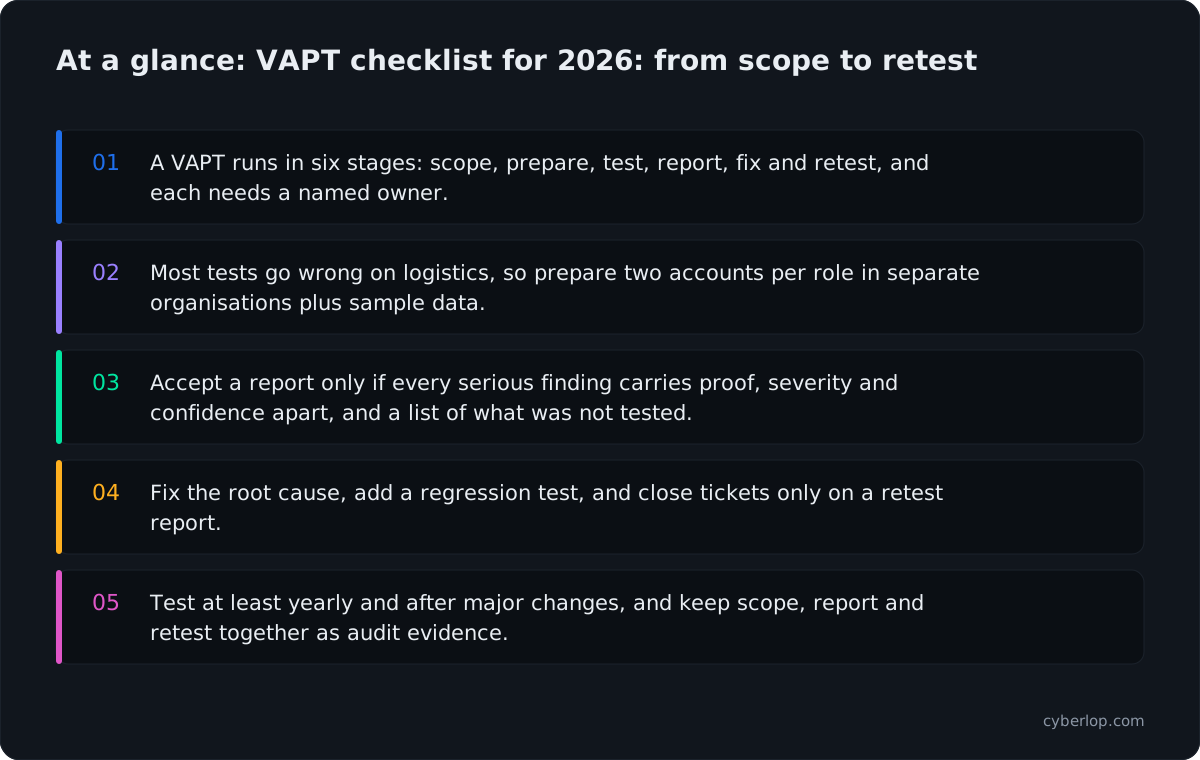
- A VAPT runs in six stages: scope, prepare, test, report, fix and retest, and each needs a named owner.
- Most tests go wrong on logistics, so prepare two accounts per role in separate organisations plus sample data.
- Accept a report only if every serious finding carries proof, severity and confidence apart, and a list of what was not tested.
- Fix the root cause, add a regression test, and close tickets only on a retest report.
- Test at least yearly and after major changes, and keep scope, report and retest together as audit evidence.
A VAPT checklist is a step-by-step list of what to prepare, check and keep at each stage of a vulnerability assessment and penetration test: before it starts, while it runs, when the report lands, and after the fixes. Use it to run the whole job from scope to retest, so nothing falls between the tester and your engineers.
It is written for founders, engineering and product leads, security and compliance owners, and agencies that run tests for clients. Each stage has items you can tick off, and the tables are built to paste into a ticket tracker.
What is a VAPT checklist, and what does it cover?
VAPT stands for Vulnerability Assessment and Penetration Testing. The assessment finds likely weaknesses, usually with tools. The penetration test then tries to exploit them, so you learn which ones can really be used against your application.
Most failed tests fail on logistics, not on skill. The test accounts do not work, the staging site is down, nobody owns the findings, or the retest never happens. If you want the basics of the term first, read what is VAPT; this post starts where that one ends.
Where this checklist sits in the standards
NIST SP 800-115 is the standard technical guide to security testing. It walks through planning a test, running it, making sense of the results and deciding how to fix them (NIST, SP 800-115). This list follows the same arc: plan, test, analyse, fix.
For web applications, the technical test cases come from the OWASP Web Security Testing Guide v4.2, which groups them into twelve categories from information gathering to API testing. Our web application test-case checklist maps those categories in detail; this post covers the process around them.
Why does a VAPT checklist matter in 2026?
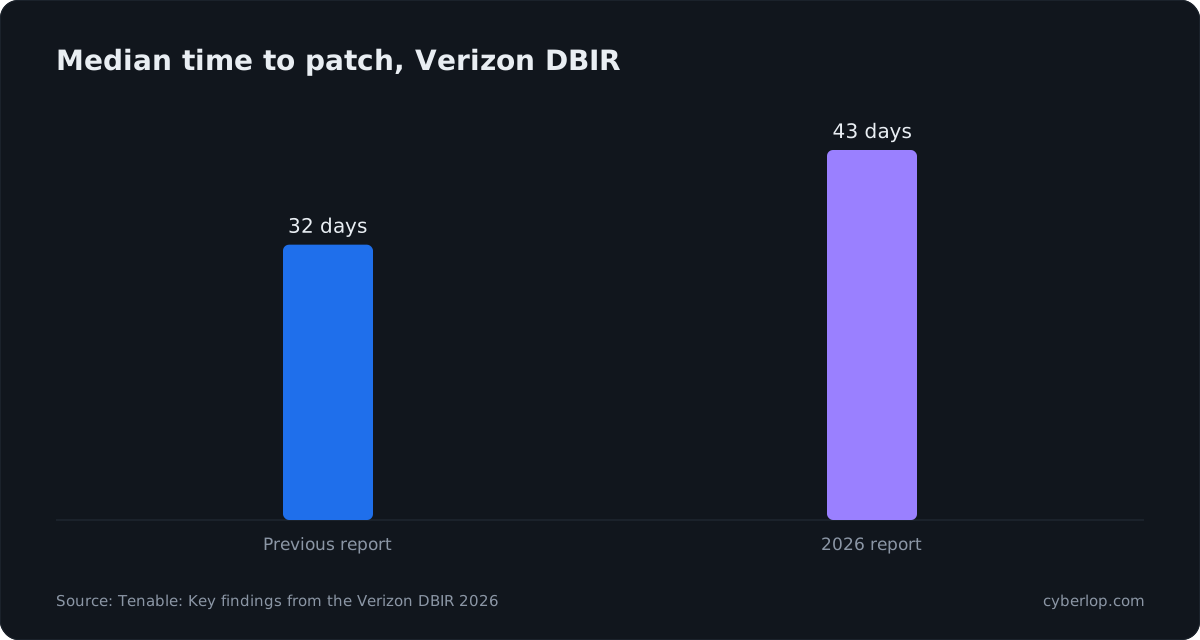
Software flaws have overtaken stolen passwords as the most common way in, and fixes are slow. In the Verizon 2026 Data Breach Investigations Report, 31% of breaches started with a software vulnerability.
Tenable's summary of the same report puts the median time to patch at 43 days, up from 32 the year before (Tenable, 2026). A test that finds a flaw is only half the job; the checklist's later stages exist to shorten that gap.
Cost is the other reason. IBM's 2026 Cost of a Data Breach research reports a global average breach cost of 4.99M USD, a record high. Finding a flaw in a planned test is far cheaper than finding it in an incident.
What a test is good at finding
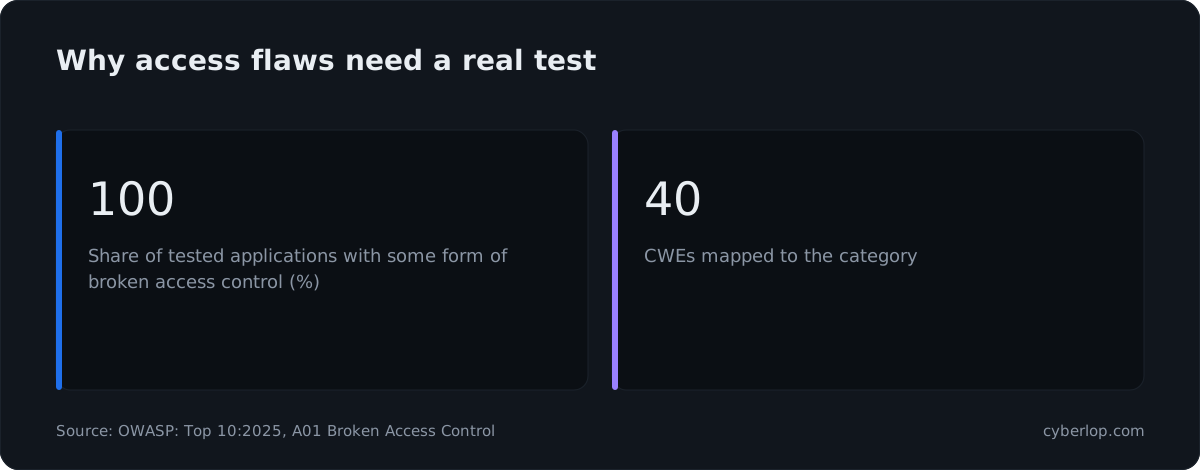
Access-control mistakes lead the OWASP Top 10:2025. OWASP reports that 100% of the applications tested had some form of broken access control. A scanner rarely spots these, because it does not know which account should see which record. That is why the account plan in the next section decides how good your test is.
What is the difference between a vulnerability assessment and a penetration test?
A vulnerability assessment lists likely weaknesses, mostly with tools, while a penetration test tries to exploit them to prove which ones are real. A VAPT needs both, and this checklist treats them as two separate outputs.
Vulnerability assessment vs penetration test, side by side
| Question | Vulnerability assessment | Penetration test |
|---|---|---|
| Main output | A list of possible weaknesses | Findings that were exploited, with proof |
| Typical method | Tools plus review, such as vulnerability scanning | Hands-on testing that starts where scanning stops |
| Main risk | Noise and false positives | A narrow scope that hides gaps |
| What to check in the report | Has each item been confirmed? | Does each finding show the request and response? |
What to do with the difference
Ask the tester which items were confirmed by exploitation and which are tool output only. Treat the second group as leads to verify, not as findings.
What are the stages of a VAPT, from start to retest?
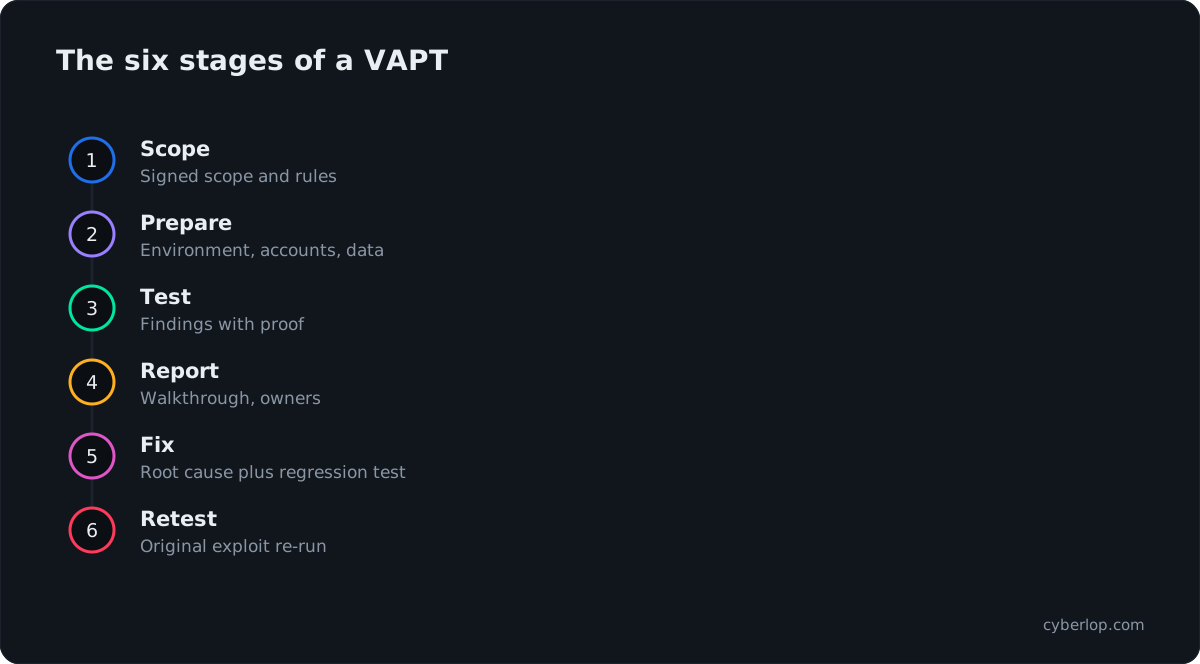
There are six stages: scoping, preparation, testing, reporting, remediation and retest. Each has an owner and an output. If any stage has no owner, that is where the project will stall.
The six stages at a glance
| Stage | Who leads | Main output | Done when |
|---|---|---|---|
| 1. Scope | Security or engineering lead with the tester | Signed scope and rules of engagement | Both sides can name what is in and out |
| 2. Prepare | Engineering | Test environment, accounts, sample data | Tester has logged in successfully |
| 3. Test | Tester | Findings with proof | Agreed test cases are covered |
| 4. Report | Tester | Report and walkthrough | Every finding has an owner |
| 5. Fix | Engineering | Code changes and release notes | Fixes are in the test environment |
| 6. Retest | Tester | Retest report | Each finding is closed, open or accepted |
What should you do before a VAPT starts?
Settle scope, accounts, environment and paperwork. This is where most of the checklist lives, because every gap here becomes lost testing days later. Allow extra time on a first test, because accounts and approvals rarely arrive on the first request.
Scope checklist
1. List every target by name
Write down domains, subdomains, API base URLs, mobile app builds and any admin panels. Include the third-party pieces you host, such as a support widget or a file store. Anything not listed is out of scope, so a forgotten admin panel stays untested.
2. Say what is out of scope, and why
Typical exclusions are payment gateways, third-party SaaS and shared infrastructure you do not control. Note them in writing. If you rely on them for security, record that as a known gap rather than a silent one. Your pentest scope should read like a contract, not a hope.
3. Choose the testing mode
Black-box testing gives the tester nothing but a URL. Grey-box gives accounts and some documentation. White-box adds source code. Most product teams get the best return from grey-box or white-box, because logic and access flaws sit behind the login. The trade-offs are laid out in black box vs grey box vs white box.
4. Agree the goal in one sentence
Examples: "Show whether one customer can read another customer's data", or "Meet the annual test requirement for our PCI DSS assessment". The goal decides how deep the tester goes and what the report must say.
5. Include AI features and generated code
If your product has a chatbot, an assistant or an agent that calls tools, list it as a target and say so in the scope. The OWASP Top 10 for LLM Applications 2025 names prompt injection (LLM01) and excessive agency (LLM06) among its ten risks, so ask the tester whether they cover them.
Accounts, roles and data checklist
Authenticated testing only works if the tester has the right accounts. Prepare these before day one.
- Two accounts per role, in two separate organisations. Two accounts in different tenants let the tester check whether one account can read or change the other's records, which is the heart of cross-account access testing.
- One account for each privilege level. Include a normal user, a team admin and, if it exists, a support or staff role. Your role-based access design decides how many you need.
- Working multi-factor authentication. Either provide a test token seed or whitelist the tester's accounts. Do not switch MFA off for the test, because then you are not testing the real login.
- Realistic sample records. Each account should own orders, files, invoices or messages, so there is something to reach across. An empty account hides access flaws.
- API documentation. An OpenAPI file or a Postman collection saves days of discovery.
- A written list of the business rules. Refund limits, coupon rules and approval chains help the tester find business-logic flaws that no scanner can see.
Environment and safety checklist
Test on staging that mirrors production where you can. If you must test production, treat it as a different risk, and read the entry on testing in production first.
Ready-to-test gate
- Staging matches production in version, configuration and features.
- Backups of the test environment are taken and a restore has been tried.
- Real customer data is absent, or masked (see data masking); personal data is never copied in by habit.
- Email and SMS from the test environment go to sinks, not to real people.
- Payment flows run against a sandbox, with no live cards.
- Rate limits and a web application firewall are either as in production or allow-listed, and the tester knows which.
- A named engineer is on call during testing and can reply within the hour.
- Monitoring staff know the test dates and source IP addresses so they do not raise a false alarm.
Paperwork checklist
Get these in place before any request is sent.
| Document | Why you need it | Watch for |
|---|---|---|
| Written authorisation | Proves the tester may test your systems | Signed by someone who owns the systems, including hosting you rent |
| Rules of engagement | Sets dates, hours, source IPs, stop rules (see rules of engagement) | What happens if the tester reaches personal data |
| NDA and data handling terms | Controls how findings, screenshots and credentials are stored | Deletion date for test data and evidence |
| Hosting provider notice | Some cloud providers ask for notice or have testing policies | Check your provider's current policy page |
| Escalation contacts | Lets the tester report a serious finding the same day | Out-of-hours phone number |
What happens during the test, and what should you check?
During testing your job is light but not zero. Be reachable, answer questions quickly, and ask for early word on anything serious. A good tester does not wait for the final report to tell you about a critical flaw.
Daily checklist for the team
- Confirm the test environment is up each morning.
- Answer tester questions about expected behaviour within a working day. "Is this meant to happen?" is a normal question, not a sign of a weak test.
- Do not patch the test environment mid-test unless you tell the tester. A silent change makes findings impossible to reproduce.
- Log any outage and check whether it was caused by the test or by something else.
- Keep a short running list of critical findings reported early, with the engineer who owns each.
What good coverage looks like
Ask the tester to confirm coverage by area, not just a count of findings. A report with five findings and clear coverage of authentication, access control, sessions, input handling and business logic tells you more than a report with fifty scanner results.
| Area | Example checks | OWASP WSTG category |
|---|---|---|
| Authentication | Weak passwords, lockout, reset flow, MFA bypass | 4.4 Authentication Testing |
| Access control | One account reading another's records, role escalation | 4.5 Authorization Testing |
| Sessions | Token expiry, logout, cookie flags | 4.6 Session Management Testing |
| Input handling | SQL injection, XSS, file upload | 4.7 Input Validation Testing |
| Business logic | Coupon stacking, skipped workflow steps, limit overrun | 4.10 Business Logic Testing |
| APIs | Object-level checks, excess data in responses | 4.12 API Testing |
What should a VAPT report contain?
A useful report lets an engineer reproduce each finding and a manager decide what to fund. Check the draft against the list below before you accept it. For a longer walkthrough, see how to read a penetration test report and how to read a finding.
Report acceptance checklist
| Item | What good looks like | Red flag |
|---|---|---|
| Executive summary | One page, plain words, overall risk and top three actions (executive summary) | A tool summary pasted in |
| Scope and method | Dates, targets, accounts used, test mode, tools | No list of what was not tested |
| Per-finding evidence | Request, response, screenshot, exact reproduction steps | "Might be vulnerable" with no proof |
| Severity and confidence | Rated separately (severity vs confidence), with a CVSS vector | A single unexplained colour |
| Mapping | CWE and OWASP references per finding | Generic advice with no reference |
| Fix guidance | Specific to your stack, with the root cause named | "Apply input validation" |
| Retest terms | Stated in the contract, with a window | Retest billed as a new project |
| Attestation letter | Available for auditors or customers (attestation letter) | Only the full report, which you cannot share |
Check each finding for proof
A finding should show that the flaw was used, not just that it might exist. Scanner output with no confirmation produces false positives that waste engineering days. Ask for the proof of exploit on anything rated high or critical.
Check what was not covered
A clean report on a narrow scope is not a clean bill of health. Make sure the report names the areas, roles and endpoints that were left out, so a reader does not assume more than was tested.
How do you triage findings after the report?
Hold a walkthrough within a few days of delivery, assign an owner and a due date to every finding, and rank by risk to your business, not by raw score. Your own context changes the order: a medium flaw in the billing path can outrank a high flaw on an unused page.
Triage checklist
- Walk through the report with the tester and your engineering leads in one session.
- Log each finding as a ticket with the tester's ID, severity, confidence and reproduction steps attached.
- Assign one named owner per ticket, not a team name.
- Check whether any finding, or the component behind it, is already used in real attacks. CISA lists those in its Known Exploited Vulnerabilities catalog, and the KEV catalog entry explains how to use it when ranking work.
- Group findings that share a root cause. One missing ownership check often explains six findings.
- Set the due date from your remediation SLA.
- Record any finding you will not fix as a risk acceptance, with an owner, a reason and a review date.
Example SLA table to adapt
These are common starting points, not rules from any standard. Set yours with your own risk appetite and your customers' contracts in mind. The full method is in the vulnerability remediation process.
| Severity | Triage within | Fix or mitigate within | Who signs off |
|---|---|---|---|
| Critical | 1 working day | Days, not weeks | Head of engineering |
| High | 2 working days | Within the month | Engineering lead |
| Medium | 1 week | Within the quarter | Team lead |
| Low | At next planning | Backlog, reviewed quarterly | Team lead |
How do you fix VAPT findings properly?
Fix the cause, not the one request that the tester sent. If the tester showed that an invoice URL works for another account, a patch on that URL leaves every similar URL open. Fix the shared check, then test the neighbours.
Remediation checklist
- Find the root cause. Ask where the same pattern appears elsewhere in the code.
- Fix on the server. Hiding a button or validating in the browser does not change what the server accepts.
- Add a regression test. Turn the tester's exploit into an automated test so the flaw cannot return. See security regression test.
- Review the pull request with security in mind. A second pair of eyes catches half-fixes.
- Release to the test environment first. Retest needs the fix where the tester can reach it.
- Write down what changed. Short release notes per finding make the retest faster.
When you cannot fix it in time
Add a compensating control, such as a rule that blocks the route or a lower privilege on the affected service, and record the date by which the real fix is due. A mitigation is a bridge, not a closure.
How do you retest after fixes?
A retest repeats the original exploit against the changed code and records whether it still works. A fresh scan is not a retest, because it does not run the same steps, so it can miss exactly the case that was reported. The retest entry covers the basics.
Retest checklist
- Send the tester a list of tickets marked fixed, with the build or commit for each.
- Ask for each finding to be re-run with its original steps and account.
- Ask the tester to try one variation per finding, such as another endpoint or another role.
- Get a retest report with one status per finding: closed, still open, partly fixed, or accepted risk.
- Close tickets only on that report, not on the developer's word.
- Update the risk register and file the report with your evidence.
Cyberlop works this way: a fix is proven by re-running the exact exploit against the new code, a closed-loop retest, not by a fresh scan. See how it works and the entry on closed-loop retest.
How often should you run a VAPT?
At least once a year, and again after major changes. Many compliance programmes and customer contracts ask for an annual test, and PCI DSS v4.0.1, listed as current on the PCI Security Standards Council document library, treats penetration testing as a requirement under 11.4 (see PCI DSS penetration testing requirements). Auditors for SOC 2 and ISO 27001 may ask for test evidence too, so check what yours expects; the SOC 2 side is covered in SOC 2 penetration testing.
Triggers for an extra test
- A new login method, role or payment flow.
- A move to a new cloud account, framework or major version.
- A new public API or partner integration.
- A real incident, or a customer asking for fresh evidence.
Between yearly tests, code ships weekly. That is why many teams add scheduled or build-gating checks on top of the annual test; the options are compared in continuous penetration testing. Cyberlop can run on a schedule or in CI/CD and gate a build.
What should you check before you hire a tester?
Ask for a sample report, the names of the people doing the work, the test method, the retest terms and how they handle your data. The full question list is in how to choose a penetration testing company, and quote comparison is covered in penetration testing cost.
Five quick checks
- Is the sample report specific, with evidence, or generic?
- Will the work be done by the people you meet?
- Are retests included, and for how long?
- Can they test behind logins and across accounts?
- Where does your code and data live during the test? For teams that cannot let code leave the network, private scanning runs inside your own environment.
What are the most common VAPT mistakes?
Most failures repeat. Check the list before you start and again before you sign off.
Testing only the login page and the home page
Attackers go for the data behind the login. Include authenticated flows and every API the app calls.
Giving the tester one account
With one account, cross-account flaws cannot be tested. Provide at least two accounts in separate organisations.
Treating the report as the finish line
The report is the middle. Without owners, dates and a retest, findings quietly age.
Fixing the symptom
Patching one URL leaves the same flaw on its siblings. Fix the shared check.
Letting the evidence go missing
Keep the scope, authorisation, report, tickets and retest report together. An auditor or a customer will ask for them, and finding them in a hurry is costly. The evidence page shows what Cyberlop attaches to each finding.
Evidence pack to keep after the retest
File these together so an auditor or a customer questionnaire takes minutes, not days.
| Item | Created at stage | Who asks for it |
|---|---|---|
| Signed scope and authorisation | Scope | Auditors, insurers |
| Full report and executive summary | Report | Auditors, customers, board |
| Ticket history with owners and dates | Fix | Auditors, your own security lead |
| Retest report | Retest | Auditors, customers |
| Attestation letter | Retest | Customers who cannot read the full report |
The one-page VAPT checklist
Copy this into your tracker and tick it off as you go.
VAPT from scope to retest
- Scope: targets listed, exclusions written, mode chosen, goal in one sentence.
- Paperwork: authorisation, rules of engagement, NDA, escalation contacts.
- Environment: staging ready, backup tested, sinks for email and SMS, sandbox payments, masked data.
- Accounts: two per role in two organisations, MFA working, sample records, API documentation.
- During: engineer on call, no silent patching, critical findings reported early.
- Report: proof on each finding, severity and confidence apart, CWE and OWASP references, list of what was not tested.
- Triage: walkthrough held, one owner per ticket, due dates from your SLA, accepted risks recorded.
- Fix: root cause addressed, regression test added, fix in the test environment.
- Retest: original exploit re-run, one variation tried, one status per finding.
- Evidence: everything filed for audits and customer questionnaires.
How can agencies and MSSPs use this checklist?
Turn the stages into a repeatable client template: one scope form, one account request, one report acceptance list and one retest sheet. Consistent paperwork means faster starts and fewer disputes. Agencies and MSSPs can run Cyberlop under their own brand; see agencies and partners.
Questions people ask
Vapt checklist: FAQs
What is a VAPT checklist?
A VAPT checklist is a list of the steps and items needed to run a vulnerability assessment and penetration test well: scope, accounts, environment, paperwork, testing, report review, fixes and retest.
What are the steps in a VAPT?
Scope, preparation, testing, reporting, remediation and retest. Each has an owner and an output, and the process is not finished until every finding is closed, still open or formally accepted.
What is the difference between vulnerability assessment and penetration testing?
A vulnerability assessment finds and lists likely weaknesses, usually with tools. A penetration test goes further and tries to exploit them to show which ones can be used and what an attacker could reach.
What do I need to give the tester before a VAPT?
Written authorisation, a clear scope, a test environment, working accounts for each privilege level (two per role in separate organisations), sample data, API documentation and an escalation contact.
In white-box mode, add read access to the source code.
How long does a VAPT take?
It depends on scope, the number of roles and how much needs retesting. A single web application with its API is often a matter of days to a few weeks of testing, plus time for preparation, reporting and retest. Ask the tester to give a plan for your scope.
How often should a VAPT be done?
At least once a year and after major changes, such as a new login method, payment flow, public API or cloud move. Some programmes, including PCI DSS, ask for annual testing and testing after significant changes.
Is a vulnerability scan the same as a VAPT?
No. A scan is automated and lists possible issues. A VAPT adds a person or a proof-driven engine that confirms issues by exploiting them, tests behind logins and checks business logic and cross-account access.
Who should own the findings after the report?
One named engineer per finding, with a due date set from your remediation SLA. A team name or a shared inbox is not an owner. Security or engineering leadership should review open items weekly until the retest closes them.
Sources
Where the facts come from
- NIST: SP 800-115, Technical Guide to Information Security Testing and Assessment
- OWASP: Web Security Testing Guide v4.2
- Verizon: 2026 Data Breach Investigations Report
- Tenable: Key findings from the Verizon DBIR 2026
- IBM: Cost of a Data Breach Report 2026
- OWASP: Top 10:2025, A01 Broken Access Control
- CISA: Known Exploited Vulnerabilities Catalog
- PCI Security Standards Council: Document Library
- OWASP: Top 10 for LLM Applications 2025
Keep reading
Related articles
Black box vs white box penetration testing: which to choose
Black, grey and white box penetration testing compared: what each finds and misses, how effort differs, when to choose each and how to combine them.
Continuous penetration testing: how to run it alongside your annual pentest
What continuous penetration testing really means, how it compares with annual pentests, DAST and PTaaS, and how to run both in your pipeline.
How to choose a penetration testing company: 20 questions, red flags and a report check
20 questions to ask, red flags, how to review a sample report, and what CREST, OSCP and CERT-In empanelment do and do not tell you.

Run your next VAPT with proof
Cyberlop finds vulnerabilities in web apps and their APIs, reports only what it actually exploited with the request and response, and proves each fix by re-running the exact exploit. Ask us to run it on one of your applications.
Or start with a $199 pilot on one application: thirty days, success criteria agreed before day one, credited against the annual if you convert.