
A pentest checklist for a web application is an ordered set of security test cases, usually mapped to the twelve OWASP WSTG v4.2 categories. Run information gathering first, then authentication, authorisation, sessions, input, business logic and the client, record proof for every item, and retest each fix.
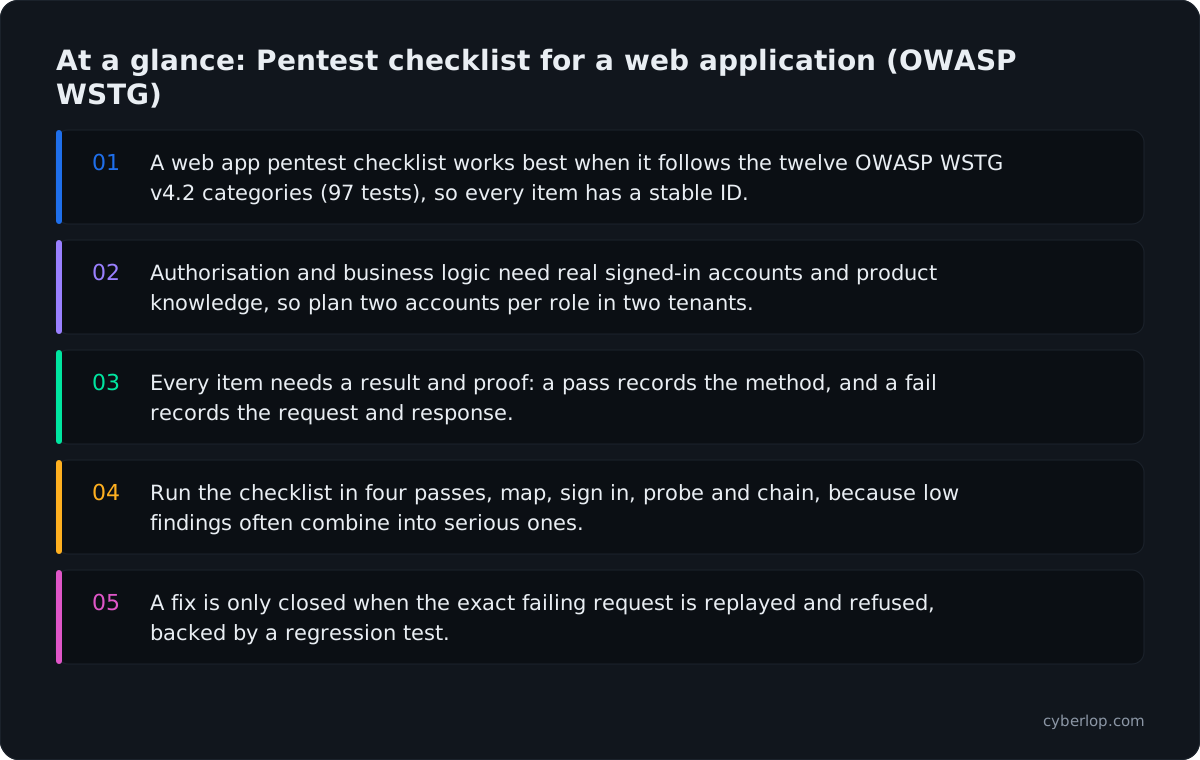
- A web app pentest checklist works best when it follows the twelve OWASP WSTG v4.2 categories (97 tests), so every item has a stable ID.
- Authorisation and business logic need real signed-in accounts and product knowledge, so plan two accounts per role in two tenants.
- Every item needs a result and proof: a pass records the method, and a fail records the request and response.
- Run the checklist in four passes, map, sign in, probe and chain, because low findings often combine into serious ones.
- A fix is only closed when the exact failing request is replayed and refused, backed by a regression test.
A pentest checklist for a web application is an ordered list of test cases, grouped by area, that a tester works through to find vulnerabilities in a running app and its APIs. The most widely used backbone is the OWASP Web Security Testing Guide (WSTG), which splits web testing into twelve categories. This page turns those categories into checks you can run, assign and tick off in 2026.
What is a web application penetration testing checklist?
A web application penetration testing checklist is a written set of security test cases, each with a clear pass or fail result. It tells a tester what to try and a reader what was covered.
A checklist is not a penetration test on its own. It is the plan. The test is trying each item against your running app and proving what you find. Our full web application penetration testing guide explains the phases around it, and the VAPT checklist covers the project steps before and after testing.
WSTG v4.2 is the stable release. It numbers every test, such as WSTG-ATHN-03 for a weak lock-out mechanism, so a checklist, a report and a ticket can all point to the same item. We use those IDs below. OWASP also keeps a WSTG v4.2 checklist spreadsheet for tracking progress; the pass criteria below are what it leaves out.
Why does a web app pentest need a checklist in 2026?
A checklist keeps testing complete and repeatable, and the data says web flaws are still how attackers get in. The 2026 Verizon Data Breach Investigations Report (DBIR), which covers incidents from 1 November 2024 to 31 October 2025, found that software vulnerabilities are now the most common starting point, at 31% of breaches, ahead of stolen passwords.
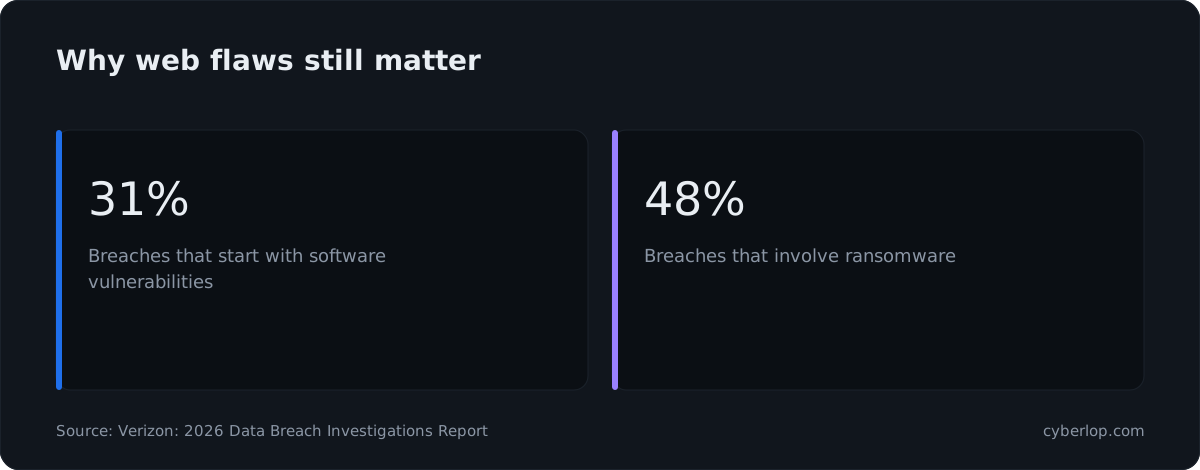
The same report puts ransomware in 48% of breaches. Separately, the CISA Known Exploited Vulnerabilities catalogue listed 1,734 vulnerabilities when we read it on 7 October 2026, each one already used in real attacks.
None of that proves your app has a flaw. It explains why buyers and auditors ask what was tested, and a checklist answers: these items, these dates, this evidence.
It does three jobs. Before you buy a test, it shows what applies to your app. When quotes arrive, it exposes thin ones: an "OWASP-based" proposal that never mentions authorisation or business logic needs questions (see how to choose a penetration testing company). And your developers can clear the cheap items first, so paid hours go on the hard problems.
What a checklist does not do
It misses flaws outside its items, usually your business rules. Treat it as a floor and add cases for your pricing, approvals, limits and tenant boundaries.
What do you need ready before testing starts?
You need a signed scope, a test environment, working accounts and a named contact. Most delays come from missing access, not from testing.
Pre-test readiness table
| Item | What to prepare | Why it matters |
|---|---|---|
| Written authorisation | A signed scope and rules of engagement naming hosts, apps, dates and what is out of bounds | Testing without permission is unlawful and unsafe |
| Target list | Production or staging URLs, API base paths, mobile back ends, third-party hosts you do not own | Gaps in the scope become gaps in coverage |
| Accounts | At least two accounts per role, in at least two separate tenants or customers, plus an admin | Cross-account checks need two owners to compare |
| Documentation | API specification (OpenAPI or a GraphQL schema), role descriptions, a data-flow sketch | Cuts discovery time and finds hidden endpoints |
| Test data | Seeded records, test payment cards or sandbox keys, disposable email inboxes | Lets testers try destructive flows safely |
| Safety limits | Rate limits, blackout windows, a rollback plan, an emergency contact | Protects production and your customers |
Choose a test mode
The same checklist runs at three depths. In black-box testing the tester has only a URL. In grey-box testing they get accounts and documents. In white-box testing they also read the source code. Deeper access means fewer guesses. We compare them in black box vs grey box vs white box.
Which OWASP WSTG categories should the checklist cover?
It should cover all twelve test categories in WSTG v4.2, sections 4.1 to 4.12. Skipping one is how coverage quietly shrinks.
WSTG v4.2 categories at a glance
| WSTG section | ID prefix | Question it answers |
|---|---|---|
| 4.1 Information Gathering | INFO | What does the app reveal about itself and its parts? |
| 4.2 Configuration and Deployment Management | CONF | Is the platform set up safely? |
| 4.3 Identity Management | IDNT | Are roles, sign-up and accounts handled safely? |
| 4.4 Authentication | ATHN | Can someone get in without proving who they are? |
| 4.5 Authorization | ATHZ | Can an account reach what it should not? |
| 4.6 Session Management | SESS | Are sessions created, held and ended safely? |
| 4.7 Input Validation | INPV | Does untrusted input change what the server or browser does? |
| 4.8 Error Handling | ERRH | Do failures leak detail? |
| 4.9 Weak Cryptography | CRYP | Is data protected on the wire and at rest? |
| 4.10 Business Logic | BUSL | Can the rules of your product be bent? |
| 4.11 Client-side | CLNT | What can the browser be made to do? |
| 4.12 API Testing | APIT | Is the API surface tested in its own right? |
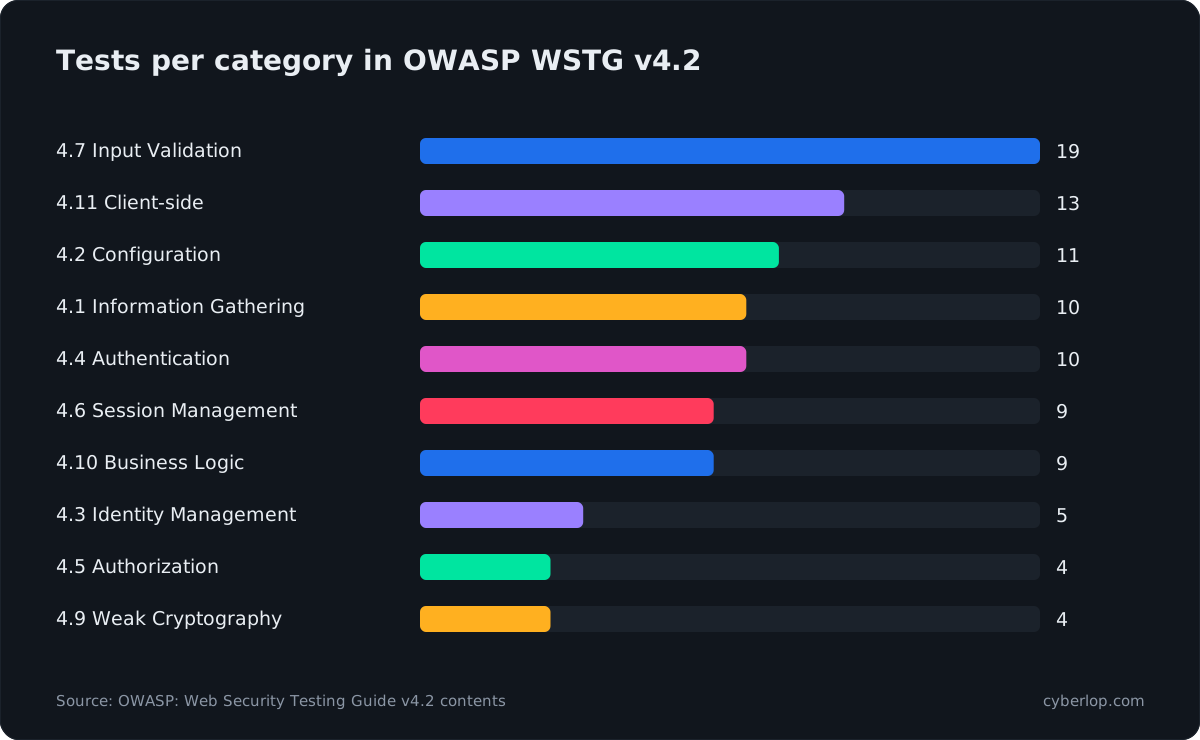
Across sections 4.1 to 4.12, v4.2 numbers 97 tests. The counts mislead if you plan time by them: Authorization has only four tests and Business Logic nine, yet those two need the most judgement, because no tool knows which account should see which record. The OWASP Top 10 is different: it ranks common risk categories, while the WSTG tells you how to test. Use the Top 10 to set priorities and the WSTG to build the list.
The web application pentest checklist, category by category
Each table below lists checks, the matching WSTG test, and what a pass looks like. Work through them in order, because earlier results (endpoints, roles, parameters) feed later ones. Mark each item pass, fail, not applicable or not tested, and never leave it blank.
1. Information gathering and configuration (INFO, CONF)
Start by mapping what exists. Forgotten hosts, old backups and open admin pages are cheap for an outsider to find and often serious.
| Check | WSTG | Pass looks like |
|---|---|---|
| List every host, path and API route, including old versions | INFO-04, INFO-06, INFO-07 | Every route is known, owned and intended |
Read robots.txt, sitemap.xml, page source and JavaScript bundles | INFO-03, INFO-05 | No hidden admin paths, API keys or internal notes are exposed |
| Fingerprint server, framework and version | INFO-02, INFO-08 | Version banners and stack traces are not exposed |
| Look for backup, old and unreferenced files | CONF-04 | No .bak, .git, dumps or test pages are reachable |
| Find admin interfaces | CONF-05 | Admin tools are not on the public internet, or sit behind strong access control |
| Try unneeded HTTP methods | CONF-06 | Only required methods are allowed per route |
| Check HSTS and transport headers | CONF-07 | HSTS is set with a sensible max-age |
| Check dangling DNS and cloud storage | CONF-10, CONF-11 | No takeover is possible; buckets are private |
Evidence to keep
A host and route inventory, screenshots of exposed pages, and the response headers for each fingerprinted component. The inventory also becomes the scope for the retest.
2. Identity and authentication (IDNT, ATHN)
These tests ask whether someone can become an account that is not theirs. Focus on sign-up, sign-in, reset and recovery, because attackers use them at scale.
| Check | WSTG | Pass looks like |
|---|---|---|
| Review role definitions and what each role is meant to do | IDNT-01 | Roles are documented and match the code |
| Register accounts with odd inputs and duplicates | IDNT-02, IDNT-03 | Sign-up rules are enforced on the server |
| Edit an invite into a higher role; remove a member, then reuse their session, API key or invite | IDNT-03 | Provisioning is checked on the server and removal ends all access |
| Compare error messages and timing on valid and invalid usernames | IDNT-04 | Messages and timing do not reveal which accounts exist |
| Send credentials over plain HTTP | ATHN-01 | Credentials are never accepted unencrypted |
| Try default and common credentials | ATHN-02 | No default accounts exist |
| Hit login repeatedly | ATHN-03 | Lock-out or throttling slows guessing without locking real users out |
| Bypass login by forced browsing or parameter changes | ATHN-04 | Protected pages reject unauthenticated requests |
| Work through reset and change-password flows | ATHN-09 | Reset tokens are random, expire and are single use |
| Try alternative channels such as mobile or legacy API | ATHN-10 | The weaker route is no weaker than the main login |
| Test multi-factor steps | ATHN-04 | The second factor cannot be skipped by calling the next step directly |
3. Authorisation and access control (ATHZ)
Authorisation is where most serious web findings live. Broken access control is number one in the OWASP Top 10:2025. The A01:2025 page reports 40 mapped CWEs, an average incidence rate of 3.74% and a maximum of 20.15%, across 1,839,701 occurrences, and says 100% of the applications tested had some form of broken access control.
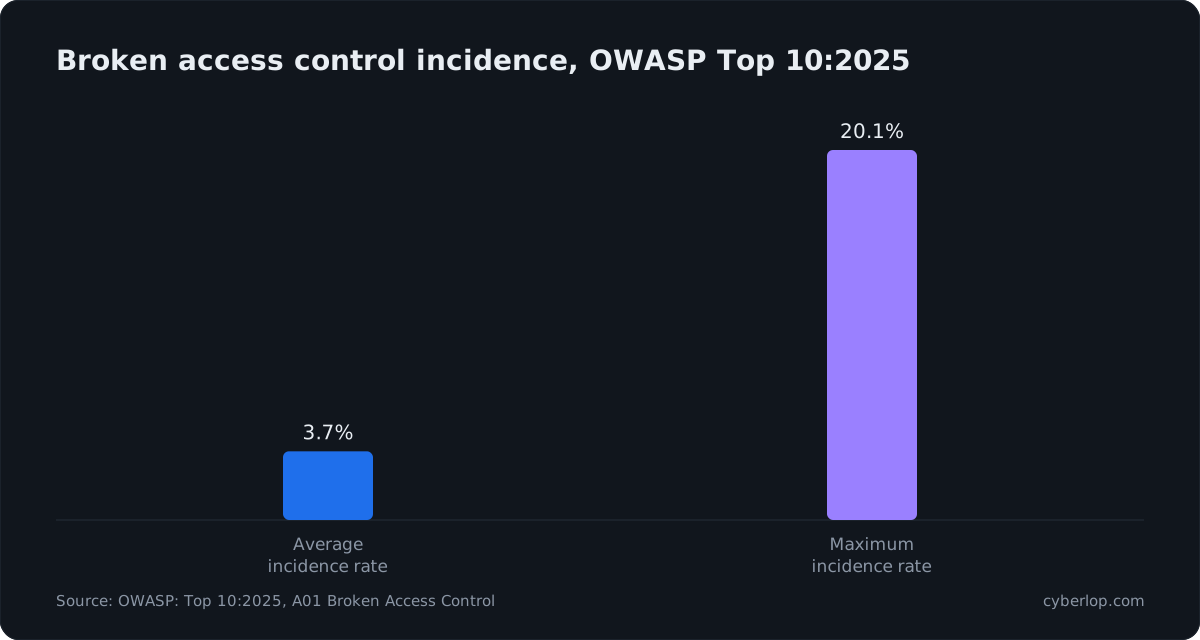
The test idea is simple: see what one signed-in account can reach that it should not, such as another customer's records or admin actions. It needs two accounts per role and two tenants. Details are in the access control testing checklist and the IDOR checklist.
| Check | WSTG | Pass looks like |
|---|---|---|
| Swap object IDs in URLs, bodies and headers between two accounts | ATHZ-04 | IDOR attempts return 403 or 404, never the other account's data |
| Call admin and staff functions with a normal account | ATHZ-02, ATHZ-03 | Each function checks the role on the server, not just in the menu |
| Replay a low-role request after changing method or path | ATHZ-02 | Rules apply to every HTTP method and route alias |
| Read tenant A data while signed in to tenant B, including exports, reports, webhooks and emails | ATHZ-04 | Tenant boundaries hold in lists, search, exports and files |
Add fields such as role or isAdmin to update calls | ATHZ-03 | Extra fields are ignored (mass assignment) |
| Try path traversal in file parameters | ATHZ-01 | Paths are resolved and restricted to an allowed folder |
| Use direct URLs for pages hidden from the menu | ATHZ-02 | Hidden is not the same as protected |
What to record
For every cross-account finding, keep the two account names, the exact request, the response that shows the other account's data, and the line of code that skipped the ownership check if you have source access. A fix should add the check where the data is read, not only in the controller.
4. Session management (SESS)
Sessions are what keep a user signed in, so weak sessions undo strong passwords. The OWASP Session Management Cheat Sheet wants Secure and HttpOnly on session cookies, SameSite=Strict where possible (Lax otherwise), and a fresh session ID whenever the privilege level changes.
| Check | WSTG | Pass looks like |
|---|---|---|
| Inspect cookie flags and scope | SESS-02 | Secure, HttpOnly and SameSite are set; scope is narrow |
| Sign in with a pre-set session ID | SESS-03 | A new ID is issued at sign-in (fixation fails) |
| Look for tokens in URLs, logs and local storage | SESS-04 | Session secrets never appear in URLs |
| Submit state-changing requests from another origin | SESS-05 | Anti-forgery tokens or SameSite block it (CSRF) |
| Log out, then replay the old token | SESS-06 | The server ends the session, not just the browser |
| Wait out idle and absolute timeouts | SESS-07 | Sessions expire as designed |
| Check token randomness and structure | SESS-01 | Tokens are unpredictable and carry no readable secrets |
| Steal and reuse a session from another browser or network | SESS-09 | Stolen tokens are short-lived and sensitive actions ask again |
Evidence to keep
The cookie header exactly as issued, and any replayed request that still worked after logout or timeout.
5. Input validation and injection (INPV)
Input validation covers anything a user can send that the app then trusts. Test every parameter: query strings, JSON bodies, headers, cookies, file names and uploaded content. The well-known classes are SQL injection, cross-site scripting, command injection, template injection and server-side request forgery.
| Check | WSTG | Pass looks like |
|---|---|---|
| Break SQL, NoSQL, LDAP and XPath queries with quotes and operators | INPV-05, INPV-06, INPV-09 | Queries are parameterised; responses do not change |
| Place script and markup in every reflected and stored field | INPV-01, INPV-02 | Output is encoded for its context |
| Send repeated and conflicting parameters | INPV-04 | Behaviour is consistent across parser layers |
| Try OS command and code injection in file names and options | INPV-11, INPV-12 | Input never reaches a shell or an interpreter |
| Tamper with the Host header in reset links and generated URLs | INPV-17 | The app does not trust the Host header for links or resets |
| Try template syntax in names and messages | INPV-18 | Templates render data, never evaluate it |
| Point URL-fetching features at internal addresses | INPV-19 | Server-side fetches use an allowlist and block internal ranges |
| Store input that another feature uses later, such as an admin screen or export | INPV-14 | Stored data is treated as untrusted every time it is reused |
Follow each input from the field to the query, template or command that uses it. A harmless proof, such as a version string, is enough evidence.
6. Error handling and cryptography (ERRH, CRYP)
Errors and weak crypto rarely cause a breach alone, but they confirm other bugs and expose data.
| Check | WSTG | Pass looks like |
|---|---|---|
| Trigger malformed requests and read the response | ERRH-01, ERRH-02 | Users see a generic message; stack traces stay in logs |
| Scan TLS versions and ciphers | CRYP-01 | Old protocol versions are off; certificates are valid |
| Look for sensitive data on unencrypted channels | CRYP-03 | No tokens or personal data over HTTP |
| Review how secrets and tokens are encrypted or hashed | CRYP-04 | Modern, standard algorithms are used |
| Probe for padding-oracle behaviour | CRYP-02 | Decryption errors do not differ by cause |
7. Business logic (BUSL)
A business logic flaw follows the rules of your code but breaks the rules of your business. No scanner knows your rules, so a person who understands the product has to test them. WSTG lists nine tests, BUSL-01 to BUSL-09. Our business logic testing checklist goes further.
| Check | WSTG | Pass looks like |
|---|---|---|
| Send out-of-range, negative and huge values | BUSL-01 | The server validates ranges and signs, not the browser |
| Forge requests to steps you should not reach | BUSL-02, BUSL-06 | Steps cannot be skipped or reordered |
| Change prices or totals in transit | BUSL-02, BUSL-03 | Totals are calculated on the server |
| Use a one-time function many times, or at the same moment | BUSL-04, BUSL-05 | Limits hold under parallel requests |
| Misuse features: refunds, coupons, referrals | BUSL-07 | Abuse is limited and logged |
| Upload unexpected and malicious files | BUSL-08, BUSL-09 | Type, size and content are checked; files are stored safely |
Evidence to keep
The normal flow, then the altered one, with the money, quota or state change shown on both. Business impact is the point here.
8. Client-side testing (CLNT)
Client-side checks look at what the browser is made to do. A Content-Security-Policy is not a numbered v4.2 test, so add a header review as your own item.
| Check | WSTG | Pass looks like |
|---|---|---|
| Test DOM-based script execution from URL fragments and storage | CLNT-01, CLNT-02 | No user data reaches dangerous sinks |
| Check redirects that use a URL parameter | CLNT-04 | Only allowed targets are accepted |
| Review cross-origin rules | CLNT-07 | No wildcard trust with credentials |
| Try framing the app | CLNT-09 | Frame-ancestors or X-Frame-Options block it |
| Check WebSocket and web messaging origin checks | CLNT-10, CLNT-11 | Origins are validated on each message |
| Check what the app keeps in browser storage | CLNT-12 | No session tokens or personal data in local storage |
| Inject HTML and CSS into rendered fields | CLNT-03, CLNT-05 | Markup is shown as text, never rendered |
9. API testing (APIT)
What WSTG 4.12 covers
Most modern web apps are thin screens over an API, so test the API directly, not only through the UI. WSTG 4.12 covers GraphQL. For REST, apply the same categories above to every route in your specification, pair them with the OWASP API Security Top 10 (2023), and read the API security testing guide.
| Check | Applies to | Pass looks like |
|---|---|---|
| Compare the specification with live routes | REST, GraphQL | No undocumented or old routes answer |
| Call every route without a token, with an expired one, and with another account's | All APIs | Each is refused or scoped correctly |
| Check what each response returns | All APIs | Only fields the caller needs, no internal data |
| Test introspection, depth and batching (GraphQL) | GraphQL | Costly queries are limited; introspection is off or restricted |
| Send bulk and repeated requests to test limits | All APIs | Bulk and brute-force traffic is throttled |
How do you run the checklist in a sensible order?
Run it in four passes: map, sign in, probe, then chain. Each pass feeds the next.
- Map (INFO, CONF): hosts, routes, versions, exposed files.
- Sign in (IDNT, ATHN): accounts, login, reset, lock-out.
- Probe (ATHZ, SESS, INPV, BUSL, CLNT, APIT, ERRH, CRYP): every category above.
- Chain: combine low findings into real impact and rate them.
Allow time for the chain pass. A leaked internal route, a missing ownership check and a verbose error can each look minor alone. Together they may expose a whole customer table. Rate the chain by what it allows. Our post on reading a penetration test report shows how.
Which checks come first when time is short?
Start with cross-account access, then sign-in and reset flows, then business logic on money or data features. These are the areas where a tool cannot know your rules, so a person has to spend the hours. The OWASP Top 10:2025 still ranks broken access control first, which supports this order.
A one-day priority order
| Slot | WSTG IDs | Done when |
|---|---|---|
| Hours 1 to 3: cross-account access | ATHZ, APIT | Each ID-bearing route refuses another account |
| Hours 4 to 6: sign-in, reset and invites | IDNT, ATHN | Lock-out works; reset tokens and invite links expire and are single use |
| Hours 7 to 8: the feature that moves money or personal data | BUSL, INPV | Limits hold; no input reaches an interpreter unescaped |
| Cheap sweep (automate) | INFO, CONF, SESS, ERRH | Headers, cookies and errors reviewed or automated |
This is a triage order, not a replacement for the full list. Anything you skip goes in the sheet as "not tested", with a reason.
What evidence should each checklist item leave behind?
Each item should leave a result, a date, a tester and proof. Without proof, a pass means little and a fail cannot be fixed or retested. The table shows the minimum. Map each fail to a CWE and keep severity apart from confidence; our post on how to read a finding shows both.
Evidence by result
| Result | Record | Why |
|---|---|---|
| Pass | Test ID, date, accounts used, one-line method | Shows the item was really run |
| Fail | Request, response, screenshot, affected route, CWE reference and a plain-English impact | Lets a developer reproduce it in minutes |
| Not applicable | Reason, for example "no file upload feature" | Stops silent gaps |
| Not tested | Reason and who accepted the gap | Keeps coverage honest for auditors |
How do you turn the checklist into fixes and a retest?
Turn each failed item into a ticket with the evidence attached, an owner and a due date, then retest the exact failing request after the fix. A new general scan does not prove the old flaw is closed; re-running the original exploit does. This is a closed-loop retest. Then try two variants, such as another HTTP method or another account, because partial fixes are common.
Add a regression test
For each cross-account or logic fix, add an automated test to your own suite that repeats the failing request and expects a refusal. Plan this in the remediation process rather than leaving it to memory.
Which checks can be automated and which need a person?
Header checks, TLS settings, known component versions and many injection patterns can be automated, and a DAST tool is good at them. Access control and business logic need account context and product knowledge, so they need either a skilled tester or tooling that works with real signed-in accounts. See DAST, SAST and IAST compared for what each tool type finds, and what we do not do for our own limits.
Cyberlop finds vulnerabilities in web apps and their APIs with black-box, grey-box and white-box pentesting. It checks business-logic flaws and cross-account access, and in white-box mode a finding can point to the file and line. It reports only what it actually exploited, and proves a fix by re-running the exact exploit. See how it works and what a finding looks like. If your code must stay inside your network, private scanning runs there.
What mistakes make a checklist useless?
- One account only. Cross-account flaws cannot be seen with a single login.
- Testing staging that differs from production. Feature flags, WAF rules and data differ, so results do not carry over.
- Ticking boxes without proof. A tick with no request and response cannot be audited.
- Ignoring the API. The UI hides routes that the API still serves.
- No retest. A fix that was never replayed is a hope, not a result.
To decide what runs every release and what runs once a year, see continuous penetration testing.
Questions people ask
Pentest checklist web application: FAQs
Does this checklist cover mobile apps?
Not fully. The WSTG covers web applications and their APIs. Mobile apps have their own OWASP standard and testing guide, MASVS and MASTG. The server-side API behind a mobile app is still tested with the checks above.
How many tests are in the OWASP Web Security Testing Guide?
Version 4.2 numbers 97 tests across twelve sections, from Information Gathering (4.1) to API Testing (4.12). Input Validation is the largest with 19; API Testing has one, for GraphQL.
OWASP also publishes a v4.2 checklist spreadsheet that lists each test ID. Use it to track progress, and record any test you skip with a reason.
What are the main steps of web application penetration testing?
Scope and authorise, map the app, sign in with test accounts, probe each category, chain findings, report with evidence, fix, then retest. The checklist above follows that order.
NIST SP 800-115 (Technical Guide to Information Security Testing and Assessment) gives a similar planning, execution and follow-up structure.
Is the OWASP Top 10 a pentest checklist?
No. The OWASP Top 10:2025 ranks the most common risk categories for awareness. The WSTG describes how to test. Use the Top 10 to prioritise and the WSTG to build the checklist.
How often should a web app be pentested?
At least once a year and after major changes such as a new login flow, payment feature or architecture move. Teams that release often also re-run high-risk categories, such as access control, on a schedule or in CI/CD.
Compliance programmes may set their own minimum, so check the standard that applies to you.
Can I use this checklist for an API-only product?
Yes. Skip the client-side items that need a browser and apply authentication, authorisation, session or token handling, input validation, errors and business logic to every route in your specification. The API security testing guide adds more.
Does the checklist change for black-box, grey-box or white-box testing?
The checks stay the same; the depth changes. Black-box starts with only a URL, grey-box adds accounts and documents, and white-box adds source code, which reduces guessing and ties findings to lines of code.
How do I know a fix worked?
Replay the exact failing request against the fixed build and confirm it is refused, then add an automated regression test. A fresh general scan that finds nothing does not prove the original flaw is closed.
Sources
Where the facts come from
- OWASP: Web Security Testing Guide, Web Application Security Testing (stable)
- OWASP: WSTG v4.2 contents
- OWASP: WSTG v4.2 checklist (GitHub)
- OWASP: Top 10:2025, A01 Broken Access Control
- OWASP: Session Management Cheat Sheet
- Verizon: 2026 Data Breach Investigations Report
- CISA: Known Exploited Vulnerabilities Catalog
- NIST: SP 800-115, Technical Guide to Information Security Testing and Assessment
- OWASP: API Security Top 10 2023
- OWASP: Mobile Application Security (MASVS and MASTG)
Keep reading
Related articles
Access control testing checklist: sideways, upward and across tenants.
A step-by-step access control testing checklist for web apps and APIs: account planning, sideways, upward and cross-tenant checks, evidence and retests.
API security testing: a 2026 guide to the OWASP API Top 10
A step-by-step API security testing guide: the OWASP API Top 10 (2023) with test cases, BOLA and BFLA checks, JWT, OAuth, GraphQL and a CI/CD plan.
Black box vs white box penetration testing: which to choose
Black, grey and white box penetration testing compared: what each finds and misses, how effort differs, when to choose each and how to combine them.

Run the checklist with proof
Cyberlop tests your web app and APIs in black-box, grey-box or white-box mode, checks cross-account access and business logic, and reports only what it exploited, with request, response and code line. Ask us to run it on one of your applications.
Or start with a $199 pilot on one application: thirty days, success criteria agreed before day one, credited against the annual if you convert.