
Home / Blog / Black box vs white box penetration testing
Buyer guides
Black box vs white box penetration testing: which to choose
Black, grey and white box describe what the tester knows before they start. That choice decides what gets found, what gets missed, and how fast your team can fix it.
Cyberlop Labs · Updated · 15 min read
Black box vs white box penetration testing is a difference in what the tester knows. Black box gets only a target and shows what a stranger can reach. Grey box adds accounts and documentation and suits most web apps and APIs. White box adds source code and points to the file and line. Most teams combine all three.
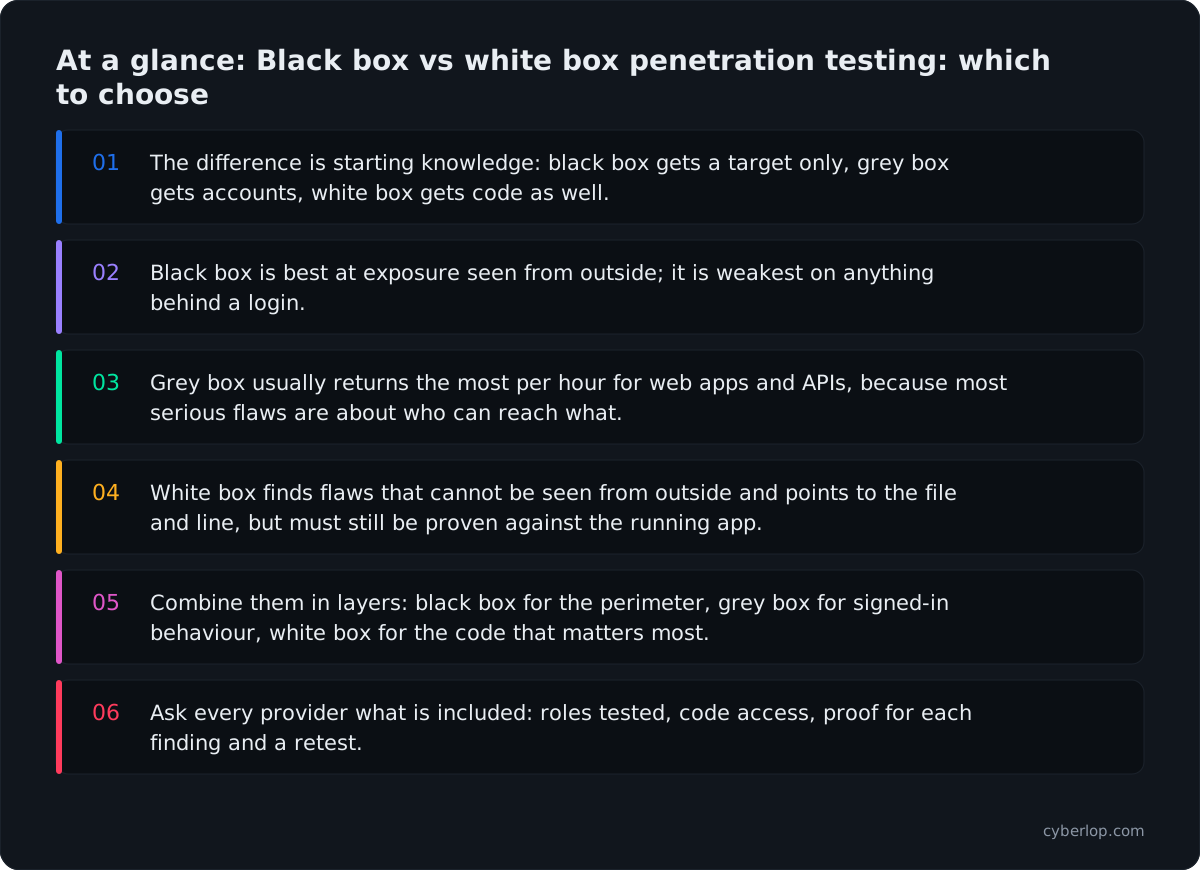
- The difference is starting knowledge: black box gets a target only, grey box gets accounts, white box gets code as well.
- Black box is best at exposure seen from outside; it is weakest on anything behind a login.
- Grey box usually returns the most per hour for web apps and APIs, because most serious flaws are about who can reach what.
- White box finds flaws that cannot be seen from outside and points to the file and line, but must still be proven against the running app.
- Combine them in layers: black box for the perimeter, grey box for signed-in behaviour, white box for the code that matters most.
- Ask every provider what is included: roles tested, code access, proof for each finding and a retest.
Black box vs white box penetration testing is a difference in what the tester knows before starting. In a black box test they get nothing but the target, as an outside attacker would. In a white box test they get the source code, architecture and accounts. Grey box sits between: logins and documentation, but no code. Most programmes end up combining them.
The one-line answer hides what matters when you buy a test. Each approach finds different problems, takes effort in different places and leaves different evidence behind. Below you will see what each type finds and misses, where current data says flaws sit, how to choose, and how to layer the three so you do not pay twice for the same coverage.
What is the difference between black box, grey box and white box penetration testing?
The UK National Cyber Security Centre defines a penetration test as a way of gaining assurance in a system's security by trying to breach it with "the same tools and techniques as an adversary". It describes transparent (open) box testing, where full information is shared with the testers, and opaque (closed) box testing, where none is. Grey box sits between the two. Starting knowledge is the main design choice, because it changes where the tester's hours go.
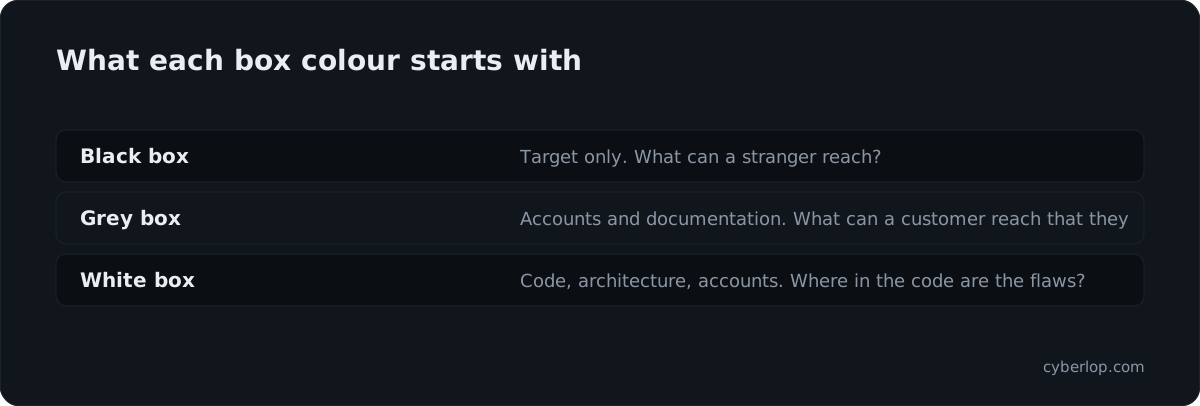
- Black box: the tester starts with a URL or a company name. No credentials, no code, no documentation. See black-box testing.
- Grey box: the tester gets one or more valid accounts and some documentation, such as an API specification. No source code. See grey-box testing.
- White box: the tester gets the source code, architecture notes, configuration and accounts, and often talks to the developers. See white-box testing.
These are not quality grades. A white box test is not "better" than a black box test any more than a blood test is better than an X-ray. They answer different questions.
| Black box | Grey box | White box | |
|---|---|---|---|
| Tester starts with | A target only | Accounts, some documentation | Code, architecture, accounts, developer access |
| Question it answers | What can a stranger find from outside? | What can a customer or partner reach that they should not? | Where in the code are the flaws, including ones nobody can see from outside? |
| Signed-in flaws (access control, business logic) | Mostly missed | Well covered | Well covered |
| Flaws in code paths hard to reach | Often missed | Sometimes | Found by reading |
| Realism of the attacker view | High | Medium | Lower |
| Time spent on discovery | High | Medium | Low |
| Fix guidance | Endpoint and parameter | Endpoint and role | File and line |
What is black box penetration testing?
Black box testing is the closest thing to what an unknown attacker sees. The tester finds your hosts, maps your pages and API routes, and probes whatever answers. Nothing is handed over.
What black box testing finds well
- Exposure you forgot about. A staging site left on the internet, an old API version, a forgotten admin panel.
- Anything reachable without an account. Missing authentication on an endpoint, public storage, verbose errors, weak password-reset flows, and unauthenticated access to data.
- Configuration problems seen from outside. Missing security headers, weak TLS settings, exposed debug pages. These are common, and also the cheapest class to fix.
- How your detection behaves. If your team has monitoring, a black box test shows whether anyone notices.
What black box testing misses
The honest limit is depth. Most of the interesting logic in a modern product sits behind a login: the billing pages, the admin tools, the customer data views. A tester with no account cannot see them. They can guess, and good testers can register for a trial or sign up as a customer, but the time they spend finding the front door is time they do not spend testing what is behind it.
Black box testing also has a coverage problem you cannot measure. If the report says "no critical findings", that may mean the application is sound, or that the tester never reached the code that mattered. This is a false negative risk, and a black box report rarely tells you how large it is.
What is grey box penetration testing?
Grey box testing gives the tester what a legitimate user would have: working accounts, perhaps at several privilege levels, plus whatever documentation helps, such as an OpenAPI file or a list of roles. The tester still has no source code.
For most web applications and APIs this is the most useful starting point, because most serious flaws in business software are about who can do what, and that only appears once someone is signed in.
What grey box testing finds well
- Cross-account access. One customer reading or changing another customer's records by changing an identifier. This is IDOR, and in APIs it is BOLA.
- Privilege problems. A normal account that can call an admin function, a trial account that reaches paid features.
- Business-logic flaws. A coupon that stacks, a quantity that can go negative, a step in a workflow that can be skipped. Scanners rarely find these because nothing about the traffic looks malicious. See business-logic flaw.
- Session and token handling. Tokens that outlive a logout, JWT checks that can be bypassed, sessions that survive a password change.
What grey box testing misses
Without code, the tester sees behaviour but not cause. They can show that an endpoint returns another customer's invoice, but not that a second endpoint with the same bug exists three folders away. They also cannot judge code paths that no account can currently reach, such as a feature flag that is off in production, an internal-only handler or a dormant admin route.
What is white box penetration testing?
In white box testing the tester reads the code, sees the architecture, and tests the running application with that knowledge. The tester can go straight to the places that matter: the authorisation checks, the query builders, the code that handles money or files.
This is sometimes confused with a secure code review or a SAST scan. They overlap, but they are not the same thing. A code review reads code and reasons about what might be exploitable. A white box penetration test reads code and then proves what can actually be exploited in the running system.
What white box testing finds well
- Flaws that are invisible from outside. A missing ownership check on an endpoint that no page links to. A hardcoded credential. A debug route left in a build.
- Repeated patterns. If one handler forgets to check who owns an object, the code often shows the other handlers that do the same. A black box tester finds one instance; a reader of the code finds the family.
- Deep logic and cryptography mistakes. Weak randomness, a signature that is checked but whose result is ignored, a comparison that is not constant-time.
- Dependency risk in context. Whether a vulnerable library function is actually called, which helps you rank dependency vulnerabilities by real exposure.
What white box testing misses
It has two limits. First, it can drift from reality: code that looks exploitable may be protected by a gateway, a WAF or an environment setting the reader never saw. Reading alone produces suspicion, not proof, so a white box engagement must still exercise the running application. Second, it cannot see what lives outside the code: a misconfigured cloud bucket, an exposed management port, a DNS record pointing nowhere. Those belong to the black box layer.
It is also the least realistic simulation of an attacker, since real attackers rarely have your code.
What does each type find and miss, by vulnerability class?
The table below maps common vulnerability classes to the type most likely to surface them. It is a guide, not a guarantee: a skilled tester can find nearly anything with enough time. The question is how much time it takes and how reliably.
| Vulnerability class | Black box | Grey box | White box |
|---|---|---|---|
| Exposed services and forgotten hosts | Strong | Not the focus | Not the focus |
| Missing authentication on endpoints | Strong | Strong | Strong |
| Cross-account access (IDOR, BOLA) | Weak | Strong | Strong, with the cause |
| Role and privilege flaws | Weak | Strong | Strong |
| Business-logic flaws | Weak | Strong | Strong |
| SQL injection and other injection | Good on visible inputs | Good | Good, including hidden inputs |
| Cross-site scripting | Good on visible pages | Good | Good |
| Hardcoded secrets and debug code | Rarely | Rarely | Strong |
| Weak cryptography in code | Rarely | Sometimes | Strong |
| Race conditions | Possible | Good | Good, once the shared state is visible |
| Cloud and infrastructure misconfiguration | Strong from outside | Partial | Partial, if configuration is shared |
Black box wins on exposure; grey and white box win on everything behind a login; white box wins on anything that lives only in code. No single column is complete. That is why the real choice is rarely "which one" but "in what order, and how much of each".
Which flaws are most common? What 2025 and 2026 data says
Broken access control and unpatched software dominate current data, and they sit at opposite ends of the box scale. Outside-in testing aims at the second. Signed-in and code-aware testing aim at the first.
| Figure | Source | What it suggests for your choice |
|---|---|---|
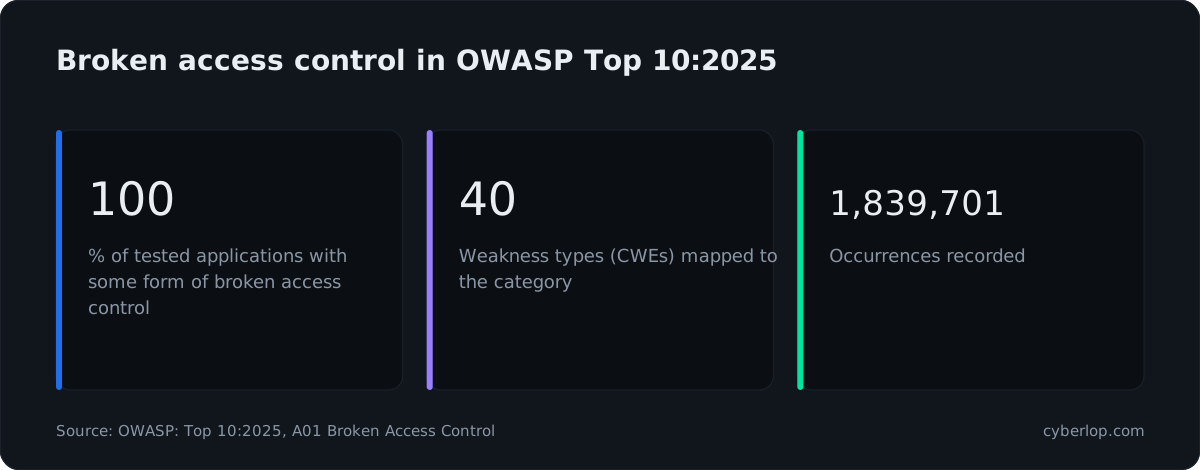
| 100% of applications tested had some form of broken access control; 40 weakness types mapped; 1,839,701 occurrences | OWASP Top 10:2025, A01 | Signed-in testing (grey or white box) is not optional for apps with accounts |
| 31% of breaches start with software vulnerabilities, ahead of stolen passwords | Verizon DBIR 2026, breaches 1 Nov 2024 to 31 Oct 2025 | An outside view of public software still pays off |
| 1,734 vulnerabilities listed as known to be exploited | CISA KEV catalogue, read 7 October 2026 | Attackers use flaws that are already public; check what you expose |
| $4.99M global average cost of a data breach, up 12%, a record high | IBM Cost of a Data Breach Report 2026 | The average is for all breaches, not a forecast for you; it frames the downside |
What these figures do not say
None of these sources compares box colours, so they cannot tell you that one colour finds more. They show where the flaws are. OWASP's 100% means every tested application had at least some access-control weakness, and those weaknesses need an account to reach and often the code to explain. The DBIR figure points the other way, to public software. That is why the data supports layers, not a single winner.
How do effort and cost compare across the three types?
We do not quote prices here, and you should be wary of any article that does without knowing your scope. What can be said is where the effort goes, because effort is what you are paying for. Our separate guide to penetration testing cost covers the drivers in detail.
- Black box spends effort on discovery. A large share of the time goes on finding what exists. That is useful if you do not know your own estate, and wasteful if you do.
- Grey box spends effort on depth. Accounts remove the discovery cost, so the same hours reach more functionality. The extra work is preparation on your side: creating accounts and test data.
- White box spends effort on access and reading. You pay for the time to read code and for your developers to answer questions. In return the tester skips the guessing, and the fix guidance is faster to act on.
Count the whole path, from the first request to the closed ticket. A cheaper test whose findings leave developers hunting for the cause can cost more in engineering days than it saved in testing days, and white box findings that name the file and line shorten that last stretch. The quote is only part of the cost. A black box report that misses a logic flaw can end with a customer finding it first. A white box test with no running environment produces code concerns nobody can verify.
Scope by application and by account type, not just "the website", and ask whether a retest is included, because a fix that is not re-tested is a guess.
Which type of penetration test should you choose?
Start from your situation, not from the labels. These six questions usually settle it.
- Does the application have signed-in users? If yes, you need at least grey box. A black box test alone will not reach most of what matters.
- Does it hold money, health or identity data? Add white box on the code paths that handle it: payments, authentication, file handling, data export.
- Do you know your own internet exposure? If not, begin with a black box pass. You cannot protect hosts you have forgotten.
- Is the codebase large or old? A black box or grey box tester will spend much of the budget finding their way. Source access saves that time.
- Who will read the report? A customer questionnaire or an auditor usually wants evidence of authenticated testing. See security questionnaires and the compliance posts on SOC 2 and PCI DSS.
- How fast do you ship? If you release weekly, a once-a-year test of any colour goes stale quickly. See continuous penetration testing.
Match the type to the risk
- New product, unknown exposure: black box first, then grey box.
- Established SaaS with customer data: grey box as the baseline, white box on the sensitive modules.
- Payments, identity or regulated data: grey box plus white box, plus a black box perimeter check.
- Pre-release of a major feature: white box on that feature, grey box on the whole app.
- Agency or MSSP serving clients: offer all three as scoped options; the client's access determines which is possible.
Can you combine black, grey and white box testing?
Treat the three as layers, not rivals. Run them in sequence and let each one steer the next.
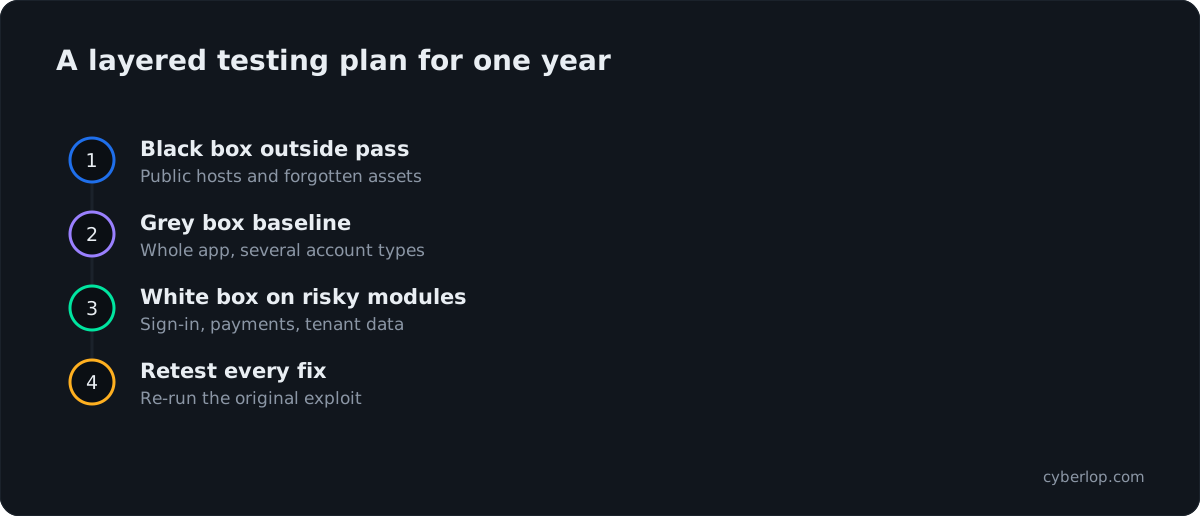
A layered plan for one year
Layer one: black box on the outside
Run an external pass to list what the internet can reach. Close anything that should not be there. This is the cheapest layer to act on because the fixes are usually configuration changes.
Layer two: grey box on the application
Give the tester accounts at the privilege levels your product really has: a normal customer, a second customer to test cross-account access, a staff or admin account, and any partner or API-key access. Ask the tester to check what each signed-in account can reach that it should not, and to try the business flows that carry money or data. The more clearly you describe the intended permissions, the more precise the test. Our checklist on access control testing shows how to plan this.
Layer three: white box on the code that matters
Pick the modules where a mistake costs the most and open them up. Authentication, authorisation, payments, file upload, multi-tenant data access. A white box tester reads those modules and proves what can be exploited in the running application. This is where a single finding often turns into a family of related findings.
Then close the loop
Every fix should be retested against the exact exploit that found the problem. A fresh scan that shows nothing is weaker evidence than the original exploit failing against the new code. Cyberlop calls this a closed-loop retest, and our post on exploited, not suspected explains why a finding should be proven before it is reported.
What should you hand the tester for each type?
Hand over only what the chosen type needs, in writing, before the clock starts. Late access is the commonest reason a test runs over.
Preparation checklist by type
| Item to prepare | Black box | Grey box | White box |
|---|---|---|---|
| In-scope and out-of-scope hosts, testing windows, emergency contact | Needed | Needed | Needed |
| Two or more test accounts of different types, plus a second customer | No | Needed | Needed |
| API specification or collection, short note on sensitive actions | No | Needed | Needed |
| Staging copy with fake data | Helpful | Strongly advised | Strongly advised |
| Read access to the repository, build steps, architecture or data-flow notes | No | No | Needed |
| An engineer who can answer questions within a day | No | Helpful | Needed |
What do buyers get wrong about test types?
Three beliefs worth dropping
"Black box is the realistic one, so it is the best one"
Realism is a virtue only if your question is "what would a stranger do?". Real attackers also buy stolen accounts, sign up as customers and read public repositories. A realistic starting point does not give complete results.
"We run a scanner, so we have done this"
A scanner, such as a DAST tool, is a useful routine check. It tends to flag suspicions rather than prove them, and it struggles with business logic and cross-account access because nothing in the traffic looks wrong. See DAST vs SAST vs IAST and why your scanner has one login.
"A clean report means we are secure"
It means the tester, with the access and time they had, found nothing to report. Ask what was in scope, which accounts were tested and what was not reached. A good report states its own limits, as publish the misses argues. The NCSC makes the same point: a test only validates the state of your systems "on the day of the test".
Do compliance frameworks require a particular type of test?
Do not assume so. Frameworks such as PCI DSS and SOC 2 are about evidence of qualified, scoped, documented testing and retesting of fixes, and wording differs by framework and version. This guide has not quoted any framework text on box colour, so confirm the exact wording with your assessor before you buy. Our guides on SOC 2 and PCI DSS cover the detail.
Which standards describe how to test?
NIST SP 800-115 (September 2008) helps organisations plan and run technical security tests, analyse the findings and develop mitigation strategies. The OWASP Web Security Testing Guide (latest stable release v4.2) is the usual list of web test cases. Both are method guides. Neither ranks black, grey and white box.
What should you ask a provider about the type of test?
Whatever the label on the proposal, these questions show what you are really buying. Our guide to choosing a penetration testing company has the full list.
- What access will the tester have: accounts, roles, code, documentation? Who provides it?
- For white box, is the running application tested as well as the code, or is it a review alone?
- Does each finding come with a request, a response and, where possible, a screenshot, and in white box mode a file and line?
- Is a retest included, and is it done by re-running the original exploit?
- Where is the code stored during the test, and does it have to leave your network?
The last point often stops teams choosing white box. Look for providers that can run inside your own network, as private scanning does.
How does Cyberlop handle black, grey and white box testing?
Cyberlop finds vulnerabilities in web apps and their APIs using black-box, grey-box and white-box pentesting, so you can pick the mode that matches the risk rather than the tool that happens to be on offer. In white-box mode it reads your code while testing the running application, so a finding can point to the file and line. It reports only what it actually exploited, and each finding carries the request, the response, a screenshot where a person can see it, and the line of code. How a finding is laid out is shown in what belongs in a finding, and the process is in how it works.
It also keeps severity and confidence apart, labels findings with CWE and OWASP references, checks business-logic flaws and cross-account access, and proves a fix by re-running the exact exploit against the new code. It can run inside your own network, on a schedule or in CI/CD. You can see the style of output on the evidence page. For limits, read what we do not claim.
What should you do this week?
Choose on what the tester can see, what they prove and whether the fix is verified, not on the label.
- Run a black box pass to see your exposure from outside, if you are unsure of it.
- Make grey box testing the baseline for any application with accounts.
- Add white box testing where the code carries the most risk, and where you want findings that point to a line.
- Require proof for every finding and a retest for every fix, then repeat when the application changes. A VAPT checklist helps you prepare each round.
Questions people ask
Black box vs white box penetration testing: FAQs
What is the difference between black box and white box penetration testing?
Black box testers start with no inside knowledge, just a target, and test like an outsider. White box testers start with source code, architecture and accounts, and can test the application with that knowledge.
The result is that black box is better at showing external exposure, and white box is better at finding flaws that live in the code and cannot be seen from outside.
What is grey box penetration testing?
Grey box testing gives the tester valid accounts and some documentation, but not the source code. It simulates a customer, partner or employee who is signed in.
It is the usual choice for web applications and APIs because it covers access control and business logic, which sit behind the login.
Which type of penetration testing is best?
None is best on its own. For an application with user accounts, grey box is normally the most useful baseline, black box adds the outside view and white box adds depth where the code matters most.
The 2025 OWASP Top 10 found some form of broken access control in 100% of tested applications, and the Verizon 2026 DBIR puts software vulnerabilities at the start of 31% of breaches, so both signed-in and outside-in views earn their place.
Is black box testing more realistic?
Its starting point is more realistic, since most attackers do not have your code. But real attackers also use stolen or purchased accounts, so a black box test does not model everything that happens.
Realism is useful if you are testing detection and perimeter. It does not guarantee coverage of signed-in functionality.
Can you combine black box, grey box and white box testing?
Yes, and most mature programmes do. A common pattern is an external black box pass, a grey box test of the whole application, and white box work on the highest-risk modules.
Share findings between layers so each test avoids repeating the last one.
Is a vulnerability scan the same as a penetration test?
No. A scan reports what looks vulnerable. A penetration test tries to exploit what it finds and reports what worked, which is why it needs judgement as well as tooling.
The NCSC describes a test as an attempt to breach a system using the same tools and techniques as an adversary might.
What is the difference between white box testing and a code review?
A code review reads code and reasons about what might be exploitable. A white box penetration test reads the code and then proves which issues can be exploited in the running application.
Proof matters because code that looks weak may be protected elsewhere, and code that looks fine may fail in context.
How often should you run each type?
There is no single schedule. A common approach is a grey box test at least once a year and after major releases, with white box on high-risk changes and a black box perimeter check at the same time.
If you release often, consider running tests on a schedule or in CI/CD, so findings arrive while the code is still fresh.
Sources
Where the facts come from
- NCSC: Penetration testing
- OWASP: Top 10:2025, A01 Broken Access Control
- Verizon: 2026 Data Breach Investigations Report
- IBM: Cost of a Data Breach Report 2026
- CISA: Known Exploited Vulnerabilities Catalog
- NIST: SP 800-115, Technical Guide to Information Security Testing and Assessment
- OWASP: Web Security Testing Guide
Keep reading
Related articles
Access control testing checklist: sideways, upward and across tenants.
A step-by-step access control testing checklist for web apps and APIs: account planning, sideways, upward and cross-tenant checks, evidence and retests.
Continuous penetration testing: how to run it alongside your annual pentest
What continuous penetration testing really means, how it compares with annual pentests, DAST and PTaaS, and how to run both in your pipeline.
DAST vs SAST vs IAST vs SCA: what each finds, what each misses, and how to combine them
DAST vs SAST vs IAST vs SCA compared: what each finds and misses, a comparison table, and the order to adopt them in a 2026 security programme.

See all three views on one app
Cyberlop runs black-box, grey-box and white-box pentesting on web apps and APIs, and every finding carries its request, response and, in white-box mode, the line of code. Ask us to run it on one of your applications.
Or start with a $199 pilot on one application: thirty days, success criteria agreed before day one, credited against the annual if you convert.