

A pentest platform for an MSSP manages or delivers penetration tests for many clients under your brand. Reporting platforms (PlexTrac, AttackForge, Faraday) organise work; open-source tools (Dradis, SysReptor, Ghostwriter) add self-hosting; partner programmes (Astra, Cyberlop) supply testing. Pick by your bottleneck, then trial two test clients.
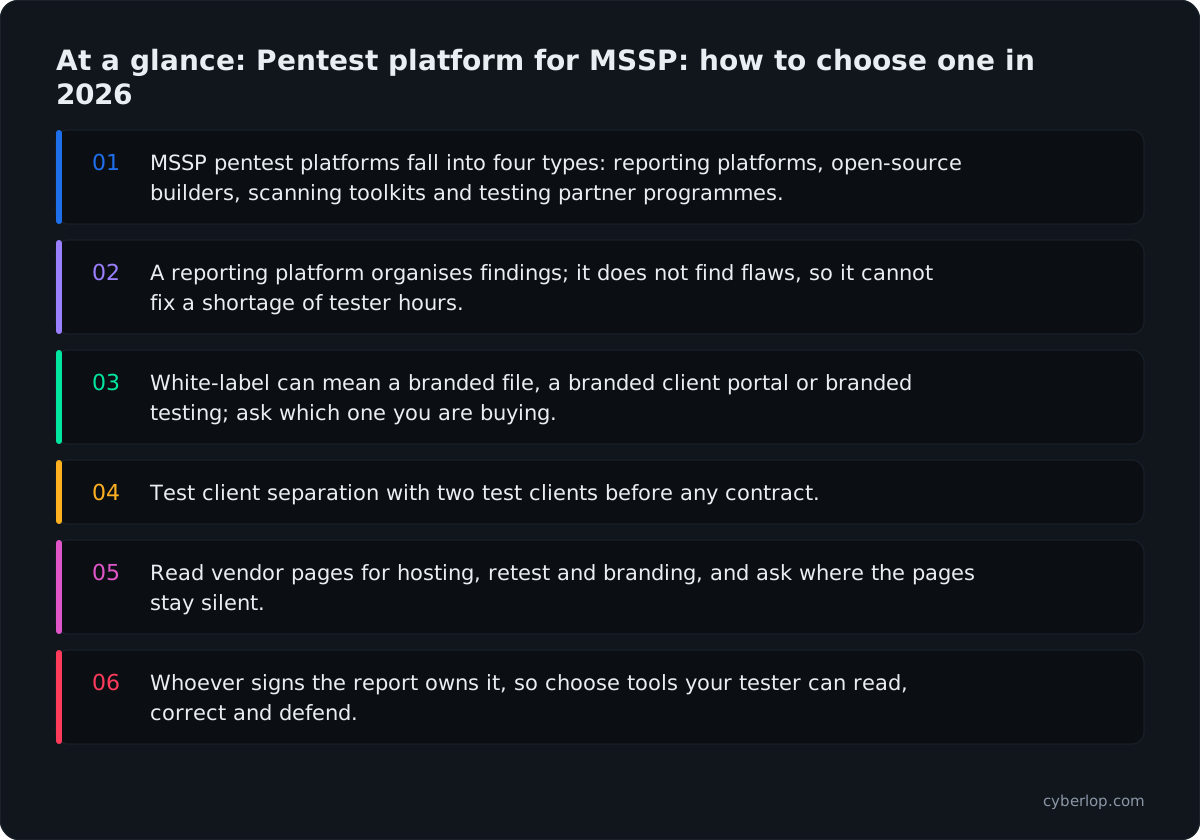
- MSSP pentest platforms fall into four types: reporting platforms, open-source builders, scanning toolkits and testing partner programmes.
- A reporting platform organises findings; it does not find flaws, so it cannot fix a shortage of tester hours.
- White-label can mean a branded file, a branded client portal or branded testing; ask which one you are buying.
- Test client separation with two test clients before any contract.
- Read vendor pages for hosting, retest and branding, and ask where the pages stay silent.
- Whoever signs the report owns it, so choose tools your tester can read, correct and defend.
A pentest platform for an MSSP is software that lets a managed security service provider run, record, report and retest penetration tests for many clients from one place, under its own brand. Four kinds of tool get that label: reporting platforms (PlexTrac, AttackForge, Faraday), open-source report builders (Dradis, SysReptor, Ghostwriter), scanning toolkits with agency features (Pentest-Tools.com) and partner programmes from testing vendors (Astra, Cyberlop). Start with your real bottleneck: writing time, scan coverage or tester hours.
Every vendor claim here comes from that vendor's own site, documentation or GitHub page, read on 7 October 2026. There are no prices; use each pricing page or ask for a quote. Where a page was silent on a point, we say so, and you should put the question to the vendor.
What is a pentest platform for an MSSP, and how is it different from a scanner?
An MSSP platform manages the work around a test (clients, scope, evidence, reports, retests) and sometimes the testing itself. A single-company scanner does not need to keep client A's findings away from client B or put your logo on the report. Those two jobs are what make MSSP tooling its own category.
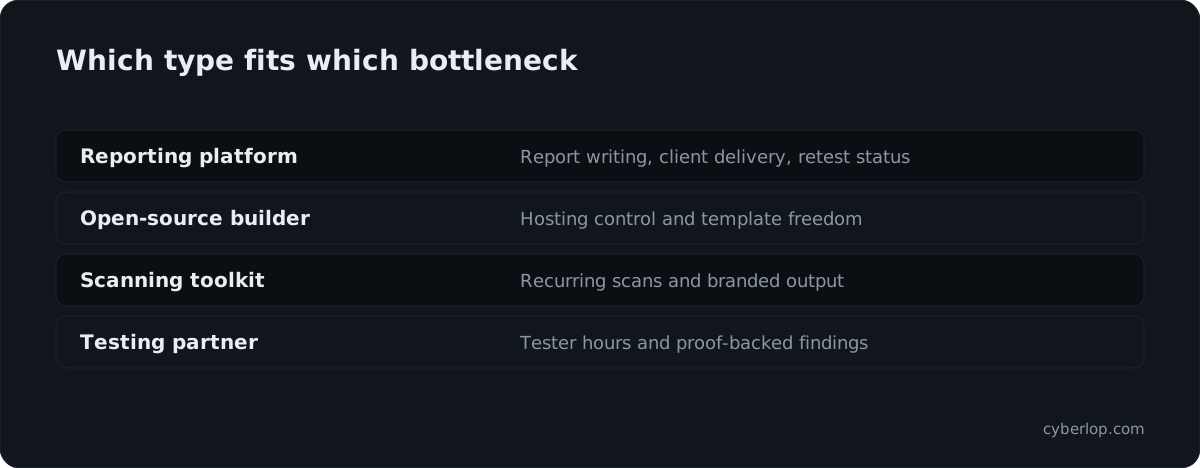
The market splits by which part of the job the tool takes off your hands. The table below sorts them into four types before we get to named products.
The four types of MSSP pentest platform
| Type | Examples in this guide | What it takes off your plate | What it does not do |
|---|---|---|---|
| Reporting and management platform | PlexTrac, AttackForge, Faraday | Writing, tracking, client delivery, retest status | Finding the flaws; your testers still do that |
| Open-source report builder | Dradis Community Edition, SysReptor, Ghostwriter | Templates and report generation you host yourself | Client portals and scanning are not the core job |
| Scanning toolkit with agency features | Pentest-Tools.com | Repeatable scans, workspaces, branded output | Manual business-logic testing stays with your team |
| Testing partner programme | Astra, Cyberlop | Part of the testing itself, delivered under a partner arrangement | Your client relationship, sign-off and scoping remain yours |
Most MSSPs end up with two layers: one place to manage engagements and reports, and one or more sources of findings. The platforms below fit different layers, so "which is best" is the wrong question. Ask which layer you are short of.
What should an MSSP look for in a pentest platform?
Judge a platform on seven things: client separation, branding, evidence, retesting, integration, hosting and the testing source. Each one matches a way an MSSP engagement goes wrong: a leaked finding, an unbranded report, a fix nobody verified.
Client separation and access
Can one client ever see another's data?
Ask how clients, groups and projects are separated, and whether a client user can be given a view of only their own results. Vendors describe this differently. AttackForge's documentation says Groups can represent customers and teams and control access to projects, reports and assets. Faraday calls its platform "multi-tenant" on its MSSP page. Ask each vendor to demonstrate the separation with two test clients. The Knowledge Hub entries on multi-tenancy and tenant isolation explain what good looks like.
Who can edit and who can only read?
Your juniors, your senior reviewer and your client need different rights. Check for review and QA states before a client sees a finding. AttackForge documents a Review and QA step; Dradis describes review states of Draft, Ready for Review and Published.
Branding and delivery
What does white-label actually cover?
White-label pentesting can mean a logo on a PDF, a custom report template, or a branded client portal. They are different things. PlexTrac describes a white-labeled client portal; Pentest-Tools.com lists branded reports and emails; AttackForge documents custom DOCX report templates with template access restricted by role, group or user. Decide which of the three your clients expect before you shortlist.
Evidence, retesting and integration
Does every finding carry proof, and can a fix be re-checked?
A client who disputes a finding wants the request, the response and the steps. A client who has fixed it wants a retest. Look for evidence upload on each finding and retest rounds tracked per project. AttackForge's documentation describes remediation notes and tracked rounds of retesting; PlexTrac describes built-in retesting workflows.
Does it connect to what you already run?
Check for an API, ticketing connectors (Jira, ServiceNow) and parsers for the scanners your testers use. Several vendors below publish an API or MCP server. Read the documentation, because a feature list tells you little about how well it works.
Hosting and data handling
Some clients will not let findings sit in a vendor's cloud. PlexTrac lists Secure Cloud, Private Hosted and Client Hosted options. Dradis describes itself as self-hosted. Faraday lists SaaS and on-premises. SysReptor says self-hosted or cloud. Ask where client evidence is stored and who at the vendor can read it.
The testing source
A reporting platform does not find anything. If your bottleneck is tester hours, you need a source of findings, not a nicer report. That is the dividing line between the first three types in the table and the last.
Which pentest platforms can an MSSP use?
Nine options follow, grouped by type and in no ranking order. Each entry gives what the vendor states, who it suits and what to ask. Product names are spelled as each vendor spells them.
Reporting and management platforms
PlexTrac
PlexTrac describes itself as a "Penetration Test Reporting & Management Platform". Its site lists AI-assisted findings authoring, template standardisation, reporting while testing with screenshots, code snippets and videos, and a service-provider package. It also describes a "white-labeled" client portal with a real-time view of findings, and built-in retesting workflows. Deployment options are listed as Secure Cloud, Private Hosted and Client Hosted, and its documentation covers clients, assets, OAuth and SAML sign-in, and API integration.
Suits: consultancies and MSSPs whose main cost is report writing and client communication. Ask: how the white-labeled portal is configured per client, and which features are in the service-provider package.
AttackForge
AttackForge describes itself as a "Pentest Management & Collaboration Platform". Its support site documents projects with scope and test cases, vulnerabilities with review and QA, reports from custom templates, tracked retest rounds, Groups for customers and teams, a self-service RESTful API and AI/MCP tooling. Customers can request a project, and project teams can include pentesters, developers and customers.
Suits: teams that want a project-centred workflow with strong API access and customer self-service. Ask: how branding is applied per client and whether data separation between clients meets your contracts. The documentation pages we read covered templates and groups but did not set out a full MSSP tenancy model.
Faraday
Faraday calls itself an "All-in-One Security Platform" and aims it at enterprises, MSSPs and AppSec teams. Its MSSP page says it is "the multi-tenant platform built for MSSPs to scale pentesting services", and it lists SaaS and on-premises deployment and an AI layer for triage and deduplication. It also lists a separate "Faraday Community" offering.
Suits: MSSPs that want findings from many tools consolidated across clients. Ask: what the client-facing view looks like and how deduplication decisions are shown to reviewers.
Open-source report builders
Dradis
Dradis describes a "Self-Hosted Pentest Reporting & Management Platform" with a Community Edition (GNU GPL v2, per its GitHub page) and a commercial Professional edition. Its site lists Word and Excel reports, a reusable findings library, review states, project workspaces that include scoping and re-test, and 47+ scanner integrations. It lists on-premises, private cloud and air-gapped deployment.
Suits: teams with strict hosting rules and an existing template habit. Ask: which features you need are in the Professional edition rather than Community.
SysReptor
SysReptor's documentation describes pentest reporting where you write in Markdown, design in HTML and render to PDF. It lists self-hosted or cloud deployment, collaborative editing, comments, version history and finding templates. Its GitHub page presents it as a customisable reporting platform for penetration testers and red teamers.
Suits: small and mid-sized consultancies that want full control of report design. Ask: how you would separate multiple clients and what the cloud and self-hosted editions each include.
Ghostwriter
Ghostwriter is an open-source project from SpecterOps, released under the BSD-3-Clause licence. Its GitHub page frames it as a tool for offensive security operations. It builds DOCX, XLSX, PPTX and JSON reports from templates and tracks clients and projects. Role-based access control, single sign-on and a GraphQL API are on its feature list.
Suits: red-team-heavy providers who want activity logging and client tracking in an open-source tool. Ask: who runs and patches it, because self-hosting moves that job to you.
Scanning toolkits with agency features
Pentest-Tools.com
Pentest-Tools.com describes "autonomous pentesting, continuous monitoring" and lists tools across reconnaissance, vulnerability scanning (website, network, API, WordPress, Kubernetes, SSL/TLS) and exploitation, plus workspaces, collaboration, pentest reporting, branded reports and emails, a REST API, an MCP server and scanning through a VPN agent. Its site refers to MSPs and MSSPs. Its pricing page shows branded reports and emails as an optional add-on, so check which plan includes what.
Suits: MSSPs that run a lot of recurring external and internal scans and want branded output. Ask: how business-logic and cross-account issues are covered, since those need a tester or a tool that tests behaviour, not signatures.
Testing partner programmes
Astra Security
Astra's partner page says it partners with compliance platforms, MSPs, MSSPs, insurance providers, individual auditors and venture capitalists. For partners it lists PTaaS with continuous penetration testing, a DAST scanner, an API security platform and manual pentesting by certified experts, plus dedicated partner support. The pages we read did not describe white-label branding or a multi-client console, so ask about both.
Suits: MSSPs that want to add a vendor-delivered testing line without hiring testers. Ask: who talks to your client, whose name is on the report, and how findings reach your team.
Where does Cyberlop fit for an MSSP?
Cyberlop is a testing partner: agencies and MSSPs can run it under their own brand. It finds vulnerabilities in web apps and their APIs with black-box, grey-box and white-box pentesting. In white-box mode it reads the code while testing the running app, so a finding can point to the file and line.
It reports what it actually exploited. Each finding carries the request, the response, a screenshot where a person can see it, and the line of code. Severity and confidence are kept apart, and findings carry CWE and OWASP references. A fix is proven by re-running the exact exploit against the new code, a closed-loop retest, not by a fresh scan.
It also checks business-logic flaws and cross-account access, where one signed-in account reaches another's data or functions, and it can run on a schedule or in CI/CD and gate a build. Private scanning lets it run inside a client's own network so code does not leave it. See the agencies page and the partner programme for the current terms.
Cyberlop is not a report-writing workspace for findings from other tools. If your pain is the template and portal layer, a reporting platform from the list above may suit you better, and many MSSPs would pair the two.
How do you choose a pentest platform for an MSSP?
Choose by the constraint that limits your growth today: report-writing time, scanning coverage, tester hours or client hosting rules. Then run a short trial on two test clients before you sign. The table maps each constraint to the type of tool most likely to help.
Matching your constraint to a platform type
| If your constraint is... | Look first at | Because | Check before buying |
|---|---|---|---|
| Report writing and client delivery | PlexTrac, AttackForge, Faraday | They manage findings, templates and retest status | Client separation and branding per client |
| Hosting rules or tight control | Dradis, SysReptor, Ghostwriter, or a self-hosted option | You choose where evidence lives | Who patches, backs up and secures it |
| Recurring scans across many small clients | Pentest-Tools.com | Workspaces, branded reports and an API for routine scanning | Depth on authenticated and logic testing |
| Not enough tester hours | A testing partner such as Astra or Cyberlop | Part of the testing is delivered for you | Whose name and sign-off appear on the report |
| Clients dispute or ignore findings | A source that attaches proof of exploitation | Request, response and the code line end arguments | Whether fixes are retested by the same exploit |
| Regulated clients | Any platform plus your own empanelment and sign-off | Regulators look at the signer and method, not the tool | Data residency and access logs |
Ten questions to put to every vendor
- Show two test clients side by side. Can a user of one ever see the other's projects, findings or evidence?
- What exactly is branded: report file, client portal, emails, the sign-in page?
- Can our reviewer hold back a finding until it is checked?
- Does each finding hold the request, the response and a screenshot?
- How is a retest recorded, and is the original exploit re-run?
- Where is client data stored, and can we choose the region or host it ourselves?
- What happens to client data if we leave?
- Is there an API so our ticketing and billing can read engagement status?
- Who is the client's contact: us only, or the vendor too?
- What does the vendor do when a client disputes a finding?
What does white-label mean for an MSSP pentest report?
White-label means the client sees your brand, not the vendor's, on what you deliver. In pentesting, branding is only the surface; the report also has to be defensible with your name signed under it.
Three levels of white-label
| Level | What the client sees | Vendors that describe it on their own pages |
|---|---|---|
| Branded file | Your logo, colours and name on a PDF or DOCX | Pentest-Tools.com (branded reports and emails), AttackForge (custom DOCX templates), Dradis, SysReptor, Ghostwriter |
| Branded portal | A client login with your brand and a live view of findings | PlexTrac (white-labeled client portal) |
| Branded testing | The testing engine itself runs under your name | Partner arrangements such as Cyberlop for agencies and MSSPs; confirm Astra's terms with Astra |
The signer is the real product
Whoever signs a pentest report carries the responsibility for it. A platform can draft the report, but your tester should be able to read, correct and own every finding. If a vendor's workflow makes that hard, move on. Read how to read a penetration test report and the Knowledge Hub entry on pentest reports for what a client should find inside.
Empanelment and regulator rules stay with you
If a client needs a CERT-In empanelled auditor, a tool cannot supply that status. Check who holds it. The post on CERT-In empanelled VAPT explains what empanelment does and does not guarantee.
Why does proof matter in an MSSP pentest programme?
Your clients decide what to fix from your report. A finding that shows the request, the response and the exploited line gets fixed. A "possible" finding gets argued about. Four public data points explain why exploitable flaws deserve the first look.
The Verizon 2026 Data Breach Investigations Report reports that software vulnerabilities are now the leading way into a breach, at 31%, overtaking stolen passwords. IBM's Cost of a Data Breach Report 2026 puts the global average breach cost at USD 4.99 million, a 12% increase and a record high, and reports a 56% increase in AI-driven attacks. The OWASP Top 10:2025 says 100% of the applications tested had some form of broken access control, and it keeps that category at number one. The CISA Known Exploited Vulnerabilities catalog showed 1,734 entries when we read it on 7 October 2026.
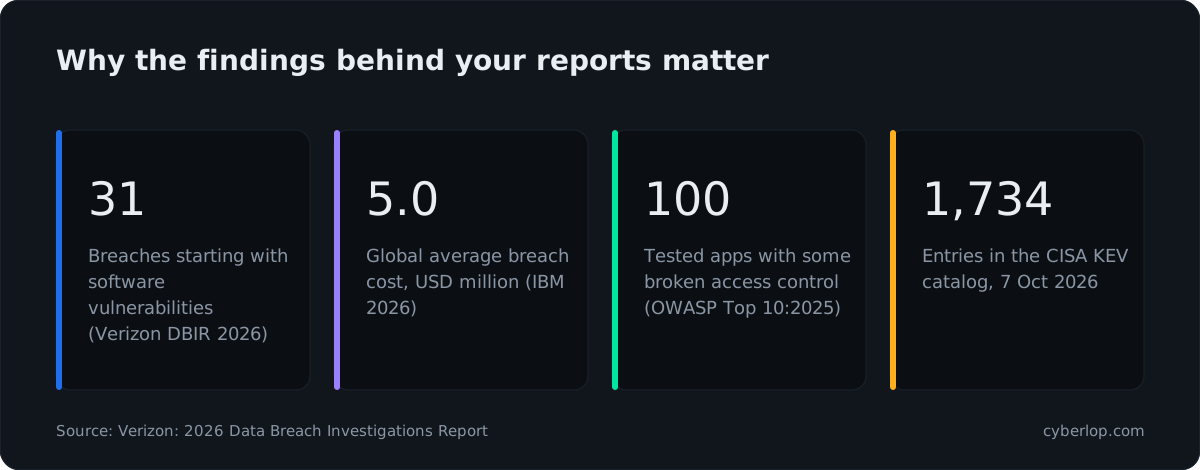
Two points follow for an MSSP. First, access-control flaws, such as one account reading another's data, slip past signature-based scanners because nothing in the response looks malicious. Check that your stack tests for them. See broken access control and IDOR. Second, a platform that ranks by severity alone leaves your analysts to sort false positives by hand. Ask whether severity and confidence are shown separately.
How do you trial a pentest platform for an MSSP in two weeks?
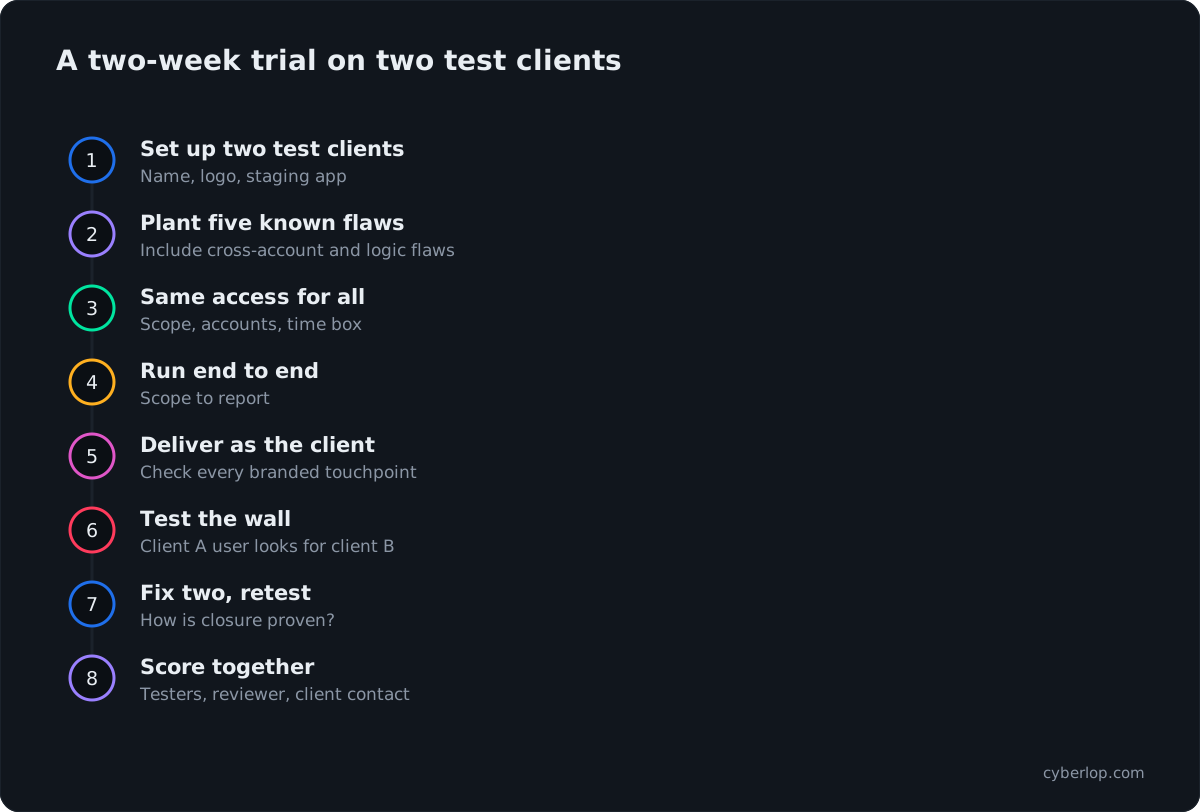
Trial on two pretend clients with one staging app each, plant known flaws, and score every candidate against the same sheet. A fair trial takes about two weeks and exposes the gaps a demo hides.
The two-week plan
- Set up two test clients. Give each a name, a logo and a staging app with test data.
- Plant five known flaws. Include one cross-account read, one broken function-level check, and one logic flaw such as a coupon applied twice.
- Give every vendor the same access. Same scope, same test accounts, same time box.
- Run the engagement end to end. Scope, test, evidence, review, report.
- Deliver the report as the client. Check branding on every touchpoint: file, email, portal.
- Try to break the wall. Using a test user from client A, look for client B's data through the platform.
- Fix two findings and retest. Note how the retest is performed and recorded.
- Score together. Testers, reviewer and the person who answers client questions fill in the sheet.
The scoring sheet
| Criterion | What to record | Weight it higher if... |
|---|---|---|
| Client separation | Any cross-client view, in either direction | You serve competitors or regulated firms |
| Branding | Places your brand did not appear | Clients log in to a portal |
| Planted flaws found | Count, with proof attached | You rely on the tool for findings |
| Noise | Findings that were not real | Your analysts triage by hand |
| Retest | Method and time to confirm a fix | Clients ask for closure letters |
| Hosting and exit | Where data lives; export formats | Contracts restrict data location |
| Effort per engagement | Hours from scope to signed report | You are growing client count fast |
How do the platforms compare at a glance?
This table repeats only what each vendor's own pages say. An "Ask" cell means we did not find the point on the pages we read. It does not mean the feature is missing. Product pages change, so confirm with the vendor.
Vendor claims side by side
| Product | Core job (vendor wording) | Branding mentioned | Retest mentioned | Hosting mentioned |
|---|---|---|---|---|
| PlexTrac | Pentest reporting and management | White-labeled client portal | Built-in retesting workflows | Secure Cloud, Private Hosted, Client Hosted |
| AttackForge | Pentest management and collaboration | Custom report templates, with access by role, group or user | Tracked retest rounds | Ask |
| Faraday | All-in-one offensive security platform; multi-tenant for MSSPs | Ask | Ask | SaaS and on-premises |
| Dradis | Self-hosted reporting and management | Custom report templates | Re-test in project workspace | On-premises, private cloud, air-gapped |
| SysReptor | Pentest reporting, Markdown to PDF | Custom HTML report designs | Ask | Self-hosted or cloud |
| Ghostwriter | Open-source reporting and assessment management | Report templates | Ask | Open-source project; see its GitHub page |
| Pentest-Tools.com | Autonomous pentesting and monitoring toolkit | Branded reports and emails | Ask | VPN agent for internal scans |
| Astra | PTaaS, DAST, API security, manual pentesting | Ask | Ask | Ask |
| Cyberlop | Proof-based web and API pentesting | Agencies and MSSPs can run it under their own brand | Closed-loop retest of the exact exploit | Private scanning inside your network |
What can a pentest platform not do for an MSSP?
Judgement stays with a person: scope, business impact, and what a client can safely fix this quarter. Reporting platforms organise findings, scanners surface suspected ones, and testing partners produce some. Each leaves a gap you still cover.
- Scoping and authorisation. Written permission and a clear scope come first, whatever the tool. See pentest scope.
- Business context. A tool can note that an endpoint returns another account's invoice; only someone who knows the client can say how serious it is.
- Remediation ownership. Reports do not fix code. Agree who owns each fix and the remediation SLA.
- Client communication. Disputes, delays and executive summaries are your service.
For a wider view of automated and AI-led options see best AI pentesting tools and best PTaaS platforms, and for choosing a provider as a buyer, how to choose a penetration testing company.
Questions people ask
Pentest platform for mssp: FAQs
What is the best pentest platform for an MSSP?
There is no single best. Reporting platforms such as PlexTrac, AttackForge and Faraday suit teams whose cost is report writing. Scanning toolkits suit recurring scans, and testing partners suit a shortage of tester hours. Trial two on test clients.
What is a white-label pentest platform?
It is a platform that lets you deliver results under your own brand. That can mean a branded report file, a branded client portal or branded testing. Vendors differ, so ask exactly what carries your logo and what carries theirs.
Is PlexTrac or AttackForge better for MSSPs?
Both describe reporting and management for pentest teams. PlexTrac lists a white-labeled client portal and hosting choices; AttackForge documents projects, groups, custom report templates, retest rounds and an API. Compare them on your own two test clients.
Are there open-source pentest reporting tools?
Yes. Dradis has a Community Edition under GPLv2, SysReptor publishes its repository, and Ghostwriter is open source under BSD-3-Clause. You host and maintain them, and client portals are not their main job.
Does a pentest platform replace pentesters?
No. Reporting platforms organise work, scanners find suspected issues, and testing partners supply part of the testing. A tester still sets scope, judges impact and signs the report. Tools change how many hours each engagement needs.
How do MSSPs keep client data separate?
Through client or group structures with access controls, plus separate branding per client. Ask each vendor to show two test clients and prove one cannot see the other, and ask where evidence is stored.
Do MSSP platforms quote prices on their sites?
This guide quotes none. See each vendor's pricing page or ask for a quote, and compare the same things: number of clients, users, projects, branded outputs and any scan limits.
Can Cyberlop run under an MSSP's brand?
Yes. Agencies and MSSPs can run it under their own brand. It reports what it actually exploited, with the request, the response and the line of code. Ask for a pilot on one application to test it.
Sources
Where the facts come from
- PlexTrac: home page
- PlexTrac: platform
- PlexTrac: documentation
- AttackForge: GitHub organisation
- AttackForge: support site index
- AttackForge: Retesting & Remediation
- AttackForge: Reporting
- AttackForge: Groups
- AttackForge: How It Works
- Faraday: home page
- Faraday: MSSP page
- Dradis: home page
- Dradis CE: GitHub
- SysReptor: documentation
- SysReptor: GitHub
- Ghostwriter: GitHub
- Pentest-Tools.com: home page
- Pentest-Tools.com: pricing page (features only)
- Astra Security: partner programme
- Astra Security: home page
- Verizon: 2026 Data Breach Investigations Report
- IBM: Cost of a Data Breach Report 2026
- OWASP: Top 10:2025, A01 Broken Access Control
- CISA: Known Exploited Vulnerabilities catalog
Keep reading
Related articles
Best AI pentesting tools in 2026: ten compared, and how to choose
Ten AI pentesting tools compared from vendors' own sites, with a scoring sheet, a table by category and a plan for a fair trial on your own app.
Best PTaaS Platforms in 2026: 9 Compared on Evidence, Retesting and Reporting
Nine PTaaS platforms compared on scope, evidence, retesting and reporting, from vendors' own sites, with six criteria to choose by.
CERT-In empanelled VAPT: who needs it, and how to check one
Who really needs a CERT-In empanelled VAPT, what the 2022 directions and 2025 audit guidelines say, how to verify an auditor, and what it does not guarantee.

Put proof under your own brand
Cyberlop lets agencies and MSSPs run it under their own brand, reporting only what it actually exploited, with the request, the response and the line of code. Ask us to run it on one of your clients' applications.
Or start with a $199 pilot on one application: thirty days, success criteria agreed before day one, credited against the annual if you convert.