
Pentera and NodeZero are automated network pentesting platforms that run safe attacks to show which weaknesses an attacker could chain together. They overlap on internal, external, cloud and Active Directory testing, so decide on deployment, safety controls and trial results. Neither replaces testing your own web app and API logic.
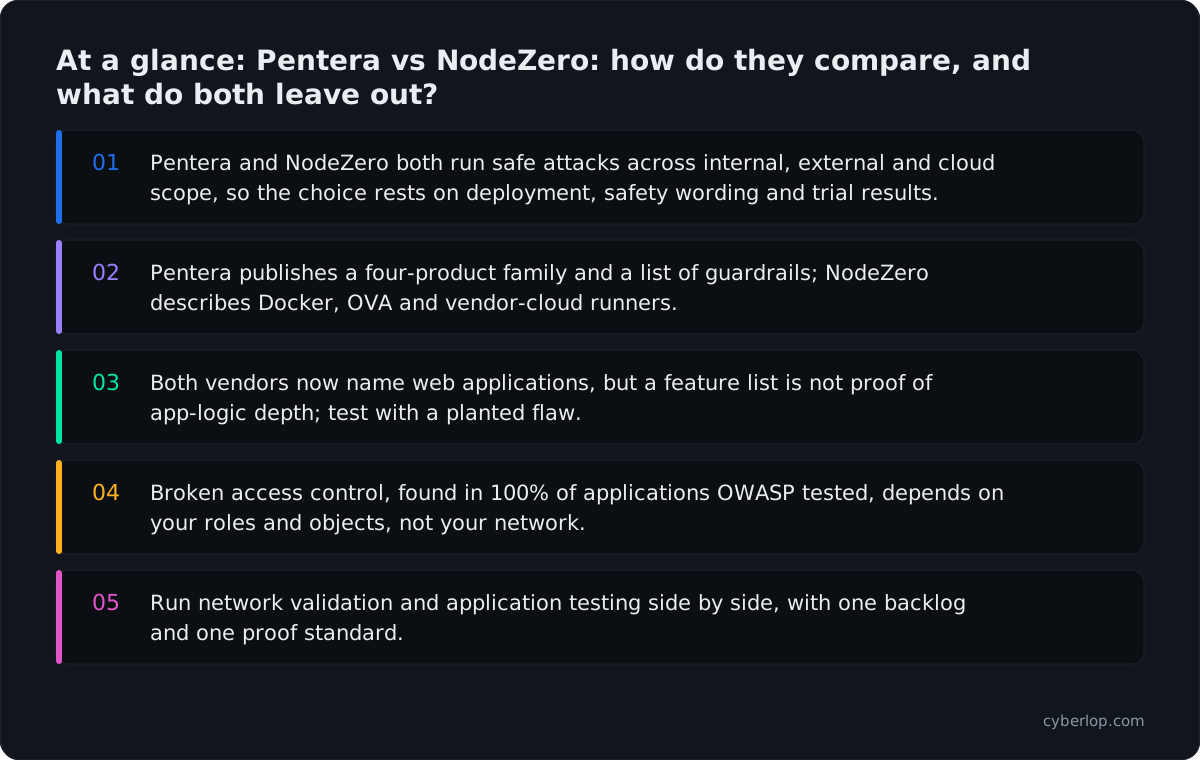
- Pentera and NodeZero both run safe attacks across internal, external and cloud scope, so the choice rests on deployment, safety wording and trial results.
- Pentera publishes a four-product family and a list of guardrails; NodeZero describes Docker, OVA and vendor-cloud runners.
- Both vendors now name web applications, but a feature list is not proof of app-logic depth; test with a planted flaw.
- Broken access control, found in 100% of applications OWASP tested, depends on your roles and objects, not your network.
- Run network validation and application testing side by side, with one backlog and one proof standard.
Pentera and NodeZero are both automated network pentesting platforms: they run real attack techniques against your internal network, cloud and external surface to show which weaknesses an attacker could chain together. They overlap heavily, so the choice usually comes down to scope, deployment and how each fits your team, not to a single winner. Neither is built around the logic of your own web application. That is a separate job.
Pentera vs NodeZero is a comparison of two products: Pentera, made by Pentera, and NodeZero, made by Horizon3.ai. This guide uses only what each vendor publishes on its own site, read on 7 October 2026. It names no prices (see each vendor's pricing page) and makes no claim that one product beats the other.
What is automated network pentesting?
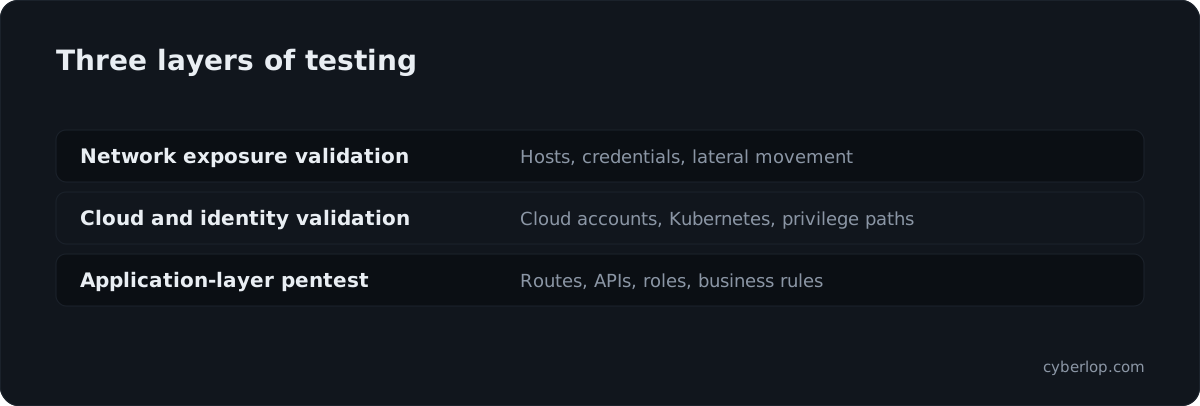
Automated network pentesting (also called autonomous pentesting or exposure validation) is software that carries out the steps of an attack on your infrastructure. It finds hosts, uses weak credentials, moves sideways and escalates privileges, then reports the paths that worked. The aim is to prove what is exploitable, not to list everything that might be.
It sits between two older ideas. A vulnerability scan lists known weaknesses and often cannot say which ones matter. A penetration test by people answers that question but usually happens once or twice a year. Automated network pentesting aims to give you the pentest answer, which weaknesses an attacker could chain, but on a schedule. Some vendors also position it against breach and attack simulation.
NIST SP 800-115 (September 2008) describes technical security testing as planning and conducting tests, analysing findings and developing mitigation strategies. Both vendors in this guide automate parts of that loop for infrastructure.
What is Pentera, per the vendor?
Pentera describes its platform as combining "AI-powered adversarial testing, risk-based prioritization, and automated remediation into one workflow". Its home page headline reads "Validate your security controls with AI to fix what's exploitable".
The four products on the platform page
- Pentera Core covers internal network security validation. The vendor lists black-box pentesting, "what-if" grey-box testing, ransomware emulation, Active Directory password assessment, OWASP Top 10 testing and CISA KEV targeted tests.
- Pentera Surface covers the external attack surface. It lists internet-facing domains and IPs, exposed services, web applications and APIs, authentication interfaces and code repositories.
- Pentera Cloud covers cloud and hybrid environments, including Kubernetes and container testing and AWS and Azure controls.
- Pentera Resolve prioritises and fixes validated attack paths with automated remediation, then re-tests.
Safety and scope statements
Pentera states that testing runs in production with "customer-controlled guardrails", naming attack throttling, customer-defined impact limits and emergency stop controls. Its Surface page also says the product does not function as an EASM, CSPM or CNAPP tool. That is a scope statement, and a useful one: Surface validates what is reachable from the internet rather than monitoring configuration.
Sources: Pentera home page, platform page, Core, Surface and Cloud.
What is NodeZero, per the vendor?
NodeZero is Horizon3.ai's autonomous pentesting platform. The vendor says it lets organisations run "unlimited pentests" that uncover exploitable paths, guide remediation and verify fixes straight away. Horizon3.ai says NodeZero executes real attack techniques "without agents or disruption".
What the NodeZero page lists
- Internal pentesting, external pentesting and cloud pentesting.
- Kubernetes pentesting.
- Active Directory and password audits, described as continually verifying the effectiveness of credential policies.
- Web application testing, listed as WebApp Pentesting.
- Tripwires, which the vendor lists as a threat-detection capability.
Deployment model
For internal tests, the vendor has you start a Docker host or an OVA (a packaged virtual machine) inside your own environment, and it describes both as free. External tests run from Horizon3.ai's cloud, using a "one-time-use architecture" in isolated networks. The internal pentest page describes results as attack paths, "showing exactly how an attacker moves" from initial access through credential abuse to wider compromise.
Sources: Horizon3.ai home page, NodeZero page and internal pentest page.
Pentera vs NodeZero: how do they compare?
On the vendors' own pages the two platforms share a core idea: run safe attacks, show the exploited path, guide the fix, test again. The differences are in packaging, named capabilities and how each describes deployment.
Side-by-side table, from vendor pages only
| Question | Pentera | NodeZero |
|---|---|---|
| Vendor's own label | Security validation platform; AI-powered adversarial testing | Autonomous pentesting platform |
| Internal network | Pentera Core | Internal pentesting |
| External surface | Pentera Surface, outside-in validation | External pentesting, run from the vendor's cloud |
| Cloud and Kubernetes | Pentera Cloud, with Kubernetes and container testing | Cloud pentesting and Kubernetes pentesting |
| Active Directory and credentials | AD password strength assessment; credential-based access validation | AD and password audits |
| Ransomware | Ransomware emulation listed under Core | Not listed on the NodeZero page read |
| Web applications | Surface lists web applications and APIs; Core lists OWASP Top 10 testing | WebApp Pentesting listed |
| Safety wording | Throttling, impact limits, emergency stop, read-only options, audit logging | "Without agents or disruption"; internal runs from a Docker host or OVA |
| Fix and retest | Pentera Resolve, then re-test | Verification that fixes work |
Read the table as a prompt for a trial, not a scorecard. Two entries marked "listed" tell you a capability exists on the vendor's page, not how deep it goes. Ask each vendor to show it on a lab network that looks like yours.
Where Pentera is the natural fit
Pentera fits teams that want separate internal, external and cloud modules, ransomware emulation and a remediation product of its own. Its published guardrails (throttling, impact limits, emergency stop, read-only modes, audit logging) give change-control reviewers something concrete to approve before anyone tests production.
Where NodeZero is the natural fit
NodeZero fits teams that like to start internal tests from a Docker host or OVA, run external tests from the vendor's cloud, and read results as attack paths that end in a verify-the-fix step. Kubernetes also gets its own pentest type on the NodeZero page.
What should you ask before buying either one?
Ask for a time-boxed trial on a network that matches production, and score both tools on the same questions. The list below turns the vendors' own claims into things you can check in a week.
Ten trial questions
- Which of your real crown jewels did it reach, and can the vendor show each step as a replayable path?
- What did it need before starting: credentials, a network position, an appliance, a container host?
- What are the safety controls, and who can press stop?
- Does it exploit, or does it only infer exploitability from version data?
- Which weaknesses did it miss that a planted test (a weak service account, an exposed share) should have caught?
- How does a finding reach engineers: ticket, export, chat?
- How is a fix verified, and does the verification re-run the same attack?
- Where does data leave your network, and which parts run in the vendor's cloud?
- What does the report offer for auditors?
- What is out of scope, in the vendor's own words?
Ask the vendor for a written scope and rules of engagement before any run. Our pentest scope and rules of engagement pages explain what to write down.
How do network pentesting platforms differ from web-app testing?
Network pentesting platforms start from hosts, services, identities and paths between them. Web-app and API testing starts from your application's routes, parameters, sessions, roles and business rules. Different questions need different tools, and a clean network result says little about whether one customer can read another's invoices.
The two jobs side by side
| Dimension | Network and exposure validation | Web-app and API pentesting |
|---|---|---|
| Starting point | IP ranges, domains, identities, cloud accounts | URLs, API specs, signed-in accounts, source code |
| Typical findings | Weak credentials, reachable services, lateral-movement paths, misconfigurations | Injection, broken access control, business-logic flaws |
| Who owns the fix | IT, infrastructure, platform teams | Product and engineering teams |
| Needs your code or app accounts | Usually not | Often: accounts, roles, sometimes source |
| Closest reference | NIST SP 800-115, network pentesting | OWASP WSTG, web-app pentesting |
Both vendors name web applications. Pentera's Surface page lists web applications and APIs, and Horizon3.ai lists WebApp Pentesting. Treat those as signs that the network vendors are widening scope. If your biggest risk is a flaw in your own product's logic, ask each vendor to show it finding one you planted.
What do the published numbers say about vulnerabilities and access control?
The published data points two ways. Software vulnerabilities are now a leading way in, which favours network validation. The most widespread application flaw, though, is about who may see what, not about the network. You need evidence for both layers.
- The Verizon 2026 Data Breach Investigations Report says "31% of breaches now start with software vulnerabilities", ahead of stolen passwords as the top way in.
- The same report page says "48% of all breaches now involve ransomware", which is why ransomware emulation features matter to network teams.
- The OWASP Top 10:2025 reports that 100% of the applications it tested showed some form of broken access control.
- CISA's Known Exploited Vulnerabilities catalog held 1,734 vulnerabilities when read on 7 October 2026. CISA describes it as an input to vulnerability prioritisation, and Pentera lists CISA KEV targeted tests.
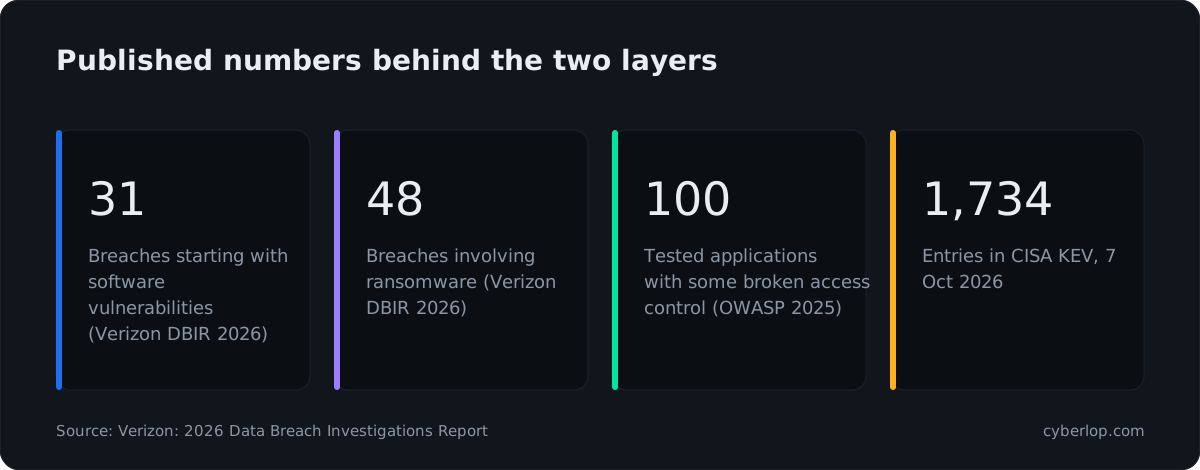
Two readings follow. First, validating known vulnerabilities, the territory of both Pentera and NodeZero, targets a real route in. Second, broken access control is a class of flaw that depends on your roles, objects and rules, so a test needs signed-in accounts and a check of what each one can reach. A network path rarely shows that.
Where does application-layer testing fit next to either one?
Application-layer testing covers the part of your estate that network tools only touch at the edge: your own code, sessions, roles and APIs. Run it alongside a network platform, not instead of one, and give it to the team that owns the product.
What the app layer adds
- Checks of cross-account access: one signed-in account reaching another's data or functions.
- Tests of business logic, such as a price, a quota or a workflow step that can be skipped.
- API testing against your published API definition, as covered in our API security testing guide.
- Source-aware testing, which links a finding to code. See white-box testing and black, grey and white box compared.
Example: the invoice endpoint nobody tested
Suppose a SaaS company with a Kubernetes cluster and a customer portal buys a network validation platform. It finds that a service account can reach a build server and the team fixes it. The portal still has an invoice endpoint that accepts any customer ID. That is an object-level authorisation flaw (BOLA), and the network platform was never asked about it. The two tests answer different questions, so you need both answers.
Example: the coupon that works twice
A fintech runs network exposure validation weekly and the report is clean. A new release adds a coupon feature that can be applied twice. No test at the host layer will see it. A pentest of the running app, driven with real accounts, will. That is the gap an application-layer pentest is for.
Where does Cyberlop fit?
Cyberlop sits at the application layer, next to either platform and not in place of it. It finds vulnerabilities in web apps and their APIs with black-box, grey-box and white-box pentesting.
In white-box mode it reads your code while testing the running app, so a finding can point to the file and line. It reports what it actually exploited, with the request, the response and a screenshot where a person can see it. Severity and confidence are kept apart, and a fix is proven by re-running the exact exploit against the new code. It also checks business-logic flaws and cross-account access.
It can run inside your own network (private scanning), on a schedule or in CI/CD, and agencies or MSSPs can run it under their own brand. See how it works and what the evidence looks like. For how automated approaches compare more widely, read our best AI pentesting tools guide and XBOW alternatives.
How do you choose between Pentera, NodeZero and app-layer testing?
Choose by the asset you are worried about, the team that will act on the result, and how the vendor describes deployment. Use the criteria below and write down an answer for each before any call.
Decision criteria
| If this is true | Look first at | Why |
|---|---|---|
| You worry about lateral movement from a stolen laptop or a weak service account | Pentera Core or NodeZero internal | Both list internal testing with credentials and Active Directory checks |
| You must show change-control teams a list of safety limits | Pentera | Published guardrails: throttling, impact limits, emergency stop, audit logging |
| You want to start internal tests from a Docker host or OVA you control | NodeZero | Vendor describes Docker and OVA options |
| You run Kubernetes and want it named as a test type | Either, then verify depth | Both list Kubernetes or container testing |
| Your biggest risk is customers reading each other's data | Application-layer pentest | Access flaws depend on your roles and objects; see the access control checklist |
| You need source-to-finding traceability for developers | White-box app testing | A finding can point to the file and line |
| You want ransomware-resilience emulation | Pentera Core | Named on its Core page, with threat groups listed |
A short selection checklist
Before you sign anything
- Name the three assets you most fear losing, and say which layer holds each.
- Decide who gets the findings: infrastructure, platform or product engineers.
- Get the vendor's current scope statement in writing, and compare it with yours.
- Run a time-boxed trial on a network or staging app with planted weaknesses.
- Check that every finding carries proof you can replay in minutes.
- Check that a fix is re-tested by repeating the same attack.
- Ask what data leaves your environment, and when.
How do you run network and application testing together?
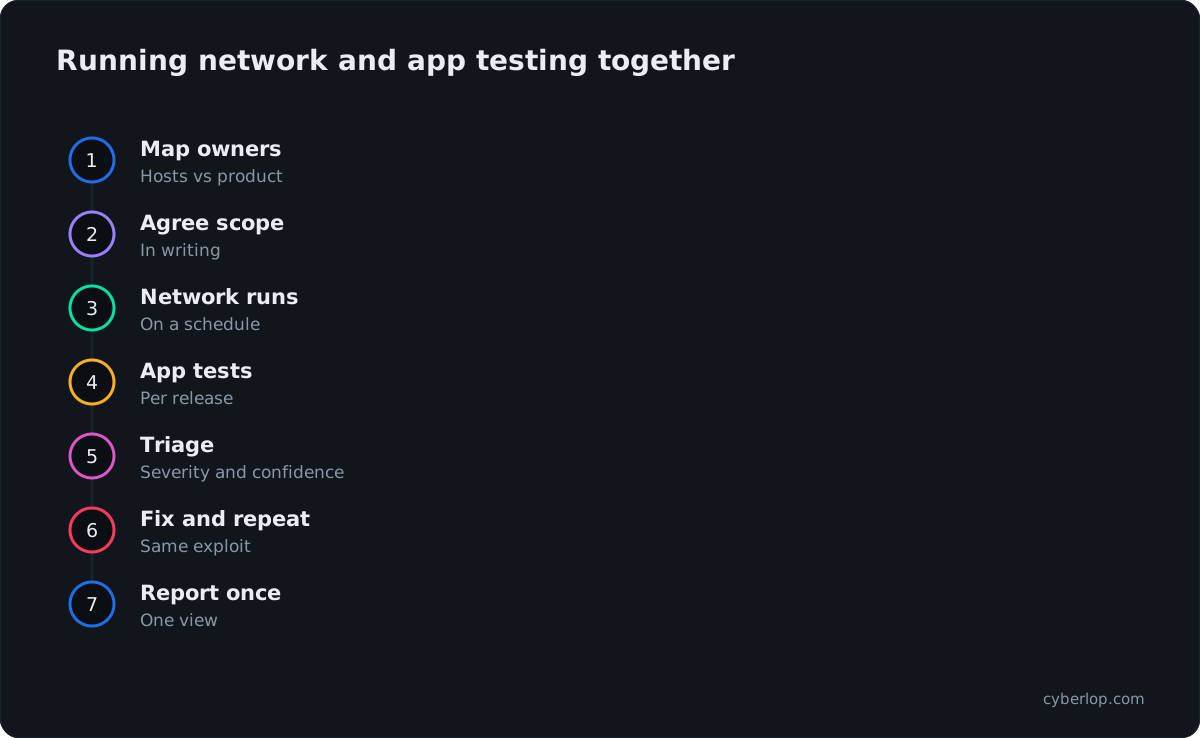
Put the network platform on the infrastructure team's calendar and the application pentest on the release cycle, then merge findings into one backlog. The two streams use different cadences because the code and the network change at different speeds.
- Map assets to owners. Hosts and identities go to infrastructure; routes, APIs and roles go to the product team.
- Agree scope in writing. Record targets, windows, accounts and stop contacts for each tool.
- Run network validation on a schedule. Use the vendor's guardrails and keep a human on call for the first runs.
- Run application tests on each release or in CI/CD. See continuous penetration testing.
- Triage with one severity scale. Keep confidence separate. How to read a finding explains how.
- Fix, then repeat the exact attack. A fresh scan is not the same as a closed-loop retest.
- Report once. Give auditors one view of network and application evidence.
Do automated network platforms replace a human pentest?
That depends on what your auditor, customer or regulator asks for, and on the vendor's own wording. Neither vendor page we read claims that its platform makes other testing unnecessary. Check what your obligations name before you cancel anything.
Pentera says its reporting is "evidence-based reporting in support of regulatory and framework requirements". Horizon3.ai frames NodeZero around running pentests continuously and verifying fixes. Both statements are about what the tool produces, and neither is a promise about a particular audit.
Questions to settle with your auditor first
- Does the framework name a human tester, a qualified assessor or a methodology?
- Does it require testing of the application layer separately from the network layer?
- Will the auditor accept tool-generated evidence, and in what format?
- How often must retests happen, and must they repeat the original exploit?
The OWASP Web Security Testing Guide (version 4.2 is the current stable release) is the usual reference for the application layer, while NIST SP 800-115 covers technical testing in general. Mapping your obligations to those two references is a quick way to see which layer each requirement touches. Our guide to choosing a penetration testing company gives a fuller list of questions.
What mistakes do teams make when buying?
The common mistakes are treating a clean network result as proof the product is safe, trialling on an easy lab, and skipping the written scope.
Assuming "web applications" in a feature list equals an app pentest
A feature list says a capability exists. It does not say whether the tool can keep a session, understand your roles or find a coupon flaw. Test it on a planted weakness of your own.
Judging by finding counts
More findings is not better. Ask how many were exploited, how many you could replay and how many your team agreed were real. Our piece on exploited, not suspected expands on this.
Ignoring who fixes the result
If network findings land in a developer backlog and app findings land with IT, nothing moves. Route each to its owner, with proof attached.
Questions people ask
Pentera vs nodezero: FAQs
What is the difference between Pentera and NodeZero?
Both are automated pentesting platforms that test internal, external and cloud environments, so the differences are in packaging and wording. Pentera is sold as a family of products (Core, Surface, Cloud, Resolve) and publishes a list of safety guardrails. NodeZero describes Docker and OVA deployment for internal tests and a vendor-cloud runner for external ones.
Run both on the same lab network before deciding.
Is Pentera a penetration testing tool?
Pentera describes itself as a security validation platform that uses AI-powered adversarial testing. Its Core page lists black-box pentesting, what-if grey-box testing and ransomware emulation. It automates attack steps, so it is closer to continuous exposure validation than to a one-off consultant engagement.
Does NodeZero need agents?
Horizon3.ai says NodeZero executes real attack techniques "without agents or disruption". Internal tests run from a Docker host or OVA that you deploy, and external tests run from the vendor's cloud. Ask the vendor for the current requirements for your environment.
Can Pentera or NodeZero test my web application?
Both vendors name web applications. Pentera Surface lists web applications and APIs, and Core lists OWASP Top 10 testing; Horizon3.ai lists WebApp Pentesting. How well either handles your sign-in, roles and business rules is something to test with a planted flaw, not assume from a feature list.
What is the difference between network pentesting and web-app pentesting?
Network pentesting starts from hosts, services and identities and looks for paths between them. Web-app pentesting starts from routes, parameters, sessions and roles in your own software and looks for flaws such as broken access control or business-logic errors. They find different problems and usually go to different teams.
Do I need both a network platform and an application pentest?
Usually yes, if you run both infrastructure and a product that customers sign in to. Each layer holds risks the other cannot see. A network platform will not tell you that one customer can read another's invoices. An application pentest will not map lateral movement from a stolen laptop.
Is automated pentesting the same as breach and attack simulation?
They overlap but are not identical. Breach and attack simulation usually replays known techniques to check whether your defences detect them. Automated pentesting aims to chain real weaknesses into an attack path. Pentera positions itself as distinct from breach simulation tools; check each vendor's current wording.
How should I trial Pentera or NodeZero?
Agree a written scope, use a network that resembles production, plant a few known weaknesses and keep a human watching the first runs. Score each tool on proof, missed plants, safety controls and whether a fix is verified by repeating the attack.
Sources
Where the facts come from
- Pentera: home page
- Pentera: platform
- Pentera: Pentera Core
- Pentera: Pentera Surface
- Pentera: Pentera Cloud
- Horizon3.ai: home page
- Horizon3.ai: NodeZero
- Horizon3.ai: NodeZero internal pentest
- Verizon: 2026 Data Breach Investigations Report
- OWASP: Top 10:2025, A01 Broken Access Control
- CISA: Known Exploited Vulnerabilities catalog
- NIST: SP 800-115, Technical Guide to Information Security Testing and Assessment
- OWASP: Web Security Testing Guide
Keep reading
Related articles
Access control testing checklist: sideways, upward and across tenants.
A step-by-step access control testing checklist for web apps and APIs: account planning, sideways, upward and cross-tenant checks, evidence and retests.
API security testing: a 2026 guide to the OWASP API Top 10
A step-by-step API security testing guide: the OWASP API Top 10 (2023) with test cases, BOLA and BFLA checks, JWT, OAuth, GraphQL and a CI/CD plan.
Best AI pentesting tools in 2026: ten compared, and how to choose
Ten AI pentesting tools compared from vendors' own sites, with a scoring sheet, a table by category and a plan for a fair trial on your own app.

Cover the layer networks miss
Cyberlop finds vulnerabilities in web apps and their APIs with black-box, grey-box and white-box pentesting, and reports only what it exploited, with the request, response and line of code. Ask us to run it on one of your applications.
Or start with a $199 pilot on one application: thirty days, success criteria agreed before day one, credited against the annual if you convert.