
Home / Blog / Rapid7 insightappsec vs qualys was
Compare
Rapid7 InsightAppSec vs Qualys WAS vs Tenable Web App Scanning in 2026
Three enterprise DAST suites, compared only from what each vendor publishes: login methods, API scanning, CI/CD gating, deployment, retests and what none of them replaces.
Cyberlop Labs · Updated · 14 min read
Rapid7 InsightAppSec, Qualys WAS and Tenable Web App Scanning are enterprise DAST suites that crawl a running web app and report weaknesses. They differ mainly in the platform around the scanner. Pick the one that matches your existing vulnerability programme, then trial it on one staging app; none replaces testing of business logic.
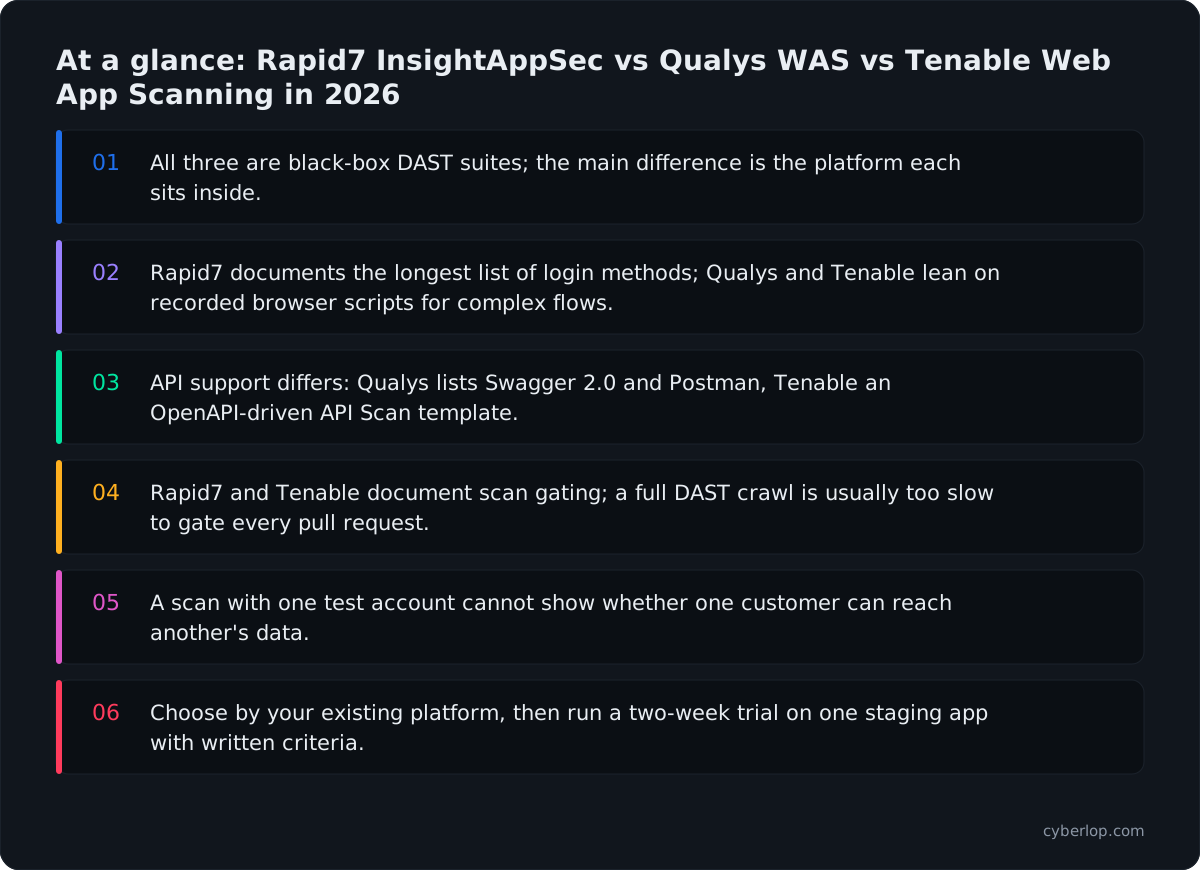
- All three are black-box DAST suites; the main difference is the platform each sits inside.
- Rapid7 documents the longest list of login methods; Qualys and Tenable lean on recorded browser scripts for complex flows.
- API support differs: Qualys lists Swagger 2.0 and Postman, Tenable an OpenAPI-driven API Scan template.
- Rapid7 and Tenable document scan gating; a full DAST crawl is usually too slow to gate every pull request.
- A scan with one test account cannot show whether one customer can reach another's data.
- Choose by your existing platform, then run a two-week trial on one staging app with written criteria.
Rapid7 InsightAppSec, Qualys Web Application Scanning (WAS) and Tenable One Web App Scanning are all enterprise DAST tools: they crawl a running web app, send test requests and report weaknesses. They differ mostly in where they sit. InsightAppSec is an application-security product with its own attack modules and pipeline integrations. Qualys WAS is an app inside the Qualys Cloud Platform. Tenable's scanner sits inside the Tenable One exposure platform. Choose by the platform you already run, then test on one real app.
Rapid7 InsightAppSec vs Qualys WAS vs Tenable WAS is a search for a choice between three enterprise dynamic application security testing (DAST) suites. This guide uses only what each vendor publishes in its own product pages and documentation, read on 7 October 2026. It names no prices (see each vendor's pricing page) and does not rank them on quality, because no vendor publishes an independent benchmark of the others.
What is the difference between InsightAppSec, Qualys WAS and Tenable Web App Scanning?
All three are black-box DAST scanners sold by vulnerability-management vendors. The practical difference is the platform around the scanner: Rapid7 describes a dedicated application security product, Qualys describes WAS as one app on a shared cloud platform, and Tenable describes web app scanning as one domain of Tenable One.
That matters because the scanner is only part of the job. Someone must also own the findings, route them to developers and close them. If your vulnerability management programme already lives in one of these platforms, the second-best scanner on paper can still be the better buy. Findings arrive where your team already looks.
InsightAppSec, Qualys WAS and Tenable at a glance
The table lists what each vendor's own pages say. "Not stated" means we did not find it on the pages we read, not that the feature is missing.
| Capability | Rapid7 InsightAppSec | Qualys Web Application Scanning | Tenable One Web App Scanning |
|---|---|---|---|
| Testing style | Black-box testing, "95+ attack types" | Automated fault-injection tests on forms and parameters | DAST with named scan templates |
| Part of a wider platform | Application Security product in the Insight platform | App on the Qualys Cloud Platform with a unified dashboard | Domain of the Tenable One exposure platform |
| Modern front ends | "modern web apps and APIs" | HTML with JavaScript and embedded Flash | Names JavaScript, HTML5, AJAX and SPA support |
| API scanning | APIs named on product page; formats not stated on pages read | Swagger 2.0 (JSON) and Postman Collection | API Scan template using an OpenAPI file |
| Pipeline integrations | Jenkins, Azure DevOps, GitHub Actions, GitLab | Jenkins plugin | Azure DevOps, Bamboo, CircleCI, GitHub, GitLab, Jenkins |
| Re-test after a fix | Validate Vulns scan and Replay Attack | Retest selected findings without a full scan | Remediation scan on selected findings |
| Internal (non-public) apps | On-premises scan engine | Scanner appliance, physical or virtual | On-premises scanner; Docker image |
| Mixes in other tools' findings | Not stated | Imports Burp Suite and Bugcrowd findings | Not stated |
A note on product names and sources
Rapid7's documentation titles the product "Application Security (InsightAppSec)". Tenable's current user guide, last revised 6 October 2026, calls it "Tenable One Web App Scanning", while the product page says "Tenable Web App Scanning". Qualys calls it "Web Application Scanning". The Qualys source we could read in full is its Web Application Scanning Getting Started Guide dated 2 August 2024, so newer Qualys features may exist that this page does not list. Check Qualys release notes before you rule anything out.
How does each tool describe itself?
Each vendor leads with a different promise: Rapid7 with fewer false positives and fast set-up, Qualys with centralised management across a large estate, and Tenable with coverage of modern front-end frameworks inside an exposure-management platform.
Rapid7 InsightAppSec
Rapid7's product page says InsightAppSec "performs black-box security testing" and automates triage, prioritisation and remediation of application risk. It lists "95+ attack types", says you can start scanning "in as few as five minutes", and names two features: Attack Replay, which lets developers test a finding "directly from the vulnerability report", and the Universal Translator.
The documentation adds scan configurations, attack templates, cloud and on-premises scan engines, role-based access control, audit logging and webhooks. It also documents "AI-Enhanced Attack Modules", which Rapid7 says help "prevent false positives from appearing in your scan results" and which need a cloud scan engine.
Where InsightAppSec tends to fit
Teams that want an application-security tool with developer-facing replay and a long list of documented login methods, and that already use Rapid7 for other work. The product page also says it reports on compliance to PCI-DSS, HIPAA and the OWASP Top Ten.
Qualys Web Application Scanning (WAS)
The Qualys guide describes WAS as "an automated scanner that uses fault injection tests to find vulnerabilities": in practice it feeds deliberately malformed input to the app's forms and judges what comes back. Its key features include crawling intranet and internet apps, support for "common authentication schemes", and reports with recommended coding practice. The guide says it "differentiates exploitable fault-injection problems from simple information disclosure".
The guide leans on scale and workflow: static and dynamic tags to group apps, a Multi-Scan feature for "hundreds or even thousands of web applications", a unified dashboard shared with other Qualys apps, and reports in HTML, PDF, encrypted PDF, PPT, XML and CSV.
Where Qualys WAS tends to fit
Organisations already on the Qualys Cloud Platform that scan many web apps and want tagging, central dashboards and report templates. The guide also describes importing Burp Suite findings and approved Bugcrowd submissions into the same Detections list, which suits teams that mix manual and automated testing.
Tenable One Web App Scanning
Tenable's user guide says the product "provides comprehensive vulnerability scanning for modern web applications" and that its legacy Nessus-based web template is "incompatible with modern web application frameworks", meaning JavaScript, HTML5, AJAX and single-page apps. The product page says it can "identify and map all pages, links, and forms" and detect "XSS, SQL injection, and vulnerable third-party components".
Tenable ships named scan templates: Scan (the complete set of checks), Overview (fewer active tests, lower impact), PCI, SSL/TLS, Config Audit and API Scan. It is part of Tenable One, so web findings can sit beside IT, cloud and identity exposure data.
Where Tenable One Web App Scanning tends to fit
Teams that already track exposure in Tenable and want web app findings in the same workbench. The templates also make it easy to start with a quick SSL/TLS or configuration check before a full scan.
How do they handle authenticated scanning and login?
Authenticated scanning is where DAST tools earn their keep, because most of a modern app sits behind a login. Rapid7 documents the longest list of methods; Qualys and Tenable both rely on recorded browser scripts for complex flows.
Login methods per each vendor's documentation
| Method | Rapid7 InsightAppSec | Qualys WAS | Tenable One Web App Scanning |
|---|---|---|---|
| Login form | Automated Login, no macro needed | HTML form authentication record | Login Form and Cookie Auth (CI/CD notes) |
| Recorded browser script | Macro (.rec) and Selenium (.side) | Selenium scripts from Qualys Browser Recorder | Selenium IDE recordings |
| HTTP-level auth | Basic, NTLM, Kerberos, HMAC | Basic, Digest, NTLM | Not detailed in the sections read |
| Client certificate | SSL certificate (.pfx) | SSL client certificate | Not stated |
| OAuth and tokens | OAuth 2.0 grants, MSAL | Not stated | API Key and Bearer Token plugins listed |
| Interactive MFA | Scan pauses for 2FA or CAPTCHA login | Not stated | Not stated |
| Test the login first | Not stated | Test Authentication without a discovery scan | Not stated |
Two practical points. First, each scan uses the credentials you give it, so a scanner tests as the single account you set up. Tenable's guide says its scanner "acts as a user" and recommends against using an administrator account, especially in production, and Qualys describes monitoring session state so a scan "remains authenticated throughout the crawl". Second, single sign-on and multi-factor are where set-up takes the longest: Qualys points to its Browser Recorder for SSO, Rapid7 pauses a scan for interactive login, and Tenable supports Selenium IDE recordings.
If your app has several account types and tenants, a scan with one login covers one slice of it. See why a scanner with one login misses what a second account could reach, and authenticated testing for the basics.
How do they scan APIs?
Qualys documents Swagger 2.0 and Postman Collection imports, Tenable documents an API Scan template driven by an OpenAPI file, and Rapid7 says on its product page that it assesses "modern web apps and APIs" without naming import formats on the pages we read.
API import and scan support
| API need | Rapid7 InsightAppSec | Qualys WAS | Tenable One Web App Scanning |
|---|---|---|---|
| Definition file | Not stated on pages read | Swagger 2.0 JSON visible to the scanner | OpenAPI file for endpoint definitions |
| Collections | Not stated on pages read | Postman Collection (JSON) | Not stated |
| SOAP | Not stated | SOAP web services scanned | Not stated |
| Dedicated API template | Not stated | Not stated | API Scan template, needs more configuration |
| Own API for automation | REST API with API key | Not stated on pages read | Tenable One Vulnerability Management API |
What to test on your own API
An imported definition tells the scanner which endpoints exist. It does not tell it which objects belong to which customer. Ask each vendor to scan an API where one account can read another account's order by changing an ID, which is broken object level authorisation, and see whether the report finds it. See our API security testing guide and best API security testing tools for more.
How do they fit into CI/CD and pipeline gating?
All three can run from a pipeline, but they describe it differently. Rapid7 and Tenable document scan gating, where a build fails if findings meet your threshold; Qualys documents a Jenkins plugin for building scans into CI/CD in the pages we read.
Rapid7's GitHub Actions page says you can scan for vulnerabilities before changes reach production, with scan gating to block deployments when findings meet your criteria. Its documentation also lists Jenkins, Azure DevOps and GitLab integrations.
Tenable runs its scanner as a Docker image in a "CI/CD" mode and documents Azure DevOps, Atlassian Bamboo, CircleCI, GitHub, GitLab and Jenkins. Its guide says you set a vulnerability_threshold of Critical, High, Medium or Low, and that this "causes your build to pass or fail", though builds can also fail on scan errors or incomplete configuration. Credentials sit in environment variables, not in the exported configuration file.
A caution on gating a full DAST scan
A full crawl of a large app can take hours. Tenable's own guide says untuned scans can run into the eight-hour default timeout in Tenable One Vulnerability Management, and that complex sites with forums, blogs or many pages are common causes. Most teams therefore gate pull requests on a smaller, targeted scan and run the full scan on a schedule against staging. Read DAST vs SAST vs IAST for how the layers fit together.
Where can each tool run: cloud, on-premises or inside your network?
Each vendor offers a cloud scanner for public apps and a self-run scanner for apps that are not reachable from the internet. That second option decides whether staging and internal apps can be tested at all.
The table shows the deployment options each vendor documents.
| Deployment | Rapid7 InsightAppSec | Qualys WAS | Tenable One Web App Scanning |
|---|---|---|---|
| Cloud scanning of public apps | Cloud scan engine | Cloud scanners for the network perimeter | Region-specific cloud scanners |
| Internal or non-public apps | On-premises scan engine | Scanner appliance, physical or virtual | On-premises scanner; Tenable Core; Docker image |
| AI false-positive filtering | AI-Enhanced Attack Modules, cloud engines only | Not stated | Not stated |
| Schedules and blackouts | Scan scheduling and blackouts | Scheduled scans and scheduled reports | Weekly or monthly automated scans |
Rapid7's rule is simple: use a cloud engine for apps "accessible from the internet" and an on-premises engine for apps "that are not accessible from the internet". Qualys says internal scanning needs a scanner appliance, physical or virtual. Tenable says its region-specific cloud scanners cover public assets, and that non-public apps depend on where they run and your data-storage needs. If your policy says application traffic must not leave your network, ask each vendor where scan results and page content are stored.
How do they help you fix and retest a finding?
All three let you re-check one finding without repeating the whole scan, but the proof is different: Rapid7 offers a developer-side replay and a validation scan, Qualys retests selected findings in a batch, and Tenable launches a remediation scan limited to the affected plugin.
Re-test options compared
- Rapid7. The documentation describes replaying the attack with the Rapid7 AppSec Plugin for Chrome, and running "Validate Vulns" so that a finding that is no longer found moves to Remediated. Rapid7 notes that validation scans are less comprehensive than full scans.
- Qualys. You can select findings from the same QID and web application and launch one retest. The guide says only potential vulnerabilities, confirmed vulnerabilities and sensitive content can be retested, and the retest "uses same settings used in the latest scan".
- Tenable. A remediation scan enables only the relevant plugin and dependencies. After it completes, the finding's status should change to Fixed on the targeted assets. Some plugin types, such as API Detected and the OpenAPI import checks, are not supported in remediation scans.
In each case the re-test runs the vendor's own check again. That is useful, but it is not the same as replaying the exact request that proved the original flaw against the new code. See closed-loop retest and the vulnerability remediation process for the difference.
What do enterprise DAST suites not cover?
A DAST suite finds what a scanner can recognise from the outside: injection, misconfiguration, weak headers, known components. It is weaker on flaws that depend on which account is making the request or what the business allows, which is where many serious bugs sit.
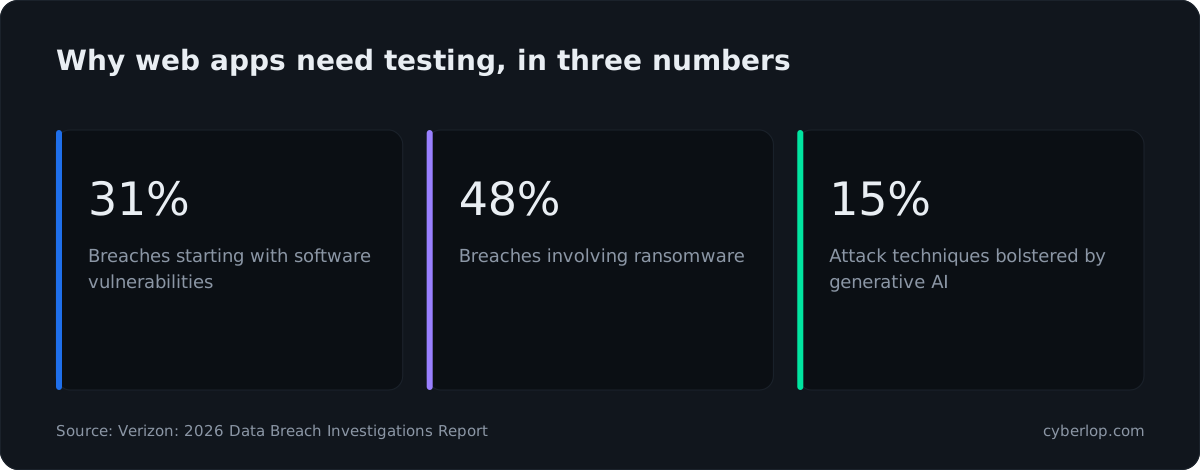
The scale of the problem is documented. The Verizon 2026 Data Breach Investigations Report reports that 31% of breaches now begin with a software vulnerability, ahead of stolen passwords as the most common way in. The OWASP Top 10:2025 (see the OWASP Top 10 entry) still lists Broken Access Control as A01. The CISA Known Exploited Vulnerabilities Catalog showed 1,734 results when we opened it on 7 October 2026, and the IBM Cost of a Data Breach Report 2026 puts the global average cost at $4.99 million, up 12% on last year.
Three gaps a team still covers
Cross-account access
Tenable's guide says its scanner "acts as a user" with no context for what any specific action means, so if a user can send an email, the scanner can press that button more than once. A scan with one test account cannot tell you whether that account can read another customer's data. That needs cross-account access checks with at least two accounts. See the access control testing checklist.
Business logic
A coupon that can be applied twice, a refund that can exceed the payment, or a step that can be skipped looks like a normal request. A business-logic flaw is found by someone who understands the workflow, not by a signature.
Proof and noise
Rapid7 and Tenable both say they reduce false positives, and Qualys separates exploitable fault-injection problems from information disclosure. Vendors count false positives differently, so count them yourself on your own app. Our post on exploited, not suspected explains why a finding with a request and response is easier to act on.
How to choose: Rapid7 InsightAppSec vs Qualys WAS vs Tenable Web App Scanning
Choose the suite that matches the platform your vulnerability programme already runs on, then test it on one real app against criteria you wrote first. Switching platforms only for the scanner is rarely worth it; switching because findings never reach developers can be.
Criteria that decide it
| Question to ask | What a good answer looks like |
|---|---|
| Does it log in to our app without manual work every week? | Authenticated scan runs unattended on staging with our SSO or MFA set-up. |
| Can it read our API definition? | Imports our OpenAPI or Swagger file and reports per endpoint. |
| Does it gate a pull request? | Build fails on your threshold; a targeted scan finishes in minutes, not hours. |
| Where do findings go? | Into Jira or your ticket tool, with owner, request and response. |
| Can it scan internal apps? | Self-run scanner works from your network; you know what data leaves it. |
| How does it prove a fix? | Re-test of the selected finding closes it, with the evidence kept. |
| What does it say about its own limits? | Tells you what it cannot see: cross-account access, business logic. |
| What does the platform already do for us? | Reuse of asset tags, dashboards and reports you pay attention to. |
Which suite suits which situation
- You use Rapid7 for other work, or want developer-side replay and documented gating. Start with InsightAppSec and check API import formats during the trial.
- You run Qualys across a large estate and scan many apps. Start with Qualys WAS and its tagging, Multi-Scan and report templates. Check the current release notes for API and pipeline options.
- You track exposure in Tenable and want web findings beside cloud and identity. Start with Tenable One Web App Scanning, using the SSL/TLS or Config Audit templates first as the guide suggests.
- You have no existing platform. A suite may be more than you need. See best DAST tools and Burp Suite Enterprise alternatives for lighter options.
- Compliance drives the purchase. Rapid7 states reporting to PCI-DSS, HIPAA and the OWASP Top Ten, and Tenable has a PCI template used for its attestation offering. Check the exact scope with the vendor, and read PCI DSS penetration testing requirements, because a scan is not a penetration test.
How do you run a fair two-week trial?
Use the same staging app, the same two test accounts and the same planted flaws for each tool, and score the results against written criteria. Two weeks is enough to see set-up effort, noise and fix-verification.
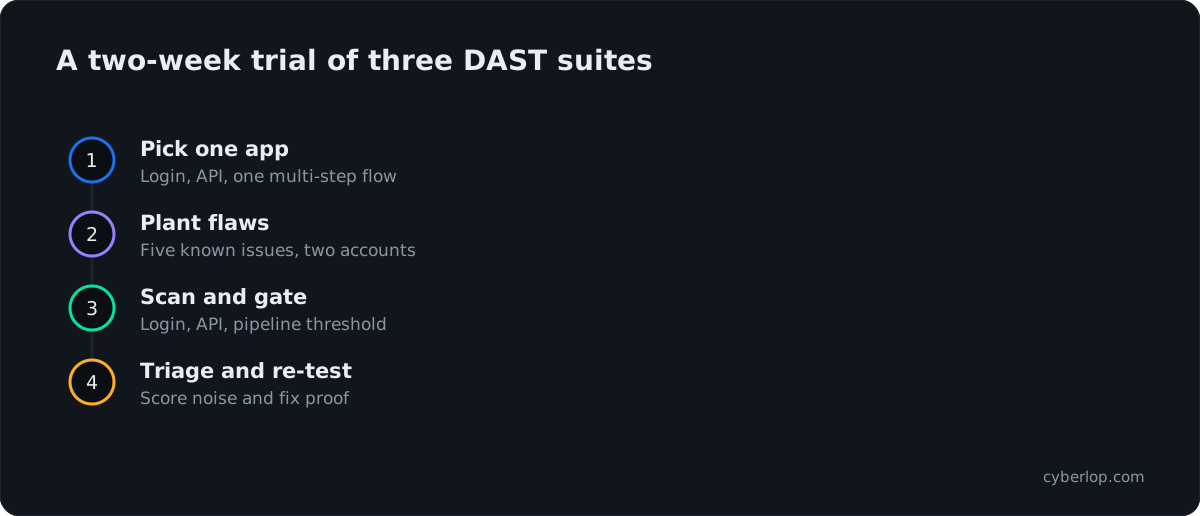
- Pick one staging app. Include a login, an API and one multi-step flow such as checkout.
- Create two test accounts in different tenants, plus one low-privilege role.
- Plant five known flaws: one injection, one missing header, one outdated component, one case where account A reads account B's record, and one skipped workflow step.
- Configure login and time how long each tool takes to scan behind it.
- Run a scan from the pipeline and set a gate that fails on your chosen severity.
- Triage every finding as real, not real or unsure, and record who did it and how long it took.
- Fix two findings and re-test using each tool's own re-test route.
- Score detection of planted flaws, false positives, set-up hours and report usefulness.
Where does Cyberlop fit next to these suites?
Cyberlop is not a replacement for a scheduled enterprise scanner. It is a pentest that sits beside one. It finds vulnerabilities in web apps and their APIs with black-box, grey-box and white-box pentesting, and it reports only what it exploited, with the request, the response and, in white-box mode, the line of code.
It also checks business-logic flaws and cross-account access, which are the gaps above, and it proves a fix by re-running the exact exploit against the new code. It can run inside your own network, on a schedule or in CI/CD, and agencies can run it under their own brand. See how it works, the evidence page and how Cyberlop compares.
The table below puts the two kinds of tool side by side so you can see which question each answers.
| Question | Enterprise DAST suite | Cyberlop pentest |
|---|---|---|
| Best at | Scheduled breadth across many apps | Business-logic flaws and cross-account access |
| Evidence per finding | Varies by vendor and finding type | Request, response, screenshot, line of code |
| Fix verification | Vendor re-check of the finding | Exact exploit re-run on new code |
| Estate-wide asset management | Strong where the platform is already in use | Use the suite for this; Cyberlop runs alongside |
Questions people ask
Rapid7 insightappsec vs qualys was: FAQs
What is the difference between InsightAppSec, Qualys WAS and Tenable Web App Scanning?
All three are black-box DAST scanners. InsightAppSec is Rapid7's application security product, Qualys WAS is an app on the Qualys Cloud Platform, and Tenable's scanner is a domain of Tenable One. Their login methods, API imports and pipeline integrations differ, so compare them against your own app.
Which is better: InsightAppSec, Qualys WAS or Tenable Web App Scanning?
No vendor publishes an independent benchmark of the others, so no honest page can name a winner. The best fit is usually the one on the platform your team already uses. Run each on the same staging app and count real findings, noise and set-up time.
Does Qualys WAS scan APIs?
Its Getting Started Guide (2 August 2024) describes scanning SOAP web services and REST APIs from a Swagger 2.0 JSON file, plus API scans configured from a Postman Collection. Check the current release notes for newer formats.
Can these tools run in a CI/CD pipeline?
Yes, per their own documentation. Rapid7 lists Jenkins, Azure DevOps, GitHub Actions and GitLab with scan gating. Tenable runs a Docker image with a severity threshold. Qualys documents a Jenkins plugin. Full scans can be slow, so many teams gate on a targeted scan.
Can they scan apps that are not on the public internet?
Yes. Rapid7 offers an on-premises scan engine, Qualys uses a physical or virtual scanner appliance, and Tenable documents an on-premises scanner and a Docker image. Ask each vendor what scan data leaves your network.
Do enterprise DAST suites replace a penetration test?
No. A suite gives scheduled breadth. A penetration test adds a person or an engine that exploits flaws and checks business logic and cross-account access. Read our PCI DSS penetration testing guide for how auditors treat the two.
How long should a DAST trial run?
Two weeks on one staging app is enough to compare set-up time, login handling, noise and re-test behaviour. Use the same accounts and planted flaws for each tool and write the scoring criteria before you start.
Sources
Where the facts come from
- Rapid7: InsightAppSec product page
- Rapid7 Docs: Application Security (InsightAppSec) documentation
- Rapid7 Docs: InsightAppSec concepts
- Rapid7 Docs: authentication
- Rapid7 Docs: test vulnerability remediation
- Rapid7 Docs: GitHub Actions integration
- Rapid7 Docs: AI-Enhanced Attack Modules
- Rapid7 Docs: on-premises scan engine
- Qualys: Web Application Scanning Getting Started Guide (2 August 2024)
- Tenable: Web App Scanning product page
- Tenable: Tenable One Web App Scanning User Guide (revised 6 October 2026)
- Tenable: documentation index
- Verizon: 2026 Data Breach Investigations Report
- IBM: Cost of a Data Breach Report 2026
- CISA: Known Exploited Vulnerabilities Catalog
- OWASP: Top 10:2025
Keep reading
Related articles
Access control testing checklist: sideways, upward and across tenants.
A step-by-step access control testing checklist for web apps and APIs: account planning, sideways, upward and cross-tenant checks, evidence and retests.
API security testing: a 2026 guide to the OWASP API Top 10
A step-by-step API security testing guide: the OWASP API Top 10 (2023) with test cases, BOLA and BFLA checks, JWT, OAuth, GraphQL and a CI/CD plan.
Best API security testing tools in 2026: nine options and how to choose
Best API security testing tools in 2026, compared from vendor docs: DAST, open source, contract-first, runtime, plus a one-week bake-off.

Need proof beside your scanner?
Whichever suite you choose, Cyberlop pentests your web app and its APIs, checks business logic and cross-account access, and reports only what it exploited, with the request, response and line of code. Ask us to run it on one of your applications.
Or start with a $199 pilot on one application: thirty days, success criteria agreed before day one, credited against the annual if you convert.