
Home / Blog / Best dast tools 2026
Compare
Best DAST tools 2026: twelve compared and how to choose
DAST tests a running app from the outside. This guide compares twelve DAST tools using only what each vendor publishes, with criteria to choose and a bake-off to run.
Cyberlop Labs · Updated · 14 min read
DAST (dynamic application security testing) tests a running web app or API from the outside. The best DAST tool for you handles your login, reads your API definitions, runs in your pipeline and shows evidence per finding. Shortlist three, test them on the same staging app, and pair scanning with pentests.
- DAST tests a running app from outside, so it needs your login, API definitions and a staging target to be useful.
- Twelve tools fall into four groups: enterprise suites, platform add-ons, developer-first scanners, and open source or surface scanning.
- Compare tools by what you can see in a finding (request, response, confirmation), not by labels.
- Run every shortlisted tool against the same staging app and score real findings, false positives and misses.
- DAST covers known checks at speed; business logic and cross-account access need a pentest.
The best DAST tools in 2026 are the ones that log in to your application properly, understand your APIs, run inside your pipeline and show proof for each finding. DAST (dynamic application security testing) is a way of testing a running web application or API from the outside, sending requests and reading responses, as an attacker would see it. This guide compares twelve DAST tools using only what each vendor publishes, read on 7 October 2026, and ends with criteria and a one-week bake-off you can run.
No tool here is ranked first. Each vendor's statements are quoted or closely paraphrased and listed in the sources, and the guide names no prices: see each vendor's pricing page. Read the DAST term first if you are new to it.
What is DAST, and what should the best DAST tools do in 2026?
DAST is black-box testing of a running application. It does not read your source code; it crawls pages, follows API definitions, sends test input and watches how the application responds. That makes it good at issues that only exist at runtime, such as injection, cross-site scripting and misconfiguration.
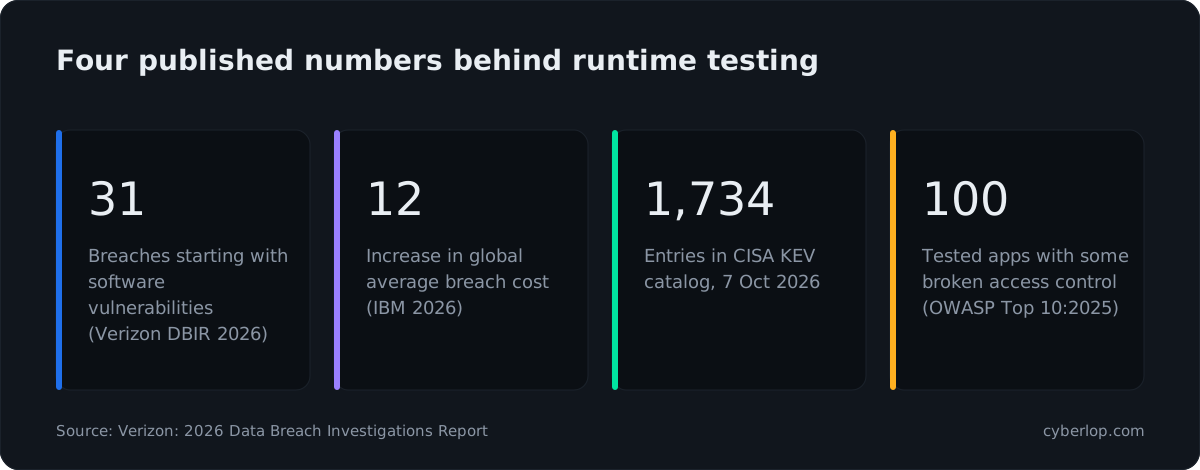
Three published numbers explain why runtime testing is on the agenda. The Verizon DBIR, 2026 says 31% of breaches now start with software vulnerabilities. The IBM Cost of a Data Breach, 2026 reports a 12% increase in the global average cost of a breach, calling it a record high. And the CISA KEV catalog listed 1,734 vulnerabilities known to be exploited in the wild when we read the page on 7 October 2026.
What DAST finds well
- Input-handling flaws that show up in responses, such as injection and cross-site scripting.
- Server and header misconfiguration on the deployed application.
- Known vulnerable components that are visible from outside.
- Regressions, when the scan runs again after each release.
What DAST usually does not decide for you
A scanner follows rules. It does not know that invoice 1042 belongs to another customer, or that a coupon should work once. The OWASP Top 10:2025, A01 page shows every application in its data had at least one instance of broken access control, spread across 40 mapped weakness types. A scanner struggles to judge that class of flaw without context. Plan for it with a pentest or a focused access control checklist. We return to this near the end.
Six things to expect from a DAST tool in 2026
- Authenticated scanning. Most of an app sits behind a login. See authenticated scan.
- API coverage. OpenAPI, GraphQL, SOAP or gRPC definitions, not just a crawled website.
- Pipeline fit. A scan that runs in CI/CD and can gate a build.
- Evidence. The request, the response and, ideally, proof of exploit to cut each false positive.
- Deployment. Cloud, self-hosted or both, and a way to reach internal apps.
- Workflow. Tickets, scheduling, policies and reports your team will actually open.
Which DAST tools are worth shortlisting in 2026?
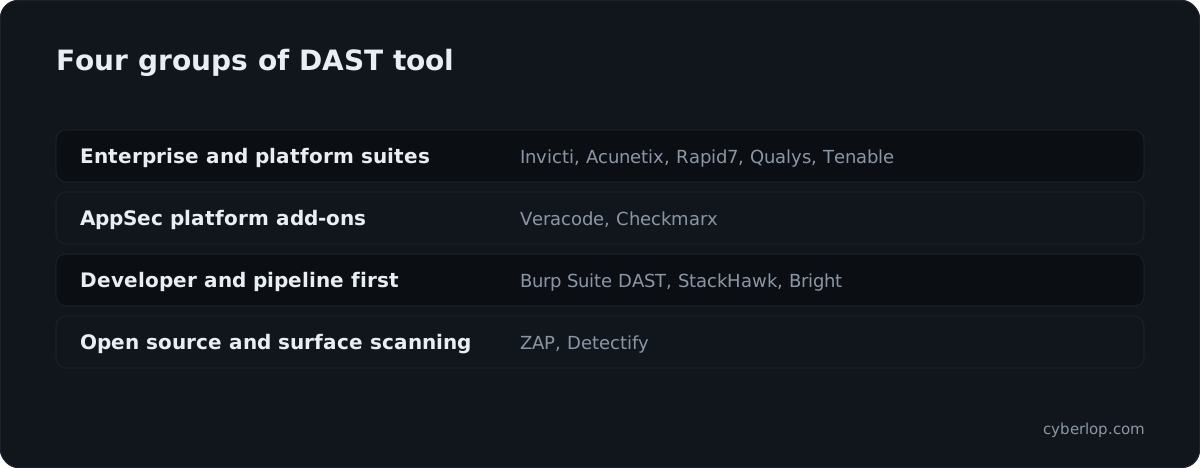
Twelve tools are worth a look, grouped by who they suit. The mix covers enterprise suites, developer-first scanners, one open-source project and a surface-plus-application scanner. Order within groups is alphabetical, not a ranking. Group names are ours; the descriptions in the table come from each vendor's pages.
Summary table of the twelve DAST tools
| Tool | How the vendor describes it | APIs | Authentication | Pipeline and deployment |
|---|---|---|---|---|
| Acunetix | Now named Invicti Web + API on Acunetix's site | REST, GraphQL and SOAP APIs, single-page apps | Role-based user flows and complex authentication scenarios | CI/CD connection stated |
| Bright | DAST for web apps, APIs and mobile | REST, SOAP, GraphQL "and more" | Not stated on the page we read | CI pipeline integration; SaaS, private cloud or Repeater mode |
| Burp Suite DAST | PortSwigger's scheduled DAST on the Burp engine | Postman Collections, OpenAPI, SOAP, GraphQL | Session-aware scanning; Basic, Bearer, API Key, OAuth 2.0 client credentials | Run in CI, gate merges by severity; cloud or self-hosted |
| Checkmarx DAST | Add-on within Checkmarx One, not sold standalone | REST, SOAP and gRPC endpoints | Record login flows in the browser; 2FA support | Runs on every build; built-in tunnelling for internal apps |
| Detectify | Surface Monitoring plus Application Scanning | Payload-based API scanning | Authenticated testing of admin panels and user settings | Scans on a schedule or triggered from its API |
| Invicti | Proof-based DAST, with IAST | Discover and test APIs | Not detailed on the page we read | 110+ integrations; on-premises, cloud and hybrid |
| Qualys WAS | Web application scanning on the Qualys platform | Not stated on the pages we read | Not stated on the pages we read | Scanner appliance for internal scans |
| Rapid7 InsightAppSec | Black-box DAST | "Modern web apps and APIs" | Not detailed on the page we read | Cloud and on-premises scan engines; scheduling |
| StackHawk | DAST that runs in CI/CD | OpenAPI, GraphQL, gRPC, JSON-RPC, SOAP | Form-based, OAuth, HTTP auth, custom scripts | HawkScan runs locally or in CI/CD |
| Tenable Web App Scanning | Part of the Tenable One platform | DAST and API scanning | Not stated on the page we read | SaaS or on-premises |
| Veracode DAST | Dynamic Analysis on the Veracode Platform | Web apps and REST APIs | Authenticated or unauthenticated; Selenium crawl scripts | REST API automation; Internal Scanning Management |
| ZAP | Open-source web app scanner | Via add-ons and API | Must be configured by you | Automation Framework, Docker packaged scans |
"Not stated on the page we read" means we did not find it on the vendor page we opened, not that the product lacks it. Check each vendor's documentation before you rule anything out.
How do the best DAST tools differ, one by one?
Each entry gives what the vendor states, who the tool suits and what to confirm in a trial. None of it is a score.
Enterprise AppSec suites and platforms
Invicti
Invicti's site describes scanning running web applications and APIs, validating findings with "proof-based scanning" and pointing developers at real business risk. It describes a combined DAST and IAST approach, 110+ integrations including GitHub Actions, Jenkins, Azure Pipelines and GitLab CI/CD, and deployment on-premises, in the cloud or hybrid. Invicti also says Miercom rated it the most accurate DAST. That is the vendor's claim, so ask to see the report.
Suits: Teams with many applications that want fewer unconfirmed findings and a wide integration list. Confirm in a trial: what "proof-based" confirms on your stack, and how unconfirmed findings are shown.
Acunetix (Invicti Web + API)
Acunetix's own site says "Acunetix is now Invicti Web + API". The page lists 7,000+ issues including the OWASP Top 10, the OWASP API Top 10 and business logic flaws, and scanning of web applications, APIs, single-page apps and shadow assets across REST, GraphQL and SOAP. It also mentions authenticated testing for "role-based user flows and complex authentication scenarios". If you are weighing the two product lines, our Invicti vs Acunetix guide goes into detail.
Suits: Teams already using Acunetix, or those who want a scanner covering sites and APIs together. Confirm in a trial: how your login flow is recorded and replayed, and which edition you are quoted.
Rapid7 InsightAppSec, Qualys WAS and Tenable Web App Scanning
These three come from vulnerability-management vendors. Rapid7 describes InsightAppSec as black-box testing with 95+ attack types, an Attack Replay feature, cloud and on-premises scan engines, and compliance reports for PCI-DSS, HIPAA and the OWASP Top Ten. Qualys documents Web Application Scanning with discovery scans and vulnerability assessment, and says internal scans need a scanner appliance, physical or virtual, inside your network. Tenable says its Web App Scanning is part of the Tenable One exposure management platform, offered as SaaS or on-premises, covering XSS, SQL injection and vulnerable third-party components with DAST and API scanning. Our three-way comparison goes deeper.
Suits: Organisations that already run that vendor's scanner for hosts and want web findings in the same console. Confirm in a trial: authentication recording, API definition import and pipeline triggers, because the pages we read did not describe them.
Veracode DAST
Veracode's documentation says Dynamic Analysis provides "automated and scalable dynamic scanning" for web applications and REST APIs. You can run authenticated or unauthenticated analyses, use Selenium to create crawl scripts, set policies linked to an application profile, automate with the REST API, and reach applications behind a firewall through Internal Scanning Management.
Suits: Teams that already manage SAST and SCA policy in Veracode and want one policy view. Confirm in a trial: how scripted crawls hold up when your front end changes.
Checkmarx DAST
Checkmarx states that its DAST tests REST, SOAP and gRPC endpoints, lets you "record login flows directly in the browser", supports 2FA, and can run tests on every build. It also has built-in tunnelling for internal apps. Checkmarx says DAST is an add-on within Checkmarx One Professional or higher and is not sold as a standalone product.
Suits: Existing Checkmarx One customers. Confirm in a trial: whether you need the platform tier to get the DAST add-on.
Developer-first and pipeline-first scanners
Burp Suite DAST
PortSwigger says Burp Suite DAST uses session-aware scanning that carries authenticated state across the scan, scans APIs described by Postman Collections, OpenAPI, SOAP and GraphQL, and supports Basic, Bearer Token, API Key and OAuth 2.0 Client Credentials natively. It can run as a CI step, "gate merges by severity", and be deployed as managed cloud or self-hosted, including a Helm deployment on Kubernetes. PortSwigger adds that DAST and Pro run on the same scanning engine. See also Burp Suite vs ZAP.
Suits: Teams whose testers already know Burp and want scheduled scans on the same engine. Confirm in a trial: what a finding contains: PortSwigger says it includes the request sent and the response that confirms the issue.
StackHawk
StackHawk's documentation describes HawkScan as "the scanner. Runs locally or in CI/CD", with dedicated configuration for OpenAPI, GraphQL, gRPC, JSON-RPC and SOAP, plus form-based, third-party OAuth and HTTP authentication and authentication scripts. Its site says it runs "in CI/CD infrastructure, not just triggered by it" and positions the platform for use with AI coding agents. See StackHawk alternatives for the wider field.
Suits: Product teams that want a developer to run the scan before merge. Confirm in a trial: how long a scan takes on your largest API, and what happens when it exceeds your pipeline budget.
Bright
Bright's documentation says it scans "any target, whether Web Apps, APIs (REST & SOAP, GraphQL & more) or mobile", tests for injection, CSRF, XSS and XXE as well as business logic vulnerabilities, integrates with CI pipelines, and supports SaaS, private cloud and Repeater mode deployments.
Suits: Teams that want a CI-friendly scanner that includes business logic tests. Confirm in a trial: which business logic checks run without you writing rules, and how login is configured, which the page we read did not describe.
Open source and surface-plus-application scanners
ZAP
The ZAP project calls itself "free and open source" and "the world's most widely used web app scanner". Its GitHub repository carries the Apache 2.0 licence and is titled "The ZAP by Checkmarx Core project". ZAP's automation page offers an Automation Framework, Docker packaged scans and a daemon API, and its documentation says you must configure ZAP to handle authentication or it cannot reach protected functionality. The repository also calls it a good tool for manual testing by experienced pentesters.
Suits: Teams with engineering time who want control and no licence fee to compare. Confirm in a trial: who maintains your scan scripts, and how login state is kept during a long scan.
Detectify
Detectify combines Surface Monitoring, which it says continuously discovers assets on your external attack surface, with Application Scanning, which it describes as "deep, authenticated DAST testing at scale". Its pages mention payload-based API scanning, rendering of single-page and JavaScript-heavy applications, recurring weekly scans in development, staging and production, and tests triggered from its API. Detectify also says a community of 400+ ethical hackers contributes research. See Detectify alternatives.
Suits: Teams that do not know every public asset they own and want discovery next to scanning. Confirm in a trial: how new subdomains reach scan scope, and whether you approve them first.
How do you choose the best DAST tool for your team?
Choose by constraints first and features second. Start with where the application runs and who will read the output, then run the shortlist against the same app.
Decision table: criteria and what to ask
| Criterion | Ask yourself | Test in the trial |
|---|---|---|
| Login and sessions | What proportion of your routes sit behind authentication? | Record or script the login on your hardest flow (SSO, MFA, short-lived tokens) and watch whether the scan stays signed in. |
| API definitions | Do you have OpenAPI, GraphQL or SOAP definitions, and are they current? | Import the definition. Count endpoints discovered against endpoints you know exist. |
| Pipeline fit | Does a scan need to finish before merge, or nightly? | Time a scan on staging. Check how the tool fails: a block, a warning or a silent skip. |
| Evidence | Who will triage, and what do they need in the finding? | Open five findings. Is there a request and response, a reproduction step and a confirmation? |
| Deployment | Can scanners reach staging, and may data leave your network? | Ask for the self-hosted or appliance option in writing; test scanning an internal host. |
| Ownership | Who maintains scan rules and scripts after the trial? | Estimate hours per month for upkeep. Open source shifts this to you; platforms shift it to the vendor. |
| Platform overlap | Do you already pay for SAST, SCA or host scanning? | Check whether the same vendor offers DAST and whether policies and tickets already connect. |
When a developer-first scanner fits
Choose one when a small engineering team ships often and wants a result on the pull request. Look at StackHawk, Burp Suite DAST, Bright, Checkmarx DAST or ZAP in an Automation Framework job. Keep the scan scoped so it finishes in minutes, and move deeper scans to a nightly schedule.
When an enterprise suite fits
Choose one when you run hundreds of applications and need central governance and audit reporting. Invicti, Veracode, Rapid7, Qualys and Tenable all describe scheduling, policies or compliance reporting on their pages. Ask for scale references and for how scan windows are managed.
When open source fits
Choose ZAP if you want to learn the mechanics, run scans in your own infrastructure and accept the upkeep. It also makes a sensible baseline for judging paid tools.
What does proof of exploit mean for a DAST tool?
Proof of exploit means the tool shows it triggered the flaw, not only that a response looked suspicious. Vendors use different words for this, so compare what you can see in a finding rather than the label.
Invicti uses "proof-based scanning" for this. Burp Suite DAST says findings include the request it sent and the response that confirms the issue. Rapid7 offers an Attack Replay feature so developers can validate vulnerabilities and test patches. Each approach reduces triage time, but they confirm different things, so ask what the evidence proves and what it leaves open. The Knowledge Hub explains proof of exploit and false negatives, the findings a scanner never raises.
What does a DAST tool not cover, and where does a pentest fit?
A DAST scan repeats known checks at speed. A pentest asks whether one account can reach another's data, or whether a workflow can be abused. Most teams need both, on different schedules. Our DAST vs SAST vs IAST guide shows how the testing types fit together.
DAST scanner versus pentest, side by side
| Question | DAST tools in general | Pentest (Cyberlop mode) |
|---|---|---|
| What it does | Sends test input to a running app and reads responses | Finds vulnerabilities and exploits them to confirm |
| Typical rhythm | Every build or on a schedule | At a release, a milestone or on a schedule |
| Strong at | Known input-handling flaws, misconfiguration, regressions | Business logic, cross-account access, chained issues |
| Evidence | Varies by tool; ask for request, response and confirmation | Request, response, screenshot where a person can see it, and the line of code in white-box mode |
Where Cyberlop fits
Cyberlop is one option here, and it is a pentest tool rather than a drop-in for any scanner above. It finds vulnerabilities in web apps and their APIs with black-box, grey-box and white-box pentesting. In white-box mode it reads your code while testing the running app, so a finding can point to the file and line. It reports what it actually exploited, with the request, the response and a screenshot where a person can see it. It also checks business-logic flaws and cross-account access, and can run on a schedule or in CI/CD. Private scanning lets it run inside your own network, so your code does not leave it. See private scanning and the evidence page.
A common pattern is a DAST scan in the pipeline for breadth, plus a proof-backed pentest of the flows that matter most. Read continuous penetration testing for how to schedule both.
How do you run a DAST bake-off in one week?
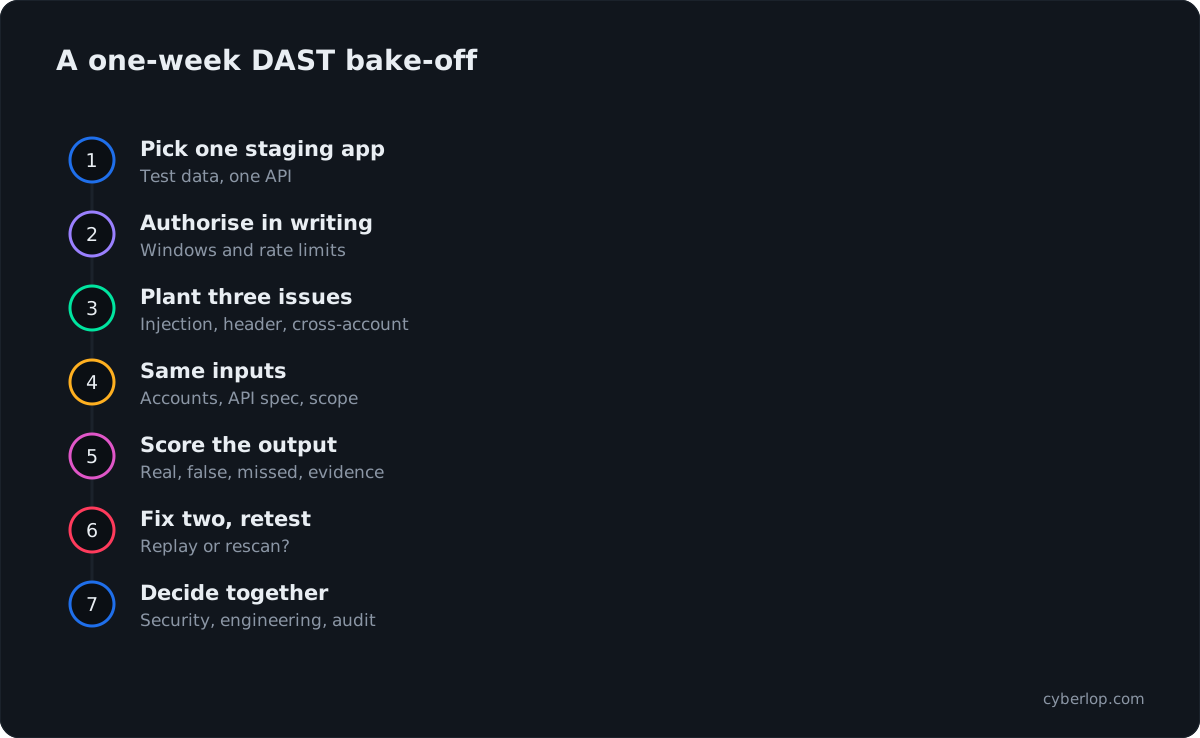
Run every shortlisted tool against the same application, with the same accounts and the same rules, and score the output rather than the demo. Written permission applies to open-source tools too.
The seven steps
- Pick one staging application with test data and at least one API.
- Authorise in writing and list the scan windows and rate limits.
- Plant three known issues: an injection point, a missing header and one cross-account read.
- Give every tool the same inputs: the same accounts, the same API definition, the same scope.
- Score the output: real findings, false positives, planted issues missed and how each is evidenced.
- Fix two issues, then retest. Note whether the tool replays the original exploit or just rescans. See retest.
- Decide together: security, engineering and whoever owns audit evidence.
A scorecard you can copy
| Measure | How to record it |
|---|---|
| Planted issues found | Count of the three you planted that the tool reported. |
| False positives | Findings that a developer could not reproduce. |
| Authentication held | Did the scan stay signed in for the whole run? |
| API endpoints reached | Discovered endpoints against the known number. |
| Time to first result | Minutes from trigger to a readable finding. |
| Triage effort | Minutes to decide each finding is real or not. |
Keep the scorecard with the purchase file. It is also useful evidence for an auditor who asks how you chose and tested your tooling.
Common mistakes when buying a DAST tool
- Judging by a demo on a deliberately vulnerable app instead of your own staging environment.
- Counting findings as a score. A shorter list with proof is often more useful than a long one.
- Skipping login testing, then finding the scanner only covered the public pages.
- Forgetting who owns scan scripts after the trial ends.
- Treating a clean scan as a clean application. See vulnerability scanning for what it can and cannot tell you.
Questions people ask
Best dast tools 2026: FAQs
What is DAST?
DAST, or dynamic application security testing, tests a running web application or API from the outside by sending requests and reading responses. It does not need your source code, so it suits black-box testing of a deployed build.
What is the best DAST tool in 2026?
There is no single best tool. Developer-first teams often shortlist StackHawk, Burp Suite DAST or ZAP; larger organisations look at Invicti, Veracode, Rapid7, Qualys or Tenable. Decide by login handling, API coverage, pipeline fit, evidence and deployment, then test on your own staging app.
Is there a good free or open-source DAST tool?
ZAP calls itself free and open source and is licensed under Apache 2.0 on GitHub. It offers an Automation Framework and Docker packaged scans. You maintain the scan scripts and authentication setup yourself, which is the main trade-off.
Does DAST replace a penetration test?
No. DAST repeats known checks quickly and suits every build. A penetration test looks for flaws that need judgement, such as one account reaching another's data or an abused workflow. Many teams run both, as covered in our DAST vs SAST vs IAST guide.
Can DAST scan APIs and authenticated pages?
Most tools here say they can. Burp Suite DAST lists Postman, OpenAPI, SOAP and GraphQL; StackHawk lists OpenAPI, GraphQL, gRPC, JSON-RPC and SOAP. Authentication varies, so test your hardest login flow, such as SSO or MFA, before you buy.
How do you reduce false positives from a DAST scanner?
Prefer tools that confirm findings, such as Invicti's proof-based scanning or Rapid7's Attack Replay. Give the scanner working credentials and a current API definition, and review a sample of findings in the trial to see how many a developer can reproduce.
Can DAST run inside CI/CD?
Yes. Burp Suite DAST, StackHawk, Checkmarx DAST, Invicti and others describe pipeline use. Keep pull-request scans short and scoped, and run deeper scans on a schedule so the build stays fast.
What is the difference between DAST and SAST?
SAST reads source code without running it. DAST tests the running application from outside. They find different problems, and IAST sits between them. See the Knowledge Hub terms for SAST and DAST.
Sources
Where the facts come from
- Verizon: 2026 Data Breach Investigations Report
- IBM: Cost of a Data Breach Report 2026
- CISA: Known Exploited Vulnerabilities catalog
- OWASP: Top 10:2025, A01 Broken Access Control
- OWASP: Top 10:2025
- Invicti: home page
- Invicti: DAST
- Acunetix: home page
- Acunetix: vulnerability scanner
- PortSwigger: Burp Suite DAST
- ZAP: home page
- ZAP: automation docs
- ZAP: authentication docs
- ZAP: GitHub repository
- StackHawk: home page
- StackHawk: DAST product page
- StackHawk: documentation
- Detectify: home page
- Detectify: Application Scanning
- Rapid7: InsightAppSec
- Qualys: WAS getting started
- Tenable: Web App Scanning
- Veracode: Dynamic Analysis docs
- Checkmarx: DAST
- Bright: What is Bright DAST?
Keep reading
Related articles
Access control testing checklist: sideways, upward and across tenants.
A step-by-step access control testing checklist for web apps and APIs: account planning, sideways, upward and cross-tenant checks, evidence and retests.
Burp Suite vs OWASP ZAP in 2026: which one should you use?
Burp Suite vs OWASP ZAP compared from vendor docs: manual testing, CI/CD, logins, APIs, scale, and a six-point way to choose. No prices.
Continuous penetration testing: how to run it alongside your annual pentest
What continuous penetration testing really means, how it compares with annual pentests, DAST and PTaaS, and how to run both in your pipeline.

See what a pentest adds to DAST
Cyberlop finds vulnerabilities in web apps and APIs with black-box, grey-box and white-box pentesting, and reports only what it exploited, with request, response and the line of code. Ask us to run it on one of your applications.
Or start with a $199 pilot on one application: thirty days, success criteria agreed before day one, credited against the annual if you convert.