
Home / Blog / Vibe coding security
Buyer guides
Vibe coding security: risks, review steps and a launch checklist for 2026
AI can write a working app in an afternoon. This guide shows what it tends to get wrong, how to review and test the result, and what to check before real customers arrive.
Cyberlop Labs · Updated · 12 min read
Vibe coding security is the practice of making AI-generated software safe for production. Assume the code has gaps. Check authorisation on the server, keep secrets out of the repository, verify every dependency, scan in CI, and test the live app with more than one account before launch.
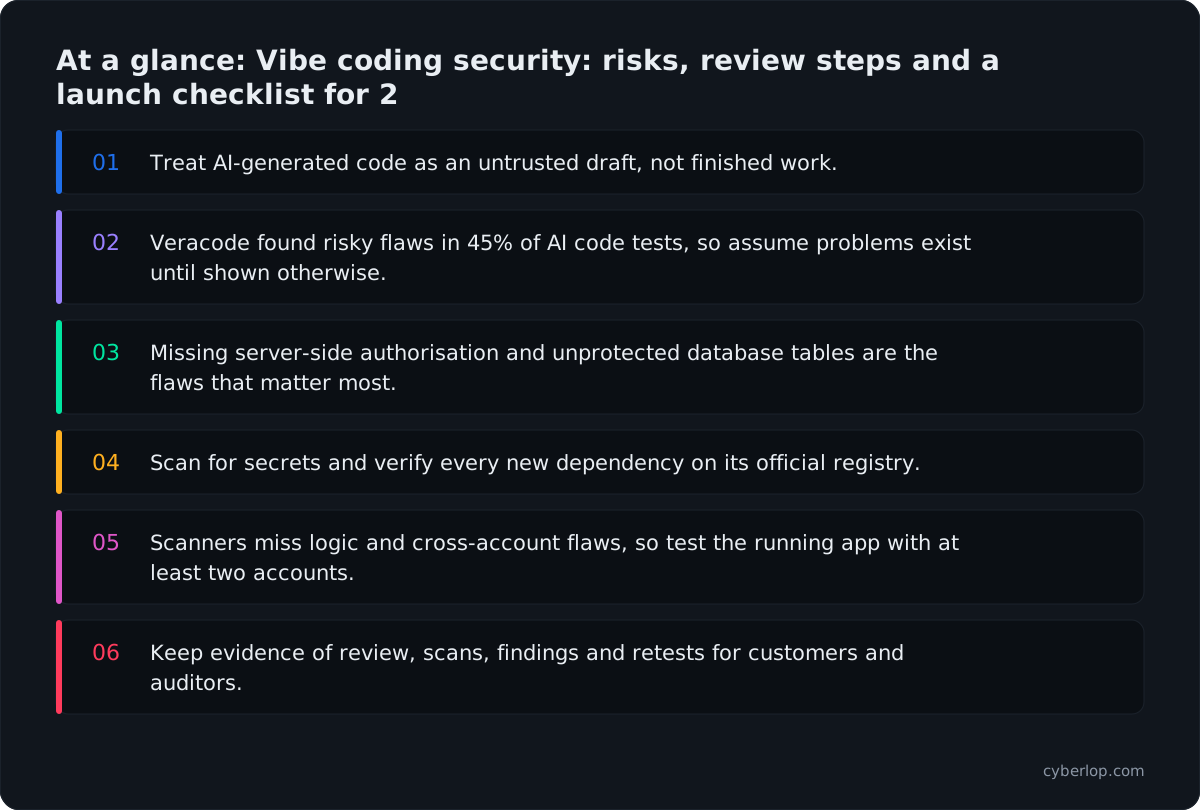
- Treat AI-generated code as an untrusted draft, not finished work.
- Veracode found risky flaws in 45% of AI code tests, so assume problems exist until shown otherwise.
- Missing server-side authorisation and unprotected database tables are the flaws that matter most.
- Scan for secrets and verify every new dependency on its official registry.
- Scanners miss logic and cross-account flaws, so test the running app with at least two accounts.
- Keep evidence of review, scans, findings and retests for customers and auditors.
Vibe coding security is the work of making software that was largely written by an AI model safe to run in production. The short answer: read AI-written code the way you would read a pull request from a fast new hire. It usually works. It also tends to skip authorisation checks, leak secrets, ship insecure defaults and, now and then, import packages that do not exist. Review it, scan it, and test the running app before real customer data touches it.
What is vibe coding security?
Vibe coding means building software by describing what you want to an AI model and accepting what it writes, often without reading the code closely. Andrej Karpathy popularised the phrase in early 2025, and it has since stretched to cover almost any AI-assisted development, from a founder prompting a no-code builder to an engineer using an agent inside an IDE.
Vibe coding security covers the review steps, tooling and guardrails that sit between "it runs" and "it is safe". That gap is real. A model optimises for code that satisfies the prompt, and a prompt such as "add an invoices page" rarely says "and make sure one customer cannot read another customer's invoices".
In March 2026 the head of the UK National Cyber Security Centre, Richard Horne, spoke about it at RSAC. He called vibe coding a huge opportunity but "not without risk of its own", which is a fair summary for a team deciding how much to trust the output.
Vibe coding versus AI-assisted engineering
The risk depends on how much a human reads. At one end, a developer uses autocomplete and reviews every diff. At the other, a non-developer ships an app they have never opened in an editor. Most teams sit in between, and the security controls should scale with that distance.
Table 1. How reading effort changes the controls you need
| Way of working | Who reads the code | Minimum controls |
|---|---|---|
| Autocomplete in an IDE | The developer, line by line | Normal code review, SAST and dependency checks in CI |
| Agent writes whole features | A reviewer, on the pull request | Review checklist below, secret scanning, tests for access rules, a test of the running app |
| Prompt-to-app builder | Often nobody | Independent test of the live app and its database rules before launch; no production data until then |
How risky is AI-generated code in 2026?
Studies disagree on the exact rate, and no figure describes your codebase. Four public data points still show the shape of the problem.
Insecure code in tests
Veracode's 2025 GenAI Code Security Report analysed code from over 100 large language models across Java, JavaScript, Python and C#. It found that AI-generated code introduced risky security flaws in 45% of tests. It also reported that larger, newer models did not write more secure code.
Leaked secrets
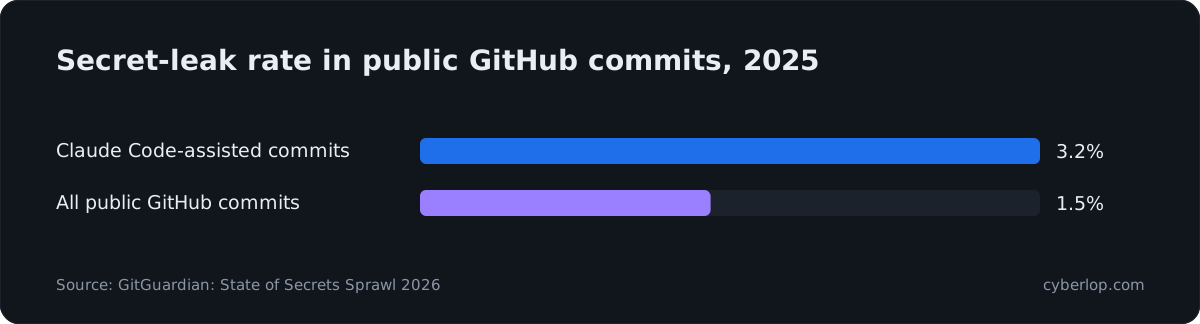
GitGuardian's State of Secrets Sprawl 2026 counted 28.65 million new hardcoded secrets added to public GitHub in 2025, a 34% increase year on year and the largest single-year jump it has recorded. Commits assisted by Claude Code leaked secrets at 3.2%, against a 1.5% baseline across all public GitHub commits. GitGuardian itself says this should not be read as a simple tool failure, because developers decide what to accept.
Invented dependencies
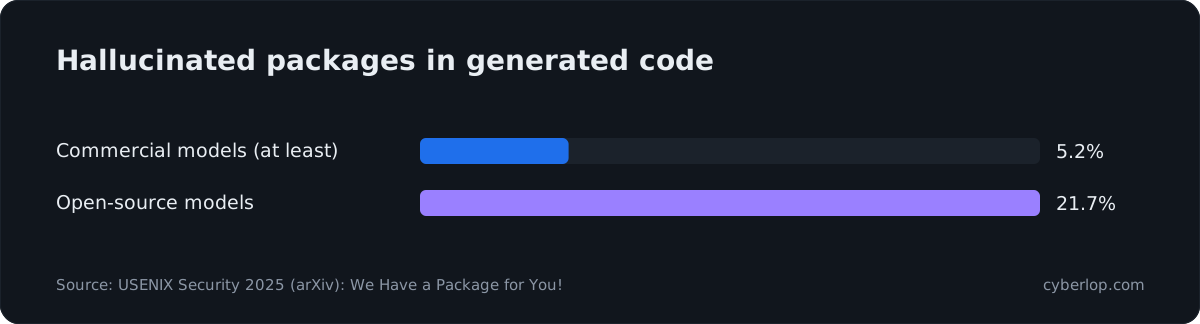
A USENIX Security 2025 paper, "We Have a Package for You!", generated 576,000 code samples and found that the average share of hallucinated packages was at least 5.2% for commercial models and 21.7% for open-source models. The authors recorded 205,474 unique invented package names.
Access control was already the weak spot
This matters because the most common web flaw does not need an AI to appear. The OWASP Top 10:2025 keeps Broken Access Control at A01 and states that 100% of the applications tested had some form of it. A model trained on public code has seen plenty of examples of the pattern done badly.
What are the main vibe coding security risks?
The same handful of failures turn up again and again. None is new; the model just produces them faster. Each one below comes with a test you can run, and most map to the OWASP Top 10.
1. Missing authorisation checks
The model builds the screen, the route and the query, and forgets the rule about who may call it. The result is broken access control: a signed-in account that can read or change another account's records by changing an ID, or a normal account that can reach an admin route.
What it looks like in code
Look for handlers that load a record by ID from the URL and return it with no comparison to the signed-in account. In a prompt-built app with a hosted database, look for tables that the browser can query directly with no row rules. This is IDOR or BOLA in an API, and our guide to broken object level authorization shows how to test it.
Why database rules matter
Supabase is a common back end for prompt-built apps. Its Row Level Security documentation says plainly: "A table in an exposed schema without RLS is readable and writable by any role with a grant on it." It adds that on existing projects a new table in public starts with every privilege already granted to its roles. If the generated code creates tables and never turns on row-level security, the public key in the browser can read the data.
2. Hardcoded secrets and exposed keys
Models paste API keys into source files, front-end bundles and .env files that get committed. Anything shipped to the browser is public. A hardcoded secret in a repository stays in its history even after you delete the line, so the fix is to rotate the key, not just remove it. The OWASP Secrets Management Cheat Sheet advises rotating secrets regularly so stolen credentials only work for a short time, and scanning early with IDE checks, pre-commit hooks and CI.
3. Insecure defaults
Generated projects often run with debug mode on, wildcard CORS, no rate limiting, permissive storage buckets and verbose error pages. Each is a secure defaults failure that the model copied from a tutorial where convenience was the goal. The OWASP list ranks Security Misconfiguration at A02:2025 for a reason.
4. Hallucinated and risky dependencies
When a model suggests a package that does not exist, an attacker can register that name with malicious code and wait for someone to install it. This is often called slopsquatting, and it is a close cousin of typosquatting and dependency confusion. OWASP now names the wider category A03:2025 Software Supply Chain Failures and recommends getting components only from official sources and keeping an inventory (an SBOM) of direct and transitive dependencies.
5. Weak input handling and injection
Models still concatenate strings into queries, trust file names and skip output encoding. Expect SQL injection, cross-site scripting and path traversal in the places where user input meets a sink. Veracode's report is the best-known measurement of this class in generated code.
6. Missing business rules
The model implements the happy path. It does not know that a coupon may only be used once, that a refund cannot exceed the payment, or that a trial must not restart on every sign-up. These business-logic flaws pass every scanner because nothing looks malformed. They are found by someone, or something, trying to misuse the feature. Our API security testing guide covers how to probe them.
7. Over-powered coding agents
The tool that writes the code can also run commands, read your environment and call outside services. A poisoned README or issue can steer it through indirect prompt injection. Keep agents on least privilege, away from production credentials, and read our notes on MCP security and AI agent security testing if your agent uses tools.
Table 2. Risk, typical sign, quick check
| Risk | Typical sign | Quick check |
|---|---|---|
| Missing authorisation | Record fetched by ID with no owner comparison | Request account B's record with account A's session |
| Database rules off | Browser queries tables directly | Query each table with the public key alone |
| Hardcoded secrets | Keys in source, bundle or git history | Run a secret scanner over the full history |
| Insecure defaults | Debug on, open CORS, no rate limit | Check response headers and error pages in production |
| Invented packages | Dependency with few downloads or no history | Verify each new package on its official registry page |
| Injection | String-built queries, raw HTML output | SAST rules plus tests with hostile input |
| Business logic | Rules only in the front end | Repeat, reorder and replay requests in the API |
How do you secure vibe-coded apps?
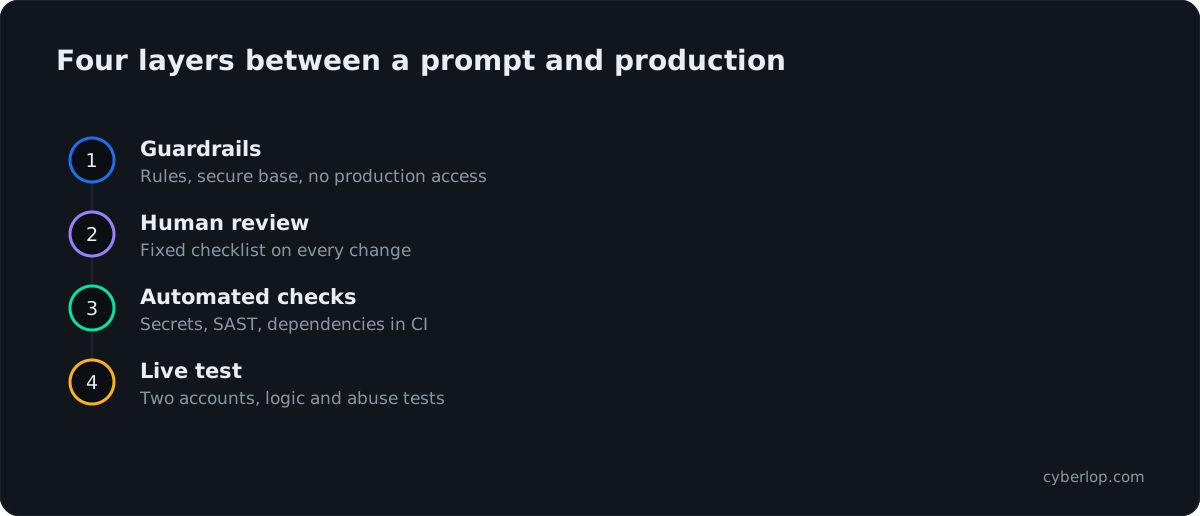
You secure them in layers: constrain what the model may do, review what it wrote, scan it automatically, then test the running application. No single layer is enough. The NCSC's message at RSAC was that AI development tools must be designed to avoid introducing vulnerabilities, so the safeguards have to be built in rather than assumed.
Guardrails before the first prompt
- Write security rules into the project. Most coding tools read an instructions file. State the rules there: check ownership on every query, parameterise SQL, never put secrets in client code, ask before adding a dependency.
- Use a secure base. Start from a template with authentication, session handling and security headers already done, and let the model fill in features.
- Keep production out of reach. Give agents a dev environment, throwaway credentials and no write access to production data.
- Protect the main branch. Require a reviewed pull request and passing checks with branch protection.
A review checklist for generated code
Large AI diffs wear reviewers out, so use a short, fixed checklist. The OWASP Authorization Cheat Sheet gives the three rules to anchor it: deny by default, enforce least privilege, and validate permissions on every request.
Check 1: authorisation on the server
For each new route, find the line that decides whether this caller may do this to this record. If the only check is in the front end, treat it as missing. Read about server-side authorisation and the ownership check.
Check 2: data access and secrets
Confirm database rules exist for every table the browser can reach. Search the diff for keys, tokens and connection strings. Confirm only public identifiers reach the client.
Check 3: inputs and outputs
Find where user input enters. Is it validated, parameterised, encoded on output? Does an error message reveal stack traces or table names? See input validation.
Check 4: dependencies
List every package the change added. Open each on its official registry. Check age, maintainers and download history, then pin the version with a lockfile. Dropping a package you do not need is the safest fix.
Check 5: business rules
Ask what a bored customer could do with this feature: repeat it, reorder the steps, send negative numbers, or use another account's IDs.
Automated checks in the pipeline
Automation catches the repeatable mistakes so humans can focus on logic. Wire these into CI so a failing check blocks the merge.
Table 3. What each automated check finds in AI-written code
| Check | Finds | Misses |
|---|---|---|
| Secret scanning | Keys and tokens in code and history | Secrets that are only logged or sent at runtime |
| SAST | Injection patterns and unsafe calls in source | Missing authorisation, since the code looks fine |
| Dependency scanning (SCA) | Known-vulnerable and outdated packages | Brand-new malicious packages with no advisory yet |
| DAST | Common flaws in a running app | Logic and cross-account flaws that need context |
| Tests for access rules | Regressions when a model rewrites a route | Only the rules you thought to write |
The DAST, SAST and IAST comparison explains where each tool earns its keep. Add a pre-commit hook so secrets are blocked before they ever reach the repository.
How do you test a vibe-coded app before launch?
Test the running app with at least two accounts and a pile of real-looking data, then try to make one account reach the other's records. Scanners and reviews read what the code says. Testing shows what the app does, and that is where authorisation and logic flaws surface. The sections below give a practical order.
Set up accounts and data
Create at least two ordinary accounts in separate organisations, one admin, and one unauthenticated session. Fill each with distinct records, so any leak is easy to recognise. Note every ID, file URL and API route each account touches.
Run the cross-account tests
- Replay account A's requests with account B's session and see whether B can read, change or delete A's data.
- Call admin routes with an ordinary session, and with no session.
- Change IDs, including those in file links, exports and webhook payloads.
- Query the database directly with the public client key and see which tables answer.
- Try changing fields the form never shows, such as role, plan, owner or price (mass assignment).
Our access control testing checklist turns these into a full plan, and the VAPT checklist covers the surrounding process.
Run logic and abuse tests
Repeat a payment, cancel half-way, apply a code twice, or run two requests at once. Models rarely handle a race condition. Send oversized, empty and unexpected values to every field.
Where an exploit-proving tester fits
This is the kind of work Cyberlop does. It finds vulnerabilities in web apps and their APIs with black-box, grey-box and white-box pentesting, checks business-logic flaws and cross-account access, and reports only what it exploited, with the request, the response and, in white-box mode, the line of code. A fix is proven by re-running the exact exploit against the new code in a closed-loop retest. It can run on a schedule or in CI/CD and gate a build, which suits a codebase that changes by the hour. See how it works and what a finding looks like.
Is AI-generated code safe for production?
It can be, if it passes the same gates as human code and a few extra ones. The model is not the problem. The missing gates are. Use this table to decide how much proof to demand before each release.
Release gates by risk
Table 4. Release gates by what the app holds
| App holds | Gate before release | Re-test when |
|---|---|---|
| Internal prototype, no real data | Secret scan and dependency check | It gains users |
| Customer accounts and personal data | Review checklist, CI scans, test of the running app with two accounts | Any change to authentication, data model or roles |
| Payments, health or regulated data | All of the above plus a full penetration test and a record of fixes | Each major release and on a schedule |
If customers or auditors ask, keep the evidence: the review notes, scan results, test findings and retest proof. That record also helps with SOC 2 and ISO 27001 conversations, and with security questionnaires. Our continuous penetration testing guide shows how to keep the test current as the code changes. For a view on automated testing tools and their honest limits, read AI penetration testing.
Vibe coding security checklist
Copy this into your pull request template. Each item is a yes or no.
Before you merge or launch
- Every route checks the caller's right to the specific record, on the server.
- Database rules are on for each table the browser can reach, and deny by default.
- No secrets in source, bundles, logs or git history; leaked keys have been rotated.
- Debug off, CORS limited, rate limits on login and sensitive actions.
- Every new dependency verified on its official registry and pinned.
- Inputs validated, queries parameterised, output encoded.
- Business rules enforced on the server: limits, one-time codes, refunds, trials.
- The coding agent has no production credentials.
- Two-account test done on the running app; findings fixed and re-tested.
- Evidence saved: who reviewed, what ran, what was found.
Mistakes teams repeat
The classic mistake is asking the model to "make it secure" and accepting the answer. Another is scanning once, at the end, and reading a green SAST run as proof that access control works. Teams also fix the one line a scanner flagged and miss the same flaw in five sibling routes, or re-prompt the model to patch a problem without checking that the patch held. The only reliable check is to run the original exploit again.
What do standards expect from AI-written code?
Standards do not exempt generated code. They ask what they ask of any software: secure development practices, tested controls and evidence. For a product team, the useful anchors are the OWASP Top 10 and ASVS for requirements, the secure SDLC for process, and the DPDP Act or GDPR if you hold personal data. If an AI-written flaw exposes customer records, the duty to report a breach applies just the same. See also the product teams page and our limits.
Questions people ask
Vibe coding security: FAQs
What is vibe coding security?
Vibe coding security is the review, tooling and testing that make AI-generated software safe to run. It treats generated code as an untrusted draft and adds checks for authorisation, secrets, defaults and dependencies.
Is vibe coding secure?
Not by default. Veracode's 2025 study found risky flaws in 45% of AI code tests. It can be made secure by reviewing the code, scanning it in CI and testing the running app before launch.
What are the biggest security risks of AI-generated code?
The most common are missing authorisation checks, hardcoded secrets, insecure defaults, invented or risky dependencies, weak input handling and missing business rules.
What is slopsquatting?
Slopsquatting is when an attacker registers a package name that an AI model tends to invent, so developers who trust the suggestion install malicious code. Check every new package on its official registry before installing it.
Can a scanner find all the flaws in vibe-coded apps?
No. Scanners are good at known patterns, leaked secrets and outdated packages. They struggle with missing authorisation and business-logic flaws, which need a test that uses real accounts against the running app.
Should non-developers launch an app they built with AI?
Only with care. If the app holds customer data, get the database rules, secrets and access checks reviewed and have the live app tested first. Until then, use dummy data.
How often should a vibe-coded app be re-tested?
Re-test after any change to authentication, roles or the data model, and on a schedule for fast-moving code. Running the test in CI/CD keeps it current as the model rewrites routes.
Does the AI vendor take responsibility for security?
Generally you do. Model vendors and app builders offer tools, but you own the application and its data. Treat generated code as your code, with the same review, testing and evidence.
Sources
Where the facts come from
- Veracode: 2025 GenAI Code Security Report
- GitGuardian: State of Secrets Sprawl 2026
- USENIX Security 2025 (arXiv): We Have a Package for You! Package hallucinations by code-generating LLMs
- OWASP: Top 10:2025, A01 Broken Access Control
- OWASP: Top 10:2025, A03 Software Supply Chain Failures
- OWASP: Authorization Cheat Sheet
- OWASP: Secrets Management Cheat Sheet
- Supabase: Row Level Security
- NCSC: CEO speech at RSAC 2026
Keep reading
Related articles
Access control testing checklist: sideways, upward and across tenants.
A step-by-step access control testing checklist for web apps and APIs: account planning, sideways, upward and cross-tenant checks, evidence and retests.
AI agent security testing: a 2026 test plan for LLM apps and agents
AI agent security testing in 2026: a test plan for prompt injection, excessive agency, data leakage and cross-account access, mapped to OWASP.
AI penetration testing in 2026: what it can and cannot do
AI penetration testing in 2026: what it does well, where it fails, how accurate it is, and questions to ask before you trust a tool.

Is your AI-built app ready for customers?
Cyberlop finds vulnerabilities in web apps and their APIs, including cross-account access and business-logic flaws, and reports only what it exploited, with request, response and the line of code. Ask us to run it on one of your applications.
Or start with a $199 pilot on one application: thirty days, success criteria agreed before day one, credited against the annual if you convert.