
Home / Blog / Best vulnerability scanner for startups
Compare
Best vulnerability scanner for startups in 2026: ten options and how to choose
Startups do not need one scanner; they need a small stack that fits their stage. Here are ten options, who each suits, and a first-week plan.
Cyberlop Labs · Updated · 13 min read
The best vulnerability scanner for a startup is a layered stack, not one product: free dependency and secret scanning on the repository, static rules in pull requests, a dynamic scan on staging that can sign in, an external exposure check, and a proof-based pentest before an audit or large customer review.
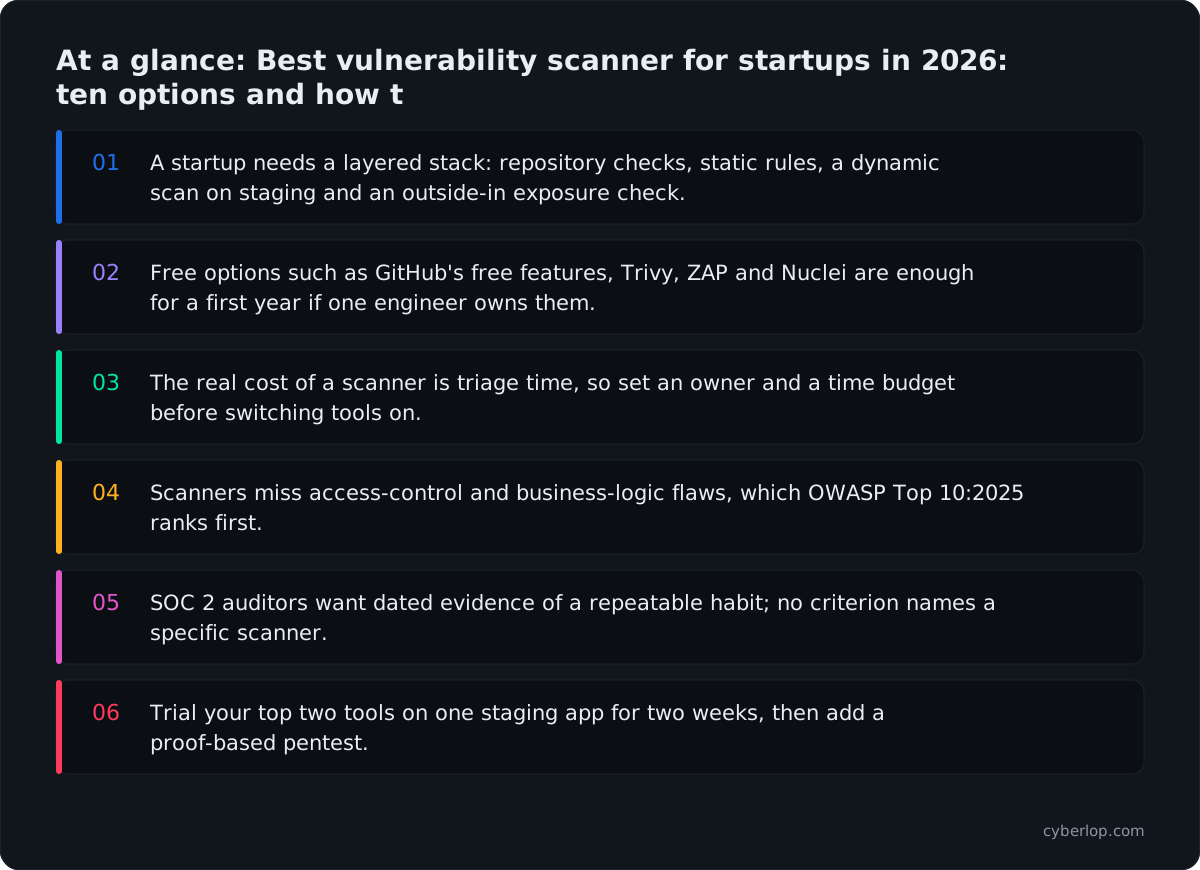
- A startup needs a layered stack: repository checks, static rules, a dynamic scan on staging and an outside-in exposure check.
- Free options such as GitHub's free features, Trivy, ZAP and Nuclei are enough for a first year if one engineer owns them.
- The real cost of a scanner is triage time, so set an owner and a time budget before switching tools on.
- Scanners miss access-control and business-logic flaws, which OWASP Top 10:2025 ranks first.
- SOC 2 auditors want dated evidence of a repeatable habit; no criterion names a specific scanner.
- Trial your top two tools on one staging app for two weeks, then add a proof-based pentest.
A vulnerability scanner for a startup is a tool that automatically checks your code, dependencies, containers or running app for known weaknesses, and the best choice is a small stack rather than one product. In 2026 a sensible starting stack is free repository scanning for dependencies and secrets, a static analysis rule set in your pull requests, a dynamic scan against staging, an outside-in check of what you expose, and one proof-based pentest before an audit or a big customer.
This guide covers nine options across those categories, from free and open source to commercial platforms, and says who each suits. Facts about each vendor come only from that vendor's own website, documentation or GitHub page, read on 7 October 2026. It names no prices: where cost matters, see each vendor's pricing page. Product names are written as each vendor writes them.
What does a startup actually need from a vulnerability scanner?
A startup needs findings it can act on this week, running where its developers already work, at a cost in attention it can afford. Coverage matters less than signal: ten alerts a team fixes beat five hundred it ignores.
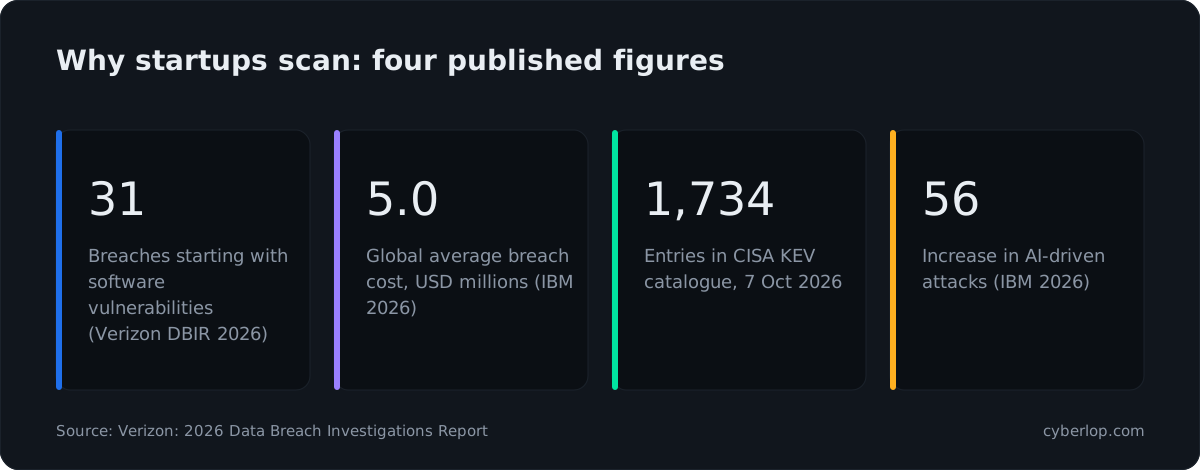
Three pressures shape the choice. A customer or investor asks "how do you test your application?" in a security questionnaire. An auditor, usually for SOC 2, asks for evidence that you find and fix vulnerabilities. And attackers keep using software flaws: the Verizon DBIR, 2026 reports that 31% of breaches now begin with a software vulnerability, ahead of stolen passwords as the most common way in.
When should a startup start scanning?
Start with the free repository checks on day one, add a dynamic scan once you have a staging environment, and book a pentest when a customer, auditor or launch date asks for one. Repository checks cost minutes to enable and catch the cheapest mistakes: a vulnerable dependency, a committed key.
SOC 2 is the usual forcing event. The AICPA publishes the Trust Services Criteria auditors work from, and they are criteria, not a list of mandatory tools. No criterion names a particular scanner. What auditors want to see is a repeatable habit with dated evidence: scans that ran, findings that were triaged, fixes that were checked. If you plan to run a Type II period, start the habit at least a few weeks before the observation window opens, so the first scans are not your first scans. Our guide to SOC 2 penetration testing covers what auditors expect from a pentest in particular.
What does it cost a startup to triage findings?
The real cost of a scanner is not the licence but the hours spent deciding which alerts matter. Every false positive burns developer attention, and every unread alert trains the team to ignore the next one.
The IBM Cost of a Data Breach Report, 2026 reports a global average breach cost of $4.99M, up 12% on the year before and the highest on record. That figure is an average across large and small organisations and is not a forecast for any one company, but it explains why customers ask about testing. Set a triage budget before you switch anything on: for example, one named owner and thirty minutes a day. If a tool produces more than that budget can absorb, tune it or narrow it rather than muting it.
What types of vulnerability scanner are there?
There are five types a startup meets: dependency scanners (SCA), static analysis (SAST), secret scanners, dynamic scanners (DAST) and external exposure scanners. They look at different things, so they do not replace each other. Our longer explainer on DAST vs SAST vs IAST goes deeper on the first three.
Scanner types compared
The table shows what each type reads, where it runs and what it tends not to see.
| Type | Looks at | Typically runs | Tends not to see |
|---|---|---|---|
| Dependency scanning (SCA) | Open-source packages and their known vulnerabilities | Repository, pull request, build | Flaws in your own code |
| Static analysis (SAST) | Your source code | Editor, pull request | Problems that only appear when the app runs, and many access-control gaps |
| Secret scanning | Keys and tokens in code and history | Commit, push, repository | Secrets that live outside the repo |
| Dynamic scanning (DAST) | The running app from outside | Staging, scheduled, CI | Logic that needs a person to understand the business rule |
| External exposure scanning | Public hosts, ports, services, certificates | Scheduled, continuous | Application logic behind a login unless it is configured for it |
| Pentest with proof | Your app and APIs, tested and exploited | Before a release, audit or launch | Nothing continuous unless you schedule it |
Which are the best vulnerability scanners for startups in 2026?
There is no single best scanner. The nine below are grouped by the job they do, so you can pick one per layer. Order within a group is not a ranking.
Repository and dependency scanners
These run on your code and packages, so they fit a startup's first week. They need no staging environment and no network access to production.
GitHub security features
If your code is on GitHub, start here. GitHub's documentation lists dependency graph, Dependabot alerts and updates, and security advisories as available on all plans. For public repositories it also lists secret scanning alerts, push protection, code scanning and dependency review at no charge, while for private repositories it lists code scanning and secret protection features under its paid GitHub Code Security and GitHub Secret Protection offerings. See GitHub's pricing page for the current terms. It suits teams already on GitHub who want alerts inside the pull request. It does not run against your live app.
Trivy
Trivy is an open-source scanner under the Apache-2.0 licence. Its site lists targets of code repositories, binary artifacts, container images and Kubernetes clusters, and scanners for vulnerabilities (CVE), IaC misconfigurations, secrets, licence compliance and SBOMs. It suits a team that ships containers and wants one free command-line tool in the build. It is a tool you wire up yourself, so someone on the team owns the configuration and the results. See our note on the SBOM if a customer asks for one.
Semgrep
Semgrep lists Semgrep Code (SAST), Semgrep Supply Chain (open-source dependencies and malware), Semgrep Secrets and Semgrep Guardian, which it describes as scanning and fixing AI-generated code as it is written. Its site also refers to a Community Edition and an open-source engine. It suits teams that want custom rules written for their own code patterns, for example "never call this function without an ownership check". Check what the Community Edition includes against the paid platform on Semgrep's own pages before you plan around it.
Snyk
Snyk's product page lists Snyk Code, Snyk Open Source, Snyk Container, Snyk IaC, Snyk API & Web (DAST) and Snyk Secrets, plus Evo for agentic security orchestration. It suits developer teams who want code, dependencies and containers in one place with editor and pull request integration. As with any broad platform, test it on your own repositories before you commit.
Aikido Security
Aikido's site lists a long set of scanners: SAST, SCA, secrets, IaC, container images, cloud posture, DAST, AI pentesting, attack surface management, and AutoFix that opens pull requests. It frames its pitch for developers as "security that opens a PR instead of a ticket". It suits very small teams that want one dashboard instead of five tools. Its site also publishes false-positive claims; treat those as vendor claims and measure on your code.
Scanners for the running app and what you expose
These need something running to test, usually a staging environment, and some of them need a test account so they can get behind your login.
OWASP ZAP
ZAP describes itself as "the world's most widely used web app scanner" and as free and open source, run as an independent project with Checkmarx providing organisational support. It says it is designed for newcomers as well as experienced professionals. Its automation page lists a quick-start command line, Docker packaged scans, GitHub Actions, the Automation Framework (described as "recommended for most non-trivial automation") and an API with daemon mode. It suits a startup with an engineer willing to learn it. The cost is time: you configure authentication, scope and tuning yourself.
Nuclei
Nuclei's GitHub page calls it "a fast, template based vulnerability scanner" with YAML templates covering protocols including TCP, DNS, HTTP, SSL, WHOIS, JavaScript and code-based detection, under the MIT licence. It suits teams that want to check known issues and misconfigurations across hosts quickly. It is template-driven, so it finds what a template describes, not new logic flaws in your own app.
StackHawk
StackHawk's documentation describes HawkScan as supporting REST, GraphQL, SOAP, gRPC and JSON-RPC APIs, authenticated scanning (form-based, OAuth and HTTP authentication), and running locally from the command line or inside CI/CD. Its home page says it "integrates into the agent loop to test your running app", with skills for AI coding agents. It suits developer-led teams that want a dynamic scan in the pipeline from the start.
Intruder
Intruder describes itself as "always-on exposure management". Its site lists external attack surface scanning, infrastructure scanning, continuous DAST for web apps including authenticated scanning behind login pages, agentless cloud scanning across AWS, Azure and Google Cloud, and reporting for SOC 2, ISO 27001, PCI DSS, HIPAA and DORA. It lists 15+ integrations including GitHub, GitLab, Jira and Slack. It suits teams whose first question is "what can the internet see of us?". Its site also describes AI-powered pentesting; read its own pages for scope.
Side-by-side summary
This table uses each vendor's own wording. A tick means the vendor lists the capability on its site; it says nothing about depth or quality.
| Tool | Dependencies | Code (SAST) | Secrets | Running app (DAST) | External exposure | Licence model |
|---|---|---|---|---|---|---|
| GitHub | Dependabot | Code scanning | Secret scanning | Not listed | Not listed | Part free, part paid add-ons |
| Trivy | Vulnerabilities, SBOM | IaC misconfiguration | Yes | Not listed | Not listed | Open source, Apache-2.0 |
| Semgrep | Supply Chain | Semgrep Code | Semgrep Secrets | Not listed | Not listed | Community Edition plus platform |
| Snyk | Open Source | Snyk Code | Snyk Secrets | API & Web (DAST) | Not listed | Commercial platform |
| Aikido Security | SCA | SAST | Yes | DAST, API scanning | Attack surface management | Commercial platform |
| OWASP ZAP | Not listed | Not listed | Not listed | Web app scanner | Not listed | Free, open source |
| Nuclei | Not listed | Not listed | Not listed | Template-based, HTTP and more | Hosts and protocols via templates | Open source, MIT |
| StackHawk | Not listed | Not listed | Not listed | HawkScan | Not listed | Commercial platform |
| Intruder | Not listed | Not listed | Exposed secrets in cloud | Continuous DAST | External attack surface | Commercial platform |
Where does Cyberlop fit?
Cyberlop is the proof layer, not a replacement for the scanners above. It finds vulnerabilities in web apps and their APIs with black-box, grey-box and white-box pentesting. In white-box mode it reads your code while testing the running app, so a finding can point to the file and line.
It reports what it actually exploited: each finding carries the request, the response, a screenshot where a person can see it, and the line of code. If it did not break it, it does not report it. Severity and confidence are kept apart, and findings carry CWE and OWASP references. It also checks business-logic flaws and cross-account access, meaning one signed-in account reaching another's data or functions. After a fix, it re-runs the exact exploit against the new code, a closed-loop retest, rather than running a fresh scan.
It can run on a schedule or in CI/CD and gate a build, and it can run inside your own network so your code does not leave it (private scanning). For startups the usual fit is a pilot on one application before an audit, a launch or a large customer review. See how it works and what a finding looks like.
What do vulnerability scanners miss?
Scanners match patterns and known signatures, so they miss flaws that depend on what your app is supposed to allow. The biggest gap is access control: the OWASP Top 10:2025 lists Broken Access Control as A01, ahead of Security Misconfiguration (A02) and Software Supply Chain Failures (A03).
A scanner cannot know that invoice 1042 belongs to another customer, or that a trial plan should not be able to call an admin endpoint. Those are broken access control and business-logic flaws. They need a tester, human or automated, who signs in with two accounts and checks what each can reach that it should not. Our access control testing checklist shows how to plan that, and vibe coding security explains why AI-written code makes the gap more common.
Known exploited flaws still matter
The CISA Known Exploited Vulnerabilities catalog showed 1,734 entries when we read it on 7 October 2026, with the newest dated 4 October. These are flaws with evidence of active exploitation. Dependency and external scanners are the cheapest way to learn if you run one; the KEV catalog is a good tie-breaker when deciding what to patch first.
AI is changing the attacker's pace
IBM's 2026 report cites a 56% increase in AI-driven attacks, led by AI deepfake impersonations and AI-enabled malware. That is a social and malware trend more than a web-scanning one, but it supports a simple point: assume faster, cheaper attackers, and shorten the time between finding and fixing.
How do you choose a vulnerability scanner for your startup?
Choose by stage and by the question you must answer next, not by feature count. Use the criteria below, then the stage table.
Eight criteria before you switch one on
- Where does it run? Editor, pull request, CI, staging or outside-in. Pick one per layer.
- Can it sign in? A scanner that cannot get behind your login tests only your marketing pages.
- Does it fit your stack? Languages, frameworks, API styles and containers, from the vendor's own docs.
- Who owns the alerts? One named person, with a time budget.
- Can it fail a build? Gate on high-confidence findings only, so you do not block releases on noise.
- Is the evidence good enough for an auditor? Dated results, owners, and proof a fix worked.
- Where does your code go? Hosted, self-run or inside your network.
- What does it say it does not cover? Read the limits, not only the feature list.
Which stack fits which stage?
The table maps four common startup stages to a starting stack. Treat it as a default to adjust, not a rule.
| Stage | Question you must answer | Starting stack | Add next |
|---|---|---|---|
| Pre-launch, first repository | Is anything obviously exposed? | Dependency alerts, secret scanning and push protection on the repository | A container or IaC scan such as Trivy |
| First paying customers | How do you test your app? (security questionnaire) | Add SAST rules in pull requests and a scheduled DAST scan on staging | An external exposure scan |
| SOC 2 preparation | Can you show the habit with dates? | Scheduled scans, a triage log, a gated build for high-confidence findings | One scoped pentest with a retest |
| Enterprise deals, Series A | Can a tester prove nothing sensitive is reachable? | Everything above, wired into CI, with named owners | Regular proof-based pentests including cross-account access |
How do you set up vulnerability scanning in your first week?
You can have useful coverage in five working days with no new budget. The order below puts the cheapest and quietest checks first.
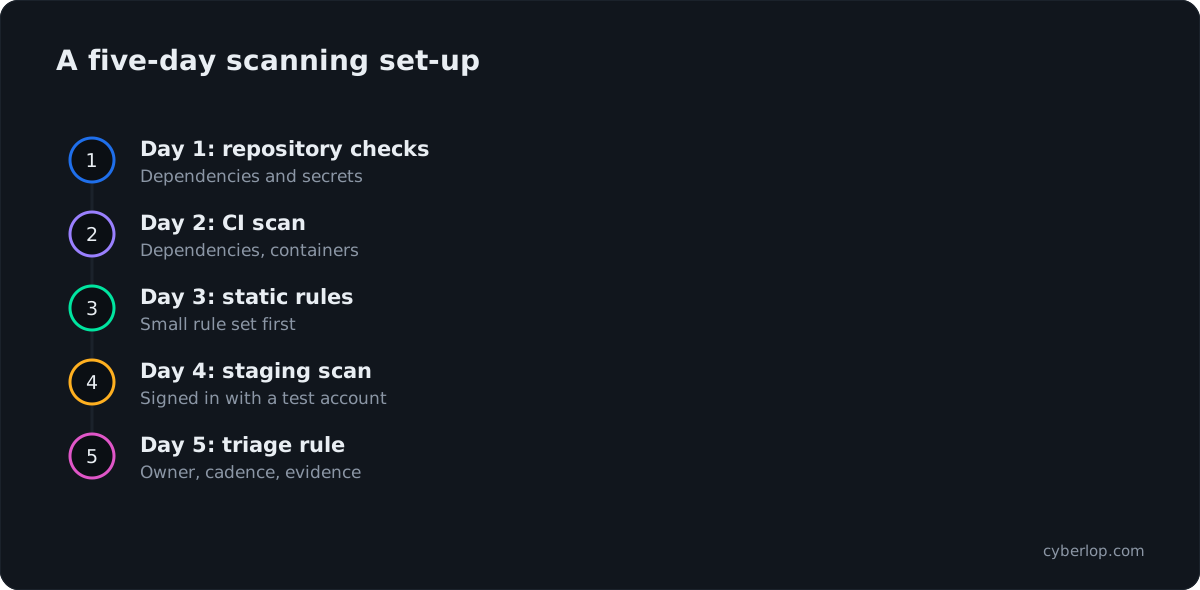
- Day 1, turn on repository checks. Enable dependency alerts and secret scanning with push protection where your plan includes them. Rotate any key it finds.
- Day 2, add a dependency and container scan to CI. Trivy or your platform's equivalent. Fail the build only on high severity with a fix available, at first.
- Day 3, add static rules. Start with a small rule set so pull requests do not drown. Add rules for your own risky patterns.
- Day 4, run a dynamic scan on staging. Create two test accounts and give the scanner one of them. Use ZAP, StackHawk, Snyk, Aikido or Intruder, depending on your budget and skills.
- Day 5, write the triage rule. Who looks, how often, and what counts as "fix now". Save the first results as evidence.
Then book a pentest for the thing scanners cannot judge. Our continuous penetration testing guide explains how scheduled scans and periodic pentests fit together, and penetration testing cost covers what drives a quote.
Should a startup pay for a scanner or use free ones?
Start free if you have an engineer who can own the setup, and pay when the time you spend running tools costs more than the tool. Free and open-source options (Trivy, ZAP, Nuclei, GitHub's free features, Semgrep's Community Edition) are real and enough for a first year. Commercial platforms mainly sell integration, triage help, reporting and support. See each vendor's pricing page and trial your top two on one staging app before deciding.
What mistakes do startups make when choosing scanners?
The five common ones are buying breadth before depth, scanning only production, never signing in, muting alerts instead of tuning them, and treating a clean scan as proof of safety.
Scanning without a login
Much of an app's functionality sits behind a login. An unauthenticated scan of a single-page app often tests little more than the login screen. Give your scanner a test account and check its report to confirm it reached the pages you care about. See authenticated scan.
Treating a clean report as a pass
A clean scan means the tool found nothing it knows how to find. It is a useful signal and not a guarantee. Pair it with periodic penetration testing and keep a record of both. If you want a wider tool landscape, see our best DAST tools and best AI pentesting tools comparisons.
Gating builds on everything
A build gate that fails on every medium finding will be bypassed within a month. Gate on high-confidence, high-severity items first, and widen it as the backlog shrinks. Gating a build works when developers trust the signal.
Which vulnerability scanner should a startup pick?
Pick the free repository checks first, add one dynamic scanner that can sign in, and add a proof-based pentest when someone outside the company asks how you test. If you want one vendor for most layers, compare Snyk and Aikido Security on your own repositories. If you want to stay open source, combine Trivy, ZAP and a Semgrep rule set. If your first concern is what the internet can see, start with Intruder. And whatever you choose, test it on one real staging app for two weeks before you sign anything.
Questions people ask
Best vulnerability scanner for startups: FAQs
What is the best vulnerability scanner for a startup?
There is no single best one. Most startups do well with free repository scanning, a static analysis rule set, a dynamic scanner such as ZAP or StackHawk on staging, and an external exposure scan such as Intruder, then a pentest when a customer or auditor asks.
Is there a free vulnerability scanner for startups?
Yes. Trivy (Apache-2.0), ZAP (free and open source) and Nuclei (MIT) are open source, and GitHub lists dependency alerts as available on all plans. Free tools cost engineering time to set up and tune, so name an owner.
Do you need a vulnerability scanner for SOC 2?
The AICPA Trust Services Criteria do not name a specific scanner. Auditors look for a repeatable way to find and fix vulnerabilities, with dated evidence. A scheduled scan, a triage log and a verified fix usually cover that.
Is a vulnerability scan the same as a penetration test?
No. A scan runs automated checks for known patterns. A pentest has a tester exploit findings to confirm they are real, including access-control and business-logic flaws a scanner cannot judge.
How often should a startup scan?
Run repository and dependency checks on every commit or pull request, a dynamic scan on staging on a schedule or each release, and an external exposure scan continuously or weekly. Add a pentest at least before major launches or audits.
What is the difference between SAST and DAST?
SAST reads your source code without running it. DAST tests the running application from outside. SAST finds issues early in the editor; DAST finds issues that only appear when the app runs, such as misconfiguration and authentication problems.
Do vulnerability scanners find access control problems?
Rarely. Broken Access Control is A01 in the OWASP Top 10:2025, and finding it needs two accounts and knowledge of who should see what. Pentesting that checks cross-account access is the better tool.
Should a startup use one platform or several tools?
Either works. A single platform such as Snyk or Aikido Security reduces dashboards; separate tools reduce lock-in and can cost less. Trial your top two on one staging app and compare noise, fix guidance and evidence.
Sources
Where the facts come from
- GitHub Docs: GitHub security features
- Trivy: official site
- Semgrep: official site
- Snyk: products
- Aikido Security: official site
- ZAP: official site
- ZAP: automation options
- ProjectDiscovery: Nuclei on GitHub
- StackHawk: official site
- StackHawk: documentation
- Intruder: official site
- Verizon: 2026 Data Breach Investigations Report
- IBM: Cost of a Data Breach Report 2026
- CISA: Known Exploited Vulnerabilities catalog
- OWASP: Top 10:2025
- AICPA & CIMA: 2017 Trust Services Criteria (revised points of focus, 2022)
Keep reading
Related articles
SOC 2 penetration testing: is it required, and what do auditors expect?
Is a pentest required for SOC 2? What it supports, how to scope it, how often to run it and what evidence auditors expect.
DAST vs SAST vs IAST vs SCA: what each finds, what each misses, and how to combine them
DAST vs SAST vs IAST vs SCA compared: what each finds and misses, a comparison table, and the order to adopt them in a 2026 security programme.
Access control testing checklist: sideways, upward and across tenants.
A step-by-step access control testing checklist for web apps and APIs: account planning, sideways, upward and cross-tenant checks, evidence and retests.

Add proof to your scanner stack
Scanners flag patterns; Cyberlop reports what it actually exploited, with the request, the response and the line of code, and retests the fix. Ask us to run it on one of your applications.
Or start with a $199 pilot on one application: thirty days, success criteria agreed before day one, credited against the annual if you convert.