

Web application penetration testing is an authorised test in which a skilled person finds and exploits vulnerabilities in a web app and its APIs, then reports only what they proved. It follows a method such as the OWASP Web Security Testing Guide, runs from scoping to retest, and ends with evidence-backed findings.
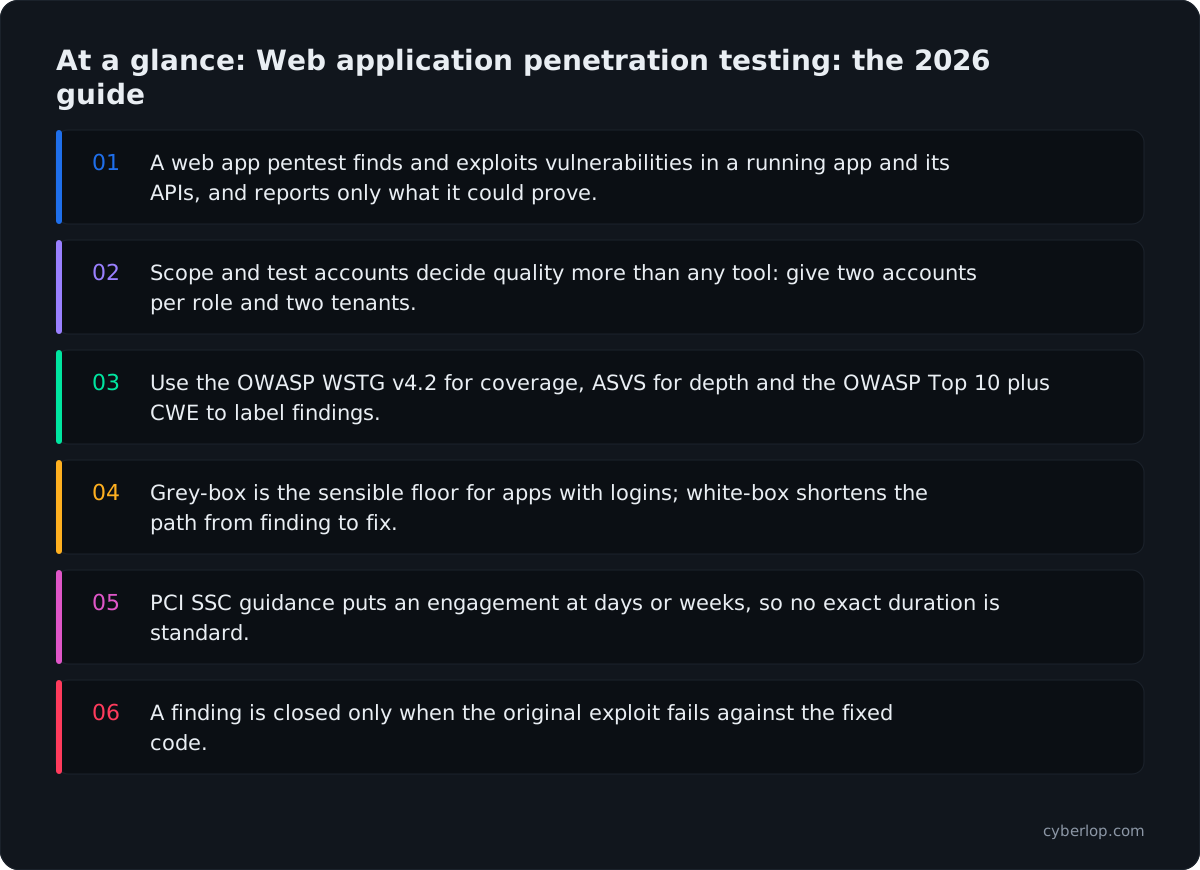
- A web app pentest finds and exploits vulnerabilities in a running app and its APIs, and reports only what it could prove.
- Scope and test accounts decide quality more than any tool: give two accounts per role and two tenants.
- Use the OWASP WSTG v4.2 for coverage, ASVS for depth and the OWASP Top 10 plus CWE to label findings.
- Grey-box is the sensible floor for apps with logins; white-box shortens the path from finding to fix.
- PCI SSC guidance puts an engagement at days or weeks, so no exact duration is standard.
- A finding is closed only when the original exploit fails against the fixed code.
Web application penetration testing is a time-boxed, authorised test in which a skilled person tries to find and exploit vulnerabilities in your web app and its APIs, then reports only what they could prove. A good test follows a written methodology such as the OWASP Web Security Testing Guide, covers login, access control and business logic as well as the usual injection bugs, and ends with a report your developers can act on and a retest that shows the fixes held.
The sections below follow the job in the order you will live it, from scoping to retest. They are written for founders, engineering leads and security owners who have to buy, schedule or run a web app pentest and want to know what good looks like before the first call.
What is web application penetration testing?
A penetration test asks a practical question: can someone reach data or functions they should not, using the application as it really runs? The tester works from the same material a real attacker would have, plus whatever access you agree to give, and tries to turn weaknesses into proof. A weakness that cannot be exploited is noted as a lead, not sold as a finding.
It is easy to confuse with two neighbours. Vulnerability scanning is automated and broad. The PCI Security Standards Council's penetration testing guidance puts a scan at seconds or minutes for each host, against days or weeks for an engagement. Secure code review reads source without running it. Our guide What is VAPT? sets out how assessment and testing fit together.
Pentesting is also not a certificate. A passed test means a particular tester, in a particular window, did not find more. The same PCI guidance warns that one cross-site scripting bug found in one place does not prove you have found them all, and that a single bug often hints at a habit in how the team builds. Treat results as evidence about a moment in time.
How is a pentest different from a vulnerability scan?
The table compares the two on the points that decide what you buy.
| Vulnerability scan | Web application pentest | |
|---|---|---|
| Question it answers | Does anything match a known weakness? | Can this be exploited, and what does it reach? |
| Duration, per PCI SSC | Typically several seconds to several minutes per scanned host | May last days or weeks, depending on scope and environment size |
| Judgement | Rules and signatures | A person decides the next step from what the app reveals |
| Output | Suspected issues | Proven findings with evidence and fix advice |
When do you need a web application pentest?
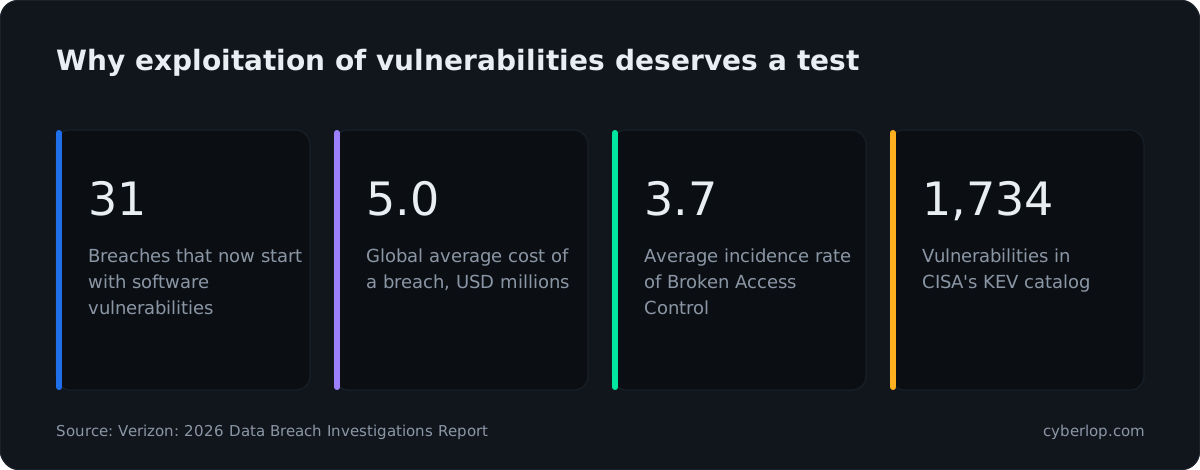
You need one before launch, after any significant change and on a schedule that matches your risk and your customers' contracts. The outside evidence says exploitation is now the main way in. Verizon's 2026 Data Breach Investigations Report states that 31% of breaches now start with software vulnerabilities, ahead of stolen passwords. IBM's 2026 Cost of a Data Breach report gives a global average cost of USD 4.99 million, a 12% rise and a record high. In OWASP's A01:2025 data, Broken Access Control shows an average incidence rate of 3.74% across 40 mapped CWEs and 1,839,701 occurrences, and the CISA Known Exploited Vulnerabilities catalog listed 1,734 entries on 7 October 2026.
Most teams commission a test for one of four reasons.
- A customer asked. Enterprise buyers and security questionnaires routinely ask for a recent third-party test summary.
- A framework expects it. PCI DSS, SOC 2, ISO 27001 and others all lean on testing as evidence. The details differ by standard; see SOC 2 and PCI DSS.
- A major release is coming. New login flows, payments, multi-tenant features or a public API change your risk more than any calendar date.
- Something changed in the architecture. A new identity provider, a rewritten permission layer or a move to a new cloud platform all invalidate old results.
How often to repeat is a separate question. Annual tests are common because they match audit cycles, but an annual snapshot of an app that ships weekly goes stale in a month. See what VAPT involves for the basics and continuous testing, covered below, for the model that tries to keep pace with releases.
How do you scope a web application penetration test?
Scope shapes the quality of a test more than anything else, and it drives what the test costs. A vague scope produces a shallow test, because the tester cannot tell what is allowed and spends the first days finding out. A tight pentest scope has these parts.
- Targets. List exact hostnames, environments and API base URLs. State whether admin panels and mobile backends are in or out.
- Environment. Decide between production and a staging copy. Staging is safer, but only if it matches production.
- Accounts. Provide at least two accounts for each role the app has, and two separate customer organisations if it is multi-tenant. Without them, the tester cannot check whether one account can reach another's data. The one-login problem explains why this matters for scanners too.
- Documentation. Share API specifications and a list of the flows that move money or change permissions.
- Exclusions. Name anything off limits: production payment gateways, third-party services you do not control, denial-of-service testing, social engineering.
- Rules of engagement. Agree test windows, source IP addresses, who to call if something breaks and how credentials are shared and destroyed. See rules of engagement.
- Written authorisation. Testing without it can be illegal. Check any third-party host's testing policy first.
One more scoping point: decide whether the API is a separate target. Modern apps are often a thin front end over a large API that accepts requests the interface never sends. Our API security testing guide covers this.
What types of web application pentest are there?
The access you give the tester defines the test type. All three are legitimate, and the right choice depends on the question you want answered. The full trade-off is covered in black box vs white box penetration testing; the short version is below.
| Type | What the tester gets | Best at finding | Typical blind spot |
|---|---|---|---|
| Black box | A URL, nothing else | What an outsider with no account can reach: exposed panels, weak sign-up, missing headers, public API gaps | Anything behind login; logic that needs an account to reach |
| Grey box | Accounts for each role, plus some documentation | Access control, cross-account access, workflow abuse, session and API flaws | Code-level causes; paths no one documented |
| White box | Accounts, documentation and source code | The widest set, including dead code, hidden endpoints and the exact line behind each bug | Needs code access and more preparation |
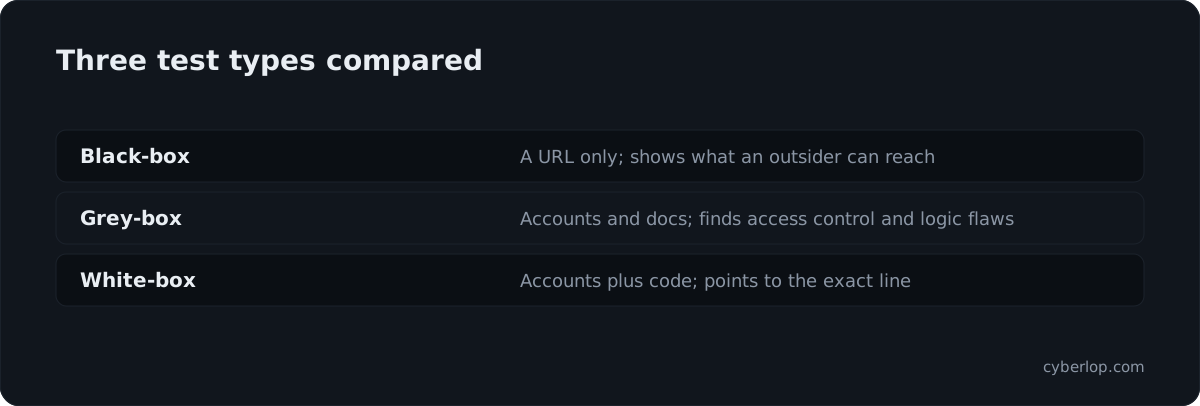
For most web applications with logins, grey box is the sensible floor, because the serious flaws live behind authentication. Authenticated testing is where broken access control and business-logic flaws are found. Add white-box access when you want the fastest path from finding to fix, or when the team will take the report straight into the code.
Which methodology should a web app pentest follow?
A methodology turns "we tested it" into "we tested these things in this way". Ask any provider which one they follow and how their report maps to it. These are the documents that matter for web apps.
- OWASP Web Security Testing Guide (WSTG). The most detailed free test catalogue for web applications. Version 4.2 is the current stable release at the time of writing, with version 5.0 in development. It is organised into twelve categories, listed in a table below.
- OWASP ASVS. A verification standard, now at version 5.0.0, that lists security requirements a web app should meet. Use it to decide how deep to go and to show what "secure" means for your app. See ASVS.
- OWASP Top 10:2025. An awareness list of the ten most critical risk categories, led by Broken Access Control. It is a reporting vocabulary, not a test plan. See the OWASP Top 10.
- NIST SP 800-115. A 2008 technical guide to planning and conducting security tests and analysing findings.
- PCI SSC Penetration Testing Guidance. A 2017 information supplement that covers scope, tester qualifications, rules of engagement, reporting and retesting. Written for cardholder-data environments, but useful for any engagement.
Practical advice: ask for WSTG-based coverage, ASVS to set depth, and Top 10 plus CWE identifiers to label findings. That combination is checkable, which is the point.
What are the phases of a web application penetration test?
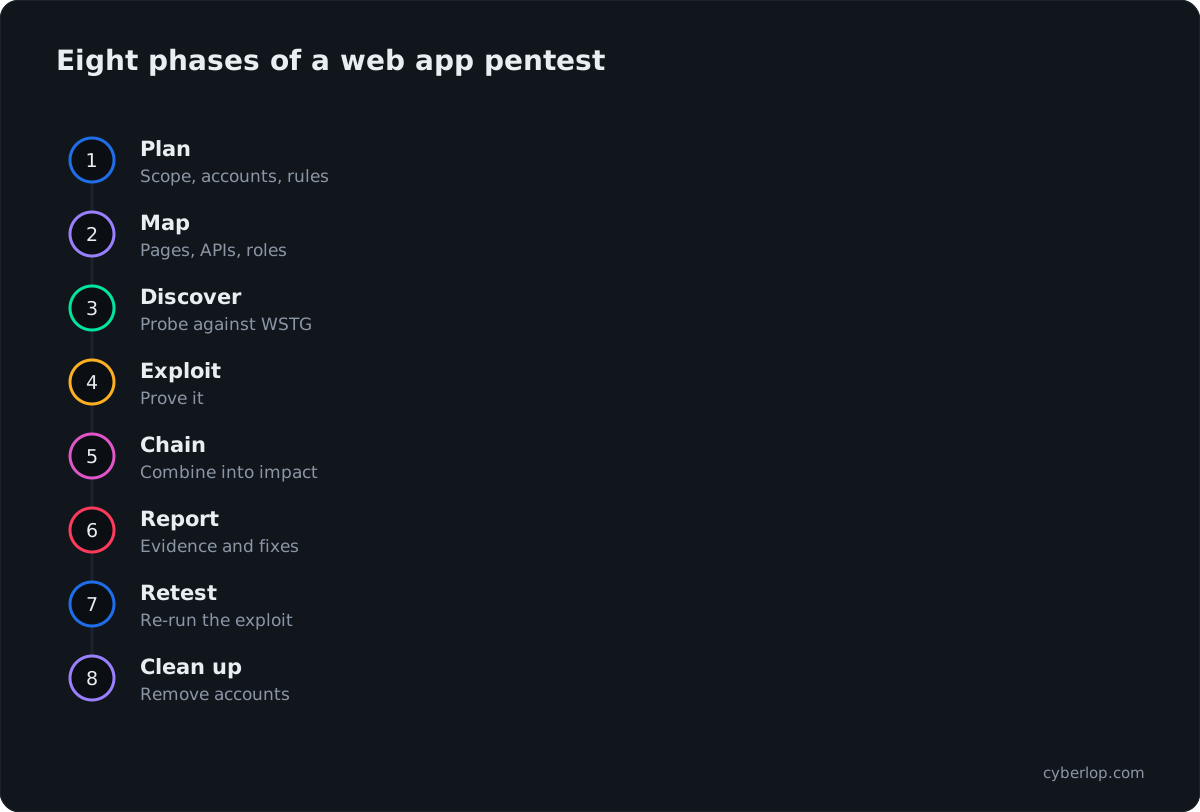
Names vary between providers, but every credible engagement moves through the same stages. Here is what happens in each, what you should receive and what the tester needs from you.
Phase by phase
1. Planning and kick-off
Both sides confirm scope, accounts, dates and contacts, and sign the authorisation. You hand over credentials, documentation and test data. Expect a short call, not a long one. The output is an agreed plan and a named person on each side who can answer questions during testing.
2. Reconnaissance and mapping
The tester builds a picture of the attack surface: pages, endpoints, parameters, roles, file uploads, third-party scripts, technology versions and anything exposed by accident. A person has to walk the real user journeys, because tools skip flows that need steps in order. Old API versions and forgotten admin routes turn up here.
3. Vulnerability discovery
Now the tester probes each area against the methodology: authentication, sessions, access control, input handling, business rules and client-side behaviour. Tools handle repetitive checks; people judge intent. A scanner does not know that a second coupon should not stack with the first.
4. Exploitation and validation
A lead becomes a finding only when it is exploited safely and the result is captured. For an access-control bug that means showing one account reading another's record, with the request and response. For injection it means showing the query changing, without dumping real customer data. This step separates a pentest from a scan, because it removes false positives before you see them. Read why exploited beats suspected for the argument in full.
5. Impact and chaining
Low-severity findings sometimes combine into a serious one. A verbose error message plus a predictable identifier plus a missing ownership check can add up to a full tenant data leak. Good testers report a chain as one story with its business impact.
6. Reporting and readout
The tester writes the report, then walks your team through it. A live readout helps, because developers ask the questions that decide priorities.
7. Remediation support and retest
Your team fixes. The tester answers questions and then retests. PCI guidance expects a retest once your fixes are in, so the tester can confirm the new controls really remove the original risk.
8. Clean-up
The tester discloses any changes made during the test, and you remove test accounts and any tools or files left behind. PCI guidance asks for both.
What does the OWASP WSTG cover?
The WSTG v4.2 groups tests into twelve categories. Use this table as a coverage check: ask the provider which categories they will cover and how, and expect the depth to follow your app's design. Not every category applies to every app.
| WSTG category | What the tester looks at | Where it bites |
|---|---|---|
| 4.1 Information Gathering | Exposed files, metadata, technology fingerprints, entry points, architecture | Forgotten endpoints and verbose disclosures |
| 4.2 Configuration and Deployment Management | Server and platform settings, file extensions, backups, admin interfaces | Debug pages, default settings, open storage |
| 4.3 Identity Management | Registration, provisioning, role definitions, account enumeration | Self-service roles, invite flows |
| 4.4 Authentication | Credential handling, lockout, password reset, multi-factor, bypass routes | Account takeover |
| 4.5 Authorization | Path traversal, privilege escalation, insecure direct object references, schema bypass | Most high-impact findings in modern apps |
| 4.6 Session Management | Cookie attributes, fixation, logout, CSRF, token handling | Hijacked or reused sessions |
| 4.7 Input Validation | XSS, SQL and command injection, template injection, SSRF, many more | Data theft, code execution |
| 4.8 Error Handling | Stack traces, error codes, timing differences | Information leaks that help later steps |
| 4.9 Weak Cryptography | TLS configuration, weak ciphers, sensitive data in transit or at rest | Exposed personal data |
| 4.10 Business Logic | Data validation, forged requests, workflow bypass, upload abuse, usage limits | Fraud and revenue loss; scanners miss these |
| 4.11 Client-side | DOM-based XSS, clickjacking, WebSockets, browser storage, CORS | Logic that trusts the browser |
| 4.12 API Testing | API-specific tests, including GraphQL | Endpoints with weaker checks than the UI |
Authorization and business logic deserve extra weight: the OWASP Top 10:2025 still lists Broken Access Control first. Our guides to IDOR and access control testing go deeper. For a test-case-level list per category, see the web application pentest checklist.
Is manual or automated testing better?
Neither alone. Tools are fast and consistent at known patterns, such as missing headers, outdated components and common injection signatures, and they suit every build. People read multi-step workflows, notice that a price can change between two requests, chain small bugs and rule out noise. Both struggle with unusual state, such as a refund on a half-shipped order, unless someone sets it up. Ask any provider what share of the work is manual. Compare tool types in our DAST vs SAST guide.
How long does a web application pentest take?
PCI SSC guidance says only that an engagement can take days or weeks, and can grow if the tester uncovers more scope. No standard fixes a number, so any exact duration is the provider's estimate for your scope. These are the factors that move the calendar.
What stretches a timeline
| Factor | Effect on the schedule | What you can do |
|---|---|---|
| Roles and tenants | Each extra role adds access checks between accounts | Share an access plan: roles and what each should reach |
| Application and API size | Count features and endpoints, not pages | Provide an OpenAPI file and keep it current |
| Test type | White-box needs time to read code but finds causes faster | Decide the type before scoping |
| Environment readiness | Broken accounts or an unstable site waste days | Check every login the day before |
| Reporting and readout | Writing and review follow the testing window | Book the readout date at kick-off |
| Retest | Fix cycles add days or weeks after the report | Reserve the retest window in the contract |
Good testers book ahead, so do not leave a test until the week an audit closes. For what drives the price, read penetration testing cost.
What should a web application pentest report contain?
A strong report lets a developer reproduce the bug in minutes and lets an executive see the risk in a page. Look for these parts.
A report you can act on
- An executive summary in plain language: what was tested, what was found, what matters most.
- Scope, dates, test type, accounts used and anything that was not tested, stated clearly.
- Each finding with a title, affected URL or endpoint, steps to reproduce, the request and response, and a screenshot where a person can see the effect.
- Severity and confidence shown separately, with a CVSS vector where it applies and the reasoning behind the rating.
- CWE and OWASP references so findings map to your tooling and audit evidence.
- Concrete remediation guidance aimed at your stack, not a copied paragraph about input validation.
- A list of what was tried and did not work, so you can see coverage.
- A retest section that records the status of each finding.
Red flags in a report
Be cautious of reports padded with scanner output, findings with no proof, or severity that follows the tool's default. How to read a penetration test report and What belongs in a finding cover the review step, and publishing the misses explains why a list of things that were tried and failed adds trust.
How does retesting work?
A finding is closed when the exploit no longer works, not when a ticket is marked done. That is the point of a retest. After fixes ship, the tester repeats the original steps against the new code and records the outcome: fixed, partly fixed or still open.
Three habits make retests quicker and more useful.
- Fix the cause, not the example. If one endpoint lacked an ownership check, look for others that share the pattern. The PCI guidance makes this exact point about cross-site scripting: one instance may hint at more.
- Ask for the exact exploit. The best evidence of a fix is the original exploit failing against the new build. See closed-loop retest.
- Add a regression test. Turn each fixed finding into an automated check so it cannot quietly return. A security regression test costs little after the exploit is understood.
Agree the retest window in the contract. Many providers include one retest round; ask how long it stays open. If fixes take months, expect to re-scope.
How do you keep testing between yearly pentests?
Use the deep test for depth and automated checks for the gaps between. A yearly test is a snapshot, and code that ships weekly can reopen a closed hole in a month. Scheduled runs or checks in CI/CD that can gate a build catch regressions sooner, and each fixed finding can become a regression test that runs on every release.
Who should run the test?
Under PCI guidance, a qualified in-house team or an outside firm can run the test, provided the testers are separate from whoever manages the systems under test. The guidance lists certifications such as OSCP, CREST and GIAC as signs of shared knowledge, not requirements, and PCI SSC does not endorse them. Certificates alone prove little, so ask about real engagement history.
Questions that separate providers quickly:
- Which methodology do you follow, and how does the report map to it?
- Who actually does the testing, and how much is manual?
- Do findings include proof, or only descriptions?
- How do you test access control between accounts and organisations?
- What does the retest include, and for how long?
- Where are our credentials, code and data stored, and for how long?
The full list is in how to choose a penetration testing company. If your code must stay inside your network, ask about private scanning options up front.
How do you prepare for a web application pentest?
Time spent here is time the tester does not lose waiting for access. Work through this list with your engineering lead.
Ready for the first day
- Staging matches production in code and configuration, and is stable.
- At least two working accounts for each role, in two separate organisations if you are multi-tenant.
- Seed data that includes records owned by different accounts, so cross-account checks mean something.
- API specification, architecture note and a list of the money and permission flows.
- Alerting contacts and a stop signal if monitoring raises an incident during the test.
- A named engineer who can answer questions the same day.
- A backup or snapshot, if testing might change data.
For a longer end-to-end version, use the VAPT checklist.
What mistakes waste a pentest?
Mistakes and better habits
| Mistake | What goes wrong | Better approach |
|---|---|---|
| Testing only the front end | The API usually accepts more than the interface sends | Name the API as a target |
| Giving one account | A single login cannot show whether one account reaches another's data | Provide two accounts per role and two tenants |
| Testing a staging site that differs from production | Results describe an app you do not run | Match code, configuration and roles first |
| Treating the report as the finish line | Findings stay open until the next auditor spots them | Assign owners and dates, then retest |
| Ignoring low findings that chain | Small flaws combine into a tenant data leak | Review related findings together |
| Testing once, then shipping for twelve months | The snapshot goes stale within weeks | Re-test after major changes or run checks in the pipeline |
Where does Cyberlop fit?
Cyberlop runs black-box, grey-box and white-box pentesting against web apps and their APIs. In white-box mode it reads your code while testing the running app, so a finding can point to the file and line. It reports what it actually exploited, with the request, the response, a screenshot where a person can see it, and the line of code. If it did not exploit it, it does not report it. Severity and confidence are kept apart, and a fix is proven by re-running the same exploit against the new code. It can run on a schedule or in CI/CD and gate a build, and agencies can run it under their own brand. See how it works, what the evidence looks like and where it falls short.
Questions people ask
Web application penetration testing: FAQs
What is web application penetration testing?
A time-boxed, authorised test in which a skilled person finds and exploits vulnerabilities in a web app and its APIs, then reports what they could prove. It differs from a scan because findings are validated by exploitation.
How long does a web application penetration test take?
It depends on scope. PCI SSC guidance puts an engagement at days or weeks, depending on how large and complex the target is. Roles, tenants, API size, test type and environment readiness all move the schedule. Allow time for reporting, a readout and a retest.
What is the difference between a vulnerability scan and a penetration test?
A scan is automated and broad, and PCI SSC guidance puts it at seconds or minutes per host. A penetration test adds manual work and exploitation to confirm which weaknesses are real and what they let someone do.
Which methodology should a web app pentest follow?
Most providers follow the OWASP Web Security Testing Guide (version 4.2 is the current stable release), often with ASVS to set depth and the OWASP Top 10 to label findings. Ask how the report maps to the methodology so you can check coverage.
Should we test production or staging?
Staging is safer for destructive tests, but only if it matches production in code, configuration and data shape. Some teams test staging first, then run a short, carefully scoped check on production. Agree this in the rules of engagement.
How often should we run a web application pentest?
At least when something significant changes: a major release, a new login or payment flow, a new identity provider or architecture. Many teams also test annually for audits. Apps that ship often benefit from continuous testing between full engagements.
What should a penetration test report include?
A plain-language summary, scope and accounts used, and for each finding the steps to reproduce, request and response evidence, severity separate from confidence, CWE and OWASP references and fix guidance. A good report also records what was tried and did not work, and the retest status.
Do we need a retest after fixing findings?
Yes. PCI SSC guidance expects a retest after remediation to confirm the new controls remove the original risk. The strongest proof is the original exploit failing against the fixed code.
Sources
Where the facts come from
- OWASP: Web Security Testing Guide
- OWASP WSTG v4.2: Web Application Security Testing
- OWASP: Application Security Verification Standard
- OWASP: Top 10:2025
- OWASP: A01:2025 Broken Access Control
- NIST: SP 800-115, Technical Guide to Information Security Testing and Assessment
- PCI SSC: Penetration Testing Guidance (Information Supplement, 2017)
- Verizon: 2026 Data Breach Investigations Report
- IBM: Cost of a Data Breach Report 2026
- CISA: Known Exploited Vulnerabilities Catalog
Keep reading
Related articles
Access control testing checklist: sideways, upward and across tenants.
A step-by-step access control testing checklist for web apps and APIs: account planning, sideways, upward and cross-tenant checks, evidence and retests.
API security testing: a 2026 guide to the OWASP API Top 10
A step-by-step API security testing guide: the OWASP API Top 10 (2023) with test cases, BOLA and BFLA checks, JWT, OAuth, GraphQL and a CI/CD plan.
Black box vs white box penetration testing: which to choose
Black, grey and white box penetration testing compared: what each finds and misses, how effort differs, when to choose each and how to combine them.

See a web app finding with proof
Cyberlop finds vulnerabilities in your web app and its APIs and reports only what it exploited, with request, response, screenshot and the line of code. Ask us to run it on one of your applications.
Or start with a $199 pilot on one application: thirty days, success criteria agreed before day one, credited against the annual if you convert.