
Home / Blog / Tutorials / Two-factor authentication
Tutorials
Two-factor authentication: require MFA for everyone who signs in
Turn on a TOTP authenticator app for your whole organisation in one setting, and learn what users, SSO accounts and scan profiles do differently.
Cyberlop Labs · Updated · 8 min read
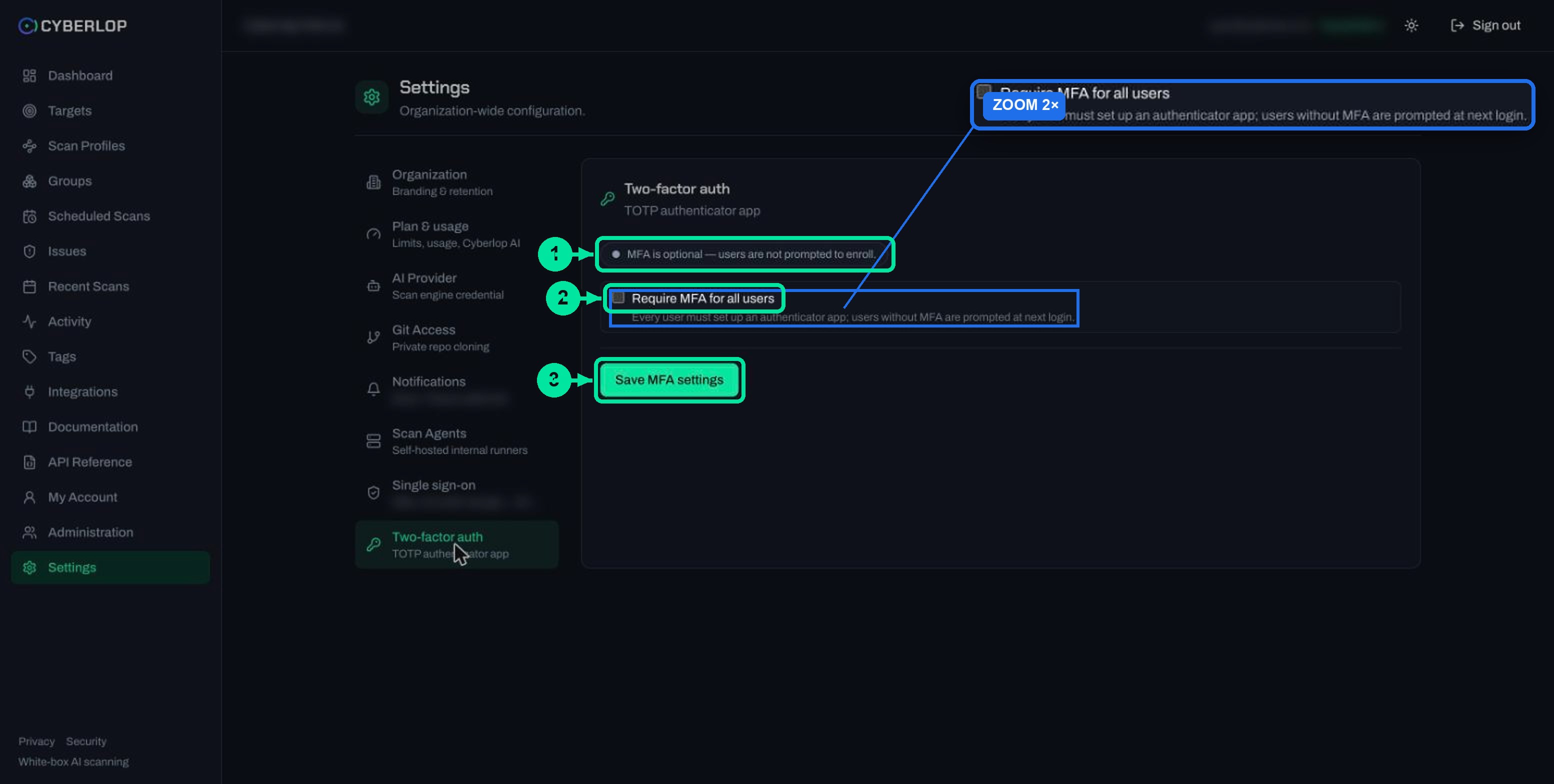
Two-factor authentication adds a code from an authenticator app to the password. In Cyberlop, an administrator opens Settings → Two-factor auth, ticks Require MFA for all users and clicks Save MFA settings. Users without MFA are then prompted to set it up at their next login.
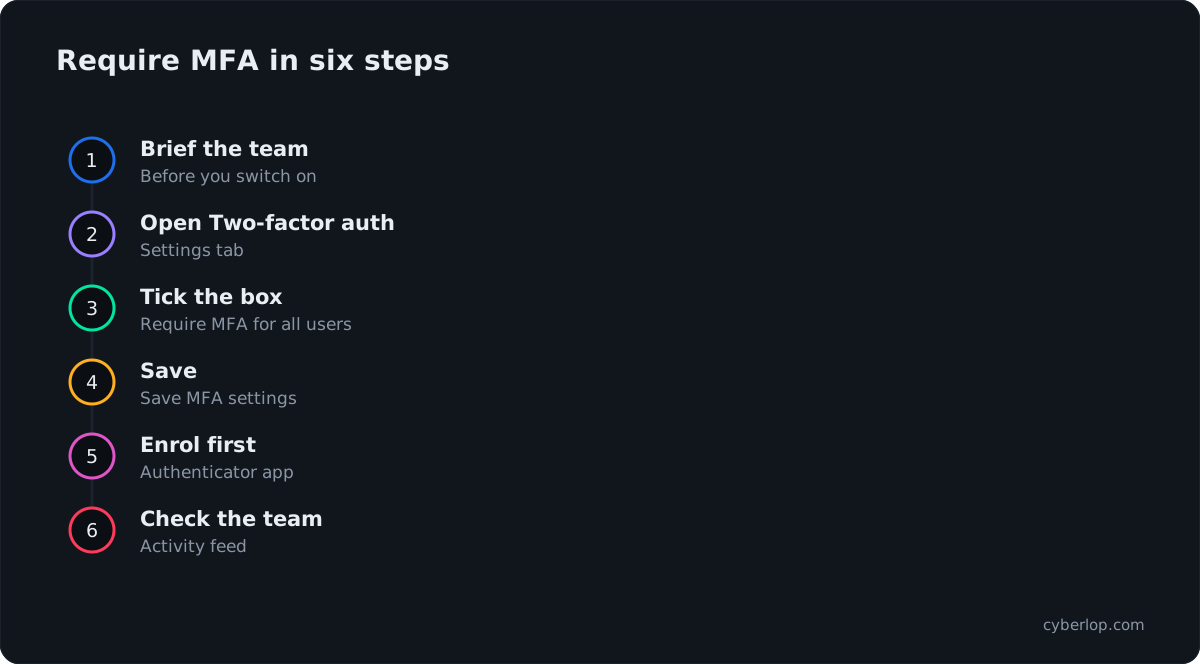
- Brief your team Tell people an authenticator app will be needed and when the change starts.
- Prepare your own account Install an authenticator app on a phone you will keep.
- Open Two-factor auth Go to Settings and select the Two-factor auth tab.
- Read the status Confirm the pill says MFA is optional — users are not prompted to enroll.
- Require MFA Tick Require MFA for all users.
- Save Click Save MFA settings.
- Enrol first Sign in again, set up your authenticator app and store any recovery codes offline.
- Check the team Ask each person to sign in and complete setup; use the activity feed to review.
- MFA is optional by default; an admin turns on Require MFA for all users and clicks Save MFA settings.
- The second factor is a TOTP authenticator app.
- Users without MFA are prompted at their next login.
- With single sign-on, MFA is delegated to your identity provider.
- The TOTP secret on a scan profile is for your target app's login, not for Cyberlop.
Two-factor authentication (2FA), also called multi-factor authentication (MFA), asks for a second proof of identity after the password. In Cyberlop it is a time-based one-time password (TOTP) from an authenticator app. An administrator opens Settings → Two-factor auth, ticks Require MFA for all users and clicks Save MFA settings.
What is two-factor authentication in Cyberlop?
Two-factor authentication in Cyberlop means a user proves who they are with something they know, the password, and something they hold, a code from an authenticator app. The code is a TOTP: a short number that changes every 30 seconds by default, as set out in RFC 6238.
The page is titled Two-factor auth, with the subtitle TOTP authenticator app. It lives in Settings, next to Single sign-on, Git Access and the other organisation-wide tabs. An administrator normally manages these settings, so if you cannot see the tab, ask yours.
Out of the box, MFA is optional. The status pill reads MFA is optional — users are not prompted to enroll. Nobody is asked for a code until an administrator turns the requirement on.
Why should you require MFA for your security platform?
You should require MFA because Cyberlop holds sensitive material: findings that prove how your apps can be broken, request and response evidence, and stored scan credentials. A stolen password should not be enough to open that door, and a second factor makes sure it is not.
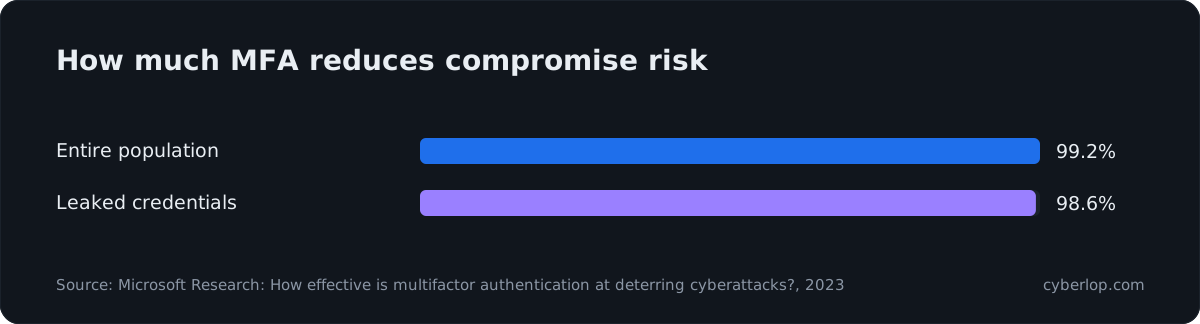
Microsoft Research looked at accounts showing suspicious activity. Accounts with MFA were 99.22% less likely to be compromised overall, and 98.56% less likely when their credentials had leaked (Microsoft Research, 2023). Authenticator apps did better than SMS codes in that work, but any second factor beat none.
CISA agrees, saying in its MFA guidance that "users who enable MFA are significantly less likely to get hacked". MFA is the practical answer to credential stuffing, brute-force guessing and account takeover from a reused password.
What Cyberlop already does around passwords
MFA is one layer. According to the in-app Security & Data Handling page, local passwords need at least 12 characters with a mix of character classes, and failed logins are rate limited per client and per username with an escalating lockout. The page also says Cyberlop stores passwords as hashes. Read password policy and account lockout for why each control matters.
How do you require MFA for all users?
Open Settings, select the Two-factor auth tab, tick Require MFA for all users and click Save MFA settings. From then on, users without MFA are prompted to set it up at their next login.
Steps for an administrator
- Tell your team first. Say that an authenticator app will be needed and when the change takes effect.
- Check that your own account is ready. Install an authenticator app on a phone you will keep.
- Go to Settings and open Two-factor auth.
- Read the status pill. It should say MFA is optional — users are not prompted to enroll.
- Tick Require MFA for all users. The help text under it says each person must set up an authenticator app, and that anyone without MFA is prompted at next login.
- Click Save MFA settings.
- Sign in again yourself and enrol first, so you can help the next person.
Field reference
| Control | What it does | Notes |
|---|---|---|
| Status pill | Shows whether MFA is optional or required. | Reads MFA is optional — users are not prompted to enroll. while the requirement is off. |
| Require MFA for all users | Makes an authenticator app mandatory. | Users without MFA are prompted at next login. |
| Save MFA settings | Stores the choice. | Nothing changes until you click it. |
The product capture behind this guide did not include the screens that walk a user through scanning the setup code. The app shows them when you are prompted, so this guide does not describe them step by step.
What do users see after you switch it on?
Each user without MFA is prompted to set up an authenticator app at their next login. The product text does not describe what happens to existing sessions, so ask people to sign in again after you save the change and tell them what to expect.
A short note to send your team
- You will be asked to set up an authenticator app the next time you sign in.
- Use an app on a phone you control, and do not share the code with anyone.
- Keep any recovery codes the app shows you somewhere safe and separate from your password.
- If you lose your phone, tell an administrator straight away.
Recovery codes
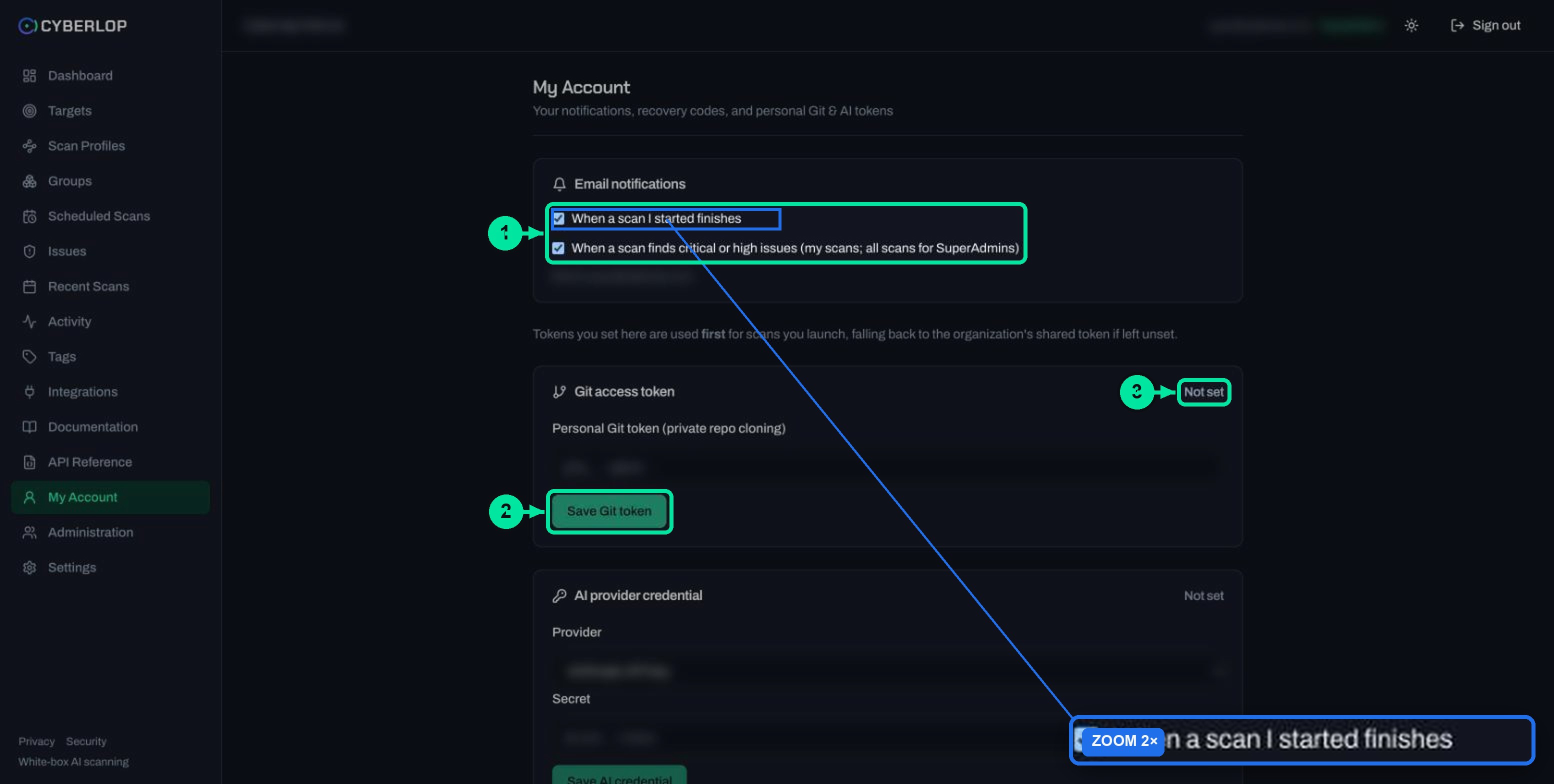
The My Account page subtitle reads: Your notifications, recovery codes, and personal Git & AI tokens. No recovery-code section was visible on the account used for the capture, so check My Account after you enrol and store anything it shows you offline.
Guidance from OWASP is to give users single-use recovery codes when they first set up MFA, and to encourage a second factor type so one lost device does not lock them out. Credential recovery is also where attackers look for a weaker path, so treat it with care.
What if you use single sign-on?
With single sign-on, your identity provider handles MFA, as the Security & Data Handling page states. Enforce the second factor there, because it then covers every app you connect, and treat the Two-factor auth tab as the control for people who sign in with a local password.
The product text does not say how the Require MFA for all users box behaves for single sign-on accounts, so confirm it in a test before you rely on it. Set up SSO in single sign-on, including the recommended Require an admin-bound SSO subject option.
| Question | Local password sign-in | Single sign-on |
|---|---|---|
| Who checks the second factor? | Cyberlop, with an authenticator app (TOTP). | Your identity provider. |
| Where do you turn it on? | Settings → Two-factor auth. | In your identity provider. |
| Password rules | 12 or more characters, mixed classes, per the Security page. | Set by your identity provider. |
Is the TOTP secret on a scan profile the same thing?
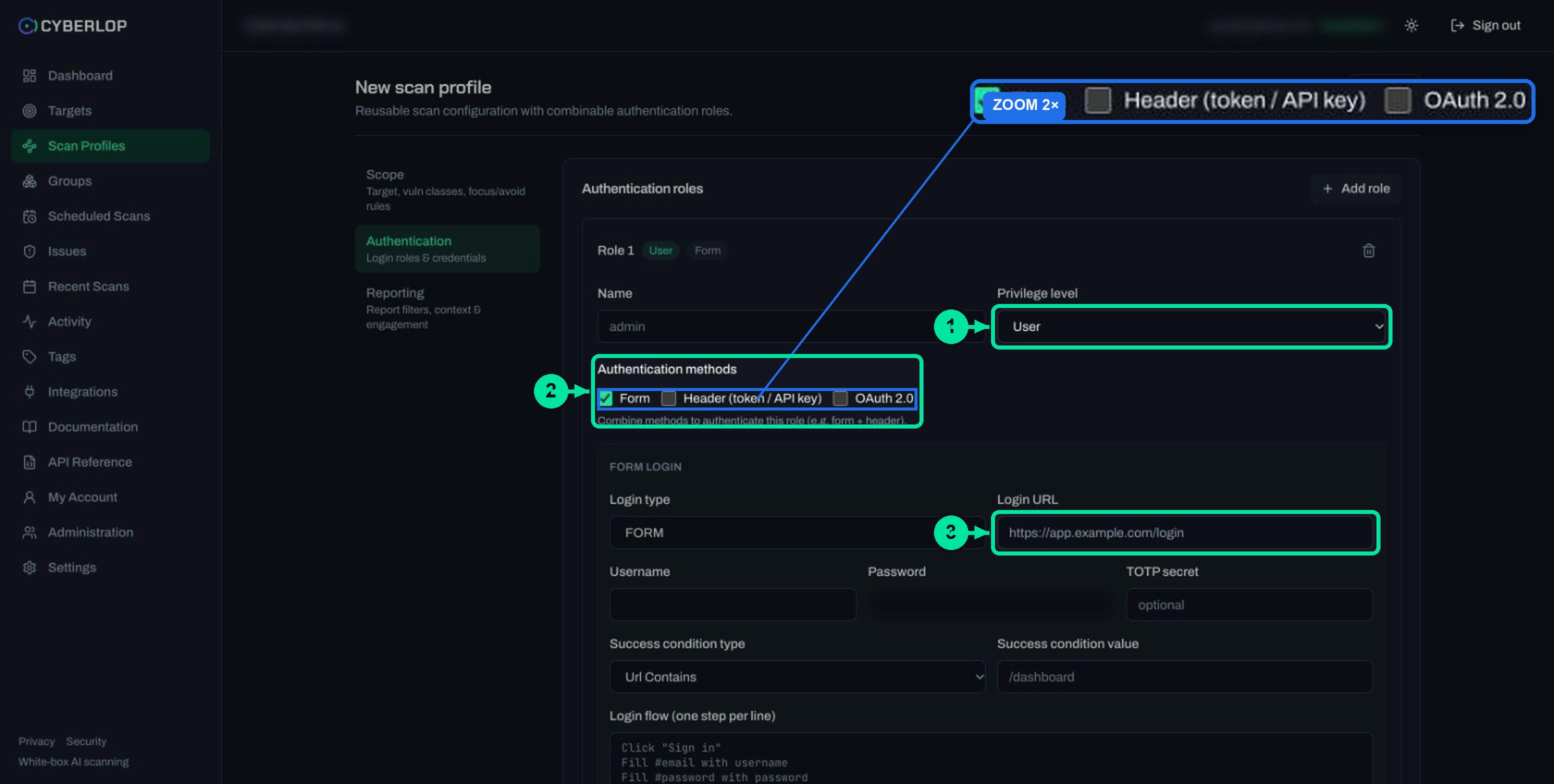
No. Requiring MFA protects people signing in to Cyberlop. The optional TOTP secret field on a scan profile is a different thing: it lets a scan complete the one-time-code step of your target app's own login, so Cyberlop can test pages behind that login.
Keep the two apart, and never reuse a real person's authenticator secret in a profile. Use a dedicated test account on a system you own and are authorised to test. Details are in form login authentication and authentication roles.
| Require MFA for all users | TOTP secret on a scan profile | |
|---|---|---|
| Protects | Sign-in to Cyberlop. | Sign-in to the app you are testing. |
| Set in | Settings → Two-factor auth | Profile → Authentication → Form login |
| Who sets it | An administrator. | Whoever edits the profile. |
| Stored as | A setting. | A stored secret: blank keeps the value, Clear removes it. |
If your target app's own login uses one-time codes, Cyberlop can test that too. Weak code handling shows up as 2FA bypass, and approval-prompt abuse as MFA fatigue.
How strong is a TOTP authenticator app?
A TOTP app is a large step up from a password alone, but it is not the strongest option. NIST SP 800-63B notes that OTP authentication is not phishing-resistant, and CISA names FIDO/WebAuthn as the only widely available phishing-resistant option. A user who types a code into a fake page can still lose that code.
What this means for your team
- Turn MFA on now. It cuts most of the risk from leaked passwords.
- Teach people to check the address before typing a code. See phishing.
- Use your identity provider for phishing-resistant methods if you need them.
- Review who has access. Fewer accounts mean fewer targets, which is least privilege in practice.
Read MFA and TOTP for plain-English definitions.
What does the full account security picture look like?
MFA sits alongside several controls described on the Security & Data Handling page. Taken together they cover sign-in, sessions, stored secrets and visibility.
| Area | What the Security page says | Where you act |
|---|---|---|
| Passwords | At least 12 characters with a mix of character classes. | Enforced for local passwords. |
| Failed logins | Rate limited per client and per username, with escalating lockout. | Automatic. |
| Sessions | Short-lived access tokens and rotating refresh tokens in HttpOnly, SameSite, Secure cookies. Refresh-token reuse revokes all sessions. | Automatic. |
| Stored secrets | Encrypted with AES-256-GCM. Raw API tokens are shown once. | See API tokens and permissions. |
| Access | Role-based permissions, with grants scoped to groups of targets. | Review roles in Administration. |
| Visibility | Activity feed: organisation-wide for administrators, team-scoped for leads, own actions for everyone else. | See activity feed. |
After a change like this, open the activity feed to check settings changes and sign-ins against the people you expect.
Troubleshooting and common mistakes
Common problems and fixes
| Problem | Likely cause | What to do |
|---|---|---|
| The Two-factor auth tab is missing | Settings are for administrators. | Ask an administrator, or ask them to enable it. |
| A user cannot get past the code step | The phone clock is wrong, or the account was added to a new phone. | Check the phone shows the correct time automatically and try the next code. RFC 6238 uses short windows, so old codes fail. |
| A user lost their phone | No second factor available. | Use a recovery code if one was saved. Otherwise ask an administrator, who follows your own identity checks. |
| Nothing happened after you saved | The box was not ticked, or the page was not saved. | Reopen the tab and check the status pill and the box. |
| SSO users are not prompted | Your identity provider handles MFA. | Enforce it there. |
| A scan cannot get past the target login code | The profile TOTP secret is missing or wrong. | Edit the profile and re-enter the secret. See edit a scan profile. |
Mistakes to avoid
- Switching it on without warning, so people meet an unexpected prompt.
- Enrolling only one administrator. Enrol at least two.
- Saving recovery codes in the same place as the password.
- Sharing one account between people, which defeats the second factor.
What should you do next?
Next step: review account and organisation settings for notifications, retention and the Plan & usage page. If your team signs in through an identity provider, read single sign-on first. For how Cyberlop protects data more broadly, see our security page.
Questions people ask
Two-factor authentication: FAQs
How do I turn on two-factor authentication in Cyberlop?
An administrator opens Settings → Two-factor auth, ticks Require MFA for all users and clicks Save MFA settings. Users without MFA are then prompted to set up an authenticator app at their next login.
Is MFA on by default?
No. By default MFA is optional, and the status pill reads: MFA is optional — users are not prompted to enroll. It becomes mandatory only when an administrator ticks the box and saves.
Which kind of second factor does Cyberlop use?
A TOTP authenticator app. TOTP stands for time-based one-time password, defined in RFC 6238, with a 30-second default time step. The app on the user's phone generates the code.
What happens if I use single sign-on?
Your identity provider handles MFA, according to the Security & Data Handling page. Enforce the second factor there, and confirm in a test how the Cyberlop setting behaves for SSO accounts.
What if a user loses their phone?
Use a saved recovery code if one exists; the My Account subtitle mentions recovery codes. If not, ask an administrator to help, and check the person's identity yourselves first.
Is the scan profile TOTP secret the same as requiring MFA?
No. The TOTP secret on a scan profile lets a scan pass the one-time-code step of your own target app's login. Requiring MFA protects sign-in to Cyberlop itself.
Is a TOTP app phishing-resistant?
No. NIST SP 800-63B says OTP authentication is not phishing-resistant. CISA names FIDO/WebAuthn as the widely available phishing-resistant option. A TOTP app is still far better than a password alone.
How can I check who changed security settings?
Use the activity feed. Administrators see organisation-wide activity, leads see their team, and everyone else sees their own actions. See the activity feed guide.
Sources
Where the facts come from
Keep reading
Related articles
Account and organisation settings: notifications, retention, logo and plan
Set notification emails and personal tokens, then configure retention, schedule timezone and report logo, and read the Plan & usage page.
Cyberlop activity feed: what it records and how to use it for audits
Read the Cyberlop activity feed: sign-ins, scans, triage, roles and support sessions, who can see them, how to search and an audit checklist.
Cyberlop API tokens and permissions: how to issue and limit them
What a Cyberlop API token is, how permission keys work, which keys common jobs need, and how to rotate, revoke and audit tokens with least privilege.

Need help locking down sign-in?
Cyberlop reports what it actually exploited, with the request, the response and the line of code. Ask us to run it on one of your applications, or read how we handle security and data.
Or start with a $199 pilot on one application: thirty days, success criteria agreed before day one, credited against the annual if you convert.