
Home / Blog / Tutorials / Api tokens and permissions
Tutorials
Cyberlop API tokens and permissions: how to issue and limit them
An API token lets your pipeline act as one Cyberlop user, with that user's permissions. This guide shows how to keep each token small, safe and easy to review.
Cyberlop Labs · Updated · 8 min read
A Cyberlop API token lets a script call the API as one user, carrying that user's permissions and group scope. An administrator issues it from Administration → Users and the secret is shown once. Apply least privilege: give the owner a role with only the area:action keys the job needs, such as ci:trigger and scan:read.
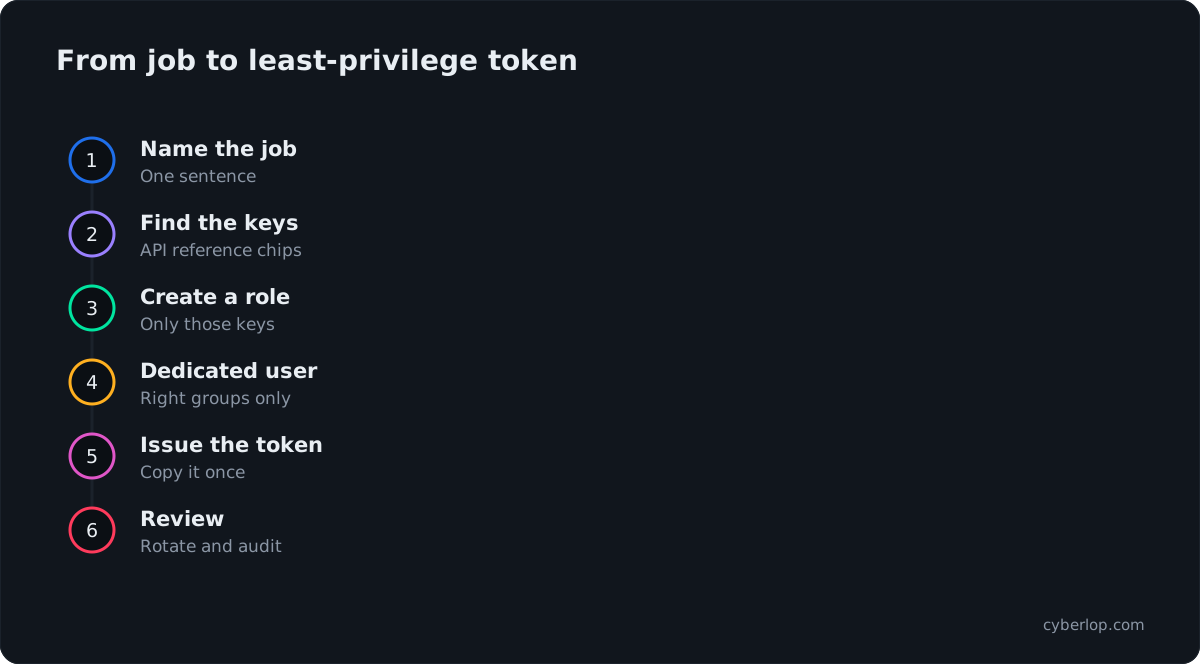
- Define the job Write one sentence for what the token must do, for example start a scan on merge and read the result.
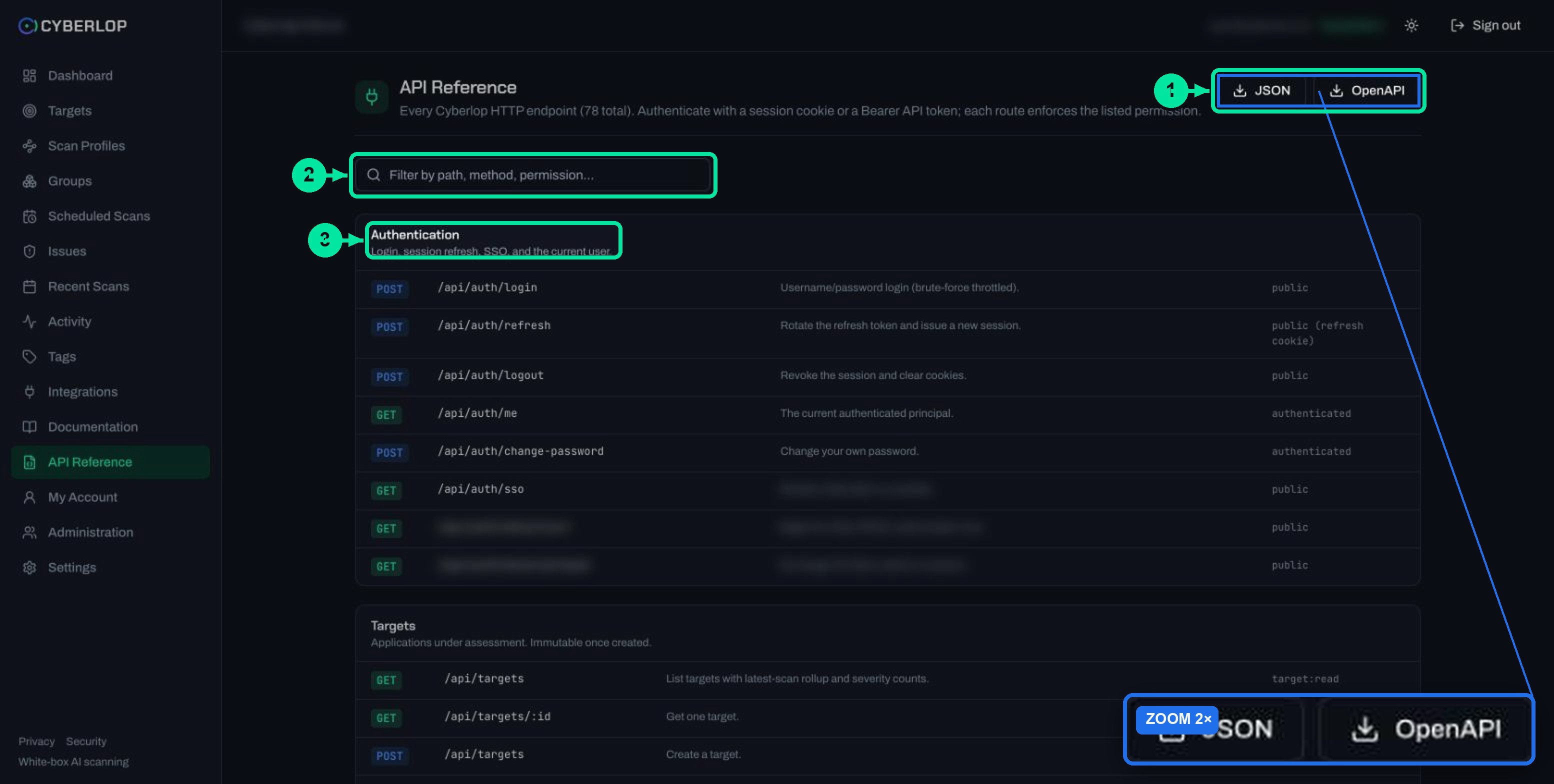
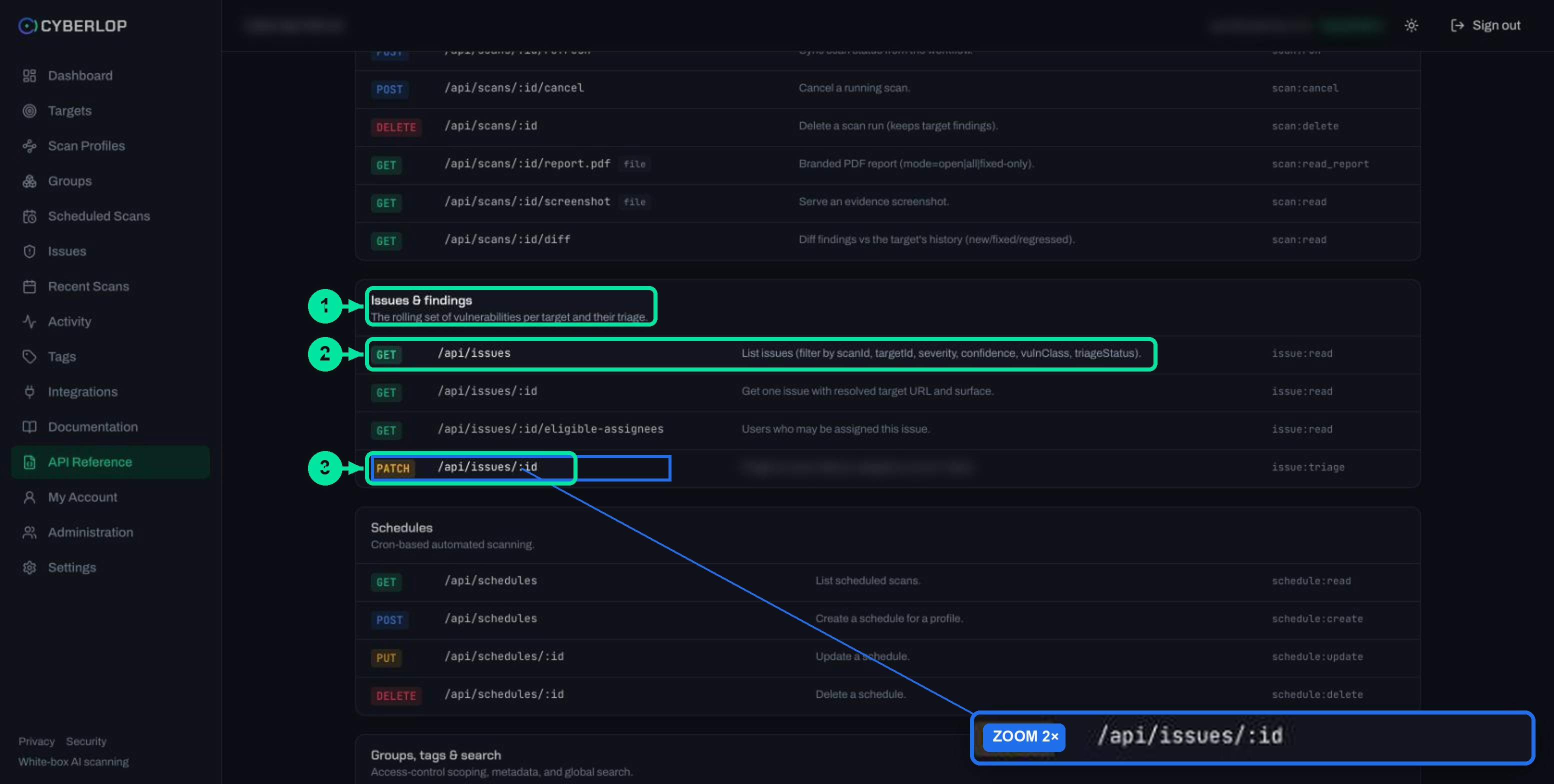
- Find the permission keys Open the API Reference and note the permission chip on each endpoint the job calls.
- Create a narrow role Ask an administrator to create a role holding only those keys.
- Create a dedicated user Have the administrator create a user for the job, assign the role and limit its groups of targets.
- Issue the token Issue a token for that user from Administration → Users. The raw secret is shown once.
- Store the secret Save it as CYBERLOP_API_TOKEN in your CI secret store, masked, together with CYBERLOP_URL.
- Test the job Run the pipeline once and confirm it triggers and reads the scan result.
- Rotate and review Rotate on a fixed rhythm, revoke at once on a leak, and check the Activity feed for the owner's actions.
- A token acts as its owner and carries that owner's permissions and group scope, never more.
- The raw secret is shown once, so store it in your CI secret store the moment it is issued.
- Permission keys follow area:action; the API reference shows the required key on every endpoint.
- Create a dedicated user and narrow role per job, such as ci:trigger plus scan:read for a pipeline.
- Rotate on a schedule, revoke at once on a leak, and review token owners like people.
A Cyberlop API token is a secret that lets a script or pipeline call the Cyberlop API as a named user, with exactly that user's permissions and group scope. An administrator issues it from Administration → Users; the raw secret is shown once. To keep it safe, give the token's owner a role with only the permission keys the job needs, such as ci:trigger and scan:read.
What is a Cyberlop API token?
An API token is a long-lived credential for software rather than a person. Your CI pipeline presents it in an Authorization: Bearer header, and Cyberlop treats the call as coming from the user the token belongs to. The API reference states it plainly: authenticate with a session cookie or a Bearer API token, and each route enforces the permission listed beside it.
Two facts drive the rest of this guide.
- The token carries its owner's permissions and group scope. It cannot do more than its owner can, and it is limited to the same groups of targets.
- The raw secret is returned once, when the token is created or regenerated. Cyberlop stores session and API tokens only as hashes, so nobody can read it back later.
Why is a bearer token worth guarding?
RFC 6750 defines a bearer token as one where "any party in possession of the token" can use it as any other holder could. Whoever has the string is the user. That is why scope matters more than secrecy alone: a leaked token with narrow permissions is an annoyance, a leaked token with administrator rights is an incident.
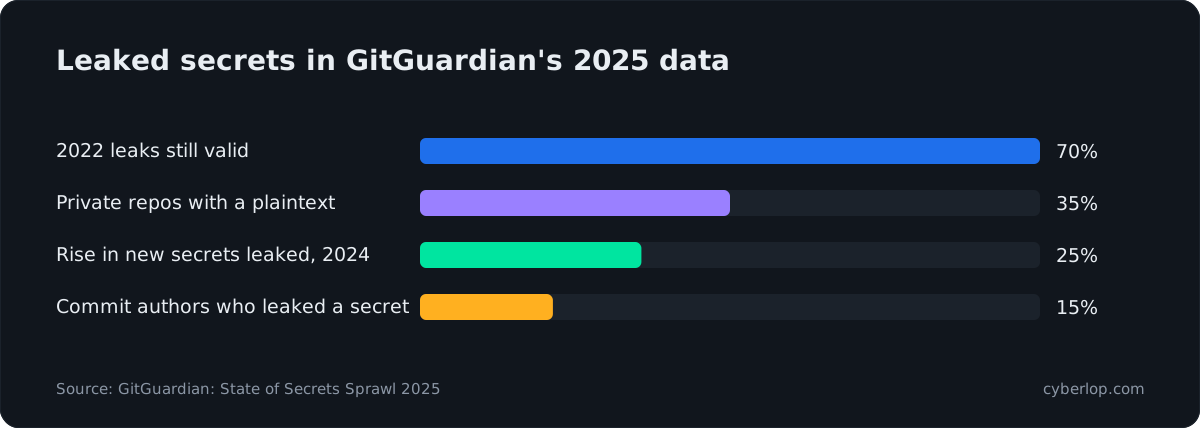
Leaks are common. GitGuardian's State of Secrets Sprawl 2025 counted 23,770,171 new secrets in public code-host commits in 2024, a 25% rise on the year before, and found that 70% of the secrets leaked in 2022 were still valid. The Verizon 2026 Data Breach Investigations Report adds that 31% of breaches now start with software vulnerabilities. Stolen secrets and unpatched flaws both get attackers in.
Is an API token the same as the tokens on My Account?
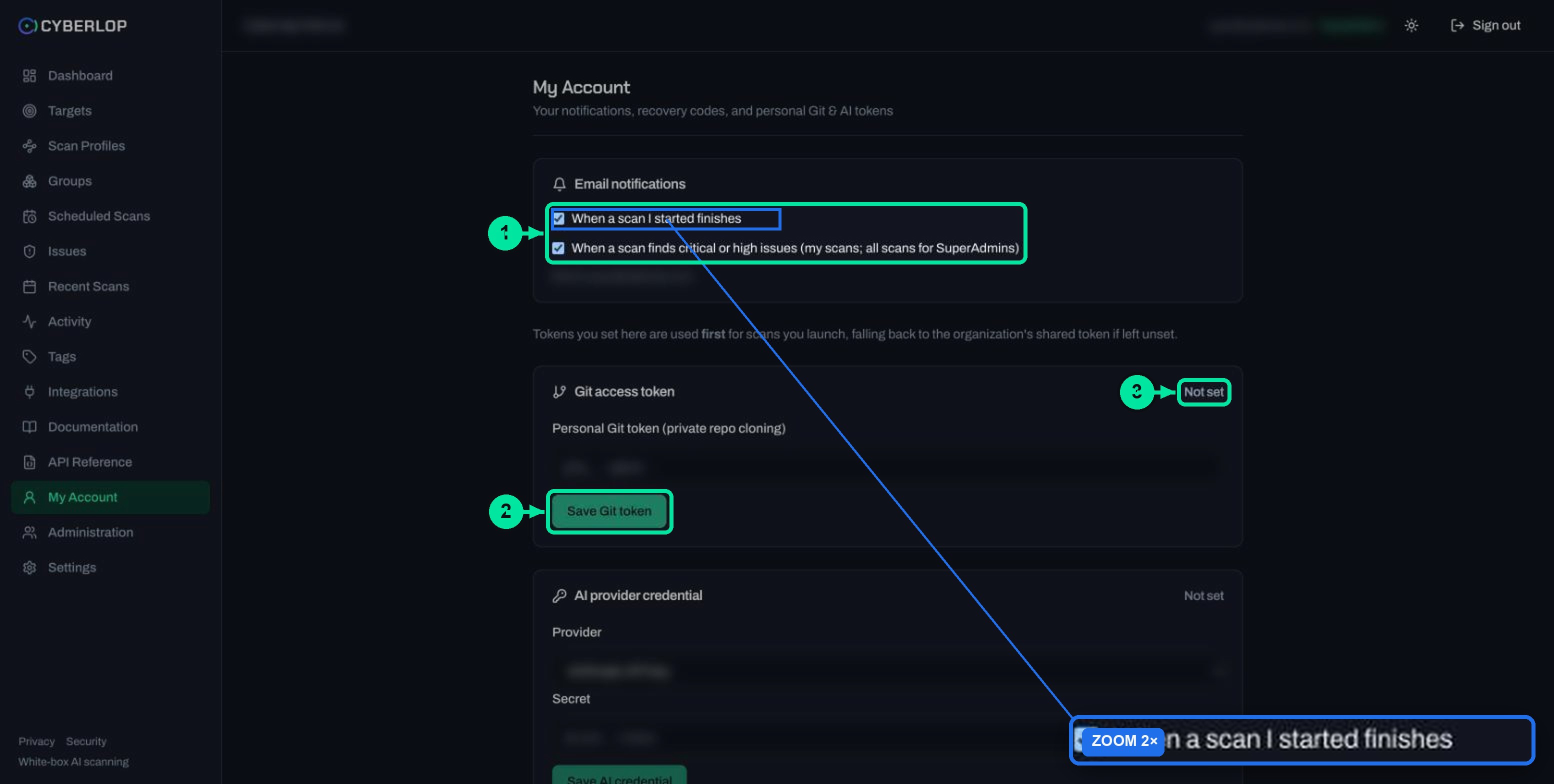
No. My Account lets you save a personal Git token and a personal AI provider credential. Those are secrets you give to Cyberlop so it can clone private code or call a model; see Git access and account and organisation settings. An API token goes the other way: it is a secret Cyberlop gives to your tooling.
What do permission keys look like?
Permission keys follow the pattern area:action, for example scan:run or issue:triage. Roles are bundles of these keys. Built-in roles include SuperAdmin and Developer, and administrators can create custom roles. In the Activity feed a created role appears as Create · Role with its list of permissions.
The API reference shows the required key as a chip on every endpoint, so it is the one place to look up what a call needs. These are the keys it lists.
Permission keys by area
| Area | Keys | What they allow |
|---|---|---|
| Targets | target:read, target:create, target:delete | List and fetch targets, create them, delete them (which cascades to profiles, schedules, scans and findings). Target export also needs target:read. |
| Scan profiles | profile:read, profile:create, profile:update, profile:delete, profile:manage_credentials | Read, build, change and remove profiles. The last key covers verifying key-vault and OAuth connections. |
| Scans | scan:read, scan:run, scan:cancel, scan:delete, scan:read_report | View scans and diffs, launch and refresh, cancel, delete, and download the PDF report. |
| Issues | issue:read, issue:triage, issue:export | Read findings, change status and assignee, export JSON or CSV. |
| Schedules, groups, tags | schedule:*, group:*, tag:* | Read, create, update and delete each, with the exact actions listed per endpoint. |
| Visibility | dashboard:read, search:read, audit:read, activity:read | Dashboard figures, global search, the audit event log and the activity feed. |
| Automation | ci:trigger | Trigger a scan from a pipeline. Polling the result needs scan:read. |
| Administration | settings:read, settings:update, user:read, user:manage, role:read, role:manage, team:read, team:manage | Organisation settings and scan agents, users and their tokens, roles and teams. |
Keys such as activity:read_team and activity:read_all also appear in role definitions, widening what the feed shows. Treat the API reference as the source of truth, because it lists the exact key on each of the 78 endpoints.
How do you create an API token?
An administrator creates it; you cannot mint one from My Account. This guide does not walk through the Administration screens, because an admin does that part. The outcome is a token issued from Administration → Users, with the raw secret shown once. Your plan must also include the API & CI tokens feature, which is listed under Settings → Plan & usage.
Steps to issue a least-privilege token
- Decide the job in one sentence, for example "start a scan on merge and wait for the result".
- Look up the keys it needs in the API reference. For that job:
ci:triggerandscan:read. - Ask an administrator to create a role holding only those keys (
role:manageis needed to do this). - Have them create a dedicated user for the job and give it that role. Add it to only the groups of targets it should reach.
- Have them issue a token for that user from Administration → Users.
- Copy the secret straight into your CI secret store as
CYBERLOP_API_TOKEN. It will not be shown again. - Run the job once and confirm it works, then check the feed for the matching entries.
The dedicated user is the key step. A token borrowed from a person's account carries everything that person can do and it goes with them when they leave. A token on a purpose-made user stays small and easy to review.
How do you use an API token in a pipeline?
Store the token and the app's base URL as two secrets, CYBERLOP_URL and CYBERLOP_API_TOKEN, then send the token in an authorization: Bearer header. The Integrations page generates this wiring for you; see CI/CD integration for the full flow.
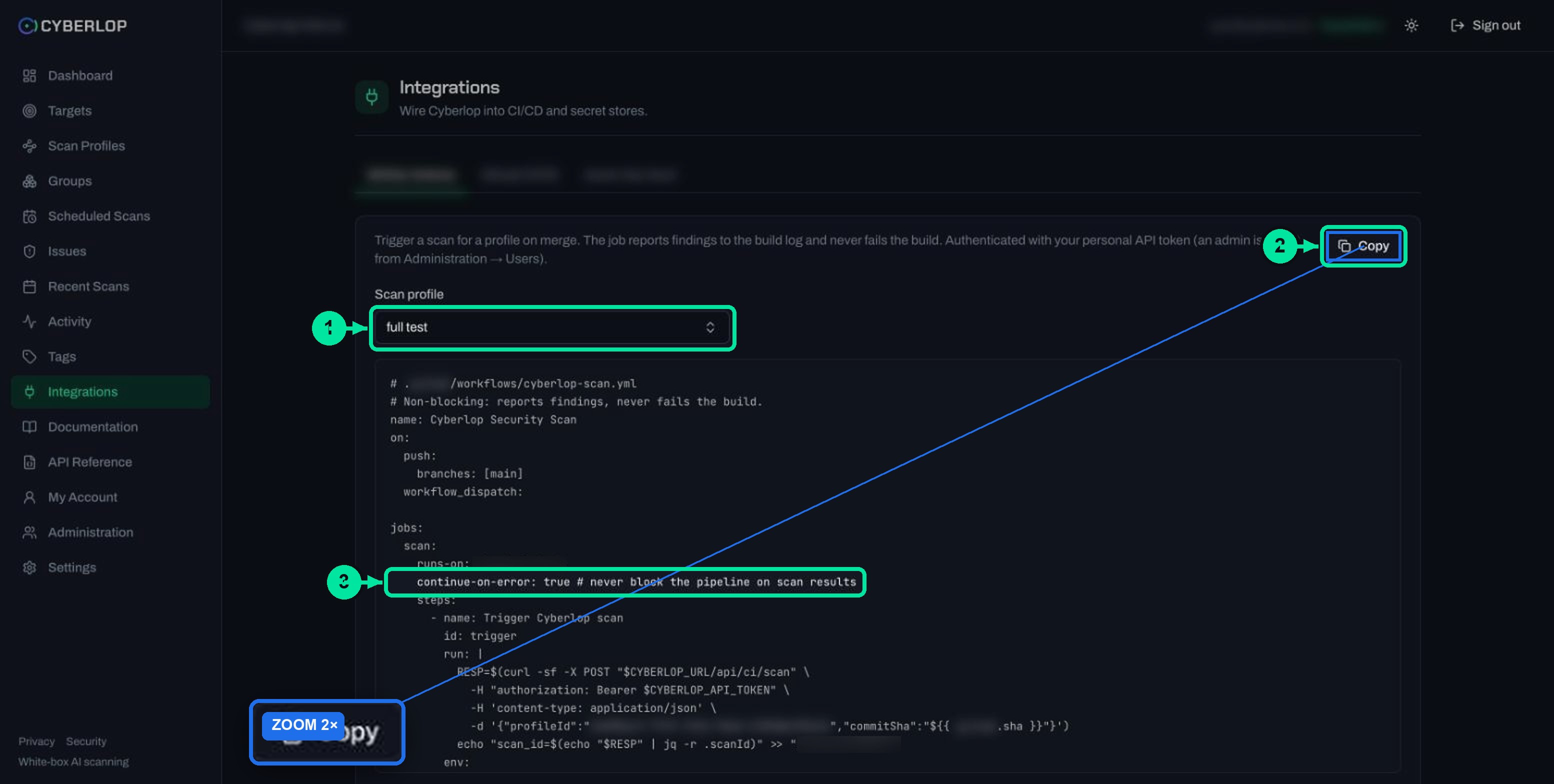
The two calls a pipeline makes
The generated job triggers a scan, then polls for the result every 30 seconds, up to 120 times. It never fails your build. In shell form, with a placeholder profile and commit:
curl -X POST "$CYBERLOP_URL/api/ci/scan" -H "authorization: Bearer $CYBERLOP_API_TOKEN" -H "content-type: application/json" -d '{"profileId":"<profile-id>","commitSha":"<commit-sha>"}'
The response carries the scan ID, which you pass to GET $CYBERLOP_URL/api/ci/result/<scan-id>. That is why a CI token needs both ci:trigger and scan:read. Mark the secrets as masked variables so they do not print in build logs. Keep the token out of the repository, and out of AI-assisted coding sessions that might paste it into a file.
Which permissions does each job need?
Give each job the smallest set that makes its calls succeed. NIST defines least privilege as giving each entity only the "minimum system resources and authorizations" it needs for its function. Here are starting points, built from the permission each endpoint lists.
Starting roles for common jobs
| Job | Permission keys | Endpoints it uses |
|---|---|---|
| Start a scan from CI and read the result | ci:trigger, scan:read | POST /api/ci/scan, GET /api/ci/result/:scanId |
| Archive PDF reports | scan:read, scan:read_report | GET /api/scans/:id, GET /api/scans/:id/report.pdf |
| Send findings to a tracker or spreadsheet | issue:read, issue:export | GET /api/issues, GET /api/export/issues |
| Close findings automatically | issue:read, issue:triage | GET /api/issues/:id, PATCH /api/issues/:id |
| Show posture on an internal board | dashboard:read | GET /api/dashboard |
These are suggestions to adapt, not built-in presets. Also note what a token should never hold: user:manage, role:manage or settings:update. Those keys can create users, issue tokens or change organisation settings, so a leaked token holding them could mint more access. OWASP's API5:2023 Broken Function Level Authorization rates exploitability "Easy" and prevalence "Common". Its fix is to deny all access by default and grant it explicitly per function. A narrow role does that for your own tokens.
How do you rotate and revoke an API token?
Rotate by regenerating the token for its user and updating your secret store; revoke by deleting the user's tokens. Both are administrator actions, listed in the API reference as create/regenerate and revoke, with user:manage required. The OWASP Secrets Management Cheat Sheet says to rotate secrets regularly so that a stolen credential stops working after a short time.
Rotation and leak response
Rotation routine
- Pick a rhythm your team will keep, and rotate at once when someone with access leaves.
- Regenerate, store the new secret, then run the pipeline once to prove it works.
- If the old value was in a log or chat, revoke rather than wait.
When a token leaks
- Revoke the user's tokens first, then investigate.
- Open Activity and look at what the owner did since the leak. See the activity feed guide.
- Issue a replacement with the same narrow role and never reuse the old string.
The app does not say whether regenerating also ends the previous secret. Test the old value after a rotation and confirm the answer with your administrator.
How do you check what a token did?
Review the Activity feed and the audit event log. API actions run as the token's owner. Give each job its own user and the trail reads plainly: a scan started by ci-scanner is plainly the pipeline. The feed shows Start · Scan entries with a Trigger chip, and the audit log is available at GET /api/audit with audit:read. The feed has no token-specific entry type that we know of, so do not rely on it to record token creation. Keep your own note of who asked for each token and why.
Common mistakes with API tokens
Troubleshooting checklist
| Symptom | Likely cause | What to do |
|---|---|---|
| The call is refused as unauthorised | Missing or wrong header, or an expired or revoked token | Check the header is authorization: Bearer <token>, with no stray spaces, then ask an administrator to re-issue. |
| The call is refused for permission | The token owner lacks the endpoint key | Find the key in the API reference and add it to the role, not to a person. |
| The scan starts but the result call fails | Owner has ci:trigger but not scan:read | Add scan:read to the same role. |
| The token works but sees no target | Group scope excludes it | Ask an administrator to put the user in the right group. See groups and tags. |
| You lost the secret | It is shown only once | Regenerate a new one; it cannot be recovered. |
| No option to create a token | Your plan or your role does not allow it | Check Settings → Plan & usage, then ask an administrator. |
- Sharing one token across tools. You cannot tell which tool misbehaved or revoke one without breaking the rest.
- Using an administrator's token for CI. It makes every pipeline an administrator.
- Pasting a token into a chat or a ticket. Treat it like a password.
- Never reviewing. Put token owners on the same access review as people.
What should you do next?
Wire the token into a pipeline next, using CI/CD integration. Then browse every call in the API reference guide and harden sign-ins with single sign-on and two-factor authentication. Related terms: least privilege, role-based access control, bearer token, API authentication, key rotation, secrets management, service account and token revocation. For testing the APIs themselves, read API security testing.
Questions people ask
Api tokens and permissions: FAQs
What is a Cyberlop API token?
It is a secret that lets a script or pipeline call the Cyberlop API as a named user. The token carries its owner's permissions and group scope, so it can never do more than that user can.
Who can create an API token?
An administrator issues it from Administration → Users, and the raw secret is shown once. You cannot create one from My Account. The feature appears as API & CI tokens in Settings → Plan & usage.
What is the difference between an API token and a session?
A session is created when a person signs in, with a cookie and a refresh token that rotates. An API token is a Bearer credential for machines. Both are accepted by the API, and each route checks the same permission.
Which permissions does a CI token need?
To trigger a scan and read its result it needs ci:trigger and scan:read. Add nothing else unless the job calls another endpoint; the API Reference shows the key for each.
What happens if I lose the token?
It cannot be recovered, because the raw secret is returned once and only a hash is stored. Ask an administrator to regenerate it, then update your CI secret.
How do I revoke an API token?
An administrator revokes a user's tokens from Administration → Users. The API reference lists this as a delete on the user's tokens, which needs user:manage. Revoke first, then investigate, if you suspect a leak.
Do API tokens expire?
The app shows no expiry setting. Treat tokens as long-lived and rotate them yourself. RFC 6750 suggests short-lived bearer tokens where leakage is likely.
Is a token tied to a scan target?
Indirectly. It uses its owner's group scope, so limiting the owner's groups limits which targets and profiles the token can reach.
Sources
Where the facts come from
Keep reading
Related articles
Account and organisation settings: notifications, retention, logo and plan
Set notification emails and personal tokens, then configure retention, schedule timezone and report logo, and read the Plan & usage page.
Cyberlop activity feed: what it records and how to use it for audits
Read the Cyberlop activity feed: sign-ins, scans, triage, roles and support sessions, who can see them, how to search and an audit checklist.
Cyberlop API reference: authentication, permissions and the OpenAPI spec
Use the Cyberlop API: 78 endpoints in 15 groups, session or Bearer token auth, permissions per route, worked calls and the OpenAPI download.

Need help scoping a CI token?
Cyberlop can run on a schedule or in CI/CD and gate a build, with every finding backed by the request, the response and the line of code. Ask us to run it on one of your applications.
Or start with a $199 pilot on one application: thirty days, success criteria agreed before day one, credited against the annual if you convert.