
Home / Blog / Tutorials / Cyberlop api reference
Tutorials
Cyberlop API reference: authentication, permissions and the OpenAPI spec
The API Reference page lists every endpoint, the permission it needs and a spec download. Here is how to read it and make your first calls.
Cyberlop Labs · Updated · 9 min read
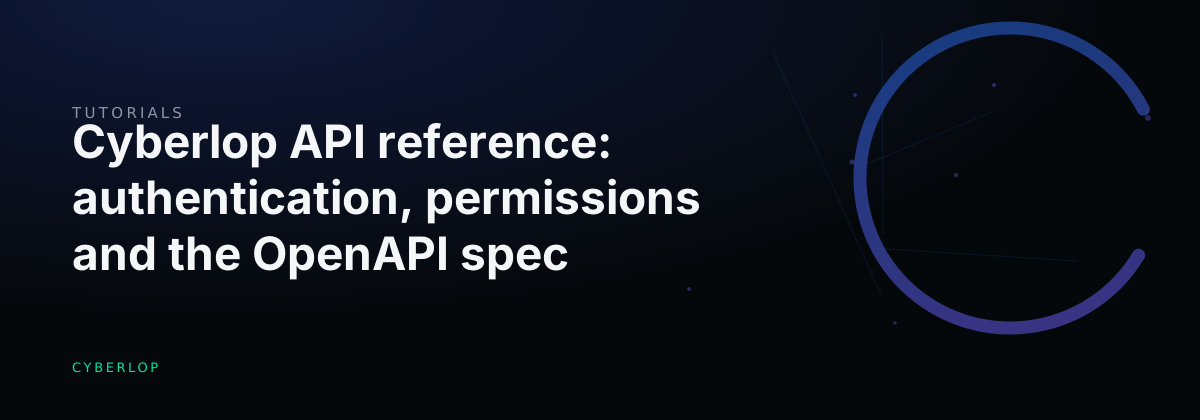
The Cyberlop API reference lists all 78 HTTP endpoints in 15 groups. Authenticate with a session cookie or a Bearer API token issued by an admin; the token carries its owner's permissions and group scope. Each route enforces one area:action permission, shown on the page. Use the JSON or OpenAPI download for the full spec.
- Open the API Reference Click API Reference in the sidebar to see all endpoints grouped into 15 sections.
- Find the routes you need Type a path, method or permission such as scan:run into the filter box.
- Ask an admin for a token An admin issues a personal API token in Administration, Users. Ask for a role with only the keys the job needs.
- Store the token as a secret Copy the raw token once and save it, with the base URL, as CYBERLOP_API_TOKEN and CYBERLOP_URL in your secret store.
- Send the Bearer header Add Authorization: Bearer followed by the token to each request.
- Check your identity Call GET /api/auth/me to confirm which principal the token represents.
- Make your first working call Trigger a scan with POST /api/ci/scan and poll GET /api/ci/result/{scanId} until done is true.
- Download the spec Click OpenAPI (or JSON) and import the file into your API client or code generator.
- The API Reference page lists 78 endpoints in 15 groups, each with its method, path and required permission.
- Authenticate with a session cookie or a Bearer API token; automation should use a token.
- A token acts with its owner's permissions and group scope, so ask for the fewest keys the job needs.
- The raw token is shown once and stored only as a hash, so save it straight into a secret store.
- Download the JSON or OpenAPI file for request bodies and response shapes the page does not show.
The Cyberlop API reference is the in-app page that lists every HTTP endpoint (78 in 15 groups), the permission each one needs, and a download of the spec. You call the API with a session cookie or, for scripts and pipelines, a Bearer API token that an admin issues. Below: how to read it, authenticate, scope permissions and make your first calls.
What is the Cyberlop API reference?
The API reference is the API Reference page in the sidebar. It documents a REST API. It describes itself as "Every Cyberlop HTTP endpoint (78 total)" and adds: "Authenticate with a session cookie or a Bearer API token; each route enforces the listed permission."
A row starts with a coloured method badge: GET green, POST blue, PUT and PATCH amber, DELETE red. Then come the path and a one-line description. The permission chip sits at the right. A "file" suffix on a path means the endpoint returns a file, such as a PDF report or an export. Two buttons at the top, ⤓ JSON and ⤓ OpenAPI, download the spec.
Why does API access need care?
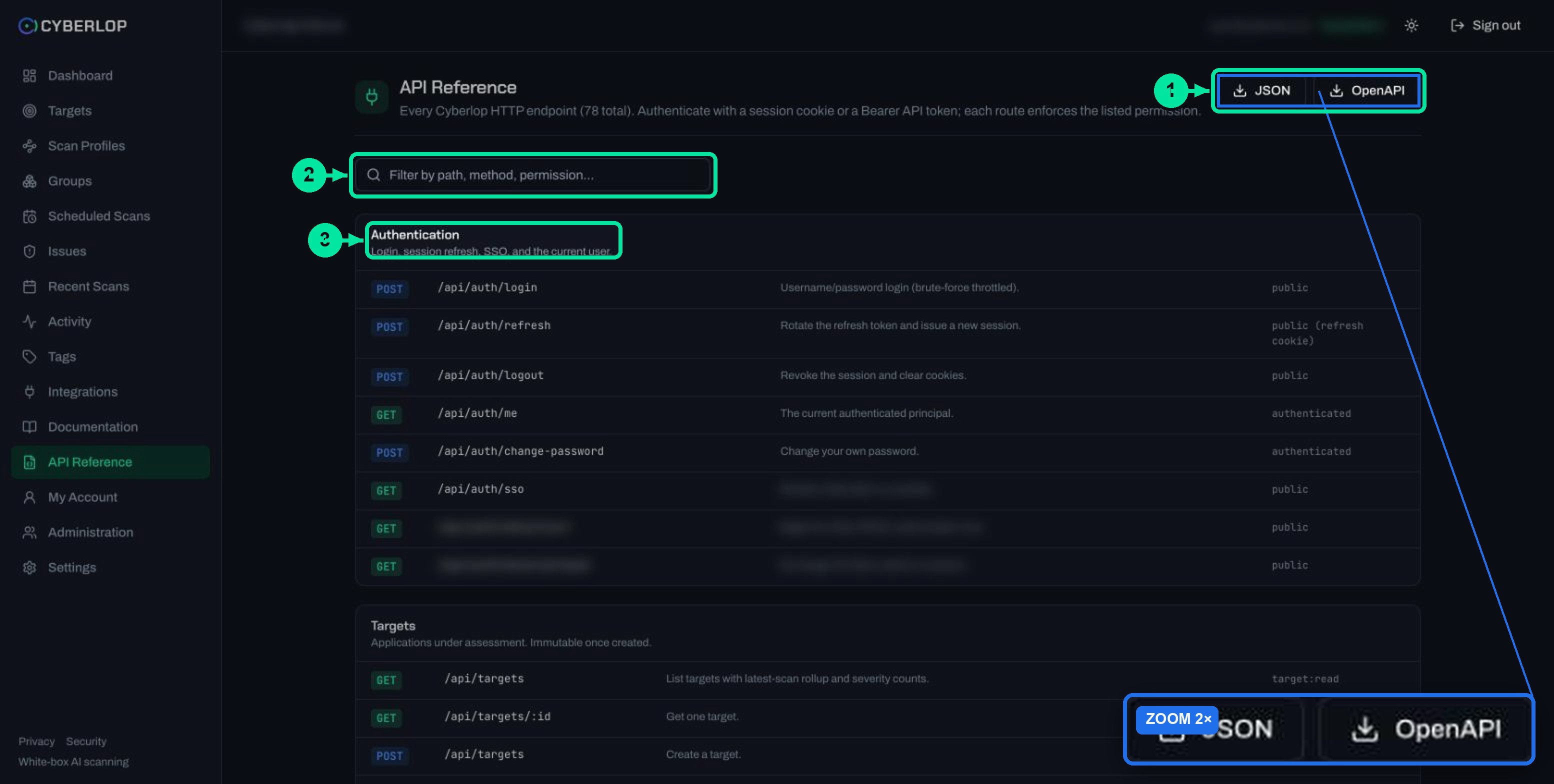
Attackers go where the traffic is, and that is increasingly the API. Akamai reported 311 billion web attacks in 2024, a 33% year-over-year increase, and 150 billion API attacks between January 2023 and December 2024. Verizon's 2025 Data Breach Investigations Report, which analysed over 22,000 incidents including 12,195 confirmed breaches, found that exploitation of vulnerabilities as an initial attack vector rose 34%.
The same applies to the tokens you create for Cyberlop. A token is a bearer token: whoever holds it can use it. OWASP rates the top API risk, API1:2023 Broken Object Level Authorization, as "Exploitability Easy" and "Prevalence Widespread" (OWASP API Security Top 10, 2023). Cyberlop lists a permission on every route for this reason. Give each token as few keys as its job needs. See OWASP API Top 10, BOLA, API authentication and least privilege.
How do you authenticate to the Cyberlop API?
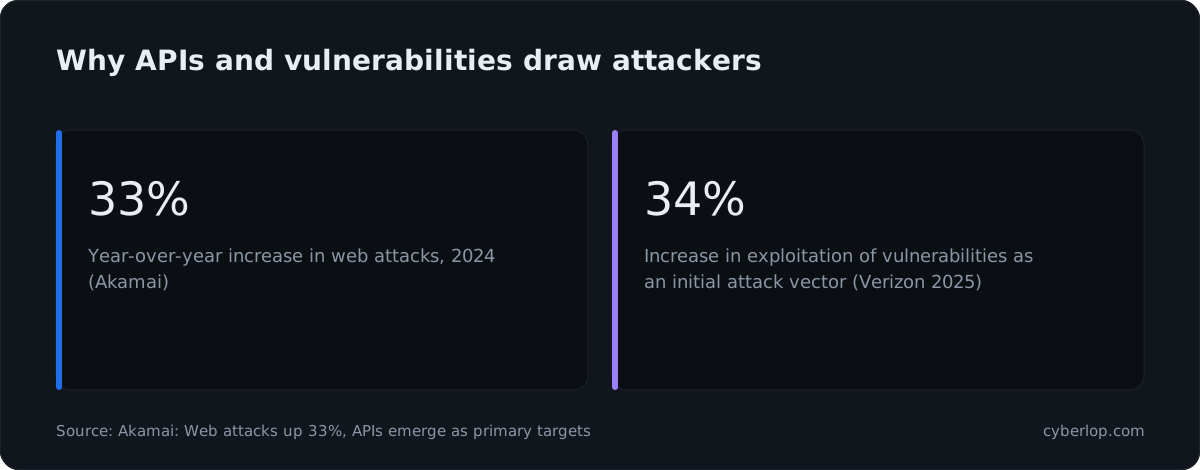
You authenticate with either a session cookie or a Bearer API token. The browser app uses the cookie after sign-in. Anything that runs unattended, such as a script or a CI job, should use a token.
Session cookie or Bearer token?
| Session cookie | Bearer API token | |
|---|---|---|
| Used by | The web app, after you sign in | Scripts, CI jobs and other machine-to-machine calls |
| How you get it | Sign in. POST /api/auth/login is throttled against brute force | An admin issues it in Administration → Users |
| Renewal | POST /api/auth/refresh rotates the refresh token and issues a new session | Regenerate or revoke through the admin token endpoints |
| What it can do | What your role allows | What the token owner's permissions and group scope allow |
| Best for | Interactive use | Automation |
The token inherits its owner's permissions and group scope. The Integrations page says the same about CI runs: "The scan runs with your permissions and group scope". A token never outranks its owner.
How do you make your first call?
- Ask an admin for a personal API token. Tokens are issued in Administration → Users, an admin task this guide does not cover; see API tokens and permissions.
- Copy the raw token when it is shown. The API reference says the raw secret is returned once, and Cyberlop stores tokens only as hashes.
- Store it as a secret in your CI tool or secret manager, never in the repository.
- Set two variables:
CYBERLOP_URL(the base URL of your Cyberlop app) andCYBERLOP_API_TOKEN. - Send the token in the
Authorizationheader with theBearerscheme. - Check who you are by calling
GET /api/auth/me. It returns the current authenticated principal.
curl -s "$CYBERLOP_URL/api/auth/me" \
  -H "Authorization: Bearer $CYBERLOP_API_TOKEN"
How do you keep the token safe?
Handle it like a password. RFC 6750, the Bearer Token Usage standard, says clients "MUST always use TLS (https)" when sending bearer tokens and that token servers "SHOULD issue short-lived (one hour or less) bearer tokens" (RFC 6750, section 5.3). Admins issue the tokens, so agree a rotation habit with them; see key rotation and secrets management.
Which routes need no token?
Login, logout, SSO availability, the SSO start and callback routes and GET /health are public, so you can call them without any credential at all. POST /api/auth/refresh uses the refresh cookie. GET /api/auth/me and POST /api/auth/change-password need any authenticated caller. Everything else needs a named permission. No exceptions.
What do the 15 API groups cover?
The page groups its 78 endpoints into 15 sections that follow the sidebar. Use this table to decide where to look first.
| Group | Endpoints | What it is for |
|---|---|---|
| Authentication | 8 | Login, session refresh, logout, SSO and the current user |
| Targets | 4 | List, read, create and delete applications. Targets are immutable once created |
| Scan profiles | 9 | Profiles, tags, YAML preview, key vault and OAuth2 credential checks |
| Scans | 9 | Launch, refresh, cancel, delete, PDF report, screenshot and diff |
| Issues & findings | 4 | List, read, find eligible assignees and triage |
| Schedules | 4 | Create, update, list and delete scheduled scans |
| Groups, tags & search | 9 | Access scoping, tag registry and global search |
| Dashboard & activity | 3 | Dashboard stats, audit event log and activity feed |
| Export | 2 | Targets and issues as JSON or CSV |
| Settings | 5 | Organisation settings and credential or webhook verification |
| Scan agents | 3 | List, register and revoke self-hosted agents |
| Administration: users & tokens | 7 | User accounts and machine-to-machine API tokens |
| Administration: roles & teams | 8 | Roles and team-based scoped grants |
| CI/CD integration | 2 | Trigger a scan and fetch a pipeline-friendly result |
| Health | 1 | Liveness check |
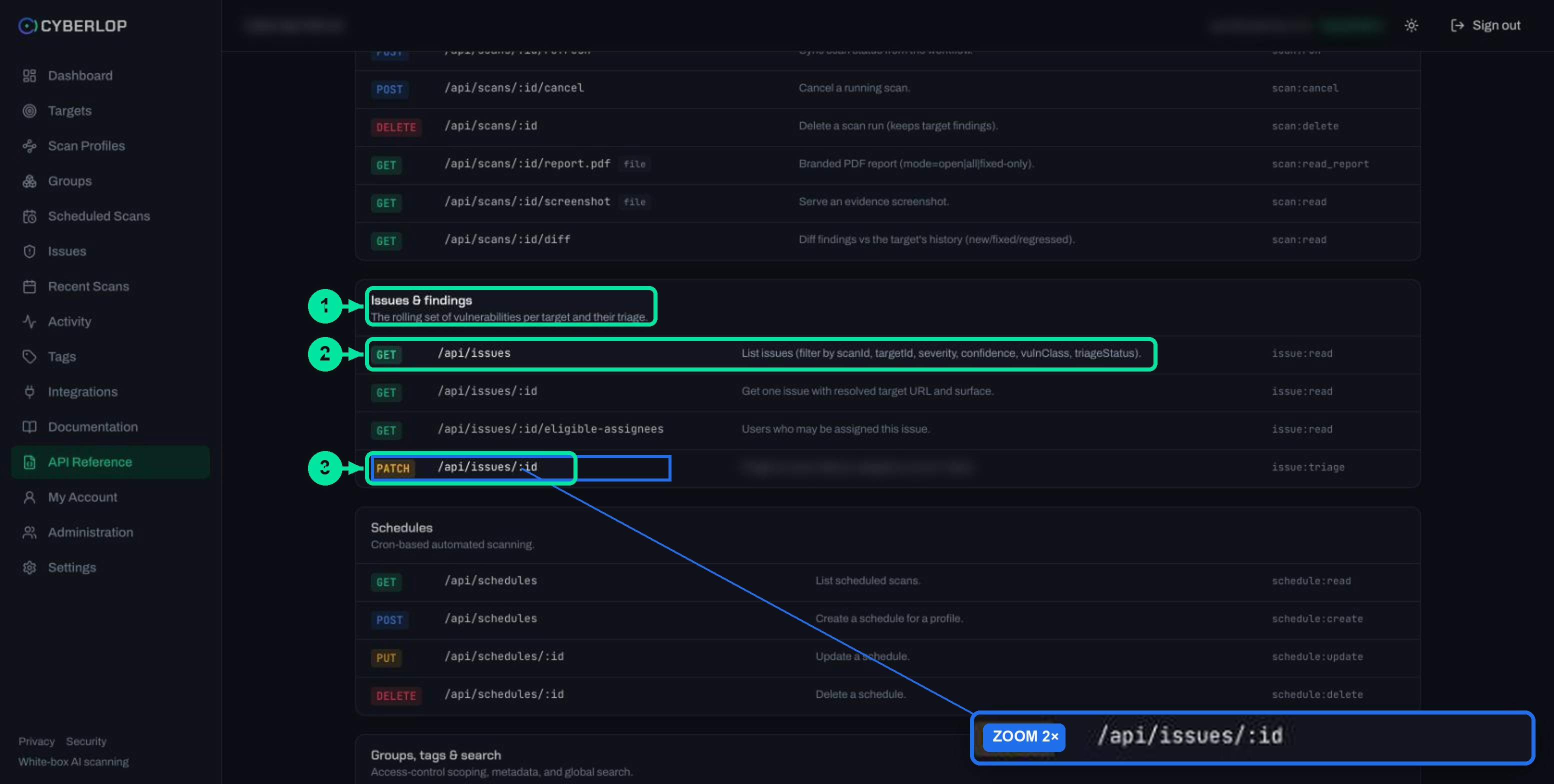
Most teams need three groups and no more: Scans, Issues & findings and CI/CD integration. The rest are for setup and administration.
How do permissions work for each endpoint?
Every route enforces one permission key, written area:action. The key is shown as a chip on the route's row. If the caller's role does not hold it, the route is not available to them. The table groups the keys shown on the page.
| Permission key | What it unlocks | Example endpoint |
|---|---|---|
target:read, target:create, target:delete | View, add and delete targets, and export targets | GET /api/targets |
profile:read, profile:create, profile:update, profile:delete | Work with scan profiles. Secrets are masked when read | GET /api/profiles |
profile:manage_credentials | Verify an OAuth2 token or a key vault connection | POST /api/oauth2/verify |
scan:run, scan:cancel, scan:delete | Launch, refresh, cancel and delete scans | POST /api/scans |
scan:read, scan:read_report | Read scans, screenshots, diffs and the PDF report | GET /api/scans/:id/diff |
issue:read, issue:triage, issue:export | Read, triage and export findings | PATCH /api/issues/:id |
schedule:*, group:*, tag:* | Read, create, update and delete schedules, groups and tags | POST /api/schedules |
activity:read, audit:read, dashboard:read, search:read | Feeds, dashboard stats and global search | GET /api/activity |
settings:read, settings:update | Organisation settings, credential checks and scan agents | PUT /api/settings |
user:read, user:manage, role:read, role:manage, team:read, team:manage | Administration of users, tokens, roles and teams | POST /api/users/:id/tokens |
ci:trigger | Start a scan from a pipeline | POST /api/ci/scan |
A few details matter in practice. GET /api/scans/:id/report.pdf needs scan:read_report, a different key from reading the scan. The agents routes use profile:read to list and settings:update to register or revoke. The system role SuperAdmin is reserved and immutable, and the base admin cannot be deleted.
Which permissions should a token hold?
Give each token only the keys its job needs. A token inherits whatever its owner holds. So a narrow token needs an owner with a narrow custom role, which an admin sets up. The examples below are suggestions built from the keys above, not preset roles.
| Job | Keys to ask for | Why |
|---|---|---|
| Start scans from CI and read the result | ci:trigger, scan:read | The trigger route needs ci:trigger; the result route needs scan:read |
| Pull findings into a tracker or sheet | issue:read, issue:export | Read-only, no way to launch or change anything |
| Fetch PDF reports for an audit | scan:read, scan:read_report | Reports are a separate key from scan data |
| Triage from your own tooling | issue:read, issue:triage | Needed for PATCH /api/issues/:id |
Use one token per job
Separate tokens let you revoke one without breaking the others, and the activity feed shows who did what. Review who holds powerful keys now and then; see RBAC and token revocation.
Do not share a personal token
Actions taken with a token are taken as its owner. If a pipeline and a person share one, you cannot tell their actions apart and revoking it cuts off both.
How do you filter the page and download the OpenAPI spec?
The OpenAPI Specification "defines a standard, programming language-agnostic interface description for HTTP APIs" (OpenAPI Initiative). Cyberlop offers both a JSON and an OpenAPI download, which you can feed to a client generator or API tool. See OpenAPI specification.
- Open API Reference in the sidebar.
- Type in the filter box, labelled "Filter by path, method, permission...". For example, type
scan:runto see every route that needs it. - Click ⤓ OpenAPI for the spec, or ⤓ JSON for the JSON version.
- Import the file into your API client or code generator.
The page shows no request bodies or response shapes. Open the downloaded file to look for them.
What do common API calls look like?
These examples use only routes, parameters and fields shown in the app. Replace the placeholders with your own values.
Trigger a scan and poll for the result
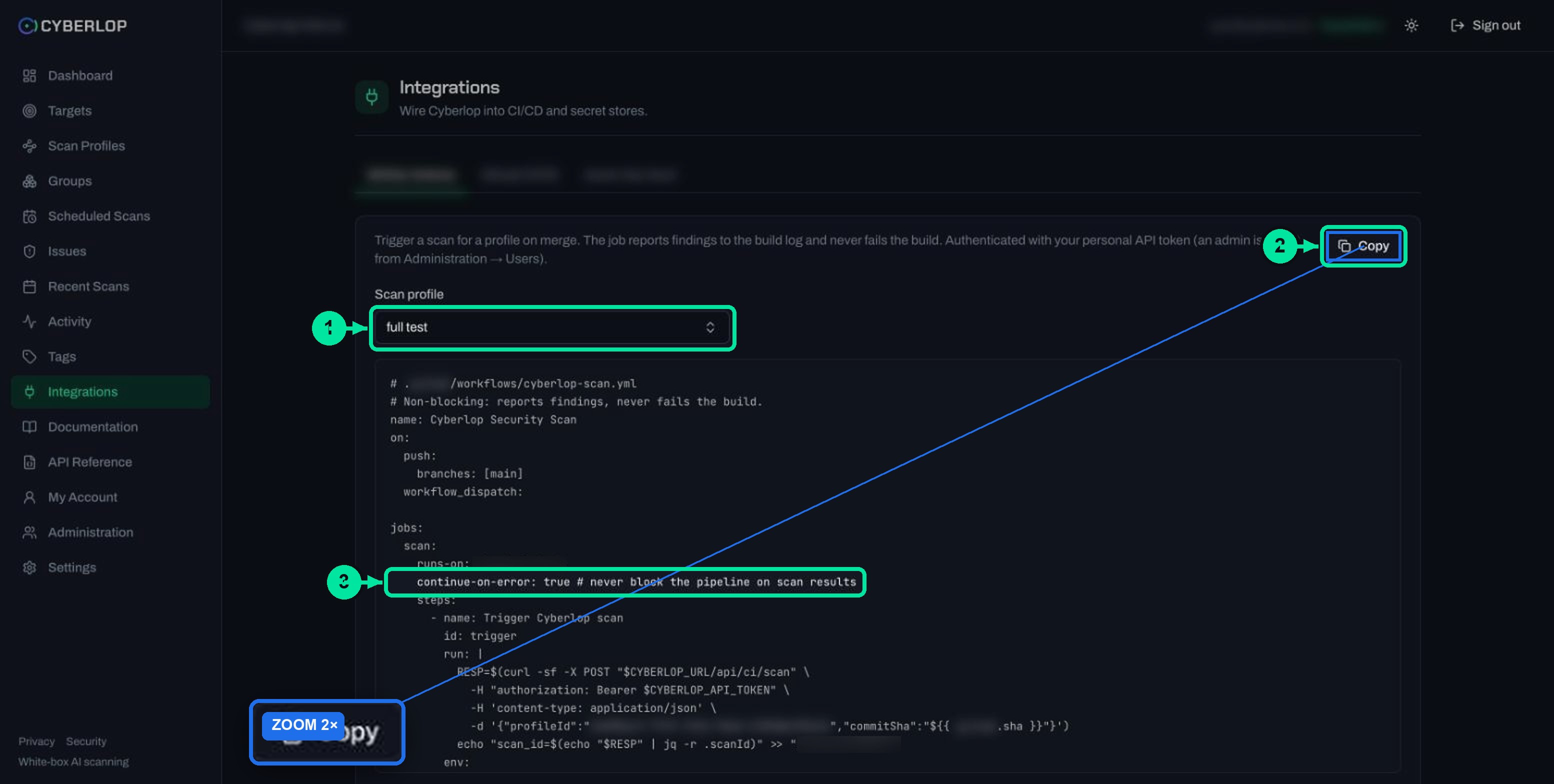
This is the same flow the CI snippet on Integrations uses; see CI/CD integration. The trigger takes a profileId (or profileName) and an optional commitSha.
curl -s -X POST "$CYBERLOP_URL/api/ci/scan" \
  -H "Authorization: Bearer $CYBERLOP_API_TOKEN" \
  -H "Content-Type: application/json" \
  -d '{"profileId":"PROFILE_ID","commitSha":"COMMIT_SHA"}'

curl -s "$CYBERLOP_URL/api/ci/result/SCAN_ID" \
  -H "Authorization: Bearer $CYBERLOP_API_TOKEN"
The first call returns the scan ID. The second returns a CI-friendly result with status, done, totals, severity counts and findings. The CI snippet polls every 30 seconds, up to 120 times, until done is true, and never fails the build.
Filter and export findings
GET /api/issues accepts these filters: scanId, targetId, severity, confidence, vulnClass and triageStatus. Exports use ?format=json or ?format=csv.
curl -s "$CYBERLOP_URL/api/issues?severity=high&targetId=TARGET_ID" \
  -H "Authorization: Bearer $CYBERLOP_API_TOKEN"

curl -s "$CYBERLOP_URL/api/export/issues?format=csv" \
  -H "Authorization: Bearer $CYBERLOP_API_TOKEN" -o issues.csv
The export route needs issue:export. For the same data from the app, see export findings as JSON or CSV and the issues list.
Download a PDF report
GET /api/scans/:id/report.pdf takes a mode of open, all or fixed-only. These match the three choices in the app; see download PDF reports.
curl -s "$CYBERLOP_URL/api/scans/SCAN_ID/report.pdf?mode=open" \
  -H "Authorization: Bearer $CYBERLOP_API_TOKEN" -o report.pdf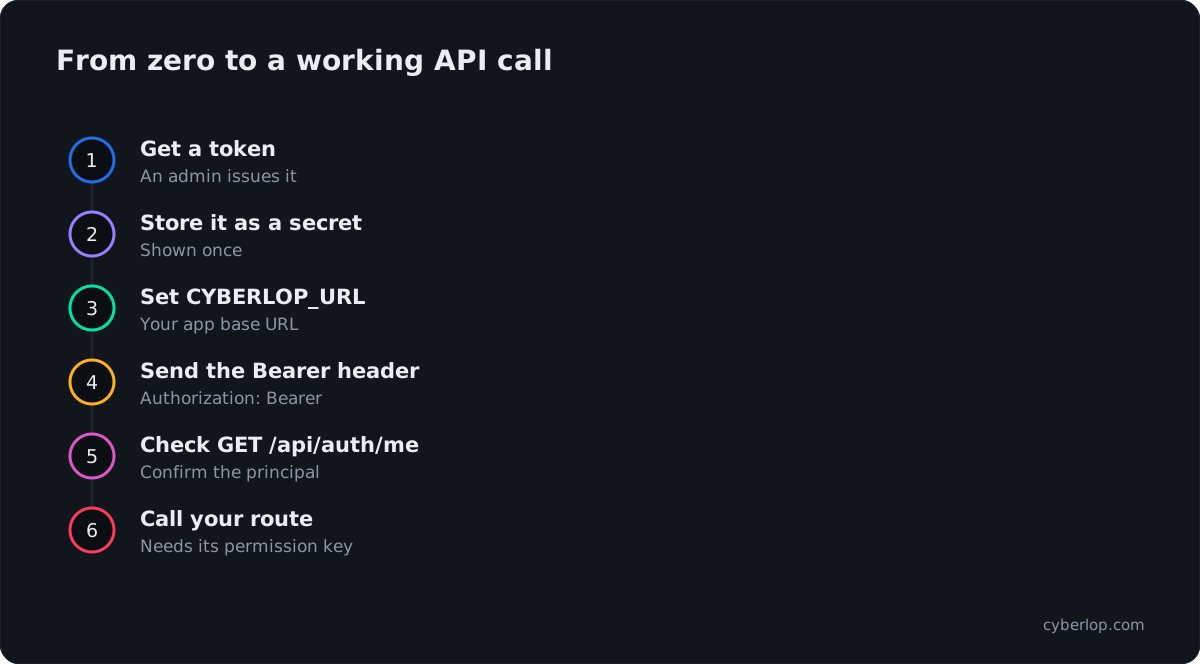
Troubleshooting and common mistakes
Most failed calls come from a missing permission, a wrong URL or a token that has been replaced.
| Symptom | Likely cause | What to do |
|---|---|---|
| A route works in the app but not with your token | The token owner lacks the route's permission key | Filter the API Reference by the route, read its chip, and ask an admin to add the key to the owner's role |
| Calls stop working after a while | The token was regenerated or revoked | Ask an admin for a new one and update your secret. Regenerating returns a new raw secret |
| Nothing matches in the filter | The filter matches path, method or permission only | Try a path fragment such as /api/scans, a method, or a key such as issue:triage |
| A scan trigger finds no profile | Wrong profileId or profileName | Copy the profile ID from the generated snippet on Integrations |
| You only see some data | Your token carries its owner's group scope | Check the owner's groups; see groups and tags |
| You used a session cookie in a script | Cookie sessions come from sign-in and are rotated by refresh | Use a Bearer API token for automation |
Keep the base URL in one variable. Treat the 78 endpoints as a menu, because most automations call only a handful. And if a script starts a scan, check that you own the target or are authorised to test it.
Next step
Now that you can read the API reference, learn how tokens are issued and scoped in API tokens and permissions. Related guides: CI/CD integration, single sign-on and self-hosted scan agents. For how Cyberlop protects credentials, read the security page.
Questions people ask
Cyberlop api reference: FAQs
What is the Cyberlop API reference?
It is the API Reference page in the sidebar. It lists every HTTP endpoint (78 in 15 groups) with its method, path, description and required permission, plus JSON and OpenAPI downloads.
How do I authenticate to the Cyberlop API?
Use a session cookie (the web app) or a Bearer API token. For scripts and CI, send Authorization: Bearer followed by your token. An admin issues tokens in Administration, Users.
What can my API token do?
It acts with its owner's permissions and group scope, no more. Each route enforces the permission key listed on the API Reference page.
Can I see an API token again after it is created?
No. The raw secret is returned once and Cyberlop stores tokens only as hashes. If it is lost, ask an admin to regenerate it and update your secret store.
Which endpoints do I need to start a scan from CI?
Use POST /api/ci/scan (needs ci:trigger) and GET /api/ci/result/:scanId (needs scan:read). See CI/CD integration.
Is there an OpenAPI file I can import?
Yes. The API Reference page has ⤓ OpenAPI and ⤓ JSON buttons. Import the file into your API client or code generator.
Can I export findings through the API?
Yes. GET /api/export/issues returns issues as JSON or CSV with filters and needs issue:export. GET /api/export/targets does the same for targets.
Can I use the API to scan a site I do not own?
No. Only scan applications you own or are authorised to test. Black-box targets also need ownership verification before scans can run.
Sources
Where the facts come from
Keep reading
Related articles
Cyberlop activity feed: what it records and how to use it for audits
Read the Cyberlop activity feed: sign-ins, scans, triage, roles and support sessions, who can see them, how to search and an audit checklist.
Cyberlop API tokens and permissions: how to issue and limit them
What a Cyberlop API token is, how permission keys work, which keys common jobs need, and how to rotate, revoke and audit tokens with least privilege.
How to add security scanning to your CI/CD pipeline
Copy the generated pipeline YAML, set CYBERLOP_URL and CYBERLOP_API_TOKEN, and get findings in your build log on every merge without blocking builds.

Need help wiring up the API?
Cyberlop can run on a schedule or in CI/CD and report what it actually exploited, with the request, the response and the line of code. Ask us to run it on one of your applications.
Or start with a $199 pilot on one application: thirty days, success criteria agreed before day one, credited against the annual if you convert.