
Home / Blog / Tutorials / Header token authentication
Tutorials
How to add header token authentication to a scan profile
Give a scan an API key or bearer token by adding a header to an authentication role. This guide covers the fields, safe tokens, rotation and how to check it worked.
Cyberlop Labs · Updated · 9 min read
Header token authentication gives a Cyberlop scan an API key or bearer token. On a scan profile, open Authentication, click + Add role, tick Header (token / API key), click + Add header, enter the header name and value, then Save. Use a scoped test token, and replace it in the profile when you rotate it.
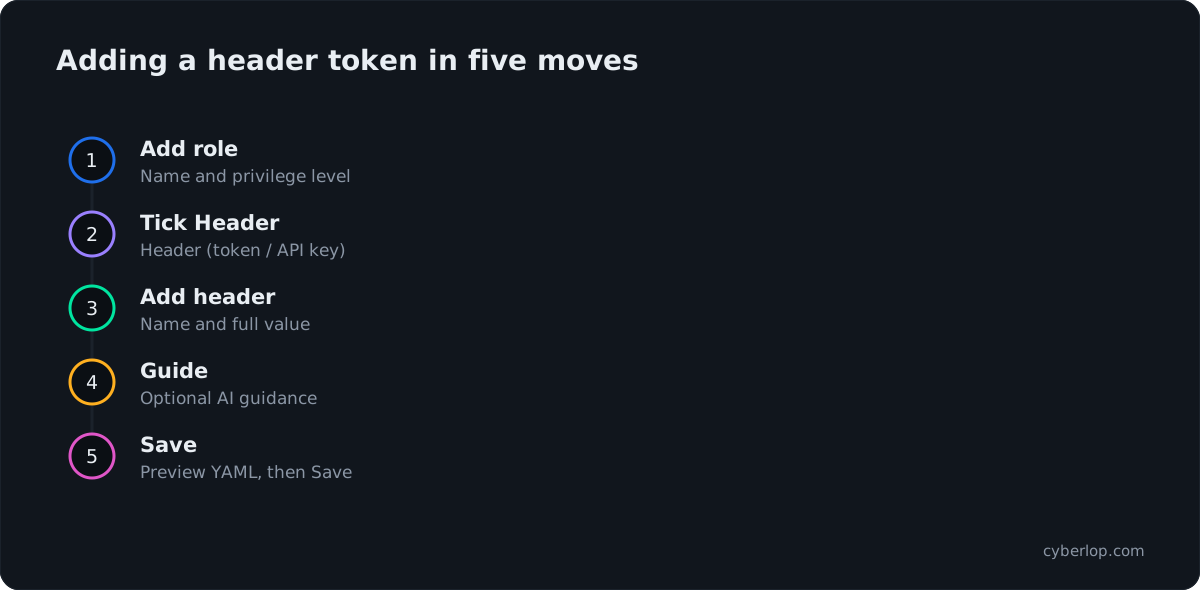
- Open the profile Click Scan Profiles, then + New profile, or the pencil icon to edit an existing one.
- Set the scope Pick the target and name the profile on the Scope section.
- Go to Authentication Click Authentication in the section switcher.
- Add a role Click + Add role, name it and choose a privilege level.
- Tick the Header method Tick Header (token / API key). Untick Form if the role does not use a login page.
- Add the header Click + Add header, then enter the header name and the full value, including any prefix.
- Add AI guidance Optionally write one instruction per line on how the token behaves.
- Preview and save Click Preview YAML to validate, then click Save.
- Run and check Start a scan, then check the Sitemap role chips and the Authentication line on a finding's Evidence tab.
- Header is one of three methods on an authentication role; it sends the name and value you type.
- Include any prefix in the value, for example Bearer followed by a space and the token.
- Use a scoped, short-lived test token on a non-production copy of the app.
- To rotate, create the new token, replace the value, save, scan, then revoke the old one.
- Confirm success in the Sitemap role chips and the Authentication line of a finding's Evidence tab.
Header token authentication lets a Cyberlop scan call your app with an API key or bearer token. Open a scan profile, go to Authentication, click + Add role, tick Header (token / API key), click + Add header, enter the header name (for example Authorization) and its value (for example Bearer ...), then click Save. The scan sends that header with its requests, so it can test the endpoints behind your API key.
What is header token authentication?
Header token authentication is a way of proving who you are by sending a secret in an HTTP header on every request. Most APIs work this way. The secret is usually an API key or a bearer token, and the header is usually Authorization, though some APIs read a custom header instead. HTTP defines header fields in RFC 9110.
In Cyberlop, this is one of three Authentication methods you can give an authentication role. A role is a named login identity with a privilege level. Without a role, the profile scans unauthenticated, and the form says so: "No auth roles. Add a role to scan behind login, or leave empty for unauthenticated scanning."
Header, form login or OAuth 2.0?
Pick the method that matches how your app accepts credentials.
Table 1. The three authentication methods on a role
| Method | Best when | What you give Cyberlop | Notes |
|---|---|---|---|
| Form login | Your app has a login page | Login URL, username, password, optional TOTP secret, success condition, login flow | See the form login guide |
| Header (token / API key) | You already hold a key or token your API accepts in a header | One or more header name and value pairs | Covered in this guide |
| OAuth 2.0 | Your API issues tokens through client credentials | Token URL, Client ID, Client secret, scope, header name, header prefix | Cyberlop mints the token itself. See the OAuth guide |
You can combine methods on one role. The form offers this help text: "Combine methods to authenticate this role (e.g. form + header)." A common case is a web app that needs a session cookie from the login page and an API key on its backend calls.
How do you add a header token to a scan profile?
You add it on the Authentication section of a scan profile, either while creating the profile or later through editing. Have the token ready first, and make sure it is a test token (see the safety section below).
Step by step
- Click Scan Profiles, then + New profile. To change an existing profile, click the pencil icon on its row instead.
- On Scope, pick the Target and give the profile a Name. The target cannot change after creation.
- Click Authentication in the section switcher on the left.
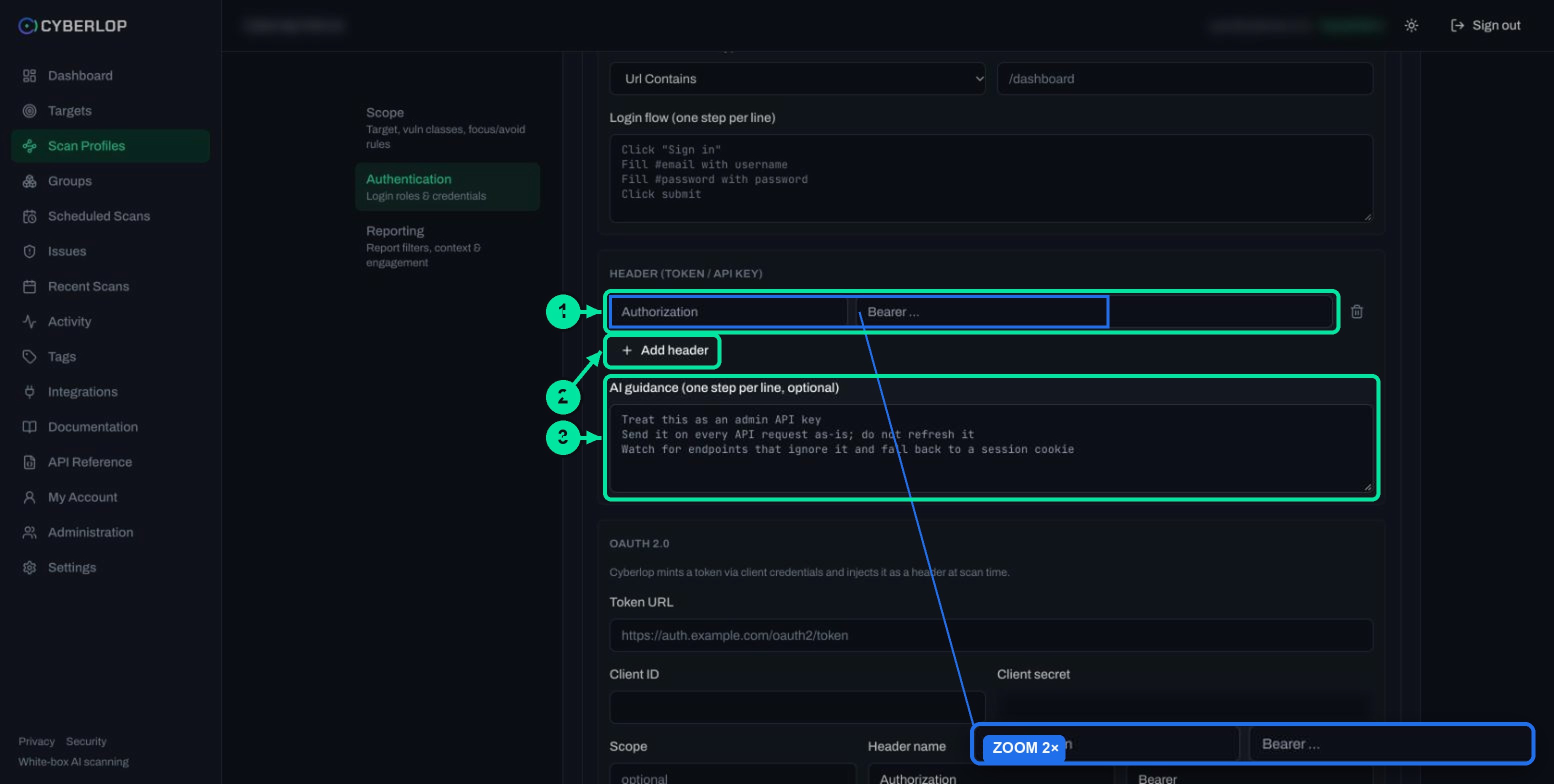
- Click + Add role. Give the role a Name (the placeholder is "admin") and choose a Privilege level: Unauthenticated, User, Elevated or Admin.
- Under Authentication methods, tick Header (token / API key). Untick Form if the role does not use a login page, because Form is ticked by default.
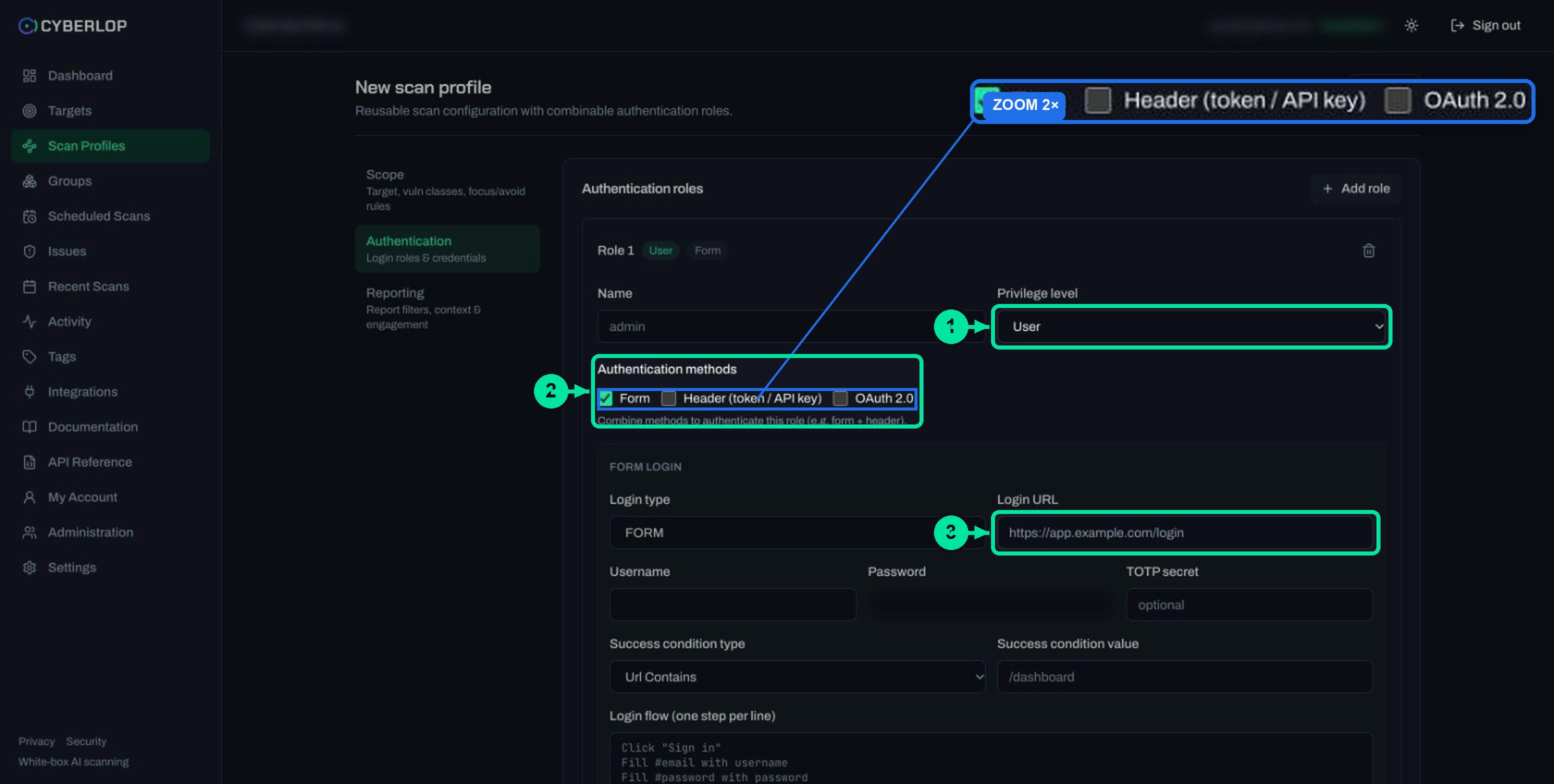
- In the header block, click + Add header. A row appears with a name box (placeholder "Authorization") and a value box (placeholder "Bearer ...").
- Type the header name and paste the value. Add more rows if the API needs more than one header.
- Optionally write AI guidance, one instruction per line.
- Click Preview YAML to validate the form, then click Save.
Field reference
Table 2. Header block fields
| Field | What to enter | Notes |
|---|---|---|
| Name | A short label for the role, such as api-user | Shown on the role card and in the profile |
| Privilege level | Unauthenticated, User, Elevated or Admin | Set it to match what the token can really do; it defaults to User |
| Authentication methods | Tick Header (token / API key) | Can be combined with Form and OAuth 2.0 |
| Header name | The header your API reads, usually Authorization | Placeholder is "Authorization" |
| Header value | The full value, including any prefix, such as Bearer and a space | Placeholder is "Bearer ...". Treat it as a secret |
| AI guidance (optional) | One instruction per line on how to use the token | See the guidance section below |
What should the header name and value look like?
Copy them exactly as your own API expects them. The scan sends what you type, so a missing prefix or a stray space is an easy way to get a token rejected.
Common shapes
A bearer token in Authorization
Header name Authorization, value Bearer, a space, then the token. A bearer token is defined in RFC 6750 as a token that any party holding it can use, which is why it must be guarded like a password. The same RFC says bearer tokens should travel in headers or bodies, not in page URLs.
An API key in a custom header
Header name as your API documents it (for example X-Api-Key), value the key alone, with no prefix unless your API wants one. The OWASP REST Security Cheat Sheet makes the same point about transport: send keys in headers, not in query strings such as ?apiKey=..., because URLs end up in logs and histories.
Some APIs need a key and a second header that selects an account or environment. Add one row for each. Use neutral test values, for example X-Environment set to staging.
Which privilege level and how many roles do you need?
Give each token its own role, and set the privilege level to what that token is allowed to do. A read-only key is a User. A key that manages other accounts is Elevated or Admin. The sitemap shows a role chip against each endpoint, so an accurate label makes results easier to read in the sitemap.
The in-app documentation suggests a normal user and, for IDOR and privilege testing, a second user. For a header-based API, that means two keys from two different test accounts. Read the authentication roles guide for the reasoning.
How do you tell the AI how to use the token?
The AI guidance (one step per line, optional) box under the header rows lets you describe how the token behaves. The scan reads it alongside the header. The form shows three example lines as placeholders:
- "Treat this as an admin API key"
- "Send it on every API request as-is; do not refresh it"
- "Watch for endpoints that ignore it and fall back to a session cookie"
Keep it short and factual: what the key can do, whether it expires, anything unusual about your API. Never paste the secret here.
What makes a safe token to give a scan?
A safe scan token is a test token, with the least access that still reaches the code you want tested, and one you can revoke without hurting anyone. Treat it like a key you would hand a new colleague: scoped, short-lived and easy to revoke.
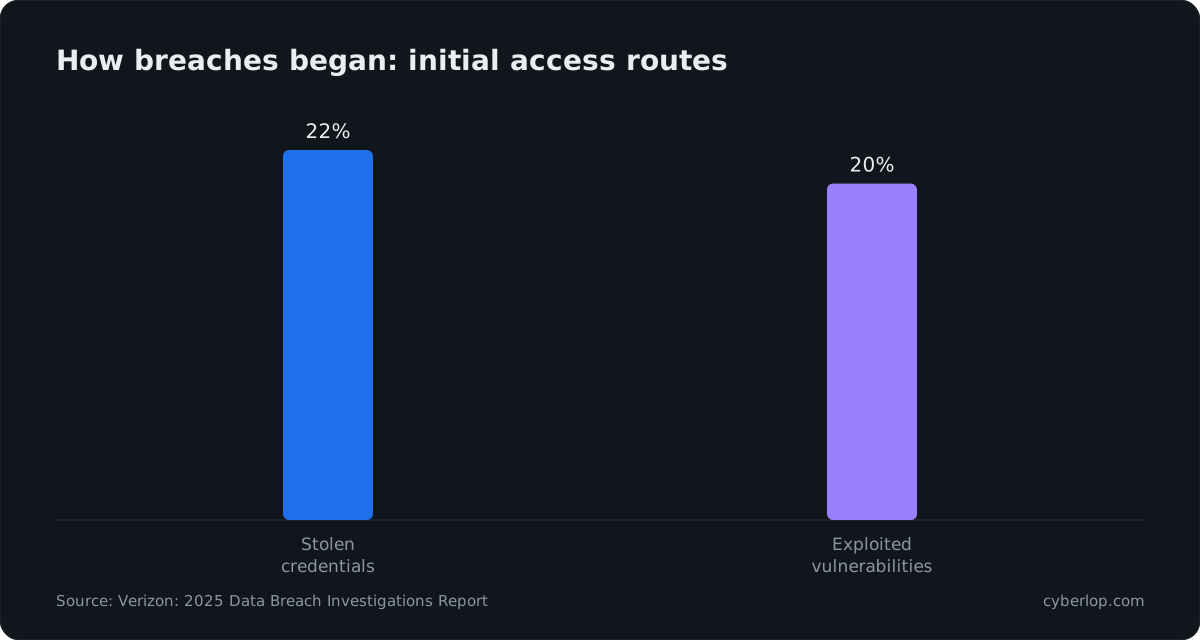
In the Verizon 2025 Data Breach Investigations Report, stolen credentials were the initial access route in 22% of breaches, just ahead of vulnerability exploitation at 20%. The same report found that the median time to remediate a leaked secret in a code repository was 94 days. A token that sits unchanged for three months is a long exposure window. The OWASP Secrets Management Cheat Sheet gives the reason to rotate: "so that any stolen credentials will only work for a short time".
Checklist before you paste a token
- Use a non-production copy. Point the target at a staging or dev copy and a token that belongs there. See the test environment entry and the exploitation phase guide for why production needs care.
- Apply least privilege. Create a key just for scanning, with only the scopes your test accounts need.
- Choose a lifetime. RFC 6750 recommends short-lived bearer tokens of one hour or less where leakage is possible. A scan of a small app typically takes roughly an hour, according to the in-app documentation, so give the token a longer expiry than the scan and revoke it afterwards.
- Keep it out of notes. Never put the value in AI guidance, rules of engagement, report guidance or application context.
Cyberlop stores secrets encrypted and, as a general rule across the app, does not show them again once saved. Its security page describes how stored credentials are handled. Treat a saved header value as write-only.
How do you rotate or replace a header token?
Rotating a header token means issuing a new one in your own app, putting it into the profile, and revoking the old one. Cyberlop does not issue or refresh a header token for you: that is the difference from OAuth 2.0, where it mints a fresh token at scan time. For a header, you control the lifecycle. See API key rotation for the wider practice.
Planned rotation
- Create a new test token in your app with the same scopes as the old one.
- Open the profile with the pencil icon and go to Authentication.
- Find the role and replace the header value.
- Click Preview YAML, then Save.
- Run a scan and check the result (next section).
- Revoke the old token in your app only after the new scan works.
Stored secrets are not shown again on edit, so do not expect the old value to be pre-filled. The edit page for form credentials shows a notice, "Form credentials stored — leave fields blank to keep it.", with a Clear option. That notice is shown for form credentials, and a saved header row may look different. When you change a header, retype both name and value. The edit guide covers stored secrets in general.
After a suspected leak
Revoke the token in your own app first, then replace it in the profile. The token revocation entry explains what revoking should achieve.
How do you check that the token worked?
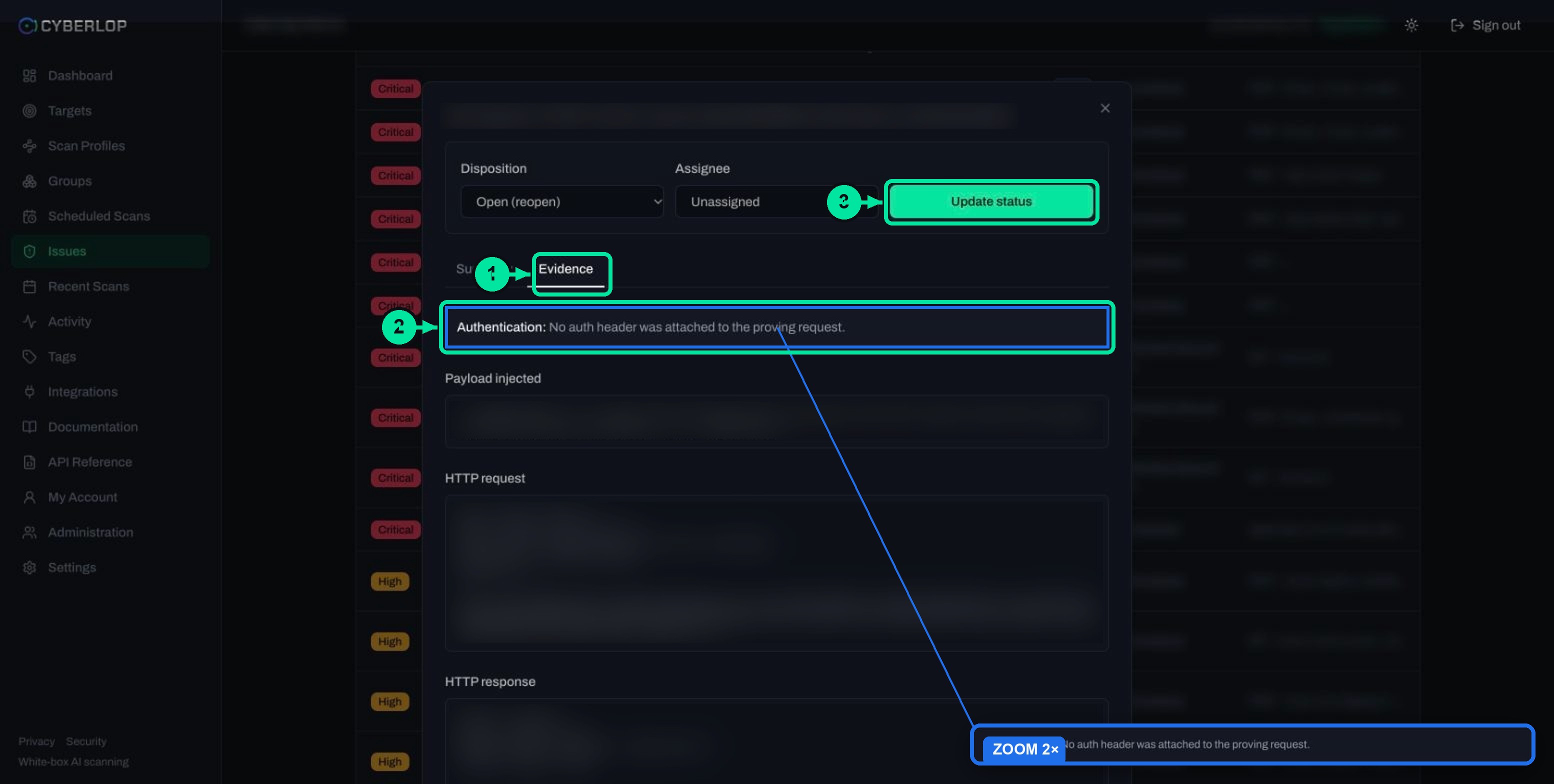
Run the scan and look for evidence that the scan reached authenticated endpoints. A rejected token may not raise an error; the scan may simply see less.
Where to look
Check the Sitemap
On the scan detail page, open the Sitemap tab. Endpoints are grouped by host with method badges, notes and role chips. Look for your role on the endpoints that need the token. If they are missing, the scan probably did not get in. The sitemap guide shows how to read it.
Check a finding's Authentication line
Open a finding and its Evidence tab. The first line, Authentication, says which role or header the proving request used. A finding that says "No auth header was attached to the proving request" came from a request without a token. See read a finding.
Troubleshooting
Table 3. Symptoms, causes and fixes
| Symptom | Likely cause | What to try |
|---|---|---|
| The sitemap shows no role chips on protected endpoints | The role was not saved, or the method box was not ticked | Edit the profile, confirm Header (token / API key) is ticked and a row exists, then Save |
| Protected endpoints answer as if unauthenticated | Wrong header name, missing prefix or an expired token | Compare name and value with a working request from your own tools; replace the token |
| Preview YAML shows a red error | A required field is empty, such as the profile name | Fill the field in the message and preview again |
| The app falls back to a session cookie | The endpoint ignores the header | Add that to AI guidance, or add a Form method on the same role |
| The scan needs a refreshed token every run | The token is short-lived | Use OAuth 2.0 client credentials so Cyberlop mints a fresh token |
What are the common mistakes?
Mistakes with the token
Using a production admin key
It works, and that is the problem. A scan can send many requests. Use a scoped test key on a non-production copy.
Leaving out the prefix
If your API expects Bearer before the token, include it in the value. The Header block has no separate prefix field, unlike OAuth 2.0 where Header prefix is its own box.
The wrong privilege level
Labelling an admin key as User makes results harder to read. Match the label to the key.
Form still ticked
A new role has Form ticked by default. If the role only uses a token, untick Form so the role holds just one method.
What should you do next?
If your API issues tokens through client credentials, continue with the OAuth 2.0 client credentials guide. Then add business context in the application context guide, and read how authenticated testing differs from an unauthenticated run. The OWASP API Security Top 10 (API2:2023 Broken Authentication) lists what to fix when a scan finds weak token handling, including its advice that "API keys should not be used for user authentication".
Questions people ask
Header token authentication: FAQs
How do I scan an API that uses an API key?
Add an authentication role to the scan profile, tick Header (token / API key), click + Add header and enter the header name your API reads and the key as the value. Then click Save and run the scan.
What is the difference between an API key and a bearer token?
Both are secrets sent in a header. A bearer token, as RFC 6750 defines it, can be used by any party that holds it. An API key is usually a long-lived identifier for an app or account. In Cyberlop you enter either one the same way, as a header name and value.
Do I type the word Bearer in the value?
Yes, if your API expects it. The header block has one name box and one value box, with placeholders Authorization and Bearer .... Enter the full value, including the prefix and the space. OAuth 2.0 has a separate Header prefix field, but Header does not.
Can I use more than one header on a role?
Yes. Click + Add header again to add another name and value row. The form describes the block as one or more header name and value pairs. You can also combine Header with Form login or OAuth 2.0 on the same role.
How often should I rotate the token?
Rotate on a schedule you can keep, and straight away after a suspected leak. OWASP advises rotating secrets so stolen credentials work only briefly. Rotation in Cyberlop means replacing the value in the profile and saving it.
Is it safe to give a scan my API key?
It is safer with a scoped test key on a non-production copy of the app, belonging to a test account. Avoid production admin keys. Cyberlop stores secrets encrypted and does not show them again once saved.
How do I know the scan used my token?
Open the scan's Sitemap tab and look for the role chip on protected endpoints. In a finding's Evidence tab, the Authentication line says which role or header the proving request used.
Sources
Where the facts come from
Keep reading
Related articles
Application context in Cyberlop: fill the ten fields and use Auto Generate from Repo
Fill in the ten application context fields of a Cyberlop scan profile, use Auto Generate from Repo, and write context that improves findings.
How to scan behind login in Cyberlop with authentication roles
Scan behind login in Cyberlop: add authentication roles, choose privilege levels, combine form, header and OAuth methods, and guide the scan with AI guidance.
How to create a scan profile in Cyberlop: Scope, Authentication, Reporting
Create a scan profile in Cyberlop: Scope, Authentication and Reporting fields, exploitation on or off, Preview YAML and Save, with a troubleshooting table.

Need a hand setting up a scan login?
Cyberlop reads your code while testing the running app and reports only what it exploited, with the request, the response and the line of code. Ask us to run it on one of your applications.
Or start with a $199 pilot on one application: thirty days, success criteria agreed before day one, credited against the annual if you convert.