
Home / Blog / Acunetix alternatives
Compare
Acunetix alternatives in 2026: nine options and how to choose
Acunetix is now Invicti Web + API. This guide compares nine alternatives, from enterprise suites to open-source scanners, using only what each vendor publishes.
Cyberlop Labs · Updated · 13 min read
Acunetix is a DAST scanner for web apps and APIs, now sold as Invicti Web + API. Alternatives fall into four groups: enterprise suites (Qualys, Rapid7, Tenable), pentester-grade and developer-first tools (Burp Suite, StackHawk), open source (ZAP, Nuclei) and attack surface tools (Detectify, Intruder). Choose by authentication, API coverage, proof and where it runs.
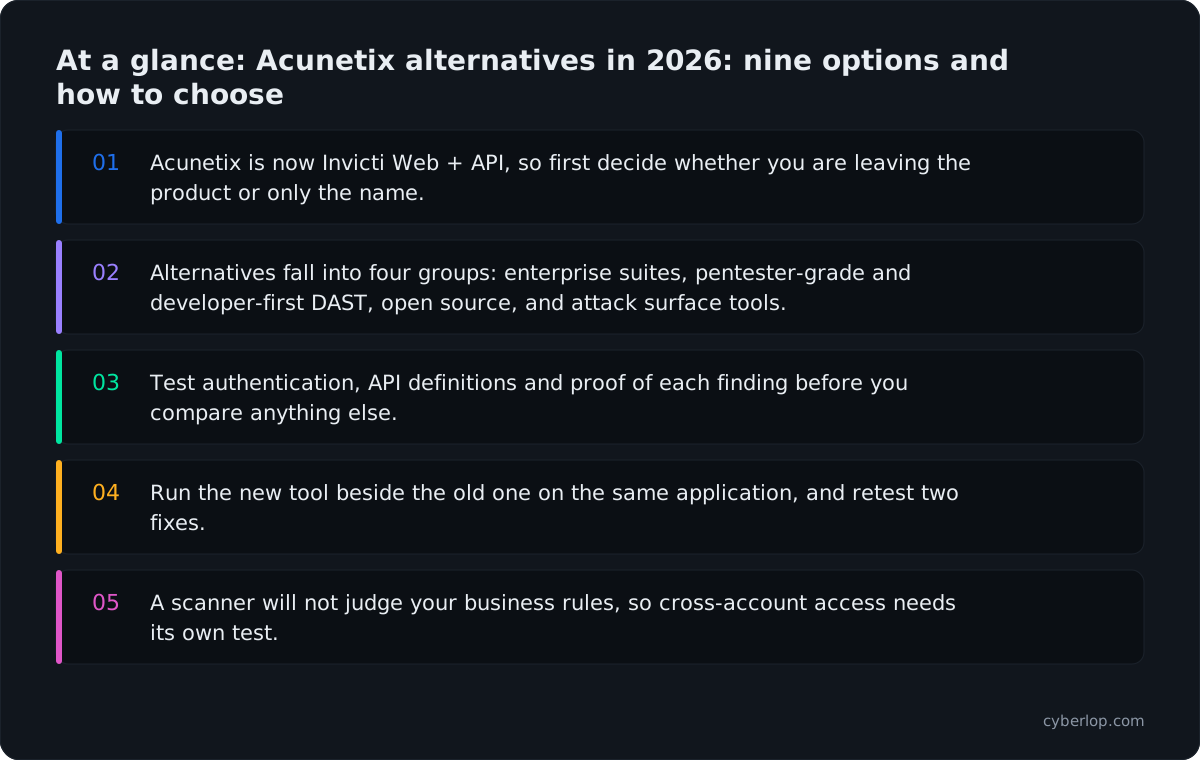
- Acunetix is now Invicti Web + API, so first decide whether you are leaving the product or only the name.
- Alternatives fall into four groups: enterprise suites, pentester-grade and developer-first DAST, open source, and attack surface tools.
- Test authentication, API definitions and proof of each finding before you compare anything else.
- Run the new tool beside the old one on the same application, and retest two fixes.
- A scanner will not judge your business rules, so cross-account access needs its own test.
Acunetix alternatives in 2026 fall into four groups: the same vendor's wider platform, enterprise scanner suites, pentester-grade and developer-first DAST, and open-source tools you run yourself. Acunetix has been renamed Invicti Web + API, so the first question is whether you are leaving the product or only the name.
Acunetix is a dynamic application security testing (DAST) scanner: it tests a running web application or API from the outside and reports vulnerabilities it can confirm. This guide compares nine alternatives using only what each vendor publishes on its own site, docs or GitHub page, read on 7 and 8 October 2026. It names no prices (see each vendor's pricing page) and does not claim that one product beats another.
What is Acunetix, and what changed in 2026?
Acunetix is a DAST product that is now sold as Invicti Web + API. The acunetix.com home page opens with the banner "Acunetix is now Invicti Web + API", and uses "Invicti Web + API (formerly Acunetix)" throughout.
What the product does
According to the vendor's product page, Invicti Web + API detects "7,000+ issues, including OWASP Top 10, OWASP API Top 10", scans REST, GraphQL and SOAP APIs, and covers single-page and JavaScript-heavy applications. It lists two proprietary technologies, AcuSensor and AcuMonitor, and says it correlates findings back to source code. It supports CI/CD integration and is available both online and on-premises. The emphasis is on "proof-based" findings: the scanner tries to confirm that an issue is exploitable instead of listing a suspicion.
What the rename changes
The vendor's announcement gives 3 August 2026 as the date. It also promises continuity for existing customers: "No disrupted workflows, no new logins, no reconfigured integrations." It also says Invicti Web + API is one of three packages on the Invicti platform.
Those three packages, per the vendor's platform overview, are Web + API, AppSec Core and AppSec Flex, with Agentic Pentest offered alongside. AppSec Core extends coverage to code, containers and the software supply chain. So if your reason for looking elsewhere is "we also need SAST and SCA", the answer may sit inside the same vendor. For the relationship between the two product lines in more depth, see Invicti vs Acunetix.
Why do teams look for Acunetix alternatives?
Teams look at alternatives for fit, not because a scanner has failed. You judge a DAST tool by who runs it, where it runs, what it can sign in to, and what its output looks like to the developer who has to fix the finding. These five questions come up in almost every review.
1. Is the name change a trigger to re-evaluate?
A rename is a natural moment to ask whether the tool still matches your needs. Procurement, security questionnaires and audit evidence may all refer to "Acunetix", so check that your records match the new product name.
2. Do you need testing in pull requests rather than on a schedule?
Some teams want a scanner that lives in the pipeline and fails a build. Several tools below are built around that: StackHawk describes HawkScan as "the scanner" that "runs locally or in CI/CD", and Burp Suite DAST lists scan triggers on pull requests, merges or schedules. Read gating a build for what that means in practice.
3. Do you want one vendor for the whole estate?
Already running vulnerability management on Qualys, Rapid7 or Tenable? Then that vendor's web app scanner keeps assets, tickets and reports together. The driver is often procurement, and it is a fair one.
4. Do you want to read and extend the tool?
Open-source scanners such as ZAP and Nuclei let you read the code, write your own checks and run everything in your own pipeline, at the cost of operating the tool yourself.
5. Does a scanner answer the question you actually have?
A scanner reports known vulnerability classes at scale. Suppose your worry is whether one signed-in customer can read another's invoices, or whether a coupon can be applied twice. A scanner will not settle that. You need a test that understands your application's rules. We come back to this in what a scanner still misses.
Why does web and API testing matter more in 2026?
Because attackers are going after software flaws more than before. The Verizon 2026 Data Breach Investigations Report says 31% of breaches now start with software vulnerabilities, "beating stolen passwords as the top way attackers get in".
Other published numbers point the same way. The IBM 2026 Cost of a Data Breach report puts the global average cost of a breach at $4.99M, a 12% rise, and reports a 56% increase in AI-driven attacks. CISA's Known Exploited Vulnerabilities catalog showed 1,734 entries when we read it on 7 October 2026. And in the OWASP Top 10:2025, Broken Access Control stays at number one: 100% of the applications tested had some form of it.
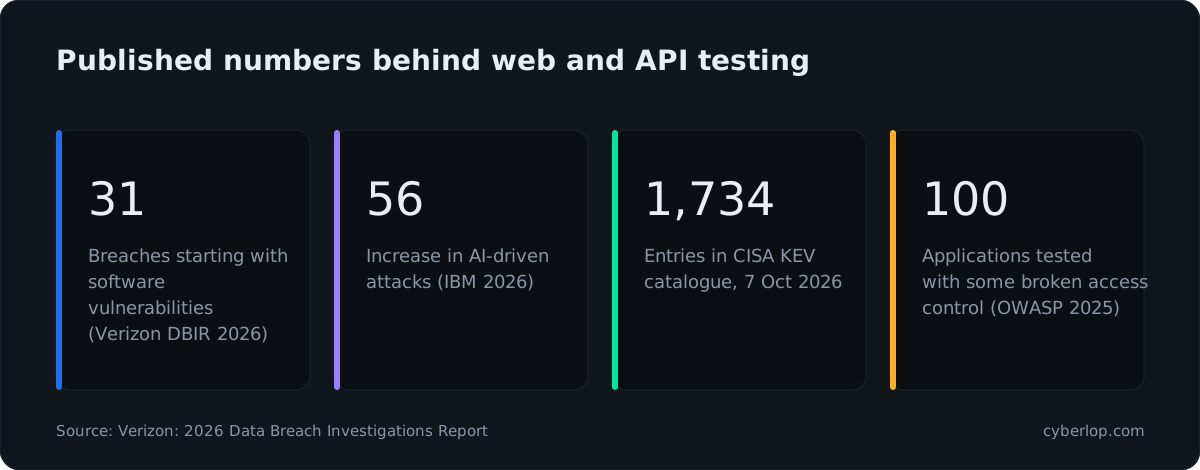
The last number matters most for this comparison. Access-control flaws are hard for any scanner to judge, because they depend on what each account is meant to reach. That is why this guide treats scanner choice and a second kind of test as two separate decisions. See broken access control and OWASP Top 10 for plain-English background.
Which kinds of Acunetix alternative exist?
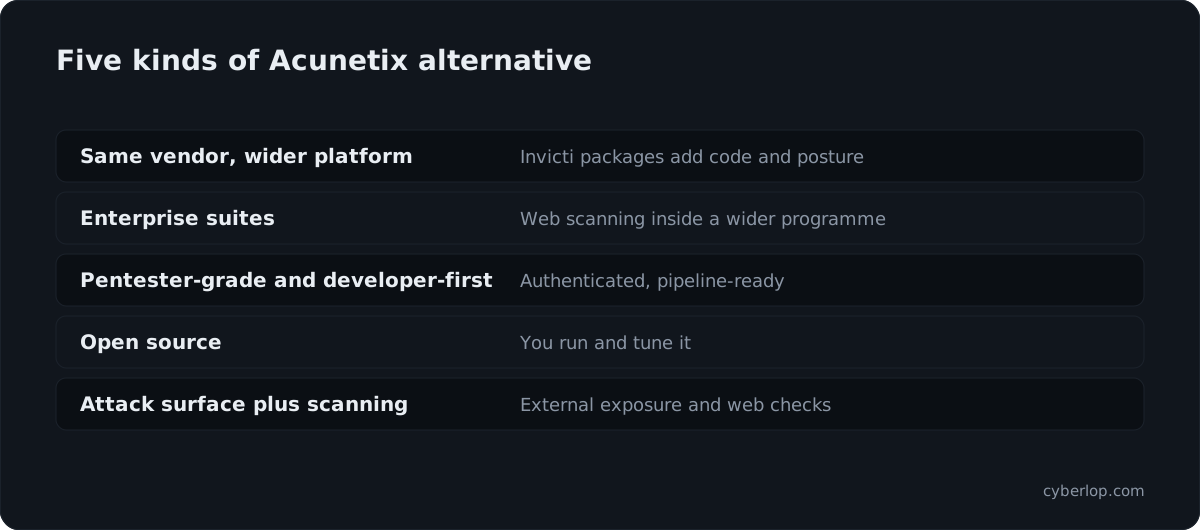
There are four kinds. Knowing which one you want narrows nine tools to two or three.
Categories of alternative, side by side
The table groups the tools in this guide by how they are built and who operates them.
| Category | Tools in this guide | Who runs it | Suits |
|---|---|---|---|
| Same vendor, wider platform | Invicti Web + API, Invicti platform packages | Your team, with the vendor hosting or on-premises | You like the scanner but need more than DAST |
| Enterprise scanner suites | Qualys Web Application Scanning, Rapid7 InsightAppSec, Tenable Web App Scanning | Your security team, inside an existing vulnerability programme | One vendor across hosts, cloud and web apps |
| Pentester-grade and developer-first DAST | Burp Suite DAST, Burp Suite Professional, StackHawk | Security engineers or developers, in CI | Authenticated testing and pipeline checks |
| Open source | ZAP, Nuclei | You, end to end | Control, custom checks, no licence fee to negotiate |
| Attack surface plus scanning | Detectify, Intruder | Your security team | External exposure and web scanning in one place |
What are the best Acunetix alternatives in 2026?
There is no single best. Each entry below says what the vendor says it does, where it tends to fit, and what to ask. Order is by category, not preference.
Same vendor and enterprise suites
Invicti Web + API (formerly Acunetix)
Choose this if the scanner works and you only need more around it. The vendor describes DAST with proof-based scanning, REST, GraphQL and SOAP API testing, 110+ integrations, and online or on-premises deployment. The wider Invicti platform adds application security posture management (ASPM), which the vendor describes as deduplicating findings from several tools into one view. Ask what is in each package, since the vendor sells them separately.
Qualys Web Application Scanning
Qualys documents WAS as a DAST service. Its documentation says it scans web applications, REST APIs from Swagger or OpenAPI files, and SOAP services described by a WSDL file. For internal applications it requires "a scanner appliance placed inside your network". It fits teams already on the Qualys platform who want web findings next to host findings. Ask how authenticated scans and API definitions are kept current.
Rapid7 InsightAppSec
Rapid7 calls InsightAppSec its black-box DAST solution for web applications and APIs. Its product page highlights Attack Replay, which lets a developer re-run a test from the vulnerability report to check a patch, and offers cloud and on-premises scan engines, including for closed networks. Its docs list GraphQL scanning and integrations with Jenkins, Azure DevOps, GitHub Actions and GitLab. It is a good fit when you want retest from the report itself.
Tenable Web App Scanning
Tenable describes Tenable Web App Scanning as DAST that crawls running applications for issues such as XSS, SQL injection and vulnerable third-party components, with API scanning, role-based access control and a choice of SaaS or on-premises deployment. Organisations that already manage exposure in Tenable are the natural audience.
Pentester-grade and developer-first
Burp Suite DAST and Burp Suite Professional
PortSwigger sells two products with one lineage. Burp Suite DAST is the enterprise scanner, built on the same scanning engine as Burp Suite Professional. It can be deployed in the cloud, self-hosted on Windows or Linux with your own database, or on Kubernetes through Helm. It integrates with Jenkins, GitHub Actions, GitLab CI, Azure DevOps, Bitbucket Pipelines, CircleCI and TeamCity, and accepts Postman Collections, OpenAPI, SOAP and GraphQL for APIs.
Burp Suite Professional is different: the vendor calls it a web penetration testing toolkit for manual work, with an integrated scanner and a BApp Store of 300+ extensions from 250+ authors. Choose Professional for a tester at a keyboard, DAST for scheduled scanning across many applications. For a closer look see Burp Suite Enterprise alternatives.
StackHawk
StackHawk is built for developers. Its docs introduce HawkScan as "the scanner" that "runs locally or in CI/CD". Configuration pages cover OpenAPI, GraphQL, gRPC, JSON-RPC and SOAP APIs. For sign-in they list form-based login, third-party OAuth and authentication scripts. The vendor now also describes an agent-driven workflow in which your coding agent configures, scans, fixes and verifies. Product teams that want a scan on every change are its natural audience. See StackHawk alternatives for the other direction.
Open source
ZAP
The ZAP site describes it as "the world's most widely used web app scanner. Free and open source", now shown as ZAP by Checkmarx. The repository lists the Apache 2.0 licence. Its automation docs offer an Automation Framework (recommended for most non-trivial automation), Docker packaged scans, GitHub Actions and a daemon API. Pick it if someone on your team will own configuration, authentication setup and triage. Burp Suite vs ZAP covers the trade-offs.
Nuclei
Nuclei is a different shape of tool. On its project page Nuclei is a scanner driven by YAML templates, released under the MIT licence, with a library of templates written by the security community. It supports CI/CD pipelines, and recent additions include template generation from a prompt. Its strength is fast checks for known issues and misconfigurations. It runs templates rather than exploring your application, so pair it with another tool for depth. See fuzzing for a related idea.
Attack surface plus scanning
Detectify
Detectify combines three things, per its site: surface monitoring of external assets, authenticated application scanning with dynamic fuzzing, and API scanning for REST and GraphQL. It also runs Crowdsource, a community of 400+ ethical hackers whose research feeds its tests. It is a good match for teams that cannot list all of their own public domains. More in Detectify alternatives.
Intruder
Intruder describes a single platform for AI pentesting, attack surface monitoring, cloud security and vulnerability management, with DAST for web apps and APIs and integrations with GitHub, GitLab, Jira and Azure DevOps. It lists SOC 2, ISO 27001, PCI DSS, HIPAA and DORA among the compliance needs it supports. Smaller teams that want infrastructure, cloud and application checks in one tool are its audience. See Intruder alternatives.
The alternatives side by side
This table repeats only facts stated on the vendors' own pages. A blank is not a "no"; it means we did not find the point stated.
| Tool | What the vendor calls it | Deployment or running model | Pipeline or automation |
|---|---|---|---|
| Invicti Web + API | DAST with proof-based scanning | Online and on-premises | CI/CD integration |
| Qualys WAS | DAST service on the Qualys platform | Scanner appliance inside the network for internal apps | See Qualys docs |
| Rapid7 InsightAppSec | Black-box DAST | Cloud and on-premises scan engines | Jenkins, Azure DevOps, GitHub Actions, GitLab |
| Tenable Web App Scanning | DAST | SaaS or on-premises | See Tenable docs |
| Burp Suite DAST | Enterprise scanner on the Burp Professional engine | Cloud, self-hosted, Kubernetes | Seven CI systems listed |
| Burp Suite Professional | Web penetration testing toolkit | Used by a tester | Manual first |
| StackHawk | HawkScan, runs locally or in CI/CD | Local or CI/CD | GitHub Actions, GitLab, Jenkins |
| ZAP | Free, open-source web app scanner | You run it, Docker supported | Automation Framework, GitHub Actions |
| Nuclei | YAML-template scanner, MIT licence | You run it | CI/CD pipelines |
| Detectify | Surface monitoring, app and API scanning | See Detectify docs | See Detectify docs |
| Intruder | Platform for scanning and attack surface | See Intruder docs | GitHub, GitLab, Jira, Azure DevOps |
Where does Cyberlop fit?
Cyberlop is one option among these, and it tests differently from a scanner. It finds vulnerabilities in web apps and their APIs with black-box, grey-box and white-box pentesting.
In white-box mode it reads your code while it tests the running app, so a finding can point to the file and line. It reports what it actually exploited: each finding carries the request, the response, a screenshot where a person can see it, and the line of code. Severity and confidence are kept apart, and findings carry CWE and OWASP references. A fix is proven by re-running the exact exploit against the new code, not by a fresh scan.
It also checks business-logic flaws and cross-account access, meaning one signed-in account reaching another's data or functions. It can run on a schedule or in CI/CD and gate a build, run inside your own network so code does not leave it, and agencies and MSSPs can run it under their own brand. See how it works and what the evidence looks like, and our honest page for what it does not do.
How do you choose an Acunetix alternative?
Choose by the job, not the feature list. Write down who will run the tool, where it must run, what it must sign in to, and what the output must look like to the developer who fixes it.
Selection criteria and the question behind each
Use this table as a scorecard in your trial.
| Criterion | Question to ask | Why it matters |
|---|---|---|
| Authentication | Which sign-in flows can it complete: forms, SSO, OAuth, scripts? | Unauthenticated scans see only the public part of an app. See authentication. |
| API coverage | Which definitions does it import: OpenAPI, GraphQL, SOAP, Postman? | APIs often carry the real data. See API security testing. |
| Proof | Does each finding show a request and response you can replay? | Proof cuts false positives and arguments. See proof of exploit. |
| Where it runs | Cloud, self-hosted, Kubernetes, or a scanner inside your network? | Decides whether staging and internal apps are reachable. See on-premises. |
| Pipeline fit | Can it run on a pull request and fail a build? | Late findings cost more to fix. See CI/CD. |
| Retest | Does it confirm a fix by repeating the test or only by scanning again? | Closing the loop is what auditors ask for. |
| Operating load | Who writes config, tunes noise, keeps definitions current? | Open source shifts this work to you. |
| Reporting | Does it map to CWE and OWASP, and export to your tracker? | Developers fix what they can find in their own tools. |
Quick rules of thumb
- If one vendor already owns your vulnerability programme, shortlist its web scanner first.
- If developers will own scans, shortlist tools with a CI-first design and test authentication early.
- If you have a tester with time, Burp Suite Professional or ZAP gives control.
- If you cannot list your own public hosts, start with attack surface discovery.
- If the worry is one account reaching another's data, add a test built for that. A scanner alone is not enough.
How do you switch scanners without losing coverage?
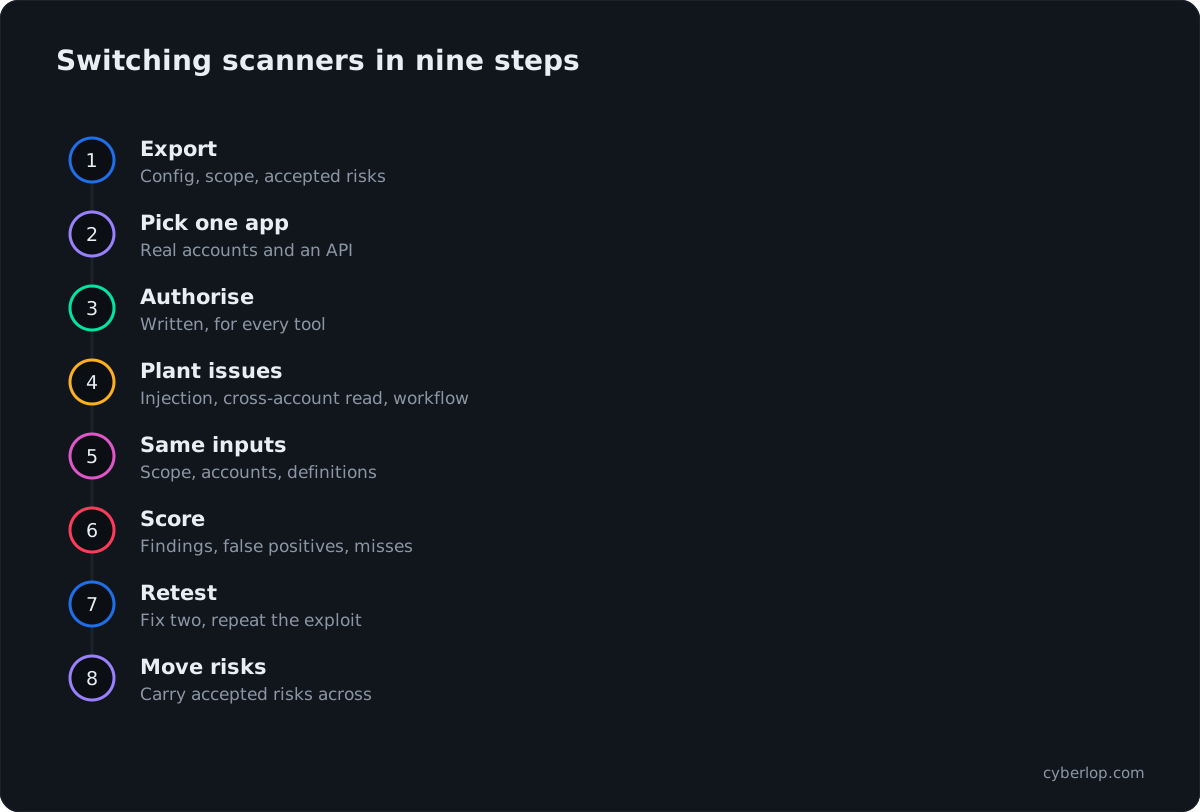
Run the new tool beside the old one for one release cycle, compare results on the same application, and retire the old one only when you can explain every difference. That avoids a blind spot at the switch.
- Export what you have. Save the current scan configuration, authentication steps, scope list, accepted risks and open findings.
- Pick one application with real accounts and an API. A staging copy with test data is fine.
- Get written authorisation for each tool, including open-source ones.
- Plant known issues: one injection, one cross-account read, one broken workflow.
- Give each tool the same inputs: scope, accounts, API definitions and documentation.
- Score the output using the table below.
- Fix two findings and retest with each tool.
- Move accepted risks across with their reasons, so the new tool does not re-raise settled items.
- Decide with security, engineering and audit owners in the room.
What to record for each tool
The table gives a simple way to count results during the trial.
| Measure | How to count it |
|---|---|
| Real findings | Confirmed by your own engineer reproducing them |
| False positives | Reported issues that cannot be reproduced |
| Missed planted issues | Planted issues the tool did not report |
| Authenticated coverage | Pages and API calls reached after signing in |
| Evidence quality | Could a developer fix it without asking questions? |
| Retest method | Same exploit repeated, or a new scan |
| Hours spent | Setup plus triage, per tool |
What does a scanner still miss?
A scanner finds known classes of flaw at scale. It cannot know your business rules, so it will not tell you that a refund exceeded the original payment or that a customer opened another customer's order.
That gap is why OWASP reports 100% of tested applications with some form of broken access control while scanner marketing talks about thousands of checks. The first is mostly about rules; the second is mostly about patterns. Both are true, and they need different tests. Our view: buy a scanner for breadth, and do not expect it to find your logic bugs. Read the access control testing checklist, broken object level authorization and IDOR for what to test by hand.
Code review and scanning also see different things. SAST reads code without running it, DAST tests the running app, and white-box testing combines both views. DAST vs SAST vs IAST explains how to combine them, and continuous penetration testing shows how a scanner and a pentest sit together. Our best DAST tools guide goes wider on scanners, and XBOW alternatives covers autonomous options.
Summary: which Acunetix alternative suits whom?
Start by deciding whether you are leaving the product or only the name. If the scanner works, Invicti Web + API is the same product. For one vendor across hosts and web apps, compare Qualys, Rapid7 and Tenable. For pipelines, look at StackHawk and Burp Suite DAST. For control, look at ZAP, Burp Suite Professional and Nuclei. For exposure discovery, look at Detectify and Intruder. Then run the trial above, and add a pentest-style check for cross-account access. If you want a pilot, see how Cyberlop works and ask us to run it on one of your applications.
Questions people ask
Acunetix alternatives: FAQs
What is Acunetix?
Acunetix is a dynamic application security testing (DAST) scanner for web applications and APIs. It is now sold as Invicti Web + API, renamed on 3 August 2026 according to the vendor. The vendor says existing customers see no disrupted workflows, new logins or reconfigured integrations.
What is the best Acunetix alternative?
It depends on the job. For pipelines, look at StackHawk or Burp Suite DAST. For one vendor across your estate, compare Qualys, Rapid7 and Tenable. For control, look at ZAP or Nuclei. For exposure discovery, look at Detectify or Intruder.
Is Acunetix the same as Invicti?
Acunetix is now Invicti Web + API, one of three packages on the Invicti platform, per the vendor. The others, AppSec Core and AppSec Flex, add code, supply-chain and posture management. Our Invicti vs Acunetix guide covers the history.
Is there a free or open-source alternative to Acunetix?
Yes. ZAP is described by its project as free and open source and is licensed under Apache 2.0. Nuclei is open source under the MIT licence. Both need your team to run, configure and triage the tool. For commercial tools, see each vendor's pricing page.
Can a DAST scanner replace a penetration test?
Not on its own. A scanner finds known classes of flaw at scale, while a pentest looks at your business rules, such as one account reaching another's data. Many teams run both. Some auditors also expect a report from a named tester, so ask yours.
Which Acunetix alternatives run inside my own network?
Several can. Invicti Web + API is available on-premises, Burp Suite DAST can be self-hosted or run on Kubernetes, Rapid7 InsightAppSec has on-premises scan engines, and Qualys needs a scanner appliance inside the network for internal apps. Cyberlop offers private scanning.
How do I compare DAST tools fairly?
Run each on the same application with the same scope, accounts and API definitions. Plant a few known issues, count real findings, false positives and misses, then retest two fixes. The switching steps above lay this out.
Do these tools replace secure code review?
No. DAST tests the running app and finds what can be reached from outside. Code review, SAST and dependency checks find different problems earlier. White-box testing connects a runtime finding to the line of code.
Sources
Where the facts come from
- Acunetix: Invicti Web + API home page
- Acunetix: announcement, Acunetix is now Invicti Web + API
- Invicti: platform overview
- Invicti: platform
- Qualys: Web Application Scanning documentation
- Rapid7: InsightAppSec
- Rapid7: InsightAppSec documentation
- Tenable: Web App Scanning
- PortSwigger: Burp Suite DAST
- PortSwigger: Burp Suite Professional
- StackHawk: documentation
- ZAP: GitHub repository
- ZAP: automation documentation
- ProjectDiscovery: Nuclei repository
- Detectify: home page
- Intruder: home page
- Verizon: 2026 Data Breach Investigations Report
- IBM: Cost of a Data Breach Report 2026
- CISA: Known Exploited Vulnerabilities catalog
- OWASP: Top 10:2025, A01 Broken Access Control
Keep reading
Related articles
Access control testing checklist: sideways, upward and across tenants.
A step-by-step access control testing checklist for web apps and APIs: account planning, sideways, upward and cross-tenant checks, evidence and retests.
API security testing: a 2026 guide to the OWASP API Top 10
A step-by-step API security testing guide: the OWASP API Top 10 (2023) with test cases, BOLA and BFLA checks, JWT, OAuth, GraphQL and a CI/CD plan.
Best DAST tools 2026: twelve compared and how to choose
Twelve DAST tools compared from vendor docs: authentication, APIs, CI/CD, proof and deployment, plus a decision table and a one-week bake-off.

Test one app, compare the proof
Cyberlop finds vulnerabilities in web apps and APIs with black-box, grey-box and white-box pentesting, and reports only what it exploited, with request, response and the line of code. Ask us to run it on one of your applications.
Or start with a $199 pilot on one application: thirty days, success criteria agreed before day one, credited against the annual if you convert.