
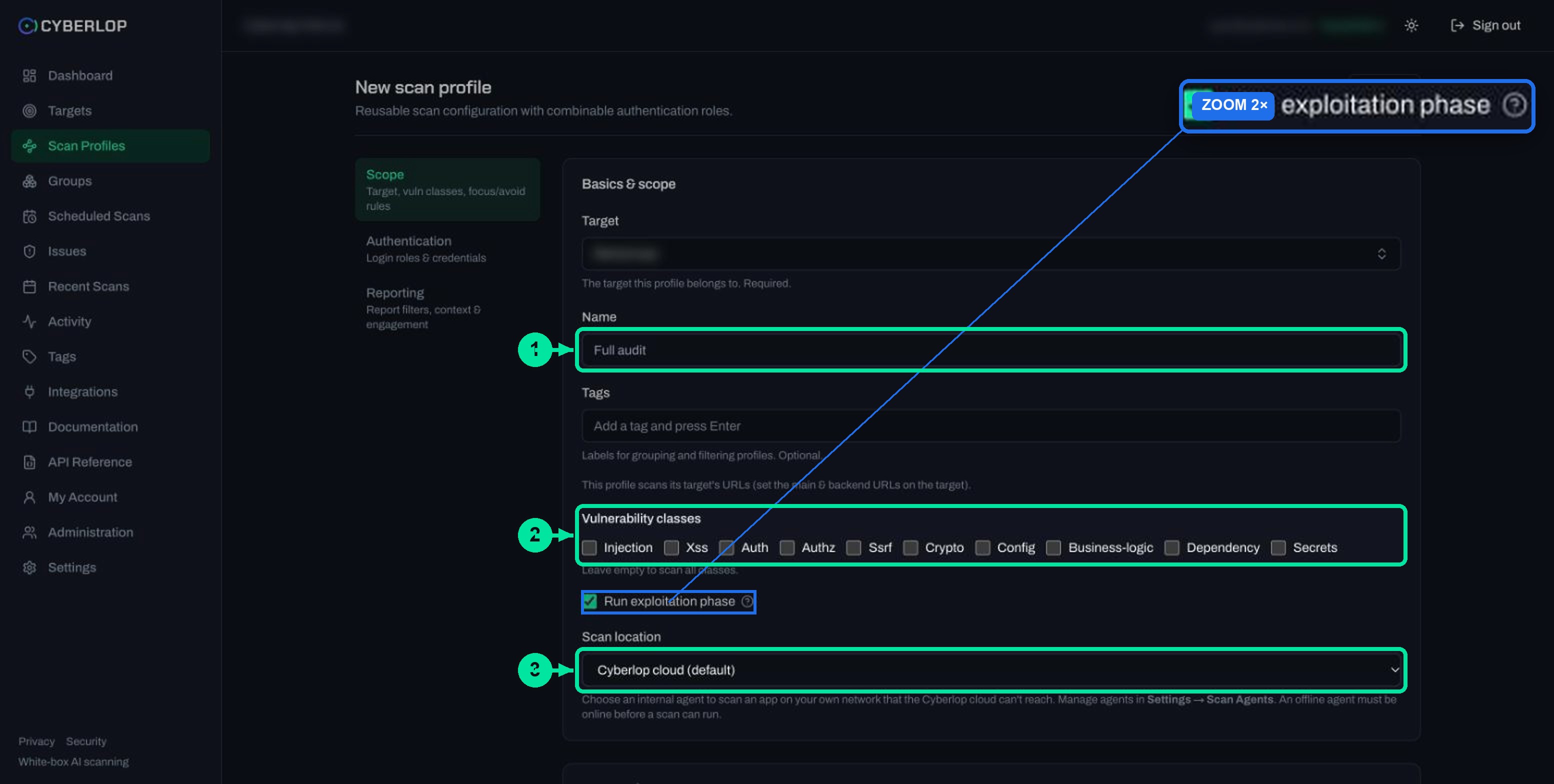
Vulnerability classes are ten checkboxes in a Cyberlop scan profile's Scope section: Injection, Xss, Auth, Authz, Ssrf, Crypto, Config, Business-logic, Dependency and Secrets. Tick the ones to cover, or tick none to scan all ten. Keep all on for a first scan, and narrow only for a specific question.
- Open a new profile Go to Scan Profiles and click + New profile, or use + New profile on a target page to preselect it.
- Pick the target and name In the Scope section, choose the Target from the searchable list and give the profile a Name.
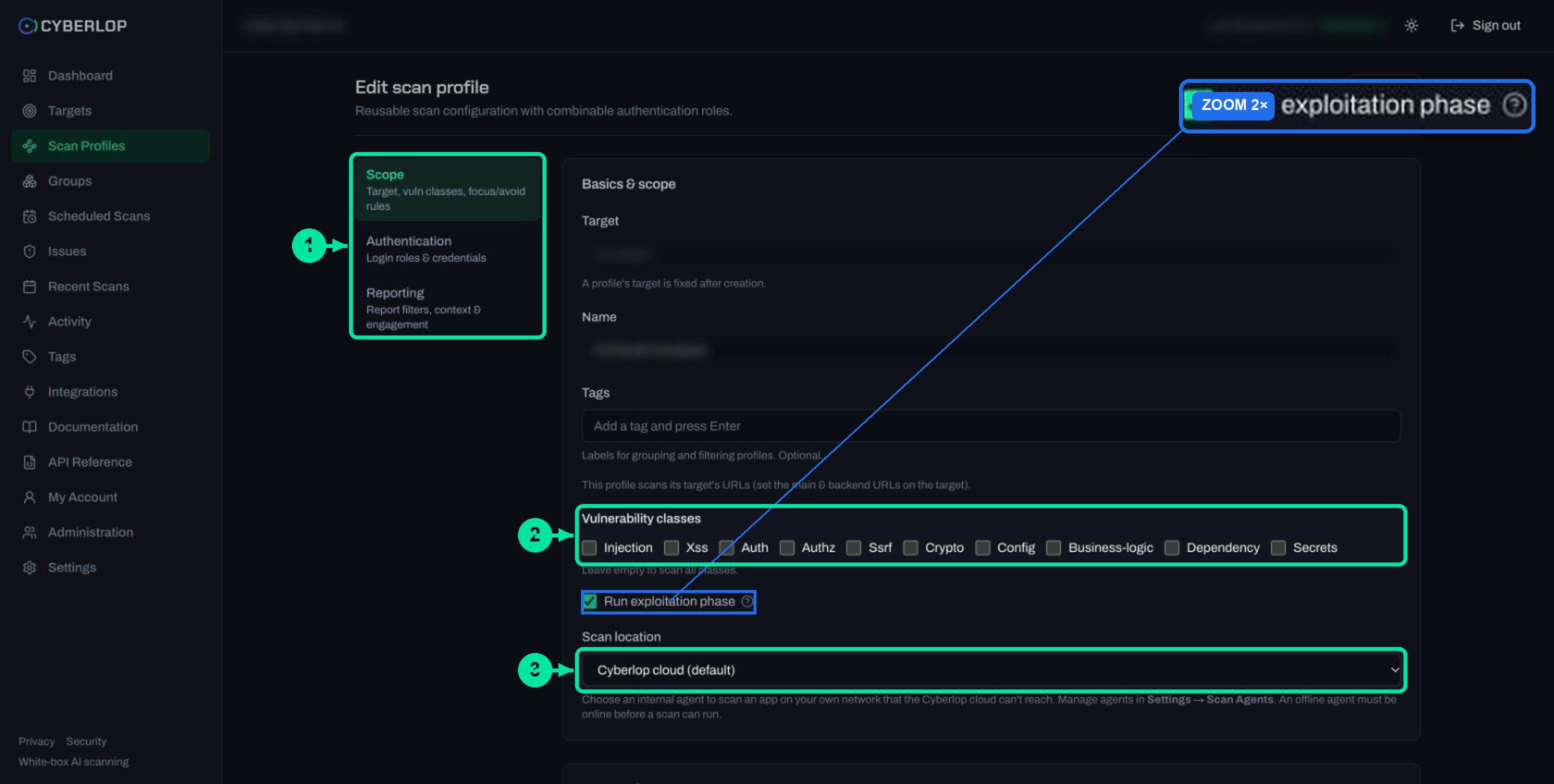
- Find Vulnerability classes Scroll to the ten checkboxes: Injection, Xss, Auth, Authz, Ssrf, Crypto, Config, Business-logic, Dependency and Secrets.
- Tick your classes or leave all empty Tick the classes you want. Leave all unticked to scan everything, which suits a first scan.
- Decide on the exploitation phase Keep Run exploitation phase ticked to prove findings against the live target, or untick it for source analysis only.
- Preview the YAML Click Preview YAML to see the generated configuration and catch validation errors such as an empty name.
- Save and run Click Save, then click Scan on the profile row. Review results with the Class filter on Issues.
- Ten classes: Injection, Xss, Auth, Authz, Ssrf, Crypto, Config, Business-logic, Dependency and Secrets.
- Tick none and the profile scans all classes; the list shows All.
- Keep every class on for a first scan, and narrow only for a specific question.
- Classes choose what is looked for; the exploitation phase chooses whether it is proved.
- The same ten names appear as the Class filter on Issues and as a parameter in the API.
A vulnerability class in Cyberlop is a family of weakness, such as Injection or Authz, that you switch on or off per scan profile. To choose vulnerability classes, open the profile's Scope section and tick the ones you want. Tick none and the profile covers all ten. This guide explains what each class covers and when to narrow.
What are vulnerability classes in Cyberlop?
Vulnerability classes are the ten checkboxes under Vulnerability classes in a scan profile: Injection, Xss, Auth, Authz, Ssrf, Crypto, Config, Business-logic, Dependency and Secrets. They decide which kinds of weakness the profile looks for. The help text under the box is short: "Leave empty to scan all classes."
Each finding's Class column uses the same ten names. The picker you use before a scan is the vocabulary you filter by afterwards.
What happens if you tick none?
The profile scans all classes, and nothing is left out. In the Scan Profiles list, such a profile shows All under Vuln classes. A narrowed profile lists its classes by name, for example "Injection, Auth, Authz, Ssrf".
For most first scans this is the right choice. A narrow profile means looking at less, so narrow on purpose. If you have not made a profile yet, start with create a scan profile.
What does each of the ten vulnerability classes cover?
Eight classes have a dedicated specialist agent in the vulnerability analysis phase, and the in-app Documentation gives each one a line. Dependency and Secrets appear in the picker and the Issues filter, but the Documentation does not describe them, so this guide covers them by name only. Table 1 sets all ten against the closest area of the OWASP Top 10:2025.
Table 1. The ten classes, what each covers and the nearest OWASP Top 10:2025 area
| Class | What it covers | Nearest OWASP Top 10:2025 area |
|---|---|---|
| Injection | SQL, NoSQL, command and template injection, including XXE, SSTI and deserialization | A05 Injection |
| Xss | Reflected, stored and DOM cross-site scripting | A05 Injection (it includes cross-site scripting) |
| Auth | Identity and session: login and logout flows, MFA, OAuth and SSO, token lifetime, rate limiting | A07 Authentication Failures |
| Authz | Access control: IDOR, missing ownership or tenant checks, privilege escalation | A01 Broken Access Control |
| Ssrf | Server-side request forgery | Listed under A01 Broken Access Control (CWE-918) |
| Crypto | The cryptographic primitive itself: weak secrets or keys, wrong algorithm, JWT signing, timing-unsafe comparisons | A04 Cryptographic Failures |
| Config | Security headers, CORS, cookie attributes, TLS, error verbosity, dangerous defaults | A02 Security Misconfiguration |
| Business-logic | Payment, pricing and quota bypass, replay, race conditions, workflow state flaws | A06 Insecure Design is the closest |
| Dependency | Third-party packages your app relies on (name only; not described in the app) | A03 Software Supply Chain Failures |
| Secrets | Credentials and keys left where they should not be (name only; not described in the app) | No single area; A04 mentions leaked keys |
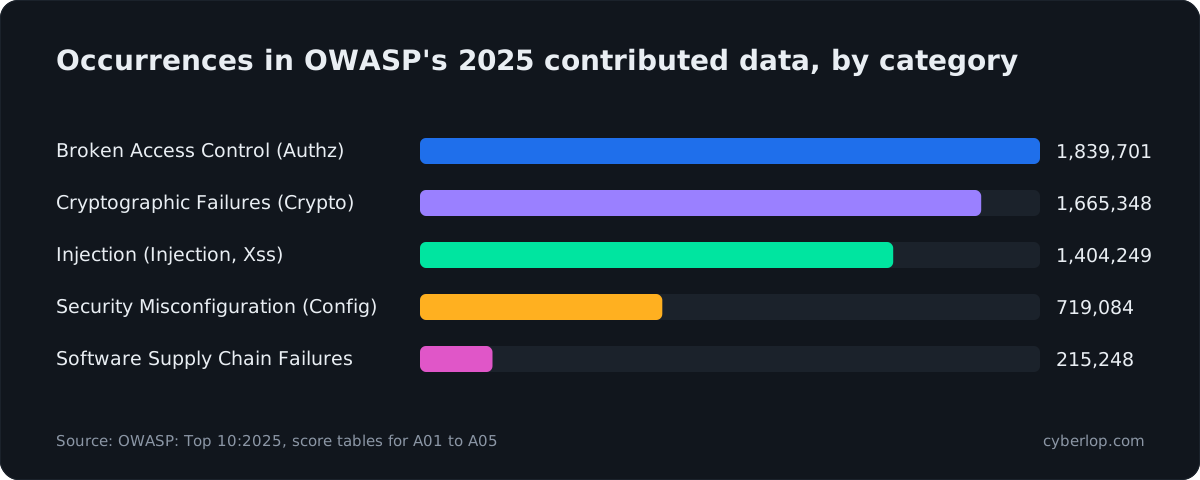
OWASP's own wording shows why the split is useful. Its 2025 edition reports that every application tested had "some form of broken access control" (OWASP, 2025), which is the ground the Authz class covers.
Which classes deal with untrusted input?
Injection, Xss and Ssrf all start with data your app trusts when it should not. The in-app docs keep each specialist "in its own lane" so one weakness is not reported several times.
Injection
Use it when your app builds queries, commands or templates from user input. A proven SQL injection finding shows the payload, request and response. OWASP's 2025 data counts 1,404,249 occurrences in its Injection category (OWASP, 2025).
Xss
Use it for pages that echo or store user content. Its three kinds are reflected, stored and DOM, and the exploitation phase proves findings with a real browser. See cross-site scripting.
Ssrf
Use it where your server fetches a URL a user can influence, such as webhooks, imports or previews. See server-side request forgery.
Which classes deal with identity and access?
Auth asks whether the app knows who you are and keeps that safe. Authz asks what you may then touch.
Auth
Login, logout, MFA, OAuth, SSO and session handling. Pair it with authentication roles so the scan can test behind login.
Authz
Missing ownership checks and privilege escalation. This is where one account reads another account's data, so give the profile at least two roles of different privilege.
Which classes deal with how the app is built and run?
These four look at the app's makeup rather than a single request.
Crypto
Weak keys, the wrong algorithm, JWT signing and timing-unsafe comparisons. OWASP's 2025 data counts 1,665,348 occurrences in its Cryptographic Failures category (OWASP, 2025).
Config
Security headers, CORS, cookie attributes, TLS and error verbosity. OWASP found "100% of the applications tested" had some form of misconfiguration (OWASP, 2025).
Dependency
The packages your app pulls in. OWASP notes that supply chain failures had the highest average incidence rate of any category, at 5.19% in its 2025 data (OWASP, 2025).
Secrets
Credentials and keys in the wrong place. In a white-box scan a finding points to a file and line.
What does Business-logic cover?
Business-logic covers flaws in your own rules, not in a framework. The docs list payment, pricing and quota bypass, replay, race conditions and workflow state flaws. Nothing is technically broken, but the rules can be turned against you. See business logic flaw.
How do you choose which classes to scan?
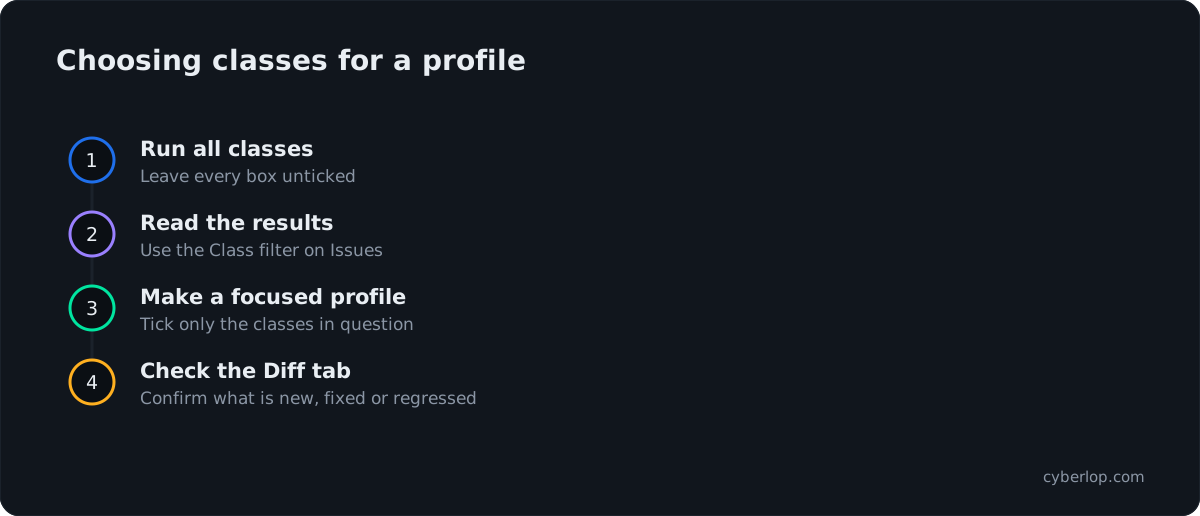
Leave everything unticked unless you have a specific reason to narrow. A reason is a change you know about, a question you want answered, or a re-check after a fix. Table 2 maps common situations to a starting point. These are suggestions for you to adjust, not rules the app enforces.
Table 2. Situations and a sensible class selection
| Situation | Classes to consider | Why |
|---|---|---|
| First scan of a new target | None ticked (all) | You learn what the app has before you decide what to cut. |
| A release changed checkout, pricing or quotas | Business-logic, Authz | Rule and ownership changes are where these flaws appear. |
| A change to login, sessions or SSO | Auth, Crypto, Authz | Identity changes touch token handling and access together. |
| A new feature that fetches URLs or accepts uploads | Ssrf, Injection, Xss | Untrusted input is the common thread. |
| A hosting, proxy or header change | Config, Crypto | Both are about settings and primitives. |
| Re-checking one fixed finding | The finding’s class only | A focused profile keeps the follow-up small. |
When does narrowing make sense?
Narrow when the question is specific. A team that has just rewritten its payment flow gets a clearer result from Business-logic and Authz than from a full run, and the narrow profile also keeps the Issues list short enough to read in one sitting.
The app does not say a narrower profile finishes faster or costs less, so do not assume it. After a run, the scan's Overview tab shows the cost and tokens consumed, so you can compare. For where those numbers sit, see the scan detail page.
When should you keep all classes on?
Keep them on for a first scan, for a pre-launch review, and for any scheduled or pipeline run you rely on to catch something new. A class you cut is a class nobody looked at in that run. Most targets are best served by one full profile that runs on a schedule, plus one or two focused profiles that you run after related changes and before releases.
How do you set vulnerability classes on a scan profile?
You set them in the Scope section of the profile form, the same place on a new profile and when you edit one. Follow these steps.
- Open Scan Profiles and click + New profile. From a target page, use + New profile on its Scan profiles card to preselect the target.
- In Scope, pick the Target and give the profile a Name.
- Find Vulnerability classes and tick the classes you want. Leave all ten unticked to scan everything.
- Decide whether Run exploitation phase stays ticked. It is on by default.
- Choose the Scan location, then add any focus or avoid rules.
- Click Preview YAML to check the generated configuration, then click Save.
- Click ▷ Scan on the profile row to run it.
The Scope section has these fields. Table 3 lists them in the order you see them.
Table 3. Scope fields on the scan profile form
| Field | What to enter | Notes |
|---|---|---|
| Target | Pick the application from the searchable list | Required. Fixed after the profile is created. |
| Name | A short label, for example "Full audit" | Required. An empty name fails Preview YAML. |
| Tags | Optional labels, added with Enter | Used to group and filter profiles. |
| Vulnerability classes | Tick any of the ten classes | Leave empty to scan all classes. |
| Run exploitation phase | Leave ticked, or untick | On tests the live target. Off is source analysis only. |
| Scan location | Cyberlop cloud (default), or a self-hosted agent | For apps on your own network. |
Can you change the classes later?
Yes. Open the profile with the pencil icon on Scan Profiles, or Edit on the target page. The target is fixed, but the classes are not. Change the ticks and click Save. Your edit a scan profile guide covers stored secrets and validation.
How do classes work with the exploitation phase?
The classes decide what is looked for, and the exploitation phase decides whether it is proved. Per the Documentation, each specialist produces hypotheses with an exact file and line, and the exploitation phase then tries to demonstrate each one against the live target in a real browser. Findings are graded Confirmed, Likely or Unconfirmed by how well they were proved.
With Run exploitation phase unticked, the profile does static source analysis only and nothing is tested live. Read the exploitation phase guide before you run against production. Report filters in the Reporting section, covered in reporting rules, then cut the findings by minimum severity and confidence.
How do you see results by class afterwards?
Use the Class filter on the Issues page. It lists "All classes" plus the ten names, and sits beside the Severity, Confidence and Target filters. Each finding also shows a class in the scan's Findings tab, and its ID begins with a class prefix, for example INJ-VULN-02 or AUTHZ-VULN-04.
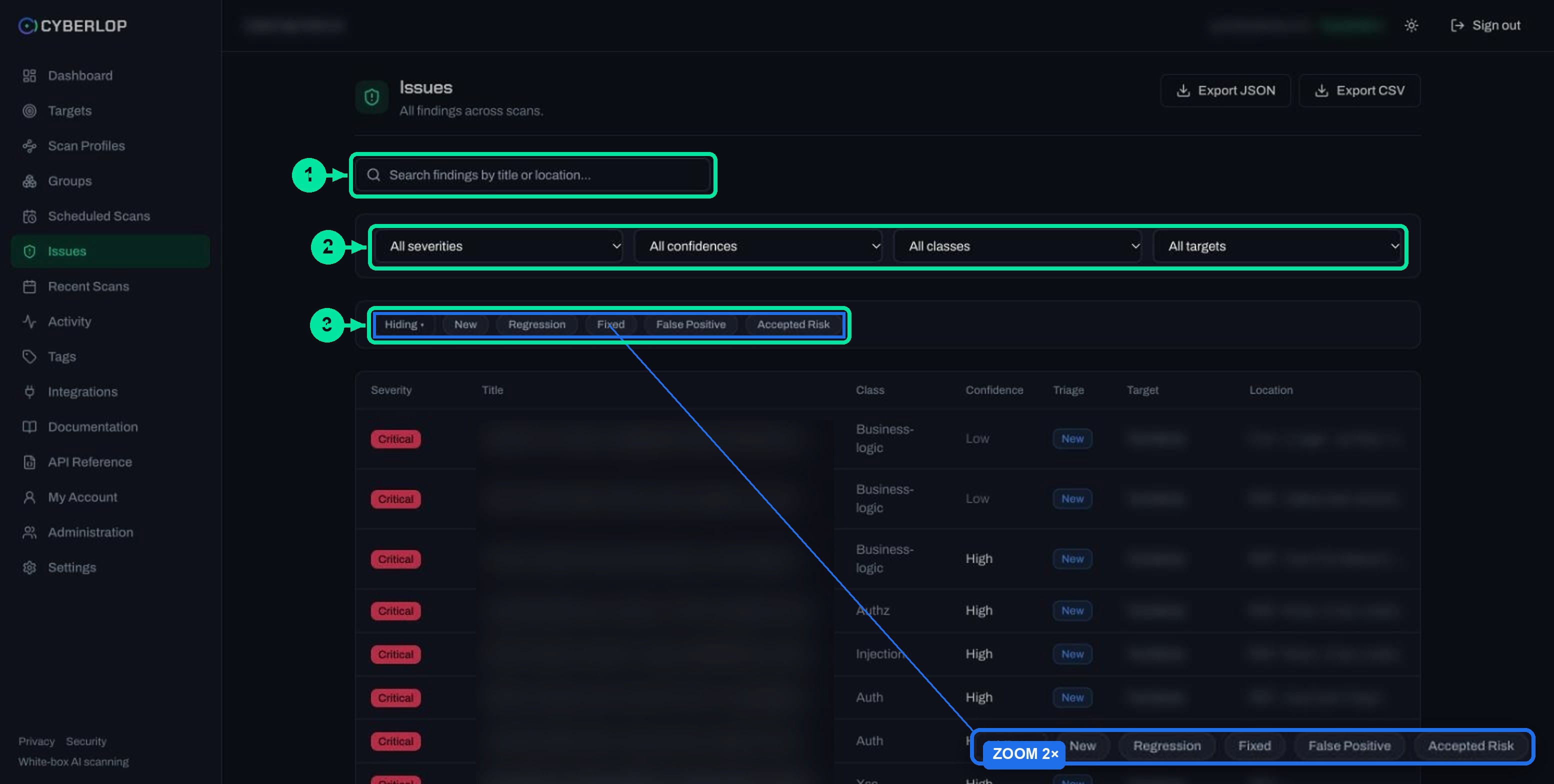
The API supports the same filter: GET /api/issues accepts a vulnClass parameter alongside scanId, targetId, severity, confidence and triageStatus. Each finding also gets CWE and OWASP references, which map the class to the standard names your auditor knows (CWE, OWASP Top 10).
Table 4. Where the class shows up in the app
| Where | What you see | Use it to |
|---|---|---|
| Scan Profiles list | Vuln classes column: "All" or a list of names | Check what each profile covers at a glance. |
| Target page | Vuln classes and Exploit columns on the Scan profiles card | Compare a target’s profiles. |
| Scan Findings tab | Class column on every finding | See which class a result belongs to. |
| Issues page | Class filter and column | Filter findings across all scans. |
| API | vulnClass parameter on GET /api/issues | Pull one class into your own tools. |
What are the common mistakes when choosing classes?
Narrowing before you have a baseline
A first scan with two classes ticked can look clean for the wrong reason. Run one full profile first, so the focused ones have something to be compared with.
Treating a narrow re-scan as proof everything is fixed
Issues persist per target, and a re-scan marks a finding Fixed only when it genuinely did not re-detect it. The Documentation we captured does not say how a class you left unticked is treated. Open the Diff tab and read it before you trust the Fixed count. See compare scans and fixed and regressed issues.
Ticking Authz with a single role
Access-control flaws show up when two accounts of different privilege are in play. The Documentation suggests "a normal user and, for IDOR/privilege testing, a second user". Add the roles first, as authentication roles explains.
Leaving out application context
The classes say what to look for, and the Application context fields say what matters in your app: tenancy model, sensitive data types, business-critical flows. Fill them in; see application context.
Scanning something you do not own
Only scan targets you own or are authorised to test, whatever classes you pick. Black-box targets need ownership verified first.
Next step: now that the scope is set, decide how far each scan should go in the exploitation phase guide. For the terms used here, see key terms. If you are still choosing between scan types, read white-box vs black-box scans.
Questions people ask
Vulnerability classes: FAQs
What are vulnerability classes in Cyberlop?
They are the ten checkboxes in the Scope section of a scan profile: Injection, Xss, Auth, Authz, Ssrf, Crypto, Config, Business-logic, Dependency and Secrets. They set which kinds of weakness the profile covers, and each finding carries one of them in its Class column.
What happens if I do not select any vulnerability class?
The profile scans all classes. The help text reads "Leave empty to scan all classes", and the Scan Profiles list shows All in the Vuln classes column.
Can I scan only one class, such as Authz?
Yes. Tick just that class and save the profile. This suits a focused question, such as a change to ownership checks. Keep a full profile as well, so you still get a broad baseline.
Which vulnerability classes should I pick for an API?
There is no fixed answer. Injection, Auth, Authz, Ssrf and Business-logic suit an API with logins and per-account records, but a first scan works better with none ticked. Narrow once you know what the API exposes.
Do vulnerability classes change what the exploitation phase does?
No. Classes choose what is looked for. The Run exploitation phase checkbox chooses whether each hypothesis is then proved against the live target. With it off, you get source analysis only.
Can I change the classes after I save a profile?
Yes. Open the profile with the pencil icon or Edit, change the ticks and click Save. The target cannot be changed, because a profile's target is fixed after creation.
How do I filter findings by class?
Open Issues and use the Class dropdown, which lists All classes and the ten names. The API offers the same filter through the vulnClass parameter on GET /api/issues.
What do Dependency and Secrets cover?
They are two of the ten names in the picker and the Issues filter. The in-app Documentation covers eight specialists and does not describe these two. Run a scan and read the findings, or ask us, to see how they report for your app.
Sources
Where the facts come from
Keep reading
Related articles
Application context in Cyberlop: fill the ten fields and use Auto Generate from Repo
Fill in the ten application context fields of a Cyberlop scan profile, use Auto Generate from Repo, and write context that improves findings.
How to scan behind login in Cyberlop with authentication roles
Scan behind login in Cyberlop: add authentication roles, choose privilege levels, combine form, header and OAuth methods, and guide the scan with AI guidance.
How to compare scans in Cyberlop with the Diff tab
Read the Diff tab: new, fixed and regressed findings against the previous completed scan, and how to prove a fix after a re-scan.

Not sure which classes to pick?
Cyberlop finds vulnerabilities in your web app and APIs, and reports what it actually exploited, with the request, the response and, in white-box mode, the line of code. Ask us to run it on one of your applications.
Or start with a $199 pilot on one application: thirty days, success criteria agreed before day one, credited against the annual if you convert.